Your PWA is still a webpage that customers can find in their usual ways. You want to apply reasonable search engine optimization and ensure the page is available to search engines. You can use JavaScript on your pages and Google will index it as long as you follow some best practices. You can use the fetch as Google tool from the Google webmasters site to see how your app looks when crawled discoverability helps get customers to your site.
But how can you measure their behaviors once they get there? That’s where analytics comes in Google Analytics is a service that collects processes and reports, data about an applications, use patterns and performance. Adding Google Analytics to a web application enables the collection of data like visitor traffic, user agent, the user’s location, etc. This data is sent to Google Analytics servers where it’s processed.
The reports are available in the Google Analytics web interface and through a reporting API, Google Analytics is free and highly customisable. Integrating Google Analytics is simple. First, you must create a Google Analytics account. Each account has properties, and these aren’t JavaScript properties, but refer to individual applications or websites. Google Analytics then generates a tracking snippet for each property.
This is a piece of JavaScript that you pasted into your page. It sends data to the Google Analytics back-end. You can also use the analytics library to create custom analytics, such as tracking specific user actions or tracking push notifications. I want to say a bit more about properties. An account has properties that represent individual collections of data. These properties have property, IDs, also called tracking IDs.
That identify them to Google Analytics if an account represents a company. One property in that account might represent the company’s website, while another property might represent the company’s mobile application. If you only have one app, the simplest scenario is to create a single Google Analytics, account and add a single property to that account. This is the key part of the tracking snippet.
The entire snippet needs to be pasted into every page. You want to track at a high level when this script runs. It creates an async script tag that downloads analytics AS the analytics library it defines the GA function called the command queue. It creates a tracker that gathers user data and it sends this data as a pageview hit via HTTP request to Google Analytics. This data is analyzed in stored in your analytics account.
In addition to the data gathered by tracker creation, the page view event allows Google Analytics to infer what pages the user is visiting, how long they are visiting them and in what order for simpler applications. This is the only coding required note. You can replace analytics GS with analytics underscore debug KS for console debugging. Using this version will log detailed messages to the console for each hit, sent it also logs warnings and errors for your tracking code.
The data is sent to Google Analytics backend where it is processed into reports. These reports are available through the Google Analytics dashboard. Here is the audience overview interface. Here you can see general information such as page view, records bounce rate, ratio of new and returning visitors and other statistics. You can also see specific information like a visitor’s language, country, city, browser operating system, service provider, screen resolution and device.
Here we are looking at the user City, it’s also possible to view the analytics information in real time. This interface allows you to see hits as they occur on your site. I encourage you to take some time and explore there’s an extensive set of features in the dashboard. You should explore the standard reports and look at creating your own. Knowing how to use analytics for improving your business or increasing revenue is a skill within itself.
Fortunately, the Google Analytics Academy offers a free set of online courses. Google Analytics supports custom events that allow fine, grained analysis of user behavior. This code uses the G a command Q, which is defined in the tracking snippet. The send command is used to send an analytics event. Values associated with the event are as parameters. These values represent the event, category event, action and event label.
All of these are arbitrary and used to organize events. These custom events allow us to deeply understand user interactions with our site. For example, here we are sending a view more event. This might be used to indicate that the user has viewed an item from our site. The event label tells us that it was a premium product. I mentioned earlier that you might use events to track push notifications.
You can add events to fire when users subscribe or unsubscribe to push notifications as well as when there is an error in a subscription process. This can give you an understanding of how many users are subscribing or unsubscribing to your app here. We send a subscribe event, letting us know that a user has subscribed to our notifications. Let’s talk about what happens when analytics meets service workers, they won’t work without a little help.
That’s because the service worker script runs on its own thread and doesn’t have access to the GA command queue object established by the tracking snippet code on the main thread. It also requires the window object. Service workers must use the measurement protocol API instead of the command Q. This is a simple set of HTTP parameters documented at the Google Analytics site. Here’s an example of recording when the user closes a push notification.
The service worker manages the notification lifecycle, so it receives a notification close event when the event fires, the service worker, sends a hit via post with tracking ID custom event parameters and the required parameters for the API. Remember that we don’t want this service worker to shut down before we complete the post, so we wrap this code in event. Wait until since hits are effectively HTTP requests, they can’t be sent if the user is offline using service worker and indexeddb hits can be stored when users are offline and sent it a later time when they have reconnected.
Fortunately, the SW offline, google analytics and PM package abstracts this process for us to integrate offline analytics, install the package in your project with the npm install command. Then, in the service worker script import, the offline, google analytics import, je and initialize. The google and google analytics object. This adds a fetch event handler to the serviceworker that only listens for requests made to the Google Analytics domain.
The handler attempts to send Google Analytics normally if the network request fails, it will be stored in indexdb. Instead, the stored hits will be resent when online. You can test this behavior by enabling offline mode in developer tools and then triggering Google Analytics hits on your app indexdb will show a list of urls that represent the unsent hit requests. You may need to click the Refresh icon inside the indexdb interface to see them.
If you disable offline mode and refresh the page, you should see that the urls are cleared indicating that they have been sent now. It’s your turn. Go to the analytics API lab in there. You will create an account, add analytics to an app look at the results and make this work in a progressive web, app good luck and have fun if you’re an instructor. This final slide links to more information on analytics.
If you’re a student, these links can be found in your textbook. You may want to use these while you are working on the lab. There are additional slides at the end of this presentation that show the major analytic screens and explain how to get there, use these to deepen your knowledge or create live demonstrations. You
In short, a be testing is just a way for you to test two versions or more of a specific page on your website. In order to try to figure out how you can convert and make your users or help your users more correctly achieve the goal, so you know a create more sales, maybe as that goal or fill up more forms or stuff like that, so basically trying to test Out different versions of your pages of your coding of your design in order to have your users convert better and you be able to achieve your business goals and better way, so pretty straightforward.
So what we did before we dive into how to actually set it up. What we wanted to test out is this, this one page and this battery priceless page and what our actual goal is is to have people actually from the price list. Click on start here and actually move forward in in order to purchase a battery. So what we did is we created one very simple change, which is: this is the original page and what we did on these is test pages.
We enlarged this start here button in order to gather more attention in to actually get more clicks. So our goal is to actually gather more clicks. If you see on our new page, the button is basically larger, so we did one simple change not much to it. So, basically, now what we need to do is we need to add one more thing before we set it up and what we want to do is set up some kind of basically some event tracking okay.
So we want to track that someone actually clicks on this button to be able to monitor if the new page is doing better or not okay. So what we’re going to have to do is tag this so step. One is we’re going to have to go to these two pages and tag this specific button. Okay, so what I’m going to do? Actually, I’m just going to take some event tracking code from an existing page, okay and we’re going to copy that okay, so you’re, basically going to add to let’s go all the way to right here.
So what you’re going to want to do is go to the code of the pages and I’ll show you how to do that. Okay! So now we’re on our FTP client right here and I’m going to edit some of the pages so battery battery price list. Let’s go here, and this is our original page with the underscore list at the end and where we have our button, which is this specific button right here start here. Basically, so it’s basically, this specific start here button we’re going to add to the a tag to the link tag, we’re going to add the following event: tracking on click so on click, push track, event, click and then we’re going to call it.
Let’s say the start here start here: battery okay and then yes, as far as it clicks, so that’s kind of the actual value itself. So now we’re going to save this we’re going to do it on the other one as well. Okay, so we’re going to go here, save and we’re going to do it on the new page we created, which is called battery price. Okay, we’re going to do it again here and the same exact event: okay and battery yes, okay, perfect! So now, let’s just test out the pages that they look okay.
This is fine, and this is fine. Okay, perfect, so now that we have that before we go into the actual area, just want to make sure we have our screen sharing. Yes, we do so what we want to do is go to the analytics and set up a goal. First of all, so we know that we’re actually tracking goals and in the a/b testing we’ll be able to actually set up our definition to see to actually monitor so I’m going to go to admin right here and go to goals.
Of course, make sure my domain is select and create a first goal, and this goal will be battery start here. Click on ok, so I know someone actually went to the the start here. Button went to the next page and I’m going to go to event right here and click on Nick so because we added an event of the click. Now, I’m going to actually have to add this information. So if you remember the category and I Caillou pasted it right here – is called click, so I’m going to paste this under category the action is start here and that’s it I mean I can put the label yes, but this should be fine.
Okay, so equals 2 equals 2. No problem now use the event value as the goal value for the conversion. That’s fine. We can keep it and if I click on verify, nothing will show because we just included that, but it’s a good thing to try to verify. Always what you do so, I’m going to click on, create a goal. Ok and the goal name is battery start here. Click on ok! So now we’re ready to start. Of course.
Do you want to test it in everything, but we’re ready to go. So if I go back to the reporting – and I go to the behavior tab right here – into experiments, you’ll get to this page so now he’s here: here’s where we’re actually setting it up. So our a so first of all, you want to put the page. You want to improve the original page, I’m going to copy this. Okay and it’ll give a preview, so you make sure you actually have the right page, which is really nice as preview and I’m going to click on start experimenting.
Ok, now we need to name it. So, let’s call it just a name that is helpful for us just in case we have multiple experiments, so battery price list get start here, clicks. Ok, that’s what we’re trying to do now. A second ago we set up the the event tracking and the goal. So I’m going to go here, go to goal set one and make sure I click on the one that we actually want to track when we actually setup okay, so battery start here clicked on goal number one.
Now we’re going to set up the percentage of traffic to experiment, hundred-percent, email notifications, if something important changes, of course and Advanced Options. We typically don’t touch those, but you can change that. The the setting here a minimum time for experiment the the longer the better. The more traffic you have obviously better will keep it at two weeks and will keep the confidence threshold at what google recommends.
So, let’s click on next okay. So now this is our original page. It looks now we have to insert the new page. We created right here, okay and we’ll call it just variation one. You can name it whatever. You want, maybe variation, one large button or maybe larger button. Okay. Now we can see it. You can compare the small button to the larger one and, let’s click – and here you can add more variations, but right now we just want to do a/b, just two versions: the original versus the new page.
We want to test out okay, so now it shows you again the the previews, it looks fine. The button is here and now we have to go to the actual insertion of code. So if you click on the insertion of code, it says here: okay, please put it in the opening tag at the top of the head tag, so you got to do that definitely has to be above your original Google Analytics code. So, first of all, of course, I’m just going to show you that the regular Analytics code is on the page.
It’s right here. Obviously you need this Analytics code on all of your pages, your original your test and everything. Now what you need to do is copy. This and insert it only on the original page, not on a new test page or anything like that right. So I’m going to copy this and I’m going to insert that to the original page right, the one that we’re trying to make it better right. So I’m going to go here and here’s the head tag, I’m inserting right after the head, I’m going to save it, okay and just make sure that it actually did catch.
Let’s check out code – and it’s here perfect. So now, let’s see if we can move forward. Let’s click on next step and now we’re going to verify that the code is actually implemented. So here it’ll tell you that actually found on the original, both the regular Analytics tracking code and the experimental code, exactly how it asks us and the variation is well found. The regular code, so that’s basically it everything worked out correctly.
All we do here is click on start experiment, and it says here: experiment launch so anytime. You want to actually go to it. You’ll have the status you can edit it. You can pause it stuff, like that and you’ll have some more details. So in another article, when you click on it after a few days a day at 2:00, 3:00 you’ll have some data as far as the goal, the goal percentage of each one, the variation versus the original probability and the conclusions of course.
So that’s it. So we set it up. I hope you guys enjoyed this article and if you guys have any questions with experiments, a B testing we’ll be happy to help. Please you know, comment and ask me any questions be happy to help and we’ll we will be creating more articles about experiments about diagnosing and looking at the actual data and, of course, some blog posts about it. Thank you very much appreciated.
Ok, so my top 3 SEO strategies and how I implement them. These are the top three things that I do to get extra traffic through the search engines. The first one is chasing high-volume keywords, which is probably more what you think of when you think of SEO.
Is you think of getting to the top of Google for highly competitive keywords? So that’s just one of three strategies I use the second. One is long tail keywords and the third one is exact match domain. So in this article I’m going to go through these three. In detail and show you how I go about getting traffic using each method, so high volume, key words and in this example I’ll use the word website design, which is a site that keyword that my site is currently ranking on the front page of Google.
For so you can see it there in first position at the moment, so the keyword website design gets twelve-thousand exact, match searches per month, which is a lot. It’s probably not the most targeted keyword, because it’s not necessarily people looking for website design companies, but out of 12,000 people. I get a fair chunk of that traffic depending on where its ranking at the time and it fluctuates around.
But if I’m ranking first i’ll get at least i’ll, probably get more than that, but, let’s just say: 1,300 visitors a month, 15,000 visitors a year and obviously ranking for these sort of keywords is very very competitive. So what I look at here is is how do you go about ranking for a highly competitive keyword? Basically, you will ranked first in Google if Google thinks that you are the authority for that keyword, so your site has to contain that content, but there’s millions of websites that contain the word website design.
So that’s obviously not enough having the keyword in your domain probably helps a little bit having it on the page. At various places in the URLs probably helps a little bit, but but again, there’s lots and lots of website with website design on their page in their URLs and in their domain. How old your site is? It is important for a few reasons google gives. Basically, it knows that if you build a site today than your site has no authority, if your site’s been around for 15 years, then not in mind that mine has.
But if it has been around 15 years, then it knows that your authority who is linking to you is obviously a very, very important one in that in the last five or so years or more, I guess is probably been the number one thing that determines SEO Position for these high-value keywords, and who is talking about you is more of a the social media aspect of things. If you’re writing lots of content and lots of people are talking about you and sharing your content, this is the kind of thing that Google likes and is going to like more and more in the future.
So, in terms of exactly what I do, first of all, my site is a fairly old site. It’s got Authority already and because I build websites. Obviously, every website I build has a link back to my site, as do most other web design companies, but I’ve built a lot of websites, and I bought this side of someone before me had also built a lot of websites. So there’s a lot of existing links through to the site.
It’s a relatively old domain. The key word is ended up in the domain, whether that helps possibly helps a little bit. If it was an exact match domain, it would definitely help, but the key word being in there certainly doesn’t hurt. Obviously, the on-page is fairly well optimized for website design, but it’s also optimized for other terms, and it’s on page stuff is not something I focus on massively for these really high volume.
Key words: the unpaid stuff is not a massive consideration. You kind of just do it once to make sure it’s optimized correctly and the rest of it has to do with off page factors. Building backlinks is is basically what it’s about at the moment is having more backlinks having higher authority backlinks having links from sites in the similar industry that are of a high authority, and we do that with ongoing SEO on the site, and that’s not really something.
I can talk about in this article. I will talk about that in future articles, but it will take me forever so I’ll leave it there for now. Creating great content is really important and I’ve got a blob in there, where I add lots and lots of stuff too, and this stuff’s important, because people share it and I put something on Twitter and people will share it. People talk about it, i’ll download it they’ll, send it to people and google sees this sort of stuff and decides that this site is a bit of an authority for that keyword.
So the second strategy I use is long tail keywords and long tail keywords are ones that get a lot less monthly searches that could possibly be more targeted than something like website design, if, obviously, if, if you’re only getting traffic for one long tail keyword you’re wasting Your time, but the thing is with long tail keywords – is that they’re pretty easy to rank for so you can pension potentially get traffic for hundreds of them, and if your aim is to get 1500 visitors a month and you can get free visits, you know for Every long tail keyword, if you can rank for 500 of them, then you’re achieving the same thing.
So it’s it’s much easier to convince google that you, you are the authority and a really specific niche. Then, if you choose a really broad keyword like website design, so if you look at this chart here, my sites getting traffic for 698 different keywords and hopefully I’ll be able to increase that with my strategy going forward to a lot more than that. But as you can see, if you’re getting traffic for 700 keywords, you can get a few thousand visitors a month just for getting a couple of visits per keyword, so these are some examples that I get traffic for fix.
Some of these are deliberate, some of them. I just ran them. I did a blog post on fixed versus variable with website designer got shared by a few people, and it I ranks on the front page for that. So I get a bit of traffic for that, probably not the most targeted thing. I don’t know how many of my customers are searching for that, but I like to get traffic from people interested in website design anyway, because they’re they’re, just as likely to share my content, which is good for Google as well and there’s some of the other longtail Keywords there that I get traffic for so how to rank for long tail keywords: it’s good to have some site authority to start with, because if you’ve got a main site, that’s got a bit of authority.
It’s not that hard to rank the subpages. If you got a brand new site with no authority, it’s going to be harder for you to rank even for a long term keyword. So with any sort of SEO the longer you’ve been around and the more authority you have the better. So you’ve got to know what the long tail keywords are. If you hear lots of people saying right, lots of content and that’ll be great for google, it’s kind of true with his long tail stuff to some extent, but wouldn’t it make more sense to actually write content that mention these long tail keywords rather than just randomly Writing lots, lots of content about stuff and hopefully you’re picking some of those up both strategies work so randomly writing lots of stuff you’ll find you get traffic for weird terms that you didn’t expect to get traffic for like that fixed versus variable width design, but strategically Choosing longtail keywords and writing posts and pages on those is another strategy that works really well, because you can see how much traffic those keywords are getting before you do it.
So you know whether it’s worth while you’re writing a post. You’ve got experiment because you don’t necessarily know someone may be dominating a particular keyword, even though it doesn’t get much traffic and it might not even be worth your while. You know shooting for those keywords. It’s sort of hard to know, sometimes, which ones you’ll be able to rank from which ones you want so you’ve got. Experiment mention these keywords in your blog posts and obviously share your blog posts, and sometimes if it’s, if it is a keyword, that’s getting a few searches and you’re kind of on the second page after writing a post.
Then then, it’s useful to do a little bit of link building to get you on the front page and then and then move on. So this basically outlines what we do. My site has authority to start with. So if I write a blog post on something, that’s not a highly competitive word, then Google will visit my site. You know, probably on the same day, it’ll Elend X, that blog post and it may put it on the front page of Google straight away depending on what it is.
I use the Google team keyword tool and I look for key words that aren’t hugely competitive keywords, but ones that are worthwhile writing post for so, if they’re getting sort of a hundred searches a month and – and you might get ten percent of that traffic – 10 searches. A month it doesn’t take that long to write an article, so I figure that’s probably worth it. If it’s getting five searches a month, then it’s probably not worth it.
If it’s getting a thousand searches a month, then you probably won’t rank for it unless you’re doing proper, ongoing link building. So that’s that’s a bit of a benchmark. I use for my own site. I experiment as well to see what works and you know I’ll, have groups of keywords, so i’ll write, ten different pages on wordpress and see how those go and something broaden an international like wordpress.
You typically won’t rank very well for, but if you choose something more specific you might rank well for that, so you focus more on those keywords and that’s what I do depending on what the keyword is. I might write a whole bunch of pages on my site. If it’s not sort of really great content that I want to share with my blog readers, I’m not going to write a blog post on it and fill my blog up with junk I’ll write.
A number of different pages on my site. And if one of the pages starts ranking well, then I will put a little bit more effort into the quality of the content. If I think there’s fair few searches for a term or if I think, there’s an opportunity to write great content about the keyword. Then I’ll write a blog post about it and obviously, if it’s a blog post off share it and I’ll hope that other people share it as well and if I’m close to the front page I’ll, do link building for that term to get it onto the front.
Page, typically, once it’s on the front page, it’s easy enough to stay there. So the third strategy I use his exact match, domains now. Here’s here’s an example: one of my domains when searching for web development brisbane this domain is coming up, for I don’t do much. I don’t really do any SEO at all on this domain. I probably did a little bit at first. I create a bit of content. It’s a blog. I’ve got in there and use it to blog about things that happened during a week and aren’t really massive things that I would put on my main blog.
But I don’t do a lot of SEO work on there, but, as you can see, it’s ranking for a keyword that gets a fair few searches against somewhat Brisbane biggest web development companies and that’s mainly because of the domain. So Google still places of fairly high importance on exact match domains. I’ve heard Matt Cutts say that that importance will be well back and I can understand why that would happen, but I don’t think it will be gotten rid of completely because an exact match domain is a finite resource.
You can only get one exact match: domain. / keyword, so I think it will always be important and I think an exact match domain you know.Com or calm that I you for an exact keyword match for a keyword is always going to be easier to rank and at the moment it’s significantly easier to rank. So I guess what you’ve got to do is find keywords that get a decent amount of search volume, search for domains that match those keywords and then set up a wordpress blog on the domain and then and then build links to that site if necessary.
So this is exactly how I do it. I use the google keyword tool to find domains. That’s yes, so, firstly, to find keywords to look for domains, i’ll, look at something like domains, central.Com that a you or net fleet and put in those keywords to see what domains are available. Typically, in my industry, none of these domains are available anymore on the brand new domain market, but you might find that they become available on the aftermarket and net fleet for Australian domains and godaddy options or drop day.
4.Com domains are too useful places and you can easily get exact match domains like I picked up a exact match domain in my niche last week for forty dollars or something and it’s one that gets quite a few searches and then I’ll set up a wordpress blog Depending on what the domain is, I might just set up a blog. That’s just got full of content. That’s got lots of downloads and stuff from ebooks that I’ve written to sort of get people to get their read an e-book, and if they like what I do, then you know maybe they’ll call or if it’s, if it’s other, potentially like a company type website.
I might set up a separate sort of business website for that, like a different brand. So, for me, setting up a webs is really easy, and I’ve got an e-book that I’ll link to in on my site where you can go through and set up a wordpress blog it. It would take probably a couple of hours realistically to set up a nice-looking, useful site that you can update. We would typically write one article a month for the blog and we build links using just a basic entry-level sort of SEO practice to that blog.
For a couple of months, until its ranking well in Google and then typically, I just leave it and then see it and then just monitor it occasionally to see how its ranking right. That’s it they’re my three strategies, I’m going to be talking about SEO a lot more on my blog, our website, designer com that I you over the next few months because we’re working on our SEO program that, where they’re rolling out, probably in three or four weeks To our clients and so check that out or have a look at us on Facebook and Twitter and I’ll see you in the next article.
I kind of wanted to put that into a little bit of context when we talked about performance historically on our team. Last year year and a half we’ve talked about a thing called rail and rail stands for response, animation, idle and load, and it’s a way of thinking about performance that puts the user in the middle and lets us figure out what they expect from things.
So, for example, if you tap on a screen, you expect something to be coming back on screen in under a tenth of a second. If you scroll or there’s a transition, that’s an animation, and we want that at 60 frames. A second idle is a bit of a funny one, but the general idea is that you should do work when the user isn’t interacting and when there’s opportunity to do so when the main thread has some time and we do those in 50 millisecond chunks.
So we can keep responding to users and loading. You want to keep the user on their train of thought, and so you’ve got about a second to get something up on screen, whether that’s from a cache for the network. Now, when we talk about rail, this is the kind of world view. Then I think many of us have today we kind of go yeah responses. Ok, yeah! We don’t need to be lucky, that’s fair enough! It’s kind of important scrolling animation.
It definitely heard that’s a thing and that’s something I want to make sure is good idle. Yeah sure seems good load load, yes, whoo back in the safe, ok load, yeah man, if I can catenate all that good stuff, but here’s the thing this is kind of where we’re thinking of being on people’s home screens and a closer look at that home screen Raises an interesting question which of these is the progressive one up which of these is the native web app? The truth is users don’t care what they care about.
Is that the thing that they tap on works really well and they would never say something: oh wow. It skipped things there you go back would go rewind, okay, nobody ever going to say this, and if they did, it was something ice. That up looks like native. I hope it behaves like it. There you go, they expect it to behave like a native app. They expect your stuff to run. Well, I want to say, behaves there, we go hello behaves for me is like performance, and it’s about.
Does it behave as we expect? Is it do the things that you know and interact with it? Just do the right things right, since that’s the case, I think we can reevaluate rail to look more like back bad clicker more like this, the response part of rail. Well, we expect our responses to be instant like every time instant. So that’s just now more important. Animations yep they’re down there and there we go they’re going up there, because we expect again, we expect instant transitions.
We expect you know scrolling to be super smooth idle. Well now, if we’re doing more work, to make responses and animations good idle is something we’re going to have to be more tactical about we’re going to have to do some work when the user isn’t, and we have things like requests idle callback for that, so idle. Just went up good news, though I think, if you’re expecting somebody to add you to home screen and run your stuff lots of times.
Hopefully, you’re going to have a serviceworker, hopefully you’re, going to be running from a cache and therefore I think load drops down to here. I don’t think it’s unimportant. Don’t get me wrong. You still got to do a good job to get that first load there, but I think over time I think that’s what we’re talking about so, if you’re being home screen minded. I think it looks more like this and I think, if you think about the the native apps, that you run, you have a similar expectation.
You don’t ever sit there thinking about well, this APK took a long time. You know when you’re using it for the 50th time you’re thinking more about how this actually behaves, whether it’s got the features you want and so on. So with that in mind, I wanted to talk about three individual components, but they give me an excuse to talk about about a bunch of other things and I can explain, I suppose, the way I categorize my components from deterministic.
We know up front. We can hard code the values, those animations and interactions through something that’s a little bit less known upfront all the way through to something where we’ve got no idea about how it’s going to behave until somebody actually clicks on the thing, or we have a little bit Of an idea, but not much so those three components are a side, nav some swipeable cards and then expand and collapse view, let’s jump straight into the side navigation, which I think most of us I’ve seen before seen these you ever seen these quite a lot.
So what, although, for each one of these I’ll, explain the theory of how I would approach them to maintain performance and to kind of be performance minded? I will be leaving probably some glaring omissions in the area of accessibility, but just as well Bob Dodds coming on next and he’s going to talk about accessibility. Oh it all fits together wonderfully anyway, the theory for the side nav. What we’re going to do is we’re going to pop on a containing element over the top of all our content, into which we can place a semi-transparent black, a background to obscure our content and then we’re going to have this contents bit with our actual side.
Nav. In it, which will slide in from the side like so so, the CSS for something like that for that containing element, it’s going to be positioned, fixed left:0, top:0 width and height 1 %. Some people like to do write 0 bottom 0. That’s fine works just as well overflow, hidden because we don’t want any scroll bars, but the pointer events. One is a bit of an interesting side step that I want to take it lets me talk about something that’s kind of like a primed element, so these are elements where you you want that thing to be ready to go, and the sign now is one of Those because, when a user taps on the button, they expect the side nav to just come throughout right.
So the general idea behind a primed element for me is that it’s something that could be activated at any time: okay, like a side, nav yeah, it probably fits that bill and if you were to toggle its visibility, it would take more than 100 milliseconds, as in Because they’re, probably at a tap a button and you ray’ll, tells you you’ve got 100 milliseconds to respond if you take longer than that, it’s going to feel lucky.
So these are my sort of two criteria. As I say, I’m leaving a glaring omission where’s. The regards accessibility so hold on to your hats for that bit coming next, but all the same we have around on. I think this is a primed element. I think it fits and as such we can take a couple of shortcuts, one of which is we’re going to promote the content bit to its own layer and, if you’re not familiar with layer promotion.
The idea is, you want to separate out an element from the rest of the page so that when you paint it or move it around, you don’t affect any other element on the page. It’s the same kind of deal. Is you know if you are not packaged whatever you create a layer and you can mess with the pixels in it and you don’t mess with anything else now? The easiest way to do that today, to create one of these layers called a compositor layer, is to use, will change transform.
So if you imagine the simplest possible page with a photo of bald idiot and a nice guy – and you put will change onto said image now, you can move it around with a transform and you can see that it’s kind of separate from the page. Obviously, this isn’t happening in real time, but it’s it’s the idea of separating these things out now you may be sitting there thinking that seems like a great idea star.
Will change transform burn that from your mind? Okay, if I’m not clear, don’t do it! The reason you don’t wan na do it is twofold. Firstly, you’ll want to keep your memory usage down, especially on a mobile device. If you create layers you’re going to use memory, you’re going to have management you’re going to have textures on the GPU all that kind of stuff, so you want to do this as needed now with the primed element, I’m going to make the argument that you probably Want to do something like the will change in your CSS, but in other cases, where it’s not known until you start interacting, you probably do the will change in your JavaScript.
The other reason is you want to keep your time in compositing to a minimum. Compositing is where we take all those layers and we squish it back together and put the pixels up on screen now, of course, if you made lots of layers, that’s a lot of depth, sorting, it’s a lot of management, and it’s a lot of putting back together That takes time, so you want to be tactical about this, so we’ve got our promoted layer and, as you can see in the CSS I’m going to put will change transform on it like so and then come back, then yeah I’m going to transform the contents off To the left, by a oddly specific 102 percent and if you’re curious about that is because I’ve got a shadow, and I just do an extra couple of percent to hide it, cheating, but that’s programming.
You know it’s just cheating right sometimes and I’m a cheat when it comes to programming, I’m very, very, not otherwise, especially not when playing little games with my kids, I’m very fair, never cheap anyway. Eventually, the user is going to tap on a button and that’s going to show the side nav, which in this case is just going to add a class in that class, is going to remove that 102 percent fairly straightforward.
And we get something like this, where it slides in from the side that semi-transparent black black background is the same kind of deal here. We’re going to do a will change of opacity from an opacity value of 0 to an opacity value of 1 and getting rid of it like so it’s just going to be the same in Reverse, we’re just going to remove that class. Everything goes back. It’s great and we could just do that, but it’s like hide side nav, which I put on the containing element.
So if you click anywhere, I’m going to hide the side nav, which is a bit bad, if you actually click on something in the side nav. So the way to get around, that is, to just add an extra handler for that particular situation, which cancels the click which is just a stopped propagation, so I’m kind of canceling the click and it works out really well, in fact so well, this is what it Looks like in reality, this is one that Surma and I built.
This is actually running on a nexus 5x and you can see you know slide out slide in. I actually added a bit of drag thing to it, which you can see if you want to afterwards. When you take a profile of this in the dev tools timeline, which is kind of what you want to be doing with all your UI elements, I have the side nav sliding in and sliding out, which doesn’t look very big. So, let’s zoom in you can see that green chunk is the frames per second and we’re hitting a nice comfy 60 frames a second on our Nexus 5x and below.
It is the amount of work frame which is pretty low because we’re not doing much we’re just using transform changes if you’re interested in seeing that actually being built for real there’s the TL DW and is also a live stream, which was about an hour long with Me and Surma, where we built the side, nav books and everything it was great, but you can catch that if you, if you haven’t seen it so, let’s move on since we’ve done the essentially done the fully deterministic hundred and two percent, nothing.
We can move on to this swipeable card, which is a little more interactive, a little more dynamic. So that’s this one you’ve seen it probably some that Google, now you know just ours and it slides up to take its place. The theory here is again. We want to promote to a layer for the thing that’s being interacted with, but we want to do that on demand. We don’t want to do this one ahead of time, because if you had a lot of cards, that’s a lot of layers and a lot of memory usage, not a good idea.
We also want to use transform and opacity as well, because we’re going to transform this thing off to the side and from a kind of behavioral point of view. If we want it to fade out, because that gives the idea of being dismissed, it’s it kind of something the user would expect now. At this point, I want to take a little bit of a detour and talk about kind of game loopy stuff, which is something that any game developer would be like yeah and it’s extremely useful in this situation.
What we want to do in these kind of cases is decouple our input, which can happen fairly, sporadically and whatever, from the actual rendering and drawing you bit. We should expect from a game because your character stood there. You don’t want to you know you want the kind of game to keep moving, even when you’re not moving the character right same kind of thing. We want this animation to keep going, even when we’re not actually doing touch.
Events, for example, and the way we do that is, we call requestanimationframe for every frame of the interaction and we’ll give it our update function, which you know the nice side effect, gives us a function that we can just call to be like just draw it. Even when there’s nothing else going on now, we’ve got a touch move at the start of the frame. Well, that’s, okay, we’ll just use it will distort its value and we’ll pick it up in the requestanimationframe.
If it comes in a little bit late or it doesn’t come in at all no big deal, we’ll just use the last known good value. If, by some weird weird chance, we actually got two or more well again we’re not doing work per input event we’re the only going to do it once per frame and we’re just going to use the last known good value, that’s good. So this is a model that you probably want to adopt. If you haven’t already for this kind of work now we get to the actually to adding the event listeners and fair enough, I’m going to share them between Mouse and touch.
I think pointer events might help a little bit here, but you know I’ve got this so touchstart touchmove touchend, so on and as a side note, the adding of these touch handlers to the document is bad. Generally speaking and the reason it’s bad is this: really? You have on the compositor thread, which gets the user touch. It’s the one that actually is told about the interaction first and by default. It would do something like scrolling.
It would just move the page up and down, but we registered a touch move, and that involves the main thread and if the main thread was busy or our touch move, just ran for a long time. For some reason, then, eventually to come back and the frame will be shipped, but in between that we’ve blocked the user oops. So that’s not as good, and there is a way around this it’s new as of I believe, chrome, 51 and it’s in opera and Firefox.
It’s in development, according to Chrome status, same with WebKit, but this is encyclopedia large, obviously, and I’m not sure about age. I can check with the folks on that team. However, what we do is we add this passive, true to the event listener. One that says is, I won’t call prevent default, I’m not going to do it. So don’t worry about waiting on me in order to do the thing you’re going to do still give me the events and give me the information, but I’m not going to prevent default.
Okay and then the browser goes cool. I won’t block then I’ll just get on with it. That’s great. So, anyway, back to where we were. We have our event listeners and we talked about what they are going to do. For example, we have this card, it’s in the start exposition. So what we’ll do is tapped on it we’ll go to our on start, which is going to basically ask for the position which lie to be paychecks or the first touch.
Events, page X and then we’ll add, will change on it dynamically, which will give us a bit of a hit because we have to create the layer and everything. But it’s probably going to be. Ok. Probably now you actually move your finger across and we have to category in what’s the new position, which is fairly straightforward, it’s the same kind of deal. We just tracked the page X or the first touch events page X and since we know where we were and where we are, we can figure out what the translation should be, such that in our update function.
We can say if you’re dragging the card, your translation is the current minus the start and what we will do is we will apply a transform with that value. Great stuff, that’s going to work, we’re going to be able to slide across. We can change the opacity and the same in the same kind of way, but we now need to think about the next part, which is I’m kind of dismissing the card right or I don’t go far enough and it comes back to the middle so kind of This is the behavioral bit, so if we consider a normalized distance, so it’s at 0.
If it was out to the side, we could say that’s position 1 or back in the other way. That’s also position 1. All we can do is we can come to throat. These thresholds, I put them in 0.35, when I was doing this, you could pick naught point 3, 6 or something else entirely. It’s very exciting. What will I choose today? Who knows that’s web dev, so I put an all point three five and if you don’t know, Pratt’s, not point three, five, I’m going to slide back to the middle.
If you do go past, not point three, five, I’m going to dismiss the card fair enough. Okay, so that’s in the the on end, like so oh yeah, threshold card width times by not 0.35, and it’s is this – is this target x value which we’re going to come on to in a moment it’s defaulting to zero? If you go past the threshold, we’re going to choose, either the card width or card with, depending on which direction you were going okay, and we can pick that up in the the else here, where we say translate x, plus equals target X minus translate X, all Over four and if you’ve been around for a while – and it done this kind of work – you probably recognize this if you haven’t very exciting little one-liner, that is incredibly helpful when you want to do what I call the easiest easing in the world or easy inning Easy takes always takes this form.
Okay, it’s value plus equals target value all over strength, and I genuinely have made other developers like memorize that, because it’s incredibly helpful, let me show you what I mean worked. Example. Let’s say you want to get this box from zero to a hundred and you basically target value. So it’s 100 zero all over strength, which is four we’ll move. It 25 pixels cool on the next iteration. It’s a hundred minus 25, which is 75 all over the strength, which is four, that’s 18 point, seven five and, as you build it up, you’re going to see that it’s going to slow down because there’s a nice kind of slowdown easing feel for this, so that Your box would go mmm sound effects, not included okay.
So that’s this one line, but it’s an incredibly helpful line. It’s either than that users back to zero, which can ease us to the card dismissal point now we need to detect doneness. There’s no better word for what we’re doing here. Is this animation done? Can I say that we’re finished with this? Okay? The way we do that is well, it’s either you go there and back to the middle, fair enough, in which case we can just say.
Are you nearly at the start? If so, yeah you’re probably done I’ll work that’ll get us most of the way there. If you are just reset the target allow the user to interact again. Other one is basically, you slide. You’ve done the slide out to the side like so, and we also know that we’re going to fade out the card. So I mean this is pretty cheeky, but we can just ask: is the opacity really really low if it is it’s nearly invisible? If it’s nearly invisible, it’s going, it’s going going gone and, in fact gone so much that we’re going to remove it from the Dom with remove child like so now that will cause all the other cards to jump up immediately, because the Dom yeah we took our Element until the other ones went full cool, there’s some space, let’s take it, which we don’t want.
We want them to animate. We have this function. That says, is what there’s and it looks like this. You know that kind of slide up there. You go. That’s the thing you want, so what we do is in our animator the cards into position. What we’re going to do is we’re just going to ask for the current card and we’re going to step through all the remaining ones like so and we’re just going to. Basically, push them down straight down by a cards height, so you go back down to where you were.
Please just ignore the fact that we just removed a card. You stay where you are, and then what we’re going to do is we’re going to wait a frame for that to take hold because styles will run after the end of our JavaScript cool and then what we’ll do is we’ll switch on a transition on transforms and We’ll get rid of it and that’ll cause all the cars to go and that’ll look great cool, and then, when we’re done, we can reset the target and in reality this is what it looks like.
This is another one that server and I built again. It took an hour there were bugs weird, so you go slide swipe it’s great. If you have two timeline and you were to take a recording of that again zoom in and it’s actually in two parts, this one the left-hand bit is the car dismiss. What are you doing slides? Don’t do that to me. I maybe it’s me and Jake. Maybe maybe we just there’s something bad going on, I’m blaming Jake.
It was all fine until Jake came on stage and everything broke for him. Interesting coincidence. Yes, so the car dismissal. That’s right there and then there’s the other bit here, which is sliding the card and you see, there’s a little dip at the start and that’s because that layer, promotion of there’s a bit of layer promotion, but the kind of setting up of those card animations did Cost us a little bit so, if you’re interested in nine, you want to see that one built.
What are you doing seriously? Okay, if you want to see that one built there’s a TL DW, there’s an hour-long livestream that you can catch of that one as well. So I football cards right. We can move on areas, I’m just going to stand around here. Okay, the exponent collapse is the final one and it’s the one. That is the kind of fully dynamic one, because you could pick any of those cards. They could be anywhere on screen and okay, in this case, in the mobile case, they might do a full screen takeover, but they might not.
They might just expand a little bit or something like that. We don’t really know ahead of time. We can’t hard-code those values and if we try it’s going to be pretty horrible, so how do we handle this situation? Well, the theory for this one is going to be a little more involved, but that’s fun. When I get something like this from a designer or I do it myself, I kind of read it over and over and over again it’s a thrilling few minutes.
But it’s a useful few minutes because it’ll as you kind of read something over and over again, your brain starts to notice the patterns and the patterns here are in this case. I think that thing is, is getting bigger and it’s moving. Yes, there’s the pink head a bit, that’s fading in, but predominately this is about a movement, it’s getting wider and taller and it’s moving and therefore I would normally go wow that feels like a width, height left in top moment.
Great, that’s probably what I would animate, except that that would be bad and the reason it would be bad is that in every browser you would trigger layout with a purple chunk at the top. There paint and composite layout is basically where the browser says. Where is every element? It’s basically a geometric process. Where is the remote element? Every element, what is its size and so on paint is where we fill in pixels and compositing is where we put the page back together all those layers.
Now, if you’ve got to do that for every single frame, when you might have a reasonable size that Dom you’re in trouble, you don’t want to be able to do under have to do this work on every single frame. Chances of getting 60 frames. A second slim to none – you may have noticed that I use transforms an awful lot and the reason it is their profile is different for an element. That’s got its own compositor layer.
Changing a transform is not going to trigger layout and it’s not going to trigger paint. It should only trigger compositing, which is something that we can probably get done comfortably at 60 frames a second, so this then changes the question to look like this. Can we do that effect with transforms? Can we remap this slow-mo? Can we do that with a transform? Well to me that looks like a scale and it looks like a translation cool.
My approach is called flip all right, so that’s the first last invert and play because there aren’t enough acronyms okay, so I’m adding another one cool, but it’s an extremely useful way to think about the animation. What we want to do is we want to essentially ask the question at room type. Where is the element that I’m interacting with so we record its first position on screen and we do that with something like get bounding, client rect, which is fun to say and has been around since ie for lint.
And it will tell you in relation to the viewport, where this element is its left, its height, its top its right, its bottom, all the stuff that we need to know know what we can do is we can actually snap the element in question out to its Final position, I’m doing this for the class. We could have manipulate the Styles. You could do whatever you need to do so now our card is going to be in its last position like so, and we can call get bounding, client rect a second time.
So now we know where you were now now. We know where you’re going to be that’s cool. That means we can start to kind of figure out our transforms that we might need dynamically. Now there is a word of warning here. Going from first to last is going to trigger styles and layout and the reason it’s going to trigger styles and layout is because the second gets bounding, client rect came after some style mutation.
We said: here’s a new class for you or here’s, some style changes, and then we asked for how wide and how high and where are you on screen and the browser goes. I don’t know you just moved everything hang on. Let me go and figure it out and I’ll come back with an answer and that’s exactly what happens. So you got to bear in mind that there’s the from this first class, I mean you might be sitting there going hang on a minute.
I’r sure you said trigger in layout was bad and I did, but the key is here: we’re not going to do it on every single frame. There are two things we need to bear in mind, one we’re going to do it once at the start, as a set up cost. Secondly, we have rail, which is going to be our friend here, bear in mind the user tapped on a card to get the animation. Therefore, in rail terms there here, we have a tenth of a second in which to respond.
We have a tenth of a second in which we can do some work and believe me, a tenth of a second is actually quite a long time, especially when it comes to this kind of work. It’s great. We should use it and we do so. When it comes to rail and flip, you can typically afford to do a single styles and layout. Pass then seriously one, but that’s cool. That’s often enough and in terms of flip, that’s a good set up time.
You’ll still need it to complete in less than 100 milliseconds, so you kind of have to be aware of how big the DOM is and if you’re able to use something like CSS containment to limit the scope of layout and paint. You should definitely do that and that’s really useful. However, we knew where we work. That was first, we know where we are that’s last and now we can transform. What we’ll do is we’ll just basically apply an inverse transform to take us back to here.
We can do that so first left, you know blah blah blah. Do that with a scale, apply a transform that uses those values. So at this point, we’ve done first last an invert – and it’s like this. So if I was the top on the card Ready, Steady, Go there, you go from the users point of view. Nothing happened. What’s really happening. Is this going first last and then we’re inverting and it feels like a lot of setup cost and it kind of is, but it gives us a huge advantage, because what we can do now is switch on transition on transforms and remove that transform and our card Will just go, we didn’t know where it was bit the stuff.
We didn’t hard code it we just said: where are you going? Where are you now I’ll figure out the transform and I’ll apply it for you, we’ve just most a remaps, something there was width, height, left and top, which wouldn’t have run at 60 frames. A second do something that definitely will hopefully all being well caveat. So because there’s always those if you’ve got some scale changes that are being applied.
They something like text, let’s say, you’re, doing something flipped like when you got something with text inside that might get squashed or stretched. So you might need to move the content to a sibling element so that it’s not affected and then just have faded in or something like that, but a sleight-of-hand. You might need to do that bit of gymnastics, but it’s well worth it like. I said the first to last does involve forcing Styles and layout, so you have to be careful with that, but this is what it looks like in reality there.
This is a little kind of expanded collapse, e-card thing, which you know that’s running on our Nexus 5x, and this screen doesn’t make a look at like it’s. 60 frames a second, but it is, and I can prove it because I’ve got timelines that show it and you can see it I’ll show you it’s great. It’s also responsive design friendly, like I said, we’re going to ask at room time what the first position is and what the last position is.
We don’t we don’t hard-code those values, which means the same animation on desktop, looks like this different position: different sizes, but still the same stuff, and this is what it looks like in timeline – will zoom in again to the top bit, and you see the dip at The start – and you see, there’s a red markers – that’s they’ve tools telling you your frames per second dipped below the comfortable point of 60, but we know that that was the setup of flipped.
That was the first lesson invert, which, on a nexus 5x on this case, was about 40 milliseconds. After that that is a steady, 60 frames, a second afterwards tremendous cool. I get to call this one a day in a moment. Some closing thoughts. You’ve noticed probably that I use will change, and I would suggest that you start doing that. If you haven’t already for elements that you intend to animate, you need to decide.
Is this thing primed? If so, I’m going to probably put the will change into my CSS. If not, I need to do it on demand, probably via JavaScript, but you want to use it sparingly, don’t go overboard. Transform and opacity are your best friends. When it comes to UI elements, running performant ly. I hope in the future to be able to say that you can get away with a lot more and actually we are heading for that world with things like Jeep, GPU, rasterization, CSS containment, lots of really good things that might help us limit the work, and I Mean that we can do more, but for today for the cross browser story, I would suggest that you stick here.
If you find yourself in the kind of dynamic and then something like flip, where you can remap expensive properties calculate your transforms at runtime is very useful. Now follow that’s news to you and you’ve never come across like layout, recalc style or anything here are some links, inbound phones out, don’t worry, you can get the slides afterwards as well. Other phones went down, don’t care anymore.
There’s the Google web fundamentals render performance section complete with Udacity course, which will take you through the same kind of content, very useful to get up to speed. Secondarily, if you want the source code for those elements, I showed you can get that at the supercharge. Do I wish to take you to the github repo? If you want to see me and Surma, where sermo basically spends an hour interrupting me and I try and code it’s like real life.
There are bugs as well. It’s just it’s every time. I don’t when it’s scary, but brilliant and there’s a TL DW, which is like five minutes. If you ever got that on that time right, I need to shut up and move on, but before I do, I just want to say this again. We are hopefully going to be here. This is the first time we’ve been invited to people’s home screens. That is incredibly exciting, but it’s also a huge responsibility.
We need to act like we deserve to be there, and that means taking a user interface work super seriously. The web is ready for us to do that. We can do that today with the tech. I’ve shown that you can. I hope that you go and give it a try, and with that I’ll say, thank you very much. You
You’ll have to look through the admin and select the site.
You can select all the different sites up here. Okay, so just go through it, it’s good! This is a lot more of a visual type tool now with the new dashboard that Google’s released probably dumbing it down a little bit for the everyday user, which is probably a smart thing for Google to do so. Anyway, it’s basically giving you a snapshot of the behavior of your website over the past 14. You can get you can do it from daily to 90 days, where you can create your own preset ranges of dates of time, so this basically, this first panel tells you how many users you’ve had in the last 28 days.
Nukid you can upper 290. How many sessions, so that’s how many different sessions from those users, the bounce rate, bounce rate is it depends on what sort of site you have. The bounce rates are usually one page views or less so one page views and that’s it. So that’s how many people go to your site and then just look over the front page without going further and it’s usually fairly high a good website.
I mean this is not to say that this is a good thing, but most websites, even the best of them. 40 to 50 percent and depends on industry, and it also depends what you display a page and when. If you display all your updates on your homepage, then maybe that is not a reason for people to delt dive deeper from on most occasions and what’s the average duration 42 seconds, you know that’s not very long, but anyway, that will change.
If I changed it to seven seven days to 28 as ninety days, it’s all the old changes now this is the time of day now in your Google Analytics in the admin section, you’ve got to make sure they’ve got the right time zone set, but and then Then this will be valid data, so this shows, when most people view the website now this websites in Australia. So this will be recorded for Sydney time so you’ll see that it gets.
It gets data in the evenings in the afternoon, and you know by the time everyone gets to work. It’s usually a little bit quieter, okay, and then it tells you what active you should have got on the site right at that time. Here is the sources, the traffic, organic referral, social media? Other you get also your acquisition reports. You can also dive deeper into those and learn more in this plenty of articles on YouTube.
You know if you wanted to get more information on acquisitions or audience overview is how to build. The audience overview in Google. Analytics would be a thing in searching in YouTube, and then you would then you would change the dates for that. You want to get rid of results in YouTube to the last year, so you want to get the latest version of analytics and that’s how you search for everything online through YouTube or through through Google search.
I always if I’m searching to something in particular information on something I always go into the tools that tells me more information here anytime past year, the same as on Google on Google on YouTube as well as Google search. I always do that. It’s just a habit. You get into and it makes a big difference because who wants to get information? That’s all with information changing so rapidly, and then you get to your referrals.
You know it depends what industry you’re in and where you get most your traffic from and then from the country I mean obviously from Australia is going to get most of their viewership from Australia. But I know for as an example, she gets quite from all over the world and active users how that’s trending over a period of Thailand, and you can look into the active user report. I’r not going to go deep right into it on how to build goals and values, and all that sort of stuff and conversions, that’s something you can search for online and you can test and then see how that goes.
And then this tells you up here, tells you okay, it’s always the week is always harder percent. That tells you how many people returned, how many people are returning from those and then by the devices. As you can see today, you know three or four years ago mobile was twenty to thirty percent. Now it’s fifty percent and that’s why all of our websites work on mobile phones as well and tablets are still fairly low, and then it gives you the most popular pages over that period of time.
You can also create pages report. You can also customize your dashboard on what other things you’d like to see on there and there’s also some also some pre-built dashboards. So it’s all about recognizing and understanding your user behavior, and then you use this in concert with the Google search console, which gives you some deeper understanding of where your appearing in search results, what keywords or that sort of stuff.
So there I thought I’d just share a little bit of an overview of the new Google Analytics home dashboard, that’s available now for all users. Thank you and have a good day.
Here’s the agenda: this is what we’re going to go over in this webinar. A brief Google Places basics. What not to do reviews using the review triage system, the best use of coupons, QR codes, building your business and then, if we have time we’ll, do some question and answer so.
The first thing I want to show you is exactly what a what Google Places is and what it is not so in this in this screenshot here, what you see is at the top. What you see is the paid listings so paid results. This is google pay-per-click. If you look at this third listing here, you can see that autumn journey hospice is actually using their google places listing or their their actual address, as an extension to their google adwords, and so that way their phone number and their actual citation shows up in their Google adwords campaign and that’s also called google boost, so there’s a couple of ways you can do that, but that gives them the blue a on the map and then, if you go down here a little bit further you’ll see that now we’re into Google Places – and You can see that these are the top seven listings.
This is what we call the seven pack abcdefg. This is a seven pack, and this is where you want to be so all of our local businesses want to be in the seven pack for their local area, and that’s where you show up at the very top of the Google search page – and this is all Natural, these are not paid results. If we look over here on the right hand, side you can see that there are some paid results underneath the map on the right hand, side as well, really the focus for this webinar is this right here.
This is the seven pack, and this is where we want to be so now. If we actually look at what a Google Places page looks like we can see here that whoops, we can see here that eminent home Healthcare has a very good Google Places, page they’ve maxed it out with pictures. They have a article. They have lots and lots of reviews coming from everywhere from citysearch from superpages from all kinds of different things, so they have reviews, they have maxed out their listing, they have citations and all kinds of good stuff.
So this is an example of an excellent and very well done. Google Places page – and this is what everyone should strive to have – is something that’s maxed out completely put together correctly. Just like this. This is the bottom of their Google Places page and what you can see here is it’s a little cut off, but these are the actually the M, the additional citations for that Google Places page. This is what else Google finds about this business across the internet extremely important, and we’ll talk about that.
So, let’s look at keyword and market research. This is the very first step in deciding and what you want to do with your Google Places page, and this is extremely important for two kinds of people that are on this webinar. I should preface this our back up a little bit and say that the two people listening two kinds of people listening to this webinar number one, our local business owners who want to do this themselves and want to do it correctly and save a little money.
By doing it themselves and the other set of folks that are reading this webinar, our internet, marketers and consultants, marketing consultants who help small businesses get to that top seven pack for Google Places. So this is geared for both of you kind of in the beginning phases, and this gives you the step-by-step on and the basics on how to achieve these results. Now we also have an entire suite of articles like 19 articles that actually walk you through can’t hold.
You the whole way and show you exactly what to do to get in that. Seven pack and those articles are very important, but this webinar just kind of goes over everything all at once. It gives you a real big overview, so you can understand why Google Places is more complicated than it may seem. So, let’s look at keyword, research. The first thing you’re going to want to do is some very targeted keyword, research, you’re, going to want to find out what people are typing in.
To look for your business is your location, and once you know the answer to that, then you are. It can be very laser focused on how to get your business to the seven pack. So this what you see on the screen here is actually a google adwords keyword, research tool, so you can use this for free, there’s no cost to it, and what I did here is you can see right here. This says seafood restaurant in san, diego right here I actually pretended like.
I had a client who is a seafood restaurant in san diego, and so what I can see based on these results that you can see they’re pretty small. But what you can see here is that they actually have about a thousand global monthly searches, but I what I really want to see are the exact searches. So if I change over here on the left-hand side to exact match types, then I can see that on a monthly basis about a hundred and forty people are typing in exact searches for the keyword phrase seafood restaurant in San Diego and that’s what I want to Know so those are a hundred and forty opportunities from my client to get a someone inside their restaurant because people are looking for that.
So that’s what I want to focus on and that’s how I do this is not the entire way. You do keyword research, but this is a good beginning to keyword, research, understanding what people are typing in, so that you know where you should be showing up on Google Places and for what keyword terms. The next thing you want to do is assess your clients are Institute current location or current situation. So is your client or are you on the in the top seven already, and what do you need to do to maintain that if you’re not in the top seven, if you’re not even near the top seven, what can you do to change that so assess your Current situation and then assess the competition status.
This is where it gets fun. You can learn a lot from what your competition is doing. So let’s say that the fish market in San, Diego is my competition, and I want to learn as much as I can about what they’re doing so that I can do it too, and I can beat them at their own game. So the first thing I’m going to do is I’m going to appear at the very top I’m going to check out their website. I actually want to see what kind of keywords are using on their website and then I want to look at the categories that they’ve chosen for the Google Places page and the first one.
They chose a seafood restaurant. They also chose some custom categories that they typed in, and I want to find out what those are too and if they apply to me, then I want to look at the tons of reviews they have and from multiple places. So Google is aggregating and grabbing from the internet all these different reviews on the fish market, restaurant, and so I want to know where those reviews are coming from and what I want to do is make sure that my business is listed on all those review sites.
So that I can get reviews there too, and I can beat the fish market at its own game, and I guarantee you if you look really closely at this page. This wasn’t done just by the people that own the fish market they actually hired. Someone to take care of this for them very, very smart indeed, especially in a competitive market like San Diego seafood restaurant. Then, if I look down, of course, they’ve got all our photos are maxed out and they’ve got article.
Then, if I look at the menu right here, they actually have sorry they have a live link to their menu, and this is great because you can put a live link to just about anything within the details section of Google Places and you want to make sure You’re doing that, that’s a page rank 10 back link to your website and that’s something you definitely want to go for and then down here. You can see more reviews from the web and I definitely want to take advantage of that look into those reviews and find out as much as I can about.
What’s going on with the fish market, restaurant and then Google Places basics. You want to write up your plan once you have established your keyword, research, you understand what your competition is doing. You know where you’re located right up your plan, so the the plan will involve these things, and this is where you get out a pen and paper and you write it down. I will optimize the following: five high-volume keyword phrases, so you want to take five keyword, phrases that you’ve researched and you want to make sure you’re optimizing that only your website what your Google Places page for those five high-volume keyword phrases.
You want to take a look at your categories, decide what they need to be going to look at some secondary keywords that you might be interested in also optimizing for. You want to look at your citation and most people don’t understand what a citation is. So I’m going to tell you right now: what a citation is your citation is the exact name of your company without any keywords added to it. That would be called keyword stuffing the exact street address and the you know, city, state, zip code and the exact local.
Not toll-free but local telephone number, so your citation is your exact business name, your exact business address and location and your exact business local phone number. That is your citation write it down exactly the way you want to appear on Google Places and exactly the way you wanted to appear everywhere else, including your website other directory listing sites. It should be the same across everything and then your website SEO take a look at what your keyword phrases are that you’ve done your research on and look at your website.
Does it have the same keyword phrases you need to match everything up and make sure it’s all very consistent, very relevant and all together make sense your description. You have a 200 character limit description for Google Places. That’s also a good rule of thumb for your website. Behind the scenes, you’re allowed to put a description of each page of your website, so you want to make sure you find out what description you want to use and you want to use it consistently across your website and your Google Places pages in your directory listings.
Hugh ponds and offers people aren’t making the most out of coupons and offers, so I would encourage you to do the best you can to get all kinds of coupons and offers out there on the table, make sure that people are aware of them and really use This to your advantage, because most people – don’t it’s important – that you do, then I want you to go to express, update, USA com and enter you or your clients, exact citation their address, their name, their phone number.
All of that into this program. This is extremely important. Express update, USA is a division of info USA com where you can buy mailing lists Express update. Usa com is an aggregator of data. So when you go there and put your information in your information is shared with lots of other places across the internet. It’s sort of like a validation service, so you want to make sure that your client citation is exactly correct in Express update, USA, what not to do! First of all and when you’re filling out your Google Places page, you do not want to engage in keyword stuffing.
So if you look at the top of the page there, you see American care partners at home. It does not say American care partners at home in fairfax in Falls Church in Arlington in Virginia. It just says American care partners at home. That’s the name of the company, that’s the end of the story. We don’t add anything to that and then, if you look down a little bit next you’ll see local number. Only. Please only use a local number here.
If you use a toll-free number, your listing simply will not show up the question becomes. Can you use a VoIP number? Can you use a cell phone number and the answer is this: if you intend on being consistent across all websites all directory listings and your Google Places page, you can use any local number that you want, but if you start mixing them up and adding different things Here and different things there then you’re going to confuse the Google monster and you’re not going to show up at all so use the same phone number everywhere across the board for your listings, email address.
I see a lot of listings missing an email address, even if it’s one that’s just for a general mailbox or maybe it’s one that you set up this just for junk mail. Please always enter an email address for contact information and then the website don’t ever click. I don’t have a website, you do, have a website do something, but you must have a website and never choose the option to not show your full address.
You always need to choose your full show your full address, or you will simply not have a listing on Google Places so make sure that the information on your website matches the description in your Google Places page and then, if we keep going down, we go down To categories when you fill in your categories, the first category needs to be one. That’s found on Google and they’ll, give you their list and then, after that, the other four can be ones that you customized yourself.
So just use your keywords, use them wisely and click and make sure that they’re not stuffed with location information. So Google Places advice, no keyword stuffing, no peel boxes. No, you cannot use peel boxes, you cannot use UPS stores and you cannot use mail boxes etc. You can look at Google’s Terms of Service to see this. You cannot use any of those services. Virtual offices like, for instance, sold by Regis re G, us calm, Regis calm.
They have virtual offices worldwide. You can rent one for around 100 bucks a month. That’s a much better option than having no listing at all. In most cases do not use toll-free numbers, you can use them as a secondary number, but not as a primary number. No duplicate listings. You cannot have multiple listings under different names and titles that will get you delisted completely, no fakery or ridiculous insanity that covers everything else that you might think that you might try when it comes to Google Places.
Don’t do it be consistent, be real and be relevant. Don’t piss off the Google monster because if you play you will pay and you if you get delisted, orb and then you’re simply out of the picture for Google Places. Don’t do that to your client? Don’t do that to yourself set up the Google Places page now. I’r not going to go into great detail on this, because you can look at all the Google Terms of Service and support for setting up a Google Places page.
So we won’t go into that here, plus we have 19 articles that walk you step-by-step through the process of setting up Google Places and give you all the tips tricks and hints, as you go as to what to do to make sure you’re getting the most bang For your buck and then you want to track the results. Google Places provides its own set of analytics. You can see here that this listing had 1299 impressions in the last 30 days and of those impressions.
363 people took action so 23, clicked on more info. For the maps 308 clicked for driving directions and 32 clicked on to the website, that’s excellent results. You can also see the top search queries and where people requested driving directions from so top search. Queries shows that when American care partners has typed in they got 60 impressions from that they got 55 from home care. They got 43 from the word living, caregivers, assisted living and on and on it doesn’t give us the detail that we would like to see under other, which is 930 other search, queries that we show for but at least we have some basic knowledge of where we’re Getting our impressions and then driving directions now this is really important for florists, chiropractors, dentist, retail spaces and even other service providers.
I want to know where people are requesting driving in directions in direction. Information from because I may be very surprised at where people are coming from to find my shop or my store, so I’m in this case this is a service provider who goes out to the home. So most of these folks don’t need to drive to this office, but you can see that alexandria has the most requests: advanced, page techniques, the power of citations, the what who and the how.
So if we go back to our example of the seafood restaurant in san diego, we can see that the AXI food restaurant has lots of Google Places citations examples here and if you look at the very bottom left hand corner, you can see that there actually a Hundred and forty more so if I were trying to beat them at this game, what I would do is I would look at every place that they’re listed and I would go in and try to get my client or my business if it were.
If, if I’m doing this myself listed on all the places that they’re listed on, because obviously Google likes to aggregate data from those websites, so that’s the first thing I would do Google Places advanced. The advanced techniques mean that you want to look at the competition citations. You want to copy them and you want to one-up them. It’s that simple. It does take a lot of time, a lot of effort and a lot of energy and sometimes an entire team of people to make this happen, but you can do it local SEO.
Your website metadata and I’ve said this before – should match your Google Places. Data should match all other directory listings data. So when you’re filling out your Google Places information make sure that everything else you do matches what Google Places says and you’ll have much more success off-site. Linking now should you be creating backlinks to your Google Places page. This means and people ask this question, because what backlinks are are links to typically to your website and the more backlinks.
Your website has the more authority it has and the it shows up. So the question becomes: if your Google Places page has a lot of links to it, will it show up better in the Google Places rankings, and I don’t think I think the jury’s still out on this? It does not hurt to get backlinks to your Google Places. Page each Google Places page has its own unique URL, so it never hurts to get backlinks to it.
Although you have to realize this, the continuous addition of citations and information about your clients, local business referencing, their nad, which is their name, address telephone number website, etc. In other words, their citations – this is one of the most effective ways to increase listing rank so that in reviews those the two first things you should be focusing on not necessarily backlinking to the Google Places page.
So when it’s all said and done and you’ve tried everything else and you’ve done anything else, then go for the backlinking. That might be something that you outsource article and Google Places. Ok, so just a little information. This is kind of our secret sauce. If you go to any of the articles that we upload for our clients, we put their exact citation in there YouTube in the description of the article we put their exact citation from google places in that section for the description of their article.
We always do that. It gives them extra citations and it works very, very well – the review triage system, what who and how? Ok. So let’s talk about reviews for a minute if you’re a restaurant – and you have a thousand reviews, the review triage system is not one that you necessarily need to use, but for everybody else, who’s not in the restaurant, entertainment industry or the travel industry. If you’re a plumber, if you’re a painter, if you’re a lawyer, a home care agency, a roofer or whatever, you might not have as many reviews as a restaurant with a thousand reviews, everybody knows that when lots and lots of reviews build up, there’s always bound to Be a few negative ones in there.
That’s completely normal and completely human nature, and we wouldn’t have it any other way so of a thousand review. Several of them may be a little on the negative side, but they kind of get buried by all the good stuff. So that’s okay, but if you’re somebody that doesn’t have any reviews or not many reviews or your industry doesn’t typically get a lot of reviews, then the most important thing you could do is use what’s called a review triage system.
This is a program that we develop. So that you only get the most positive reviews, but they are real reviews and they are from your customers. So what we do is we set up a website? That’s just for the review system. So we have it. Our client who’s. The business owner asked their customers to please go to a dedicated website, that’s just for them and leave some reviews. There are several questions that they’re asked it’s just basically, yes, no rating on the scale of one to five and then a little place where they can add some text and lots of clients are happy to do that.
They don’t have to. They don’t have to create accounts, they don’t have to do anything. They just go and leave their a review and they’re done once the review is done. That review is automatically emailed to us and to our client. So we can each take a look at it and decide if that review needs to move on to step 2. If it’s a really good review, it moves to step 2. If it’s not a good review, then the client are, but the business owner goes back to the customer to try to resolve the issues and that review never sees the light of day.
If it’s a great review, then we summarize it we send it back to the customer and say we would love for you to share this wonderful review with the rest of our community. Would you please put it on Google Places, yelping, yahoo or whatever, and we give them the link to do so. So this we have all of the scripts written out all of the emails written out. We have for anybody, that’s not so much in the elder care industry.
That’s the one you’re looking at here, but for anybody who’s, not the elder care industry. Like a plumber, a painter auto repair shop, whatever it is, you can actually incentivize clients by maybe giving them a free oil change or ten dollar gift card to starbucks or whatever. So you might want to think about the ways you can incentivize somebody to go through the kind of hassle factor of leaving a review on a review site and there’s a lot more to this, and we will have a product together just for the review triage system.
If you need help with the review triage system, let us know and we’ll put together one just for you and your clients top 10 review sites in Google Places search. This is just for for your reference. Only you want to look at what your competition is doing. First, this data and research comes from local SEO guy. This is andrew, scotland’s blog a local search, optimization small business marketing and search engine, optimization strategy.
So for 2011, the top ten review sites are Yelp, citysearch, insider pages, yahoo, local dealer, rater duties, book, tripadvisor, edmonds, agates an open table, and you can see a couple of them really do cater to the restaurant industry, but definitely look at what your competition is doing And then also, this list is extremely helpful. The best use of coupons that I went online to look for some really good examples and was hard to find any actually in google places, but I did run across this one, not too bad.
Free estimates are no new water heater through Hoffman brothers. There’s a local company to me: maintenance, programs and water heaters and all kinds of stuff like that, so they have three pretty good coupons. Actually they have four and when, if you are looking at them on your mobile phone, this is what you would see. You would see that they have some good information now. Only one of these coupons actually has a phone number in it.
This one over here on the right. All of them should have a phone number in them, and the reason is that, if you’re on your mobile phone, a phone number like this is one that you can just click on and automatically dial huffman brothers. So that’s something that they should include in every coupon plus there’s opportunity to put a picture in here, and so they should have a picture in each one of these here’s an example.
This is my listing. I just put this up as a quick example. If you know that most of the customers that are coming to your store or your website or two are looking for, you are using a PC or a laptop, you might consider putting a QR code with a dis special discount in your in your in your coupons And the reason I say that is that you can actually once somebody uses their smartphone to capture or to scan that QR code.
You can actually then capture their name, their phone number, their email address whatever it is, you want, so you can get more data from them if they they scan it. Now. The problem with this is, if you’re, a restaurant or you’re doing this for a restaurant or an entertainment, venue or travel industry. You don’t want to use QR codes in your coupons because they will show up on the actual cell phone and then they’re not scalable by the cell phone.
So this only is a good strategy when it’s done for businesses that you know, people are searching from their pc or laptop, but just sort of an example of what can be done. The next. The one of the important things to know is that Google Offers is in its beta phase right now and it’s a really only active in portland oregon and it’s just getting started, but it will be a competitor of Groupon and several other things.
If you have your Google Places act together, you will then have your google offers act together. So, if they’re, for no other reason, you want to make sure that you have google offers together and our google places together so that when google offers comes to your town, you can make the most of it. Google Maps and Google Places. Many people know what my maps is and if you don’t that’s, okay, it still exists, but it used to be that they would show up on Google Places pages and they don’t anymore because everybody spam them.
So what we do is we create a dynamic google map of our clients, location and we place it on their website. So if you look at any of our websites, you’ll see that each of them in several places, has a google map actually on the website. Now this is not a screenshot, it’s actually a dynamic map. So if you were to put your pointer on it and move around or click on it, it actually does stuff it moves around with you it you can actually click on the directions or show service area or more or rate it.
You can click on these things and you can actually make them work, so this is not a screenshot. This is an actual dynamic map and the embed code is on the Google Places page QR codes. This is a part I love. So if you want to know more about QR codes, you should first of all take the time to pull out your smartphone and scan this one and then you’ll see what I’m talking about so actually I just did this one in a mysterious way.
It’s a picture. So if you know me at all, you’ll know why I picked this picture, but anyway you can use QR codes for lots of things and they are going to fast become one of the most interesting ways to market your business, especially local businesses, so be sure to Pay attention to this vast company’s top 13 lists. Qr codes on business cards for scavenger hunts for labeling, for storefront displays, promotions, discounts and giveaways laptop stickers.
T-Shirts get funky with your QR code design by making it pink blue multi colored use. Qr codes to get like some follows on your facebook supplement, your retail space, increase your ecommerce sales, build your email subscriber list and get the phone ringing. In fact, you could. You know, instead of for a good time, call Jane. You can just create a QR code with James phone number on it. Stick it up all over the place and then lots of people will call Jane and I’m kind of just kidding.
Don’t do that. But anyway, it’s very funny: ok and then let’s talk about building your business. If you are the internet, marketer or the consultant, let’s talk about you for just a minute. First of all, you have lots of tools to your advantage. If you’re a traffic geyser person, you have influenced engines, local search, results, screen shots and other online tools of show placement. You should use all of them for pricing.
I always charge a setup fee at a monthly legacy fee to and to help your client. Your client understand more about why you need a monthly fee beats the simple rule of you cannot set it and forget it in this case. This is not a Ron Popeil product and you just can’t set it and forget it. You have to list everything so that the customer has a clear understanding of the amount of work involved on a monthly basis and folks, let me tell you there is a lot of work involved.
You need to you, have a choice. You can charge a high setup fee or a low setup fee and a higher monthly recurring fee, which makes the most sense in this economic environment. For you, my guess is that maybe a lower setup fee and a higher monthly recurring fee makes more sense because it becomes more digestible, easy to buy it off and chew. For the small business owner, I will say that for look for google places we do.
Custom quotes for anybody who wants us to do a Google Places program exclusively, and the reason is that, if you’re in New York City in your restaurant – and you want to be on the seven pack and you’re located in manhattan – guess what it’s going to cost you A lot more money for me to get you spend the time to get you on the top seven than it is for me to do that for you, if you’re a restaurant in West winnemucca North Dakota, where there is very little competition, so we always custom quote: Not because we think somebody else can afford more or less it’s because location, demographics, geography all play a role and how difficult or how easy it might be to get somebody in the top.
Seven so always make sure you check around a new little research before you throw out quotes for Google Places. Results, show results screen shots from before to after never miss an opportunity to show your client results and show prospects results. All you need is that first client and you’ll be able to get more to come to you over time. So what’s next, you can do this yourself if you’re a small business owner.
You can do this. If you’re, an internet marketing consultant go to ww LOL, place, profits, com, that’s local place, profits, com, there’s a 40 page PDF and of course I spelled and wrong and 19 articles that walk you step-by-step through everything from set up to advanced techniques. All 19 are there and they’re they’re excellent and they do walk you through step-by-step. The list price on the website is five hundred forty nine dollars and through midnight tonight now you’re reading this article or this webinar after we did our first webinar so and in the first webinar the price was 199 and you can do a to pay at 9950 E 30 days apart, so you can get some special pricing and special deals, but my request to you – because I don’t know when you’ll be reading this article is that you actually check with us.
First, these prices are not set in stone and we do not have to honor the 199 just because you’re reading this six months later, so you need to check with us and find out what the pricing is. What the deals are. There may be some really good out there, don’t ever hesitate to ask what you want to do. Is you want to send your questions about pricing about product if it’s not on the website, go to valerie at LTC, EP calm, just email me and i’ll be able to tell you what the current pricing is and where you can find the right length so Valerie At LTC EP calm, if you want to call us as 888 404 1513 you’re going to get a much faster response, though through email valerie at LTC EP calm.
Thank you so much. This has been valerie van move and I hope you enjoyed the webinar and good luck with your Google Places.
Modern web development involves quite a few tasks, running servers, optimizing images and processing source code. Now these are the kinds of manual tasks that you can automate with: gulp grunt make or other build tools. The world of build tools is constantly changing, but we chose gulp here for its relative longevity and its relative simplicity simply put gulp reads: a file called the gulp file to tell it what to do it then processes your source files, transforms them and writes the results To a build directory, this is a sample golf rjs file, it’s written in JavaScript with a couple of no js’ extensions for loading, other files, the require statements of the top load, the core gulp commands and the gulp interface to uglify.
These are known as gulp plugins and by the way, uglify is a program to compress and minify javascript. Now, gulp files are divided into a series of tasks. A task might run a server minify some code or even delete files. Each task should be one self-contained action. We define a task named uglify j/s and write some JavaScript to implement it. The gulp dots sauce task reads all the J’s files from source J s.
We then pass all those files into the uglify tool using the pipe command. Now the output of each command is ready to pipe into the next, so we use the gulp nest command to write the result into new files under dist J s. Snap formerly gulp is a cross-platform streaming task. Runner that lets developers automate many development tasks at a high level, gulp reads: files as streams and pipes the streams to different tasks.
These tasks are code based and use. Plugins the tasks modify the files building source files into production files to get an idea of what gulp can do check the list of gulp recipes on github gulp is an ode package and the plugins that it uses are also node packages. So you need to install node.Js first, this also installs the node package manager, and you should also enable gulp from the command-line and to do this install the gulp CLI package.
You can then go into your project or create a new one and have NPM install the gulp plugins. You need into your project right, your gulp file, j/s, and you can begin using gulp from the command-line here’s an example of creating a project and installing gulp plugins. The first line creates a new NPM project. This generates a package JSON file that lists your project’s plugins. The following commands install various example plugins, including gulp itself: the save dev flag updates the package JSON file with the corresponding plug-in the plugins are installed in a node modules directory with this method, you can easily reinstall all plugins and their dependencies later by using the package.
Json file, rather than reinstalling each plug-in individually, now note that plugins, a B and C a imaginary we’re just using those names to show how plugins work once the plugins are installed. They need to be loaded into the gulp file using require now you’re ready to define tasks. This task is named task ABC. It takes file from the some sources, files path and pipes and through functions from each of the plugins which modify the files.
The processed files are passed to gulp tests, which writes the files to some destination path. The task we just defined can be run from the command line by typing gulp space and the task name in this case. It’s gulp space task, ABC here’s a set of links for learning more about gulp ins. We’ve also built a code lab that takes you through common tasks, follow the link to get to the lab. Now don’t worry if you’ve missed any details, just look at the gulp documentation and our to find out more.
We supply gulp files with our code labs, so you’ll be all set for now. Let’s get back to writing PWA s and i’ll see you soon.
I almost didn’t make it as well sad but true so yeah. My name is Marc Bates, where you’re here to talk about rapid web development with go. I won’t be nearly as funny as Matt and at look at their leaving already. Oh, I can completely understand if anybody else didn’t know this was me you can absolutely leave my god, and I was just about to compliment you.
These are my friends. According to my mother’s paychecks, so those of you who saw and saw their talk just a few minutes ago know that this is actually how I look in real life, but this is how I look as a gofer that is my custom. Ashley McNamara gopher down there in the corner. What I love, what this is, nobody else has this gopher. It is impossible that guitar is unique to me, the hair, the shirt everything else you got to go for eyes me that’s mine, so Who am I for those of you who don’t know which I assume is almost everybody, except for the people in the front row Here and you I said, my name is Marc Bates.
You can find me on the Twitter’s, the github slack as Marc Bates, I run a company called gopher guides which does customizable training. So if you have training needs come find us, I also run go Buffalo do, which is what we’re going to talk about today, we’re going to talk about the wat in the. Why and the what I say and the Buffalo oh and demo. But what do I in the demo? This is an interesting project and I think this project has we can have a real impact on the NGO community, a really positive impact, I think – and I’m not just blowing smoke, because I’m amazing and actually made this beautiful logo here I should talked about.
So. Let’s talk about web development ago and why I think Buffalo is what we need to not only be able to do better, make faster websites or make websites faster, but also to grow the community to make the community stronger and better. Who has heard this phrase before right? Literally everybody? I see this on Reddit and Twitter and slack like I’m looking to build a web app. What do I do just use a standard library which is, I think, just awful advice.
That’s the equivalent of saying RTFM, all right, just go use the standard library. How do you not know this, but I’ve never written go before, but it’s in the standard library and by the way, the standard library is amazing and one of the best standard libraries we have I’ve ever seen. So I’m not downplaying the standard library, but talking about the the way that new people come to go and what they see and what their first reactions to the go community are and unfortunately, a lot of people’s first reactions.
It’s is this very elitist kind of we’re better than you. We don’t need your stinking frameworks. We don’t need your rails, your symphony, your Django or whatever right. We roll our own who’s heard that phrase before just roll your uh that’s fun, because I want to ship an app this weekend, I’ll just roll my own rails, that’s got ta, be easy. The standard library is essentially a collection of building blocks.
That’s really what’s been, for, I think Steve said the other day. It’s meant for library, authors not really for end-users right, like it’s meant for the people in this room to build really cool packages, so that those new people coming in could do something even simpler and even more amazing. This by the way, is the world’s largest Lego sculpture ever made. It is a life-size life-size, as if they really exist, x-wing fighter, if it’s in California – and if you ever see the movie brick you’re, the brick you mentoree on Lego, who’s.
Seen that nobody – oh my god, it’s amazing, they talked about the building of this thing and how they shipped it and manufactured it and construction. It’s awesome, and this is me and my oldest son a few years ago. He was very excited not as excited as me, but he was kind of excited. I really had to pay him to do that. So look every language getting back to standard library. Language has a standard library.
Some are better than others and go is definitely one of the best, but why would you want to build a web app using justice, standard library? Let’s take Ruby, for example, right ruby has a staring library: ruby has web app stuff in the standard library. Does anybody here every built a web app using just the Ruby standard library I didn’t think so? Has anybody here built a web app using just the Java standard library, the dotnet standard library, no see you kind of see where I’m going with this? We are like the only language who touts this way of building complex web applications, just use the standard library it’s great, it really is, but why would you want to do that? Why would you want to sit there and spend all that time rolling your own? There are reasons I’m not going to say there aren’t reasons.
There are plenty of reasons to just use a standard library. You know Matt talked earlier about building gopher eyes me in five hours. It’s got how many endpoints to two or three yeah right. It’s a tiny little app right, you don’t need yeah, you don’t need a rails to build gopher ëismí, but you know what you do need something like that for its to build a giant web application, a business. You can’t roll your own and get that to market anytime soon, and for me, it’s all about getting to market.
I need to get to market. You need to get to market because that’s how our businesses are built. Web apps are not simple, don’t let anybody tell you they are here are a few things that almost every web application needs, and I’m not talking ago, fries me that to end point thing: I’m talking you know you’re going to build the next big thing. Hopefully, right you’re going to build a business, you need all of these things and they don’t all exist in the standard library they’re, not there.
Some of these things are, but not all of them. So now I want you to imagine just for a second. You knew who is new to go. Oh wow, okay, fantastic! So you don’t have to imagine the rest of you pretend you’re them and do a little mental exercise. You’re new to go – and you say I this new startup idea and I’m going to crank it out. This weekend, because that’s what I’m used to doing in some other languages, I can roll a django app and weekend or rails the symphony app.
What have you so I’m going to roll it and go because I hear go? Is the next big thing I’m going to create a ride chair because, as we found out yesterday from Steve, you cannot create a ride-sharing app that without using go. So that’s we’re going to do so. I say: okay, I know I got to do all these things. So let me start looking through the standard library right, okay, well router. I found those to serve mocks fantastic, so I got a little hello world going where we’re rocking.
Now I want to do a post requests. Can’t really do that. I can put a case statement in there that that seems good or an if I’ll start with an. If maybe and then very quickly, you’re like I need a third-party router, I’m going to have to pull in gorilla, mocks or HTTP router, and now I’m on reddit saying: does anybody know of a good road or I can use the serve MUX? Doesn’t do it? For me, and they respond with just use the standard library and then somebody yells, the other person flips their finger off, but it becomes a whole international incident yeah so anyways, oh, my god, okay, fine, okay, I’ll use it I’ll use gorilla mocks, I’m in third priority.
Now I’m going to get to templating and you start using the attempting library and you’re like oh. I really need to do a slightly complex if statement in my liya, I can’t do that. I can’t I what, if I want to pass a function into another function like a nice little help. Oh, I can’t do that. Does anybody know of a good template package and all of a sudden, like you start going down this list and you realize, like the standard library, is good, but it is not going to get you this app out in a weekend, and I have talked to a Lot of brand-new developers and those of you new to go who’s tried to write a web app using standard library, something fairly complex.
Yeah tell me if any of these words sound familiar to you, scary, daunting, unwelcoming. That’s the problem! We’re having you don’t see that Steve Steve’s going maybe Ashley says yes unwelcoming. This is how I fell. I felt like that when I first came well, I know put the peanut gallery in the front rounds. I did I didn’t know. I did not invite you. I specifically said you should goes to the other top read mine on article later.
The problem I’ve found is I’ve talked about people. This is the way they felt and then they’re gone. They don’t come back, they pull of Kaiser, so say hey just if you don’t understand that reference. You are missing a an amazing movie, absolutely amazing movie and I’ve just ruined the ending. Don’t point your read again now, but if you ever see it try to forget this, so I had a lot of people. I’ve been doing go now for for almost five years now, and during that time I’ve shown up at a lot of usually a lot of Ruby me.
That’s telling everybody use go which, by the way is really mean. Don’t do that like don’t go to other people’s meetups and tell them that they’re doing it wrong. I do that. That’s my job. If you start doing that, I’m out of business, that’s their good, but I’d show up and these people would say. Okay, mark, you love go. What do you used to build web apps? I said: well, you just use rails and I’m like well, that seems counterintuitive to your statement of go is amazing and it is but this was me honestly up until this year and then this happened Buffalo the the question is where’s, the logo came first or not.
It did now so yeah. Well, let’s talk about Buffalo buffalo is an ecosystem for rapid web development. Is it a framework? You might say that I won’t, because the framework is where it is taboo in our industry, for some reason, or at least this community. The word framework is like a kiss of death for some reason I was talking to Steve again about this is, and I did Steve wrote Cobra who uses Cobra right.
It’s excellent, it’s excellent, but you know what it is. It’s a framework and Steve said that when he first published Cobra was like. Why would you need this framework just to use the standard library? We have the flags package it’s like well. Have you ever tried to build complicated, CLI tool using just a standard library kind of hard not going to lie to you so Buffalo I like to considered an ecosystem cuz? It’s not just about the Buffalo package matter of fact.
The Buffalo package itself is not overly big and that’s important to remember what it is is glue around the best parts of go and the best parts of what the community has had to offer for go. We take the stance of we’d, rather not have to write it ourselves. We want to use the gorilla Lux rudder, that is battle tested and everybody loves right. I don’t want to ride a router. You don’t want me to write a router.
I can’t even say write a router well, I said at that time. Maybe I can build a router who knows um Buffalo takes all this stuff and just kind of gives it to you. We found the best packages and I’ll talk about some of them in a minute to do all these things for you, so that you can roll an app out in a weekend and those people coming to go for the first time can have that positive experience. That welcoming experience that they had the first time they went through rails, for example, I remember going from Java to rails back in 2005, actually fun fact I quit Java in 2003.
I quit development. I rage quit development after writing, a hundred thousand lines of XML and it’s not a joke 100,000 lines of XML. I rage quit and worked in a recording studio for two years. That was and then I was out and then someone introduced me to rails and it was magical. It was like. Oh look, how welcoming this is like. I can get something out fast and that’s what I want. I want to just start coding.
I don’t want to spend time figuring out all these pieces right as a consultant as a business owner as a human being, I need to just get to market. I just want to get my stuff out there. I don’t want to spend weeks rolling my own custom. Router or my own templating system, or figuring out my how to run migrations against my database, I want somebody to figure that all out for me somehow I became that person which is kind of terrible.
This is an important slide and one I really want to drive home when we talk about Buffalo buffalo is extracted, it is not imagined, and that is important whenever you’re talking to anybody about their new framework, their new library, their new tool, if they imagine, if they Sat down one day and said you know it would be nice, a package, a library or framework to do X, Y & Z, don’t use it because it hasn’t been used.
It hasn’t been tested, someone, yes, who was it? Was it Matt? Was it you yesterday who said like um just hold on to it like don’t release anything publicly like play with it? Learn it right and then you can release it publicly and that’s what happened with Buffalo buffalo is years old in a lot of ways, and I spent a year working for a company building an enterprise application for them that needed to be installed on-site.
They needed they didn’t know what the database was going to be, so they needed support from MySQL PostgreSQL light. They need to feel a ship, a binary, no other files, no templating files, no JavaScript files, a single binary. They need to be able to send it to them and say here here a couple commands and that binary run them and that’s where buffalo really took shape and then in December of last year I was talking with Brian Kedleston and I can’t remember how the conversation Came up, I said I’ll.
Let me show you something and I showed him Buffalo he’s like. Oh my god, you absolutely have to open-source that you need to publish that and then he scheduled me on go time like for two weeks later he could get two weeks. Yeah, two weeks to bang this thing into shape and that’s true and his that up did anybody. Has anybody heard my go time episode couple people yeah you you more of you should because it is the highest-rated go time episode.
It is, and it’s live from a Dunkin Donuts which which has a story to it, but anyway buffalo has two goals and the first one is incredibly selfish. I’r not going to lie to you. It’s let me write applications as fast as I can I rails. That is a hundred percent. The first goal I consider myself to be the primary user of Buffalo. Actually I consider Brian cattle son to be the primary user. Buffalo is rather you push more production.
Buffalo helps, and I have you write one a week. I think at this point yeah, but for me that was the original impetus right. I wan na be able to write apps as fast like Hannah rails, the other ones bit more altruistic. I want to make go more accessible and I think the web is the best place to do that, and why do I think that I think? Well, I know there are more web developers in the world than anybody else.
Well, not anybody else. There’s a lot of Chinese people, probably more of them than been web developers, I’m almost positive that I’ll check later, but now there are more web developers than any other type of developers. This probably a better qualification and that’s a big world. We’ve got between 500 and $ 100,000 and the other day on Twitter said I was just about to give up on golang, and then I found Buffalo and it’s almost like a conspiracy to make rails or as Gophers.
I was like no, it’s a conspiracy. If that’s absolutely the point, we want to get more people and go because I want a bigger community. I want conferences like this to thrive and we’re seeing this we’re seeing more and more conferences every single year, which is awesome, but we can make this thing go through the roof and what do we get with a bigger community apart from more information and more diversity? And better libraries of better packages, we get more jobs who here writes, go full-time for their current job, not enough people right, not enough people, and you know why? Because we need more go developers.
If you have more go developers, companies will take more of a risk on go and it’s not really risk. As we know, go is amazing. You’re not here to be sold on, go you’re already paid your ticket or you stumbled in off the street Ernesto, but yeah companies will be take more of a chance and they’ll say: ok, look! Look at all these developers out there and they’re all doing these amazing things. We should start doing that in-house, so more jobs, bigger community means, more jobs means less, not writing go and that’s awesome.
I am down to one rails, app, one ruby app. I have to maintain, unfortunately, no I’d love to. I love the app, but I want to write it in Buffalo, but it’s three years old. I can’t but I’m down to that and that’s an awesome feeling to not have to deal with Ruby anymore, nothing against Ruby, but I really love go so really what better way to grow go. I think, then, through the web. So with that said enough evangelizing, why? I think Buffalo is important to the community.
Hopefully you feel the same way. Hopefully you you can see that as a community. We can take this project and it’s not my project. We’ve got a lot of great contributors and I want to see more contributors, but we can take this thing and we can make it big and we can grow this community in a way. That’s you know, we’ve only just kind of touched the surface on. So that’s the: why of Buffalo? If you will, let’s talk about the what it’s probably what some of you were here to see, but what a buffalo Buffalo is a batteries included framework and we’ve heard this phrase before but when I say batteries included, I actually mean all of the batteries, not just The go batteries and that’s an important part of what Buffalo does here are some of the included batteries, for example, gorilla mocks for routing plush for templating pop for database web pack and yarn for our asset pipeline deployment.
We’ve got things like docker and Buffalo, build which we’ll talk about testing we got go. We got some testify in their task scripting. If you ever used like a rake in Ruby before we got an amazing system called grift which lets you use the phrase I grana grift today, no ok, so I named things based on puns, never mind: okay, internationalization sessions, the whole nine yards. If you don’t like the included batteries, that’s fine just use your own there’s only one included battery.
That is absolutely required. That’s the gorilla mocks router, but if you get down so that’s the only one you absolutely have to use, but if you don’t like your own use, the other one you get rid of them. A lot of these have flags, so just turn them off. You don’t want webpack turn it off. You don’t want docker turn it off. You don’t want plush or templating and use the API flag and boom you’re just dealing with JSON stuff right.
There’s lots of lots of customization here we are not forcing you to use anything except for gorilla mocks, but with that said understand that if you change that some of these pieces, some of the built-in generators may not work for you, as I kind of have expectations Of what you’re expecting to do, but, for example – and I don’t expect you to read this code – you can replace the templating engine by implementing the template engine type.
Just one function takes three arguments. You can create your own renderers, it’s one func, it’s a interface with two functions, very simple functions, and so on and so forth. Let’s talk about development. What’s the development time like for me, buffalo is all about developer productivity. That is the number one metric I base. Buffalo on how easy can I build my app? How fast can I build my app? I go into an argument with somebody on github the other day because they wanted benchmarks on like the router and stuff with my kid, so the gorilla mocks Rodrigo look at their benchmarks and you’re like but we’ve.
What are you two hiding on top of like? Does it matter you get two millisecond response times it doesn’t matter, it’s fast enough for you. For me, the development speed is the benchmark that matters and we’ll do this. I’r actually going to build an app and we’ll deploy it to Heroku. By the end of this talk here, we offer a ton of commands. Buffalo is not just a package, it is a tool chain and that’s why I say it’s an ecosystem.
The buffalo binary has so many sub commands, and so many sub commands off those sub commands. So do insane things now we have plugins where you can write your own sub commands for Buffalo and plug them in and we’ll see that with my Heroku one later, but the Buffalo dev command compiles starts the application for you, reades any assets and rebuilds them. If you’re using webpack, so as you change your style sheets and JavaScript and by the way its default configuration is es6 and s CSS and jQuery, and all that stuff is kind of ready out of the box.
We do production, minification, ugly, fiying and stuff like that. For you static assets to serve from disks, there’s no recompiling of go file like you know, if you’re using like bin data before we have to keep compiling every time, we make a change to something we don’t have to do that they’re all served from disk. So later, if you’re go files change, we read them, we recompile the application and restart it for you, so the by the time you hit save and vim, and you tab back over to your browser, your apps already restarted.
You can refresh the page and area changes. We even show you a web page if there was an error compiled in your binary and tell you what the error is. We go out of our way to make the developer experience amazing for you deployments. This is another key thing we want to be able to deploy our apps quickly and fast. One of my favorite ways is docker and if you generate a new Buffalo app, for example, you get a file that looks like this.
It’s a multi-stage docker file and that’s all you need to compile and deploy your application or you can use the buffalo build command, which is kind of cool too again builds assets for production if you’re using webpack bundles your templates, your assets, your migrations, anything else, any Other static content you might have into the binary all there in one command, auto versions, the binary installs, the SHA and the build time into the binary as well.
So we can query the binary. We can run migrations off the binary. We can serve the app off the binary, that’s kind of an important one. It supports all to go tags, LD, Flags, environment variables. Everything like that entire tool chain is one binary to rule them all now, whatever you know, I don’t want to be here either you just tell the organizers. We had a talk and enough. Okay, let’s do a little demo shall we so for our demo we’re going to bring up someone from EA to demo their really boring game for the next ten minutes.
I really hate those Apple demos, they’re, the worst they’re, so bad, oh, my things over there. Okay, am I close to it here we go and there’s my mouse. Oh, like I saw something. Computers are hard. There you go there, we go where’s the mirroring option. Anybody see it Oh arrangement. Thank you. Yeah there we go. Okay, fabulous! So, let’s start a new application here, so petals’ ins name just popped up, bigger, how’s that okay, so there you it’s the buffalo new command, all apps start with a buffalo new and you can see.
We’ve got a ton of flags here to skip yarn, skip webpack skip pop docker. You can do non multi standard database type, Postgres, MySQL, sequel, Lite. You can skip that entirely. You can do just the API, which makes it just aged like JSON API and gets rid of all templating and fun stuff, like that. I don’t know why you would, but you could, but let’s create a new Buffalo app here called golang UK. That sounds good here.
We go, this is going to go, get a few things, go import step. Oh, we have a console in Buffalo, so you knew Buffalo console and get in there, and you can talk to your models and stuff like that which is kind of fun, and the console is getting a big rewrite as well. We’re not going to keep using gore. We’re going to we’ve got a big rewrite in the works, so now I’m going to installed a bunch of front-end packages.
Here there we go. I’ve created my whole application. I’ve created a ton of files, I’ve actually done a get in it and if I go into the application here, was it golang UK not go lonk there we go, I can’t type standing up why they make people type soon. You know this is what your default Buffalo application looks like hard to read in the back, but you shouldn’t sat in the back plenty of space up front.
I don’t know why you’d be back there. Yeah we’ve got a couple dot files here, but we’ve got actions as well. All our handlers are going to go. This is how we’re going to handle all of our requests. Our assets is where our style sheets are Java. Scripts, are s CSS our images, whatever we want going to go in there are grips. These are these little tasks. We get to run here, locales for internationalization models for our database stuff, node modules cuz its node.
I don’t know what they did they put stuff in there, don’t look. It’s scary public folders of all your assets gets compiled and then templates, that’s where all of our templates should go so first thing I like to do well. The first thing I usually do well, I don’t do because I’m awesome he’s configure my database yeah Mel file to talk to my database, make sure that’s it’s set up correctly. So if we look at that here, for me this is 100 % set up correctly.
Surprise. It works fine on my machine, but yeah you can figure your username, your password, your hosts, all that sort of stuff and once you’ve done that you can run the nice DB, create all command they rego. I’ve created my production, development and test databases all created. For me, I could start my application here. There we go. It started on port 3000 and if I go to port 3000, my assets have compiled there.
We go whoo, a buffalo, fantastic, be pretty boring. If that was it, that wouldn’t it be, but this is kind of interesting. I love this feature. This is just the homepage, but we can show this on. The console. I’ll actually show it on a console. Looks I think it’s cooler there Buffalo tasks routes. Here we go here’s a list of all of our routes: method, get’ slash! There are no aliases for this route, the helper name that you can use in your templates there’s route path, and this is the handler that tack actually handling that which is kind of cool.
So I can just very simply look and say who is handling that particular thing, and it gives me the actual like full path, name to it, which you won’t see in a lot of other places. Okay, so we’ve got an app running here, but that’s not that interesting. Let’s actually do something here: let’s uh do some database stuff shall we yeah? I love. I love your enthusiasm. You like yes mark. Let’s create a new resource and we’ll call this widget and widget.
Will have a name and it’ll have a body which is of type text. If I run that there we go, I’ve created a whole bunch of code. I’ve created actions, an entire set of crud actions to handle my resource. I’ve said it created a whole entire set of templates to handle my resource. I have also created models to handle my resource. I have created migrations to handle my resource, and now I can run Buffalo DB migrate.
There we go. I’ve created my database, it’s my table in my database and we if we go back here and restart there, we go starts up everything here. I go back. Ok now I have a whole bunch of widgets stuff in my routing table. If you don’t believe me that that actually exists and we’ll look at some of this code in a second here here we go: here’s my widgets and I create a new widget and if I hit save ooh, I think a validation errors, fancy fancy pants hello world, Nice to see you yeah, I could save it.
Wow a database backs widget fantastic. Did that in about what 10 seconds, not even which is pretty cool. We also it’s a nice log output here, but let’s actually look at some of this code. What actually happened there? Most of the stuff that you’re interested in is going to be in actions. Your actions folder and here is the actions app folder the actions app. This is where most of your life lives in a buffalo application.
You create a new buffalo application. Give it a few configurations by default. We have two different types of buffalo applications, automatic and standard, never use standard, it’s a stripped down version of automatic and I don’t know why you would use it, but we have it just because we had some middleware like the session saver. So we automatically save your sessions, so you don’t have to keep doing it in your code.
Anymore, parameter logging, CSRF, middleware kind of all set up for us. I like to wrap all my requests in a translate database transaction. You don’t have to internationalization handler asset Handler and then finally, our widgets resource right down here at the bottom. So all that was generated for us by Buffalo by their generator commands. But you own this code and that’s important to understand this, isn’t like Goa or something like that where you have to keep continually regenerating stuff once you Genet, that’s it we’re kind of like here is the base for you to work with this.
Is your application? Not ours do what you need to and if we look at the widgets like spell widgets, we just go here we go. This is the action. This is the resource that we generated. So you can see here’s some nice list information. So we go. We get all the list we have pagination set up for you by defaults, so we can paginate all your widgets, but you go in here and you change this and you do this.
You build your business logic, we’re just trying to get you started. We want you to have that beautiful, win. Remember we want you to start getting too busy getting to your business logic as fast as possible and giving you as much information as we can to do that and you can go through and you could see all the other fun stuff that’s happening in there and We have a widget model somewhere. If I can type here, we go.
Here’s my widget model that was generated. You, you IDs, you can use int, but I recommend you, you IDs, I think, they’re better. For a lot of reasons. We’ve got Auto, manage, created and updated. Apps, for you, here’s our name, there’s our body, some nice string stuff, a collection type. We even try to start adding validations for you based off what you typed in that command line, because you said that you wanted what a title and a bar name and a body – and you didn’t say there were no lights, so we say: okay well, they obviously Have to be present, that’s where those validation errors came from and then you could go down.
There’s different validations for different action. Types like if you’ve saved it if you’ve updated it that sort of thing, and now, let’s look at templates new here’s our new page for our template, with this lovely form for helper here for anybody familiar with rails. This is the plush templating library by the way hands down the most powerful templating system. Brian’s going. Oh yeah, no other go templating system.
Is this powerful and I really truly saying that not just because I wrote it, but that’s part of it hey. It was named after an awesome song from the 90s what STP series are formed for for a widget, and it goes to the widgets path and it’s a method, type post and we’ve got a partial support here. If we look at the form for it, there we go, we got nice things like input, tags and text areas and all sorts of stuff, and this handles all of our CSRF.
All of our error handling, if we go back to say edit a widget and we inspect the HD. Let’s not do that. Let’s do a view source. That’s the thing view source the people still view source, maybe not know. I click on the page. Now see. Look! It’s oh show page source, not view page source. Oh, it’s still the same. Damn inspector, I was lame. There we go and go away. There we go and there we go. That’s what I was looking for.
Just give you an idea of the generated form. You see. It’s got IDs and methods and authenticity token there, which is our CSRF token, someone. I think it goes off the screen and all that sort of stuff there yeah. So this is all built-in. This was all free for you to just go and use and do with. As you please, but this isn’t enough wait how much? How are we doing for time? We’ve got ten minutes, someone know Tam.
Thank you. I’r just going to keep doing this till someone responds because this apparently means show me the time I know sign language. That’s not true at all, let’s uh, let’s actually deploy. I clearly don’t know anything about sign language. Let’s deploy this app and then we’ll do some more fun stuff with it. Hopefully, if we still at some time here so I am going to use the buffalo Heroku plug-in.
I know and have you used this yet now and if I do buffalo Heroku set up here, we go it’s going to start, creating a buffalo, app or app. For me, set the go canned: go ian vida production set a session secret for me, it’s creating a database for me Saturday up SendGrid for me, because, typically, when I set up an app, I want all the bells and whistles Redis and that sort of stuff. I could have skipped some of this stuff, but anyway they said this is an unofficial plugin.
This is a plugin by the way, but I don’t want to sit here and type all the stuff out, while you’re readed uh there we go okay, so it’s setup Heroku. For me, it’s building my docker container that was built that was generated for me in Buffalo, and now it’s doing yarn stuff for all that JavaScript I’ve added it’s linking dependencies building fresh packages. It’s sad! It’s like the D acid stuff takes so much longer than the ghost stuff and we’re almost done there.
There we go. Okay, we are making sure we have all of our dependencies. We are building the binary here now we’re in the go Buffalo build world here, I’m going to build a statically linked binary with the static flag. There we go. It’s building everything there are all assets got built production great. Now, we’ve moved it into Alpine. We using multistage docker here we are pushing to Heroku, hopefully pushed come on, come on Wi-Fi here we go we’re running our migrations on Heroku.
I remember this is actually all happening inside an alpha alpine container has just my binary in it. It has zero other files. There we go, I’ve migrated my database, here’s my database config. It’s going to open up my brand-new Heroku app here. Hmm, look at that right, wow, that’s pretty cool, and then I go to my widgets. There we go and I can create a new widget, and this is all working just fine all right.
That’s an easy, pleasant experience for anybody, probably not the experience you had trying to write a go app for the very first time. I’ve generated a ton of code. Admittedly, but writing these code writing this code is not that complicated if we go back really quick to the home handler here. This is a pretty good example of what a buffalo handler looks like they’re, really simple, and whether you agree with the a concept of them being simple or not.
We can definitely take that offline Florin and I had a law have had long discussions both online and offline about this, not being a kind of standard go type, you know, do use standard go handler, but the reason it’s not is because we want trying to make This as easy as possible for everybody absolutely is dead, simple possible for new people coming in, and this is as poss as simple as we can possibly get it.
You have a handler, you take a context to return an error and we will handle the error for you. We give you ways to handle the error on your own and you can easily plug in your own custom error handlers, but by default we’ve got your back and if you don’t believe me, take a look at the one you’re with here we go on. That’s a list of production, isn’t it let’s look at this route shouldn’t exist here we go here’s! What an error looks like in development mode, for example, so invalid type for UUID that not a UUID.
I can imagine that we could see the whole stack trace here. We could see what is currently in the context of this request. What are we looking at? What are parameters? Do we get? Were there any form arguments and what routes do we have, because maybe this is a 404 page? So again it’s about development. We are trying to make your life as good as possible, but giving you as much information as we possibly can as to what went wrong and why it went wrong and yeah and then we’ve got.
We’ve only got five minutes left, so you know I’m actually to stop it here and take just five minutes worth of questions. There’s so much more. I can show you, but I highly encourage you to go but go to go. Buffalo dot IO, there’s tons of great docs if you’re looking for good PR Doc’s are always a great first PR, the blog blog go Buffalo dot. Io I’ve got insane amounts of article and blogging content.
I actually have an entire 20 minute article. I need to post about writing custom helpers and NGO that I posted in the selection and we have our own slack general. The buffalo slack blog, I posted in there the other day, but it still needs to go up in the blog, so check that out go to the slack blog tweet me. I’ve got stickers by the way: awesome ashley, mcnamara, buffalo stickers and magnets whoo.
No one else is giving you magnets people revell, isn’t giving you magnets bigos, not giving you magnets, IRS, definitely ain’t giving you magnets they’ll. Take your magnets. I really should have said that, but no I didn’t mean to say BAE. He he will take your magnets. No too far, just a little bit a little bit. Okay, okay, so we got time for just like couple questions. Are there any questions right here in the front? I could hear you it is.
Is there a MongoDB plugin back? That is an excellent question. Pop is does not support MongoDB. Currently, I would love it if it could. I don’t know if I can or not. However, you can skip pop and bring Mongo to the table, but you don’t get. Is the generators that we have won’t work for you? However, we have plugins, as we saw with the Heroku one. If I do, you know Buffalo help. I should have a couple plugins here right, plug-in tools for deploying helpers.
I don’t have any other plugins right now, so you could absolutely right. You could be the person who owns the Buffalo Mongo plug-in that supports all this stuff. Has nice generators and everything mm-hmm? It would be awesome because I’m not doing it other questions right there, not so much question. But could you just show us the console working because I’m sure the console is getting a big refresh, we’re currently using library called door? But what do we have? We have widgets right.
So I can say you know, models widget and then models DB. First, there we go and if I print off the widget there we go and then obviously I can update the widget. I can do whatever I want with the widget, but yeah we’ve got a new console in the works. That’s going to blow this away and it’s going to also be standalone too, so you could use it in your own projects, not just buffalo projects but yeah you or you can currently do that.
We can’t control it programmatically and that’s our big downside with but yeah. This is really cool, that’s one of my favorite parts, and so many people don’t even realize it’s there, yeah cool. I think we got one more question time for one more right over there wait for the mic. Thank you. My mouth, nice talk. Thank you. How can we collaborate? What is the feature that you need to implement or something that you wish you have, but you don’t have time to do it what’s the Fisher the feature I wish we had, but I don’t have time to do.
Oh god, I don’t know, there’s a lot, we’re not there yet we’re not at one. Oh and that’s important to know. I don’t have a good answer for you honestly, because there’s a lot of things, I would like to see more database support, MySQL Oracle. Any of those things are always awesome, more plugins for deploying to tools like GAE or other. You know Asher whatever, like I’d love, to see plug-ins for that stuff, but just on the 100 front, we’re at 0, 9 3 came out this week, we’re not going to 1o anytime soon and that’s not because we’re afraid, but because we want to have the same Compatibility promise that go has so once we hit 100.
We are going to stay with that implementation forever. Well, not forever till oh, but we don’t want to make oh like three weeks later right. We want you to have stable applications with that said, Buffalo. The o9o range has been incredibly stable between upgrades apps. Almost nothing has changed that you’ve needed to tweak so right now, if you go from oh a 209, for example, there are some changes there, but they weren’t even that steep, actually, so we’re definitely leveling off yeah cool.
I think that’s all I have time for. Thank you very much come find me four stickers and magnets
This is rod Davis in this article, we’re going to show you how to create and send an amazing and professional email if you get confused, just write a question at the comment box below so, let’s begin. First, let’s look at a typical email. It’s a plain straight up: ordinary email that people send to one another all the time now I want to show you the same email see how colorful it is, how the statistics appear at a graph form.
Now, let’s go back and look at both emails, side-by-side. Here’s! The straight-up ordinary-looking email, here’s the newly-created email. Now I ask you which of these emails? Would you like to send the plain average ordinary looking one or the amazing one, with all the color and the graphics which one would you say we agree, we would send the second one with the color and the graphics when you click on the new email setting.
This is the page that you you will go to. This email will be from burn to learn training at gmail.Com now it’s time to complete the two line, and we can do this by typing in the first few letters of the email address, the name will appear automatically and we’ll go through the two line. When you click on it to add additional addresses to the two line, click on the address book. Look at all the names there, let’s type in the first initials of the name we want and that’s Dustin Garza.
We click on Dustin’s name, and it automatically picked appears on the two line: click, OK and there it is now, let’s pair a CC address, I can’t just put in the first few letters. The name appears automatically and when you click on it, it’s the name burn to learn. Training at gmail.Com appears on the CC line automatically. Now it’s time to prepare a subject and we’re going to say: hey friends, check this out now we’re going to show you how to add the body to this email by inserting a table with six rows.
First, click on insert and then click on table move your cursor down. Six rows; click on the sixth one. Now you want to Center this now we’re going to begin with the very first row, we’re going to click on pictures in insert and we’ll go down to many options and pick images. Now we’re going to double click on the image we want and then click insert and there you have it. The image is nice beautiful right on the first cell now we’re going to work on the message.
Part of your new email first go to the original text. Now, let’s select it and copy it alright, now, let’s go over to our new email, where we will paste it there. We have it now. Let’s work on the style of this message, a little bit. First, let’s, let’s consider at the font, there are several options. We can choose, there’s several. As you can see, we really really like brass kabil old face. That’s looking pretty good! Now, let’s choose the font size notice, how the font change size changes as we scroll down the font sizes we like fourteen, so there we have it now.
Let’s work on the date, let’s really make that pop after we put some color on it like this golden look, look and change the size of the font. Let’s make it really big: let’s try three six now I’ll send of it. Oh that’s really outstanding. It just kind of pops, doesn’t it now, let’s get some some spaced and the top and the bottom of it, so it doesn’t look just squeezed in this spot and there you have it so now, we’re going to add a color border, select a color for it.
Wow, that’s a good nice tone. Color we’re going to insert show you how to insert a chart in this email so go over to chart and we have several options. There’s a line. There’s pie this bar their stock, their service surface. Let’s use a pie, chart just click. Ok there, it is okay. First, we Center it centered a message on the message tab and now we want to change this background color. Now we want to give this chart a title, so we click on the title section and type in the title we want going to give it a color as well choosing yellow we’re also going to change this font size to 20.
So now we have a very bright, yellow title check this out you now we want to teach you how to put a signature right in your your chart, so click on insert and then click signature, we’re going to choose the burn to learn signature and there we Have it we want to cut and paste it in the chart so that it’s properly aligned you next, we want to show you how to give your amazing email, a very professional look, we’re going to add header and footer margin with color.
So, first we go to get a color for it and that’s a nice color that complements our top header. Now we’re going to put a footer in there with another color, and this will be a matching color now. This will really give our amazing looking email. Even a greater look of professionalism, this is fun and easy to do so far. Right, we’ve just got a few more things to do. We want to remove the borders around this email, so we select the whole thing and click on no border and the border lines disappear, and we have an amazing looking professional email ready to be sent all right there.
We have our new email. The next thing we need to do is to send it so, let’s scroll over and hit the send button, it has come through in all of its color, without border lines, with interesting color with the body of it at the right font, size and a good signature. This is an amazing and professional-looking email, one that we should be really proud to send want to. Thank you for listening and in our next tutorial, we’re going to teach you how to fix an email.
That’s stuck in your outbox until then have fun you
Thank you for coming to this 9:00 a.M. Session for the jet lag and insomniacs, and those of you often left from the party last night. So let’s talk about web components. We had a whole bunch of titles. For this talk, it doesn’t actually match. What’s in a program, my favorite was the me Annika school for kids, who went to web component good and do other things good too.
It was rejected and addy osmani suggested Miao Miao pro-tips Miao Miao, which is pretty much what’s going to happen here. So Miao Miao hi everyone, I’m Monica, I’m not Waldorf on Twitter and github in Internet places and officially at Google, I’m an Imagineer and that’s because I get very excited about emoji and I sort of like shout about it into the void that is Twitter, but what They actually pay me, for it is OH emoji, so fun thing about the slide.
I had to use Android emoji and not the Apple ones. It was mandated by legal and what I do is web components and for the four people in the audience. I think, as we did a raise of hands, we don’t know what that is. What components are a standard we’ve been working on so that you can write reusable widgets for the web, so you can make your own fancy parts and give it to people and everybody can use it.
I work on polymer, which is a library that helps you write. These web components, and in particular I write web components with polymer. We have elements like these ones that are like material design. For me elements we also have lemons. I don’t look like anything. We have a declarative, Ajax element that you can put in your page and get super easy, xhr requests and that’s kind of fun. So you might not think of yourself as an element developer.
You might think like you’re, a web developer, you make apps, but if you want to start playing with web components, I think thinking like an element. Developer is really important, so you might only make to make elements for your for your own application, but you’re kind of making them for future. You because future you is going to have to use these elements and if they’re crappy, future use going to have a hard time.
So I’m going to tell you basically all the mistakes I’ve made in the last year of making web components so that maybe you won’t have to do the same ones. So there’s like four things that I thought are kind of interesting about making web components you got to make an API that doesn’t enrage your users, and this is actually kind of interesting. You’ve got to maintain this element once you start giving it out people you got to make sure that’s fast and isn’t like slow like molasses and destroys everybody’s application, and you want to make sure that it’s accessible.
So these are the four things we’re going to talk about. So let me tell you a story in the 90s, we had HTML one and it was lovely and was basically like reading the paper on the internet. Things that you might see on a page were things like links and headers and images. If you were lucky and that’s all it happened, you opened a web page and you read it and I was pretty much it and in 1995 things got exciting.
We got HTML 2 and they Channel. We got three awesome elements, we got input, we got form and we got but and we got select and I think we found button well, input type equals buttons there. So now this meant that like websites could offer you interaction. You can type something in a text box and the website would react to you in some way and the reason why I think this is important is that these are basically like ogee web components.
There are little reusable widgets that the platform gives you and you can put in your application. That’s exactly what a web component is, and since 95, in the 21 years that we’ve had this we’ve come up with a couple of more web web components or like whatever you want to call them. We have article and audio, which are kind of awesome. Canvas is like an enormous framework in and of itself dialog in details, and things like that.
I’r really implemented in all the browsers and a lot of the input types aren’t implemented in all the browsers. So the reason why I’m telling you is that, even though we kind of had web components for something like 21 years, we’re not very good at making web components and I’m going to spend the next like 10 minutes telling you how input is really terrible. Because that’s one of my favorite things to do in life on the other side of the world, we have UNIX and here’s where, like begins to be a little bit of a flame war.
So we’ve had your NIC since the 1970s, and one of the things that UNIX is really good at is making reusable little programs that everybody knows how to use. These are the ones that I just like used, probably in the last week. These are the ones you’ve. Probably used ever in your life, maybe not till knit and lynx unless you’re playing a joke on somebody, but UNIX is really good at this. You use LS every day like if you use a terminal, you use LS every day and the reason why UNIX is so good at it is because UNIX has a philosophy about how to write these super tiny components, commands programs whatever you want to call them, and That’s what we’re going to talk about for a little bit, because, if you’re going to go ahead and right web components, I want you to think of what grep does and not what input does grep is a great example of our useable component.
Input is absolutely terrible. First thing so: yeah UNIX has like 17 bullets in their philosophy, and some of them are super meta, like value developers times over computers, which is great, and I don’t know what that means. But one of the ones – that’s the most popular one – is that your component should do one thing, and this is a hundred percent true of web components. If you build a component, it should be really tiny.
It should do the thing that it says it does and it shouldn’t do anything else. If you look at the cat command cat takes a file from your computer and spits it out to the terminal, it doesn’t try to print it. That’s what LPR is there for it doesn’t try to find a string in it. That’s what grep is there for it doesn’t try to sort it alphabetically, that’s what sort is there for cats takes a file and prints it to the terminal.
Input, on the other hand, has something like 21 types. I think today. Last time I checked, even when it started in 1995, it had eight eight types off the bat, that’s how he started the races and that’s really terrible, because they don’t really have anything in common. These input types others in they allow you to select a value. You have input type equals text ray just like mash keyboards and they appear on-screen.
You have the slider which, like you, drag a ball on a vertical slider and that magically picks a number. You have a color picker that gives you an RGB color. You have the map type, which is basically like an image map and where you click on that image is the thing that gets saved as a value. So again, all of these things they have in common the fact that they have a value. They shouldn’t be the same element.
They don’t even look the same, and then you start like painting yourself into a corner once this is your API that you started with. So here I’m creating input, it’s a by default of type equals text, so it’s an HTML input and because you can type in it – and it has a carrot, you can get where that carrot is and selection start is the property that you do this and then I’r going to change the value, the type to input type equals number I can still type.
I still have a carrot, but now, if I actually try to access that property, I get an exception. It’s not that it’s like a bad value. I literally get an exception. The browser panics this makes no sense from an API perspective. Both of these are an HTML input element. Both of these have the same prototype. They have the same property, and yet, if you access it on some types like most of the types to be honest, selection start just barfs on your console and the reason why this is happening is because input type equals text and imple type equals number should never Have been the same element, they were the same 11 because in 1995 we didn’t have JavaScript, we didn’t have polyfills, we didn’t know how to fall back to a default behavior.
So we’re just like we’re going to put everything in one element and it’s going to have a default value and it’s going to be great, but 21 years later, we’re still paying for these mistakes that we had to do in 1995. Because of what the platform was like, so this is why don’t look at input for API advice, because input makes mistakes all the time another one of the UNIX philosophies is composition.
Programs play very nicely with pro with other programs in UNIX. This happens with pipes, the output of any program can become the input of any program and everything works, magically and beautifully, and the way this works on the web is by sort of nesting elements together. So select is composable like select an option or composable. That’s how you can put elements in a checkbox and you can put in text and you can put in a button and you can put in an input and an image and can what do you think is going to happen here? Does anybody know what actually happens? Yeah, this happens, it’s amazing, so the input gets rendered outside of the select box, we’re not even trying there’s no image and with a button we’re just taking its text value.
This is not a composable element. This looks like it could be composable, and so I’ve had a chance to get it really right and they made a mess of it and the historical reasons here are again because in like 1995, when it came out, are you four on Windows didn’t know how to Draw select, select, combo boxes, otherwise, but 21 years later again we can do better and with polymer we did do better. We made our own select box, we called it paper because its material design and in the drop-down you can put on items.
So you can put in text, you can put in an input and you can put in a button and it looks like exactly what you would expect there is the text. There is the button there’s the lemon. I don’t know why you would put an input in a pop-up menu, but I mean you could nothing to nope nobody’s stopping you if you want to do that and that’s a composable element. So when you’re making your elements think about this, are you expecting to have children composed in there? And if you you, try not to make assumptions about them, try to expect sort of any types in there, because people are going to put inputs in your drop-down menus and you’re going to have to deal with it.
And this one leads me to extensibility, which is the code that you’re writing today should work in ten years from now, unless was written 40 years ago on a platform that is nothing like the Mac that I’m running it now and Allah still works. It probably had to be recompiled, but I don’t think anybody changed the source code dramatically. 20 years ago. We wrote forum and forum is the opposite of an extensible and plan for the future element, because forum only works with the input element and when I say it only works with the input I mean it is literally baked in the parser when the parser gets to The for form element: it only looks for input for elements that have the tag, input and skips everything else, and this blows for us as web developers, because what, if I make a super awesome input now that is like way prettier than the crazy native endpoint.
I can’t put it in a form because the form is going to ignore it altogether, so I have to like start hacking around it and make hidden input so that the form recognizes it. So, in contrast in polymer, we try to like not make assumptions about what sort of things again our element expects. We have the swipeable container, where anything that you put in it gets this like magical, Android, swipe, left or swipe right action, and this means that I can put in divs and I can put in inputs and I can put in polymer elements, and I can even Put in like web components that people wrote without polymer that a lemon doesn’t care, it accepts everything and that’s a really good element, because if it works today, it’s going to work in the same in the same way in like 10 years, when the Dom might change A little bit but the platform stays, but the elements stay similar.
So the point here is like to not make any assumptions when you’re making your relevance – and it’s very so. The way I interpret is that when you create your element, assume that it starts like sort of naked, without anything, it doesn’t have any property set on it. It doesn’t have any children, it’s just like born into the world, and then it starts reacting to things when properties change react to that.
Don’t assume that the properties are already set. If people add content to it, react to that assume that when your element starts up, it has nothing and you have to deal with everything that follows, and that means that pretty much in any way that people are going to use your element you’re going to be Fine, because you pretty much covered all your bases by just reacting to changes – and this also sort of leads me to this conversation about state, because, unlike UNIX and this is where UNIX wins, UNIX programs don’t really have any state, they start up.
You give them some input, they do something with the input and then they die and everybody’s happy, but on the web the input sort of lives there on the page, for as long as that page is open and you’re probably going to type in it, and it Has to somehow remember what you typed in it and that’s it isn’t, is internal state which isn’t necessarily bad, but what what you should do about it is that make sure that if your element changes the state internally, you communicate this to anybody.
Who cares you fire? An event every time this internal state changes and similarly you as a user, should be able to always change the internal state of this element in the same way that the element can do it and guess what guess? What input fails that so input type equals number? It’s kind of a good one, a good element, because in theory it lets you like validate when you type in it. So it lets you type in digits and a period for decimals and like the negative sign in a for exponents.
So it doesn’t. Let me type in Monaca emoji, which is great. I guess so, if I type in one two, three four, the internal value of the input is one two three four. If I type in nothing, the value is nothing, and if I type in junk the value is nothing wait what yeah. So it turns out, because this value is actually invalid. The input is going to secretly reset the value to the empty string, but don’t actually tell anyone.
This is going to do it internally and not fire an event about it and if you start with nothing and you type in junk, you as a programmer cannot detect this change, like nobody has told you that that anything has happened, but you with the eyeballs are Looking at that input and be like look there’s junk in it, you got to do something about it, but as a program where you can because input is like hiding, it stayed away from you.
So don’t do that don’t be input which is pretty much. The like point of the stock never be input, because nobody really likes surprises, like surprises in an API, are the worst they’re like finding that your cake is made out of kayo and not cake, and this is San Francisco. Everything is made out of kale. This is the new tragedy in my life, so remember how I said that the reason why we painted ourselves into a corner with input is because in 1995 we didn’t have polyfills.
We had to somehow have a default type on all these stupid inputs, and the only way we could do it is just jamming them into one object, but now we have polyfills, so we need to deal with polyfills, and the really important thing about polyfills is that If your element expects a polyfill, please for the love of God, do not include that polyfill with the element and here’s the story. So we have an element that uses the web animation polyfill with the web animation spec, which works on some browsers and not all of them.
So there’s polyfills for this and we were like we’re going to be so nice to our users and include the polyfill with this element and everything’s going to be grained you’re going to have a great time and then Chrome settings came around and they’re like. We would really like to use this element on Chrome settings, a page that runs on Chrome and no other browsers. Chrome has the web animation standard implemented, but because we jammed the polyfill in that element, chrome has to actually download the polyfill for something they already know.
How to do on every single page? That’s really great, so they don’t really want to use that element and they hate us for it um. So the moment you include the polyphen in your element, you take that choice away from the application developer. Maybe they want to use a different polyfill. Maybe they don’t even care about supporting Internet Explorer. Who cares? Don’t Jam the polyfill in there you’re not actually helping anyone document it, but it’s required, but let the user take care of that.
So what I hope you got from this last ten minutes is that input is terrible and you should not look at it for any API advice, and that group is kind of really good, because UNIX is actually really good at making this. So if you want to read the 17 full at least 17 bullets of UNIX philosophy, I strongly recommended they’re kind of really interesting and they’re, probably going to make you help better make you make better APs help you make better ApS, got it in the end.
Awesome. So we have an element: we’ve given it to people, it has a beautiful API, nobody hates us for it, and now we actually have to maintain it somehow. So the thing about maintaining your elements and why it’s important is that if you go on NPM and you download a package that hasn’t been updated in two years, this is going to give you like the creepy GPS like if nobody cares about this package – and nobody Is fixing it and I’m probably going to be running with a lot of bugs? This is the same with web components.
If you want people to use your elements, you got to keep your elements up-to-date, because that makes them cool and usable and one way we and polymer do. This is by making sure that we follow semver. Oh whoa, whoa, whoa whoa. That was exciting. We got there Samburu, I get excited with silver all the time, so silver stands for semantic versioning and it basically means that every of the every one of these numbers in these versions actually mean something they’re, not just random.
So the last number on the right here I have a tweet from Dave Mithen who makes fun of semver because no matter how what do you think you’re shipping you’re actually going to break your users. So you know keep that in mind. The last number means that this patch has a patch fix. It has bug, fixes it still backwards-compatible everything is a-ok. The middle one means that you’re shipping some features, but they still backwards compatible.
So if you’re using this version yesterday and then you update and you get the new version, your your app should still be fine you’re going to get new features, you don’t have to use them, but like everything that used to work should still continue to work. It probably won’t because you’ll write some bugs, but that’s a different problem and the first one is a major version. This means you’re actually introducing breaking changes.
So if somebody wants to pick up this new version, they actually have to do a little bit of work for everything to work in their application and there’s two things. I want to tell you about major version. Bums, one of them numbers don’t have meanings. Please do not think that increasing your major version is actually like a marketing ploy, or anything like that. Don’t get obsessed about this all you’re doing is communicating that this version has breaking changes, you’re going to have a bit of a hard time and the second one is just because you can communicate this breaking changes doesn’t mean you should have like really aggressive breaking changes.
Breaking changes are really terrible for your users. They have to do work. They have to like read the new API and figure out how you broke them and figure out how to like make their stuff work again. So I’m Palomar we try to be very deliberate. We haven’t shipped a major change yet because we want to make sure that, like the moment, we ship it. It’s like a write change and it’s going to not be actually very hard for users to update to it so be very deliberate about what you’re shipping.
In a major change, don’t just abuse it because you can’t communicate it. That’s what Ruby does um so now that we have cember, we can tell the users that you know this user. This version is going to break you or not, but the only way we’re going to figure out if we’re actually going to break users is by testing, and this should not be new to anyone. You’re right software, you tested duh, but testing.
Look. What is is kind of interesting, because what components are new, and I found that I had to test things that I did not expect that I had to test the first one is obviously the public API. If you pinky swear that a function exists, you should make sure the function exists and does what it says it should do. Duh umm and I’m trying to click now we’re having great times with this remote. I really like it.
So. The other thing is that you might want to start introducing this idea of like a private API. Javascript doesn’t care, so don’t worry about that one. But if you introduce a convent, couldn’t convention like underscore news private, you get to be responsible for less of that API. Like a lot of your configuration methods or any of like your internal functions, you don’t have to make them public because, if you’re making it public you’re responsible for them, but if you make them private, then anybody who’s using them.
You can be like listen you’re on your own. I told you not to use it. If you really want to use it can’t promise it’s going to be there same polymer, you use, underscores any functions or properties that start with an underscore or two underscores. If it’s a behavior, I private use them at your own cost. I might just delete them for shits and giggles. You should test your accessibility, so element should be accessible and I’m going to like rail on this one in about 20 minutes, but you should also test this.
You should unit test it because you don’t want to break it. We use the accessibility, developer tools. It’s on github under Google Chrome, that’s what this cryptic diagram means and they’re, basically an API that you can run as a unit test and every time you said something like roll on an element. It makes sure’s it like, runs 20 tests and make sure all the Aria labels are set up correctly and tab indexes are set up correctly and your contrast isn’t terrible.
So that’s really good. You can automate them. You should also test the look and feel – and this is where things get interested, because your vending elements that look like something the thing that they look like kind of becomes part of your cart. It becomes part of your contract with the API it with the element user. So I discovered this a super hard way where we had an element. It was a button and I thought, being extremely awesome and I changed the box sizing from content box to border box, and I was like everybody’s going to love this change and I broke like 15 people because it turns out if you change it to border box And somebody was sending a size on that element.
That side is now completely messed up and they’re going to have like adjust everything and add 20 pixels to everything, and I ship that as a bug fix – and it was actually breaking change. Go me and that’s because I don’t have any tests for the UI so make sure you actually test the UI, because you’re promising your user. That a thing looks like the thing. It should look like. Here’s a bunch of UI frameworks and libraries that let you make UI tests, I don’t care which one you use just use, one.
You don’t even have to you everybody’s, taking pictures of these nice. You don’t even have to use this one. You can literally do like get bounding client direct on your elements and make sure that the right size and like the font size, is the same. Do whatever you want as long as you test your and if I don’t remember, I told you, elements are composable and they like should accept children and they should like working other things.
So if your element should be composable and that’s the thing that you care about, make sure that you test it. If you’re writing something, that’s like a form put all sorts of things in that form and make sure it doesn’t crash. If you think is like an input, put it inside a form and see that works, fine test, your things, cool, we’re testing, we have silver, we’re telling the users we’re updating our elements.
Users, trust us they’re delighted with our elements are going to use them forever. We need to actually write documentation about it, um, because if you don’t WTF m, you can tell people to RTS em later so cover your bases. Now, if your element has any edge cases document them, I don’t care that your element is being weird if it’s in like RTL mode as long as you tell me about it, because otherwise, I’m going to write this like super-lonely stock over Stack Overflow post, that nobody’s Going to respond to I’m just going to be sitting there and be like it’s been 10 hours.
Why doesn’t this element work just document your is going to be great, we’re maintaining irrelevant. Everything is great. Let’s talk about performance, so performance has been a big topic at i/o performance. We want fast steps fast, apps, lead to user engagement, lead to more views, leads to me getting promoted and getting paid more. Everybody wants that. But when we talk about elements, performance is actually really important, because if you it doesn’t matter how fast I make my application, I can use rail and purple at everything if I’m building it out of really terrible and slow elements, there’s nothing that I can do, which Means that you, as an element developer, have to make to be very careful about what you put in an element because it’s going to screw somebody in a major way later.
So, if you think about your element, maybe it’s like 1 milliseconds fast. Let’s see it’s a checkbox and it takes 1 millisecond to paint because that’s what we really do, one thing: do it fast duh? So if you think about painting, if it takes one millisecond to paint your element, you might like high-five yourself and be like one. Millisecond is the fastest paint I’ve ever heard of in my life, I’m doing great, but if I have like a thousand pizza toppings on that page and they’re, all checkboxes you’ve now added a whole second to that page and a whole second to a web page is Actually enormous we’ve been trying to like save milliseconds out of pages, and you just made it so much slower, so focus on first paint and make sure that the first time your element shows up on the page is as fast as I can possibly be.
Steve are well on the polymer team. Has an amazing rule about this? The best to advise about how to make your element be fast is do less and be lazy. This applies to like any, that you want to be fast, do less be lazy? By do less, we literally mean that don’t do anything, you don’t need before. First paint, don’t like said magical handlers, don’t set magical Styles that are needed maybe later so we had this code a lot in a lot of our polymer elements were like when the element was being attached.
So when was actually inserted in the Dom, we were updating the pointer events to make sure you couldn’t click on disabled things, and we are, you know, adding click handlers, and this looks like very reasonable code right. It’s very short. It probably doesn’t take very long to run, but again, if you do it a thousand times, that’s a thousand event listeners you’re setting up before you’re painting the page, that’s enormous.
So what we do now is we wrap it in this like after next render? We do everything that’s needed for paint, this isn’t needed for first paint and everything that’s needed, like literally the tick right effort painted we do it after the next render – and this is really great because now my page paints really fast. My elements paint really fast and they’re interactable the milli site like instantly right after so everything is perfect and everything is fast.
Be lazy. Take sad one step, one step further, don’t do anything unless somebody acts chillie asks you for it. Don’t just like volunteer to do work, that’s bonkers! You would never do that in real life. I have nothing to do right now. Let me do some work. It’s great you’ll read Netflix. You know you do so in polymer. In polymer, we have a lot of polymer elements: they implement the material design, spec and the material design.
Spec. Has this thing where, like every time you click on something has like a really satisfactory poll that is a little jiggle and everything’s, really nice and fun. So the way we were coding it up is that literally every element had a ripple element inside of it check boxes buttons inputs. Everything had a ripple which sounds really great in theory, right like it should ripple, we should put a ripple element in there.
It turns out that’s crazy. Let’s go back to my pizza, topping analogy. I have a thousand pizza toppings, I’m probably going to click on like four of them, because I’ve tried to put all the pizza toppings on a pizza before and it is terrible. Don’t do it pineapple and mushrooms don’t go together. They go together with onions, though so, if you’re only going to like click on three things, you only need three ripples you’re now creating like 997 ripples.
You don’t actually need so we update our code and we do something else that where no element has a ripple when it starts up, but if you click on it, the first thing is going to do on that clicking will be like do. I have a ripple. No well, here’s a ripple make it jiggle. So now, in this enormous application, we’re only creating the ripples, we actually need or being incredibly lazy – and this makes everything super fast because I’m not just creating Dom nodes that are sitting on the page.
Doing absolutely nothing not even giving them access to Netflix do less be lazy, do less be lazy. This is your manager tattoo it somewhere and we didn’t just like come up with us one day. Well, Steve did he woke up he’s listening to like this weird podcast? I think that tells him that, but like we actually started writing tests for performance to figure out how this was going and there’s many different ways in which you can test performance and they’re all terrifying, because I’m actually terrified of everybody else’s frameworks.
So I have like two simple ones that I use and they work really well. The first one is console dot time so cause the whole time, takes a label and basically like between the first time. You call time and time end on that label. It calculates how much time does this cost and you can also nest them, so you can be like well. Creation took this long, but setting attributes took this long and the reason what causes all time is.
Nice is because you get dev tour. You get a timeline in the of tools and you can see like what’s actually happening here. This is incredibly fast because I was just doing random numbers in a loop you’re, never going to get code that runs in ten milliseconds like that, but yeah. So that’s constant load time. It gives you a time line if you’re even lazier than that, and you don’t want to don’t care about that aki-nee’s performance now, which literally just tells you milliseconds now milliseconds now, so you can do it before and you can do it after a task and see How long that took – and I think that you do inside, if you want to test your first paint – is that you want to create your element.
You want to attach it to the body and you want to do a giant hack. So let’s talk about this giant hack in the same way that we’re optimizing our elements, the browser has been optimizing itself because it assumes there were terrible developers which we are so just because you’re appending something to the body doesn’t actually mean chrome is going to paint It Chrome’s going to like wait to batch them.
If that’s the thing isn’t visible, chrome doesn’t even care if it doesn’t affect the layout, it doesn’t care and you can’t actually tell chrome to paint things so the only way we can we can time. This correctly is by sort of forcing chrome to relay out the entire page, which also forces it to paint offset with. Is one of these attributes that when you call it on a on an element, is a style attribute? It like has to recalculate the layout because it’s in reference to its parents, so that’s the one that I use pretty much anything with the word offset in it is going to cause a relay out.
You can Google for all the other ones. If you don’t like it, but the idea here is that, if you want to make sure your element has painted somehow trigger our relay out on the page and the follow up to that is don’t do this once do it like a thousand times, do it as Many times as you have time for, because if you only do it once anything could have happened in there, somebody could have sent you an animated gif to your slack blog, which slows down your computer.
The garbage collector could have run the garbage. Collector could have not run if you do it a thousand times you’ll get more accurate numbers. You actually get a good answer about how slow or how fast your element is at painting, and the reason why this is awesome is that now you can automate it. You can put this in a unit test. You can put it on a test that you run on every merge and then on every more.
You can be like well, this elementals, like 10 milliseconds fast yesterday and itself 15, and then you can ask yourself whether the feature you’re, adding or the bug fix, you’re adding, is actually worth this performance, constant you’re taking. So let’s talk about accessibility, there’s! This amazing quote about so anywho, but the conclusion here, just to like bring it home, is test your elements for performance make sure they are fast.
If your elements are have their ups really slow. I hate you and you’re going to slow down the web. Please don’t slow out. The web is really hard for all of us accessibility. So there’s this amazing quote by Cordelia Dylan, which is that accessibility is like a blueberry muffin. So the way you make a blueberry muffin isn’t by taking a plain muffin and a fistful of blueberries and jamming them in there and be like I made you a blueberry muffin, you made me garbage the way you make a blueberry muffin is by taking the eggs And the flour in the sugar and the butter and beating them together and adding the muffin the blueberries to this raw dough and putting them in the oven and waiting for 35 minutes, and then you get delicious blueberry.
Muffins accessibility is hard. You have to do it. The entire time from the birth of your element to the end of your element, in the same way that you make muffins, you can’t just make an element and the last day before you ship and be like, I didn’t, make it accessible. Let me jam some Eric: are your labels in there you’re going to make a terrible job about it, and the reason why this is important is that if you don’t have accessible elements, you’re not going to be able to make accessible apps? And if you don’t want to make accessible, apps you’re a terrible person, you should have meat making apps for anybody.
You should be doing something else. Thanks y’all Rob Dodson gave a really good talk yesterday at 9 a.M. On this stage about how to make your elements accessible, and I strongly recommend going and reading it at home. It’s an amazing talk and he tells you like proper, concrete things on how to make it better. I’r going to tell you two things that I got wrong because they were like kind of like really easy things for me to get right, and I didn’t focus dates.
Are only a big one, focus dates tell you, you know where the focus is on the page. It’s a really ugly outline that in the 2000s it was really cool to set outline none on focus because nobody really liked it and that’s really terrible, because if you’re not using the mouse and you’re just using the keyboard, you’re not going to know where you’re on The page, but even if you are a mouse user, if it’s just like you, remember the last time you had to buy something on the internet and at the end you get to the 15 field.
Visa credit form where you have to like fill in on your information. Your shipping address your mailing address, your name and your credit card number and you’re going to be tabbing to them. I promise you, you don’t actually click on every single field. I know you and if nobody is telling you where the focus is on that page you’re going to start typing your credit card number in your like address field, you’re going to get frustrated, it’s already frustrating experience buying things on the Internet.
Don’t make it worse, don’t make bad you eyes for people, I don’t care whether you use this outline or a different outline or you’re communicating focus in a different way. As long as you are communicating focus in someone, you can make like a nice ripple around it. Just make sure that if somebody is using the keyboard, they know where the focus is on that page and the platform helps you with this tap index equals zero.
Whatever you put it on, that thing becomes focusable and by default at least it gets the really ugly outline it’s ugly, but you’re doing better than not doing anything at all. And the other thing is that you have documented active element which tells you where the focus is on that page, which means now you can unit test this and automate. This make a test where you have 17 of your elements and simulate tabbing through it, and check that the thing is that the thing that is focused is the thing that you expect to be focused, and it’s styled, like you, expect it to be focused unit tests Are the best they make sure that your element doesn’t randomly break? The platform also gives you Aria.
Aria is what a voiceover application is used to read: HTML, there’s a whole bunch of like documentation. Aria, I’m not going to talk about Aria. I just want to mention that some elements have like built in Aria like nav and a have like extra Aria built in themselves, and that are you labeled by is this really awesome attribute? That is basically like Aria label on steroids, because if an element already has a built in Aria label like input the native input, does it uses the Aria label to read whatever you typed in it? You can’t put an extra Aria label on it.
You can only have one so if you want to make the native input more accessible, like say, with a label that describes what it’s for. Are you labeled wise, therefore, that it always adds more information to any element, so this is really important. Please make your elements accessible, because if we’re going to make accessible elements, we’re going to get accessible, apps and the same thing happens for performance.
If you have fast elements, you’re going to get a fast app and if you have maintainable elements, you’re going to get a maintainable app and that’s really our goal as element developers, we want to make the web better. We want to make amazing apps for other people, so that’s it. I hope you got something out of the stock. Please go home and make elements and if you do tweet them at me, so I can what remained thanks.


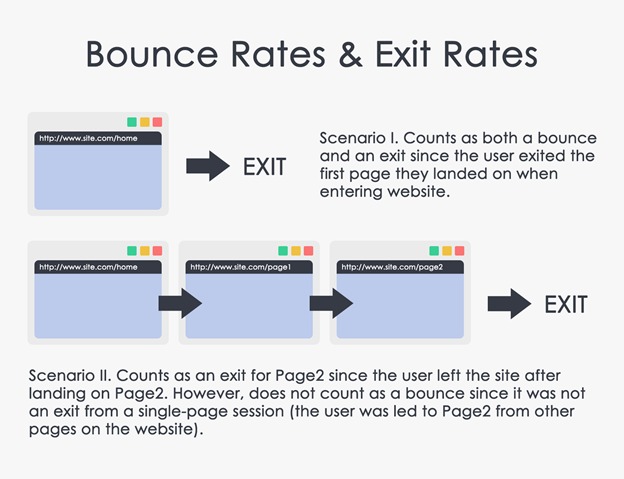

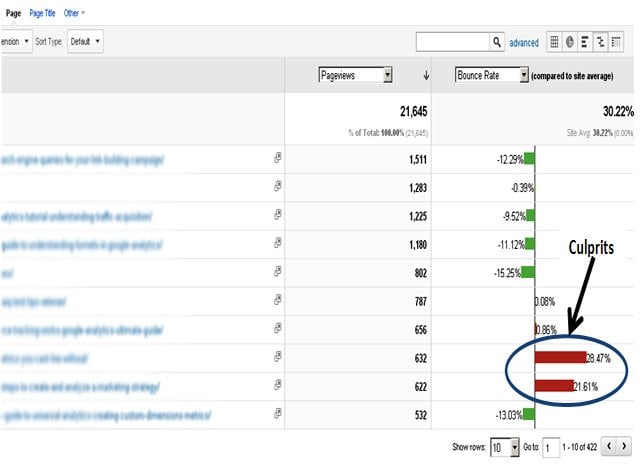
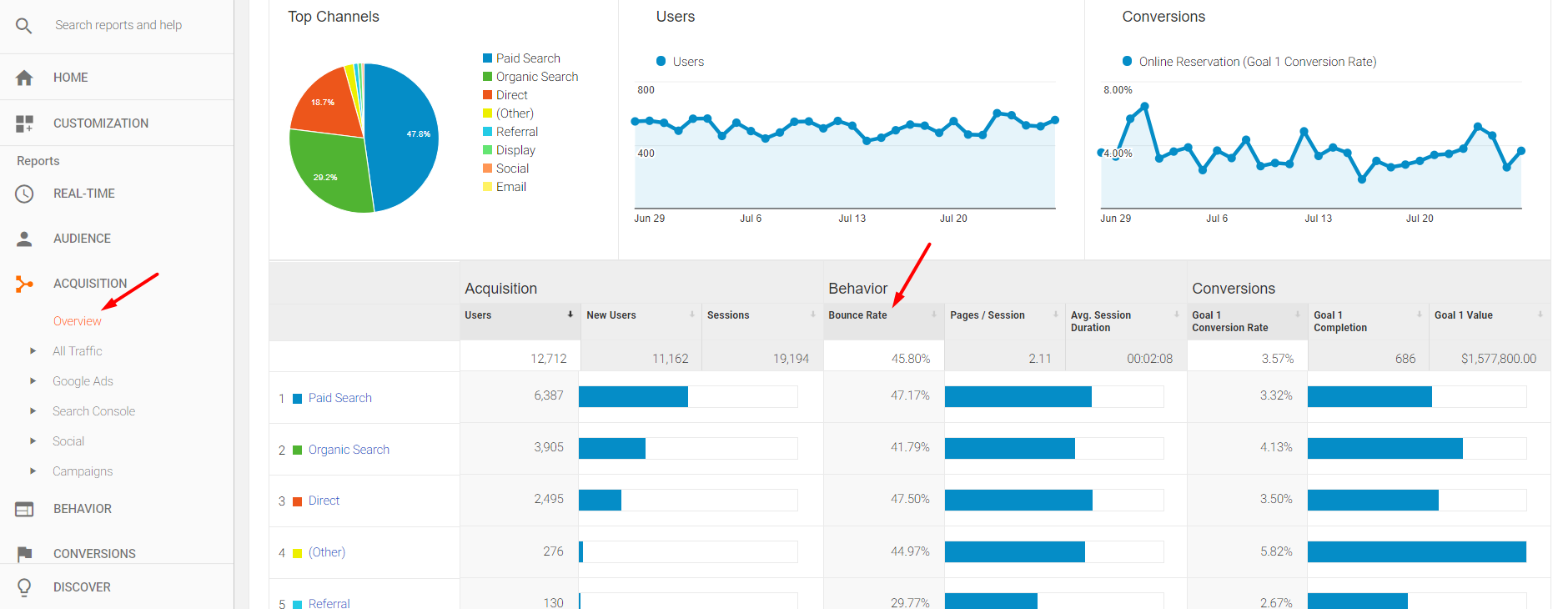



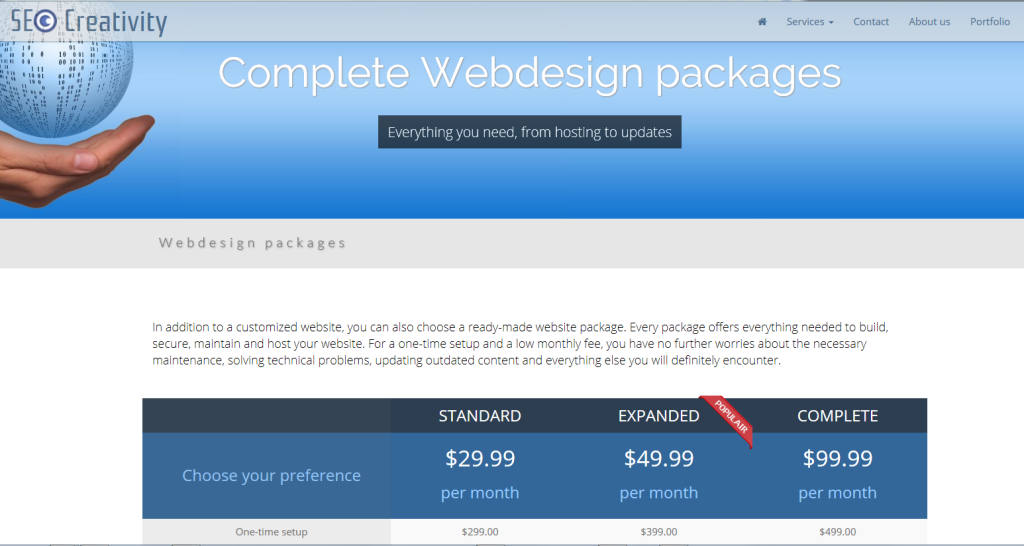





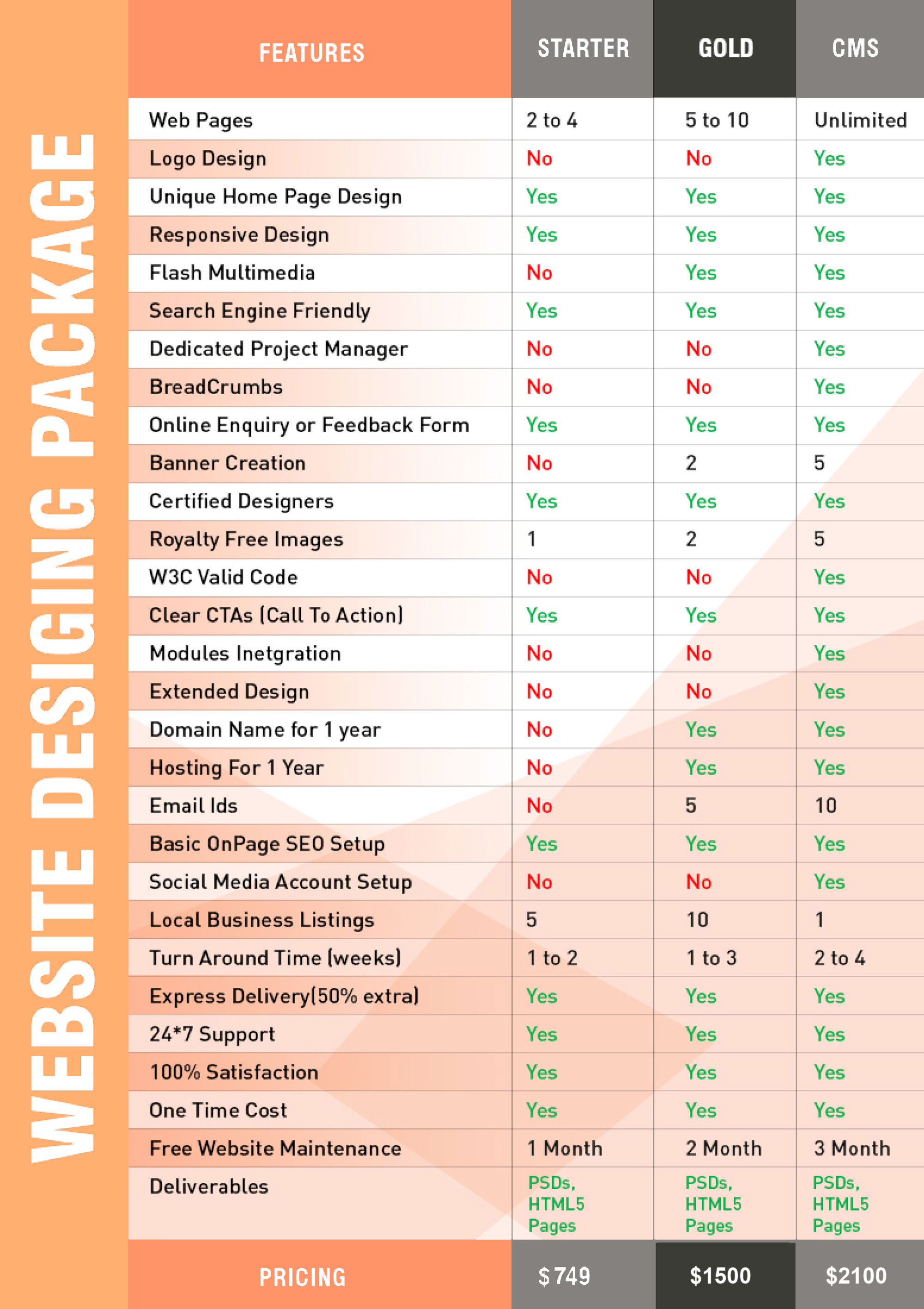


 Jimmy's Internet Marketing Business Blog