So let’s go to the page and start up an account, so we’re going to go to the top right hit the signup button immediately. It actually lets you sign up with Facebook, Facebook part of me, and this is something I definitely recommend, because once you actually start uploading music and sharing things you’re going to be able to share with your Facebook friends as well, so you’re casting a bigger net.
I definitely recommend that you do that, so I’m just punching in a password, I’m not going to actually agree to sign up with Facebook or to get the email updates or anything like that through SoundCloud, because it’s kind of like a dummy account and I’m doing it For this tutorial purpose immediately, what you’re faced with is a username and a, but actually username that SoundCloud automates for you.
I definitely recommend that you make your own and, of course, make it to the likeness of all. Your other accounts that you’ve previously made now right here. This is kind of like the startup page. It recommends that you begin following other artists, and you could do this by genre or by any other type of a audio. You know options that are there like audiobooks comedy ideas, things like that, but I definitely recommend that you just stick with music right now.
All the other stuff is more for, like a different type of leisurely stuff. So right here you can see all the people that I’m now following, which is great, and it also gives you an option right here to do select any of the groups that you just began following on the lower right portion, so you can deselect them now. I’r no longer following these people and I can go ahead and hit, follow and start listening to move on to the next page.
Now the next page is like the homepage of SoundCloud. So what you’re going to see are a lot of the artists that you you’re now following you can listen to your music. Actually, the music starts right away and right here you get an option to upload. You can comment you can like you can reap repost. You could do a lot of different things right here. Definitely recommend that you explore a lot of these right here.
You can even download some of this music and a lot of times it’s for free, so I’m going to go ahead and just mock up a little comment right here and then what ends up happening? Is you when you’re done with your comment you hit enter and it ends up on the little timeline there? If you could notice there’s these little photo icons as the music is scrolling long and those are people’s comments. So that would be one of yours when you post now, let’s go ahead and go back to the upload section and you’re not going to be able to upload anything until you confirm your email address.
So I definitely recommend that you go to your email addresses. I’r going to do right now and view the email that SoundCloud just set you okay, so I’m going to go to my email go to my inbox and there it is so it says: welcome to SoundCloud click. It, and essentially all you really need to do is go to the section that says, click this link and then from there it’ll set you back to your SoundCloud account and basically say that it’s confirmed.
So it’s basically confirmed that I am the person that started this profile and I’ll be able to. You know really start uploading, music and building my profile here so right here. I recommend that you have all your you know: sections ready. You know maybe a quick little bio, obviously any music that you want to upload and any images that want you want to associate with those upload music albums, and you know anything like that.
So right now, as a placeholder, I’m posting up a photo of myself because I didn’t really have anything to prepare like I said this is just for tutorial purposes. I’r making a small little description. Of course you want to do a lot more work on the description. End of things, and, of course tags are very important, because this is what this is a way: people finding you. So if you know you type in EDM and you’re, an electronic dance music, you know producer they’ll, find you a little bit easier with these tags.
As for advanced settings, we’re not really go over that too much, but if you did actually activate through your Facebook account you you right now you already have a chance to start sharing that music. Since I didn’t, i’m, unfortunately not going to be able to do that, but if you did you’ll be able to write a message and then hit activate Facebook and immediately once you hit save any of the music that you created on this profile.
You could now share with your Facebook account even your Twitter and actually, if you have a tumblr account which we might go over in another article, you’ll be able to go ahead and share that music there as well. So it’s a it’s a really great option. So right now I’m just creating a little message right here, as you can see just so that you know you could possibly share and you’re limited to the amount of characters you could use, which is, I think, a thing about Twitter and that’s reason why so, I’m Hitting save and now we’re going to look at my profile, it’s going to be very simple, you’re, going to see some other options right there at the top, maybe a little heart, with a little comment, speaking bubble with a heart.
Those are you know from anybody that likes your music you’ll, get comments there and things like that, which we’ll go over in a little bit right. Now, I’m going to go ahead and stop this music. Go back to my page that I just created and we’re going to go ahead and sample the song that I just that I just uploaded. So this is how quick it is. I’ve already created a very small profile right now, we’re listening to a song that I made just for this particular article, something very small and yeah.
I’r going to be able to do a lot of these same things, if not every single thing that I just did. Probably within 10 minutes, as long as you have all of your elements for your profile kind of on your desktop or at the ready. Essentially so I know we’re listening to a song and we’re going to go to Explorer, which is, I think, like pretty much going back to the homepage. So you can explore new music and some artists, and things like that, and this is actually one of the funner things that you could do as well.
You know a lot of what SoundCloud is about is about finding music and sharing it and sharing comments, and things like that. So I definitely recommend that you check out all this all this stuff out and right here we’re looking at a page where even you listen to different genres, music and obviously a little love wav file right there at the top right will bring you back to your Profile, you can see exactly look here’s where your songs at or, if you’re listening to another song, you could use that fun to get back to that song.
Again, you have the speaking bubble right there with the heart on it for likes. You have your messages and you can go back directly to your profile by clicking the button that I just click right there. I noticed that I didn’t have a picture, so I wanted to go ahead and have a picture. I definitely recommend that you build up your page as much as possible upload, maybe two or three songs. At a time you know – or maybe at least two you don’t want to bombard people with music.
But here are your options. You have a GoPro setting right there. That’s for some different advertisement and paid options which we’re not going to go over through this article, but that’s pretty much it so in our next article, we’re going to cover YouTube, how to create an account how to upload and how to share I’ll catch. You guys, on the next article
Each of these will help you increase your brand awareness, increase sales and increase your bottom line. I’r Coco, I built a profitable ecommerce store to six figures in just sixty seven days in an extremely competitive and oversaturated industry. Just last year, another one of my stores did over 12 K within the first 12 hours of launching, and I did that using the tactics.
I’r about to share with you. No luck, no hope all strategies that worked for me time and time again. That I know will also work for you. This is millennial money in business and we share the tools to help. You escape your nine-to-five with confidence every Monday, Wednesday and Friday. So do me a favor hit like and subscribe. It’s healthy algorithm to show our article to more people, and it gets us that much closer of hitting our goal of becoming the first woman led business blog with more than 1 million subscribers did you say so Bo? No anything else! Sorry about that interruption! Small business marketing 2020 tip number one.
Everyone talks about you needing to constantly post on social media. If you want to build your business and while that could be helpful, commenting on social media is way more effective. Why? Because when you’re, just posting posting posting you’re, relying on Instagram or whatever platform of your choice, we’re going to focus on Instagram for this conversation. But when you’re posting like that you’re hoping the platform will show your post to only 4 % of your followers.
And maybe your followers are actually interested in your brand, but also – maybe not so, maybe try this instead, instead of hoping your customers come to you, you need to go to them, find the places and pages on the platform that your ideal customer likes to frequent. They might be your competitors pages, they might be what I call social water coolers, where they post news and niche related content, think the shade room, if your ideal customer is a person of color or someone interested in hip-hop and urban culture or think trend mood.
If your ideal customer is into makeup or country music daily for country lovers, definitely made up that last one don’t know anything about country, but if you need help creating your customer, avatar just click the link to this article. This is where I go. Super in-depth on the topic and it’s extremely useful, but you find these pages, you see posts, you think your ideal customer would respond to and you hop in the comment section and respond to those people.
They will click your name to see who’s responding to them, because that typically doesn’t happen and think back anytime. You’ve left a comment on a public forum. If anyone liked your comment or responded, that is a notification that you saw in your Activity Feed and you definitely went to check out who that person was so if people see but you’ve already, given them something of value, whether it’s liking their comment or are responding To their comment thoughtfully and not spammy you’re, actually triggering a psychological need for this person to reciprocate what yup we read a whole lot around these parts, breathe honey books, meanie but sure so next time, you’re logged into your business Instagram account don’t just scroll past or Doubletap interesting content hop in the comments and get social on social media and it’ll pay off in brand awareness, which of course, is the first step in getting your customers through the know, like trust, funnel know, like trust funnel, like that tip, you subscribe yet we’re just Warming up now, just warming up small business marketing 2020 tip number two post, let’s pay more, you got excited, I suppose, less hot.
No, both less pay more sis. Now I actually think this is going to save you money and make you more money, while also saving you time, because you could always make more money, but she can never make more time, except with this tip. Now, I’m kind of going to be contradicting what I’ve taught you in the past. So as you know, every social media marketing guru tells you content, content, content, content content.
You got ta get out there, ain’t just dish out content, just get it out there, and it’s like. I actually decided to take a six months break from social media and I’m going to talk about how that affected. My branded business in one of my next articles, but during this time, is when I discovered this post, less pay more strategy, so, like I just stated, Facebook organic Reach is dead and instagrams organic reach keeps getting throttled.
Why? Because each of these platforms are businesses that want you to spend money to connect with people that might want to give you money. So, instead of trying to beat the algorithm – maybe let’s just approach this – like you – would any other tool necessary for your business’s growth and put a budget behind your post strategy, so lil disclosure – I have probably a dozen social media pages for businesses.
So while I wasn’t posting on my personal account, I did have time to experiment with these accounts and instead of posting, several okay post throughout the day, which can irritate your followers and become spammy real, quick. We move to only posting one or two posts a day and I know you’re thinking, but what about the algorithm? How will anyone ever find my business just put five ten dollars: Facebook ads behind your posts that force it into your followers feeds or even better target? Your ideal customer just check out my results on a single boosted post to see what it can do for you almost 300 likes more than a hundred saves 42 follows all female all around the target age of my ideal customer and all of them interested in my Specific niche: how much did this cost me? Five dollars? 81 cents? Most businesses don’t get that kind of action in a single day with a single post organically, because the platform doesn’t want you to now stash.
So it takes an average of 30 minutes to an hour and a half to formulate an ID post. So if you go from posting six posts a day and spending about four hours, doing it to only spending thirty minutes on a single post in a day, if not worth your five dollars like we got to start thinking smart here, sis. How much is your time worth five dollars? One post thirty minutes or four hours, six posts and free one post is the answer in five dollars.
However much you make as long as it’s more than a dollar and 25 cents an hour, it is worth it to save your time, post, less and pay it even more and yes, there’s a difference between simply boosting a post and getting on a desktop and going To Facebook’s ad platform and getting super targeted and all that stuff, all of these are really effective, but these are the results I got by just doing the most basic boosting of the post, which is super beginner, friendly and a great way to introduce yourself to Facebook.
Ads, that’s my post, less a more strategy that I haven’t heard a single other marketing Pro share. Oh did I already subscribe here you’re going to make me beg you’re going to make me, but how about this? Let’s drop a money, bag, emoji or a dollar sign in the comments section, if you’re getting any value from what I’m sharing, it really helps. My article gets shown to more people that might need to hear what I have to say and growing this blog to 1 million subs is the only New Year’s resolution, the only business goal, the only focus my team has for 2020.
Why representation? How are there dozens, if not hundreds of guys with business blogs on YouTube with half a million a million plus subscribers, and there isn’t a single blog for women and business and money passing level, not a single one? Yes, I’ve said this before and I plan on saying in every article until we hit our goal so right with my sister’s, don’t know about you, but there are a bunch of little girls out there.
I have a goddaughter. I have a bunch of me since I’m one of seven kids, but if they don’t see themselves represented on this platform, how are they going to know that this is a real, tangible possibility? It’s super important on the dollars and cents. It’s on us to show them. What is possible baby it subscribe and let’s get to tip three which helped me launch one of my businesses to over 12 K in the first 12 hours and help me reek in over a quarter of a million dollars in just a few months just last year.
That marketing strategy, no one is talking about – is the small business marketing 2020 tip 3. That continues to make me a bunch of money, start a hyper specific blue burnished. Just so you don’t think I have an unfair advantage because of my news and media background check out what these two entrepreneurs in Marisa Ramirez article, who is a really great youtuber to sub to if you’re, going to learn about making money, and I’m sure you are So check around which market to someone’s email list because of our common on YouTube.
We generated over six figures in four hours, but in this article this couple talks about making six figures in four hours, with only 200 subs selling insurance. They talk about getting speaking engagements now: they’re traveling the world living by their own rules all because they launched a hyper specific uber. Nice YouTube blog. Yes, I can talk about my success here, but I want you to hear from regular everyday people that decided to do this and their business blew up because of it.
In my last article, I discussed how much YouTube paid me for a article that hit 1 million views, and I talked about the fact that I’ve never really. I mean up until now, focused on growing my youtube blog. I’ve only ever used this platform for its long tail marketing opportunities, knowing that when you search for something on Google, because Google owns YouTube and places article results of Bob ranked sites, this is a way for you to beat every last one of your competitors that have Been building up their site SEO for years, so if you were to search how to start a hair extensions business, even though I had only launched my hair extensions business around the start of last year, I beat all of my competitors by showing up, as the first Article in those intent-based search results.
You could search right now, I’m still number one. You can do the same for yourself. So if you’re going to do this, you just have to stay in your lane. Stay focused on your business and talking about those topics, your blog should be very strictly business focus and should answer questions and offer solutions to potential customers. You really can’t worry about views because not about getting a million views that have nothing to do with what you’re.
Actually, selling and people that aren’t interested in what you’re offering when you can get 1000 views from people that are actually searching for you and what your brand has to bring to the table so with YouTube. They now know you a little more. They, like you a little more no way. Okay and a great thing about this – is that your articles live on YouTube forever and will remain in search results forever, as well as long as you provide that value.
You only have to post the article once and you’ll continue getting paid from it for years. If you want to dive even deeper on the subject. Of course, I have even more YouTube articles coming, but you can also join my Alive monthly business coaching. It happens in my private CEO society, Facebook group and it’s literally only $ 5 a month right now for the first handful of people to join so hit the link in the description, and it’s next topic it’s about to have some of us in our feelings.
We’re talking credit, how you can fix it and a mistake. I made following the advice of literally every credit with your expert out there that cost me a 100 point drop in a single day. Yup hit subscribe and the notification bell to make sure you don’t miss this. You can’t afford to
We got some energy, Alright awesome That that lunch is digested and you’re ready to learn. Okay, so…, I am Quincy and I’m going to talk about how to write technical blog posts that people will actually read That that “, actually read” part, is important. So umm, you may be wondering. Why is this developer talking about writing? Well, I worked as a journalist for about three years after college and I would say that technical blogging was absolutely critical to people actually realizing that freeCodeCamp existed and to our early community growth We’re a small nonprofit.
We don’t have like a lot of resources for advertising or for public relations, so we turn to trying to write articles worth reading, So I’ve been writing very actively on both Medium and on Quora, and I also edit freeCodeCamp’s Medium publication, which publishes a whole lot of Articles on Development, Design and Data Science, So my goal is for all of you to walk out of here with both the confidence and the tools that you need to be able to write technical articles, that people will sit down and actually invest the time in reading.
So there are really three elements to this. First, you need substance. Second, you need to package that substance for consumption And Third, you need to go out and publicize it. So before we get into that, though, I want to see why people are blogging. I saw a lot of hands go up earlier for people who are blogging, I’m just going to go up right now, Who is blogging because they want to impress future employers.
Ok, quite a few. All right, who wants to apply recently learned knowledge. One of the best ways to reinforce your own learning is to turn around and teach it to somebody else and to technical blog post is an excellent way to do that All right and who just wants to share their insights with other developers and kind of pay. It forward Quite a few of you,… And . Maybe nobody will raise their hand, because this is a little immodest, but who is interested in becoming a thought leader in a specific domain? All right Yeah! You want to.
… So you want to get on the conference circuit…. You want to get on podcasts like “ CodeNewbie”, and you want to raise awareness of your area of expertise Great. It does not matter like, regardless of your reason, it does not matter Really. The goal should be to just get people to read your articles. If you set out to achieve that one single goal, it will help you with all four of those objectives.
Let’s start with substance, You need to write something that matters And…. I will tell you that people quickly, they have all these kind of rules of thumb about blogging like oh, it should be 600 words and uh. You know just quickly get it out there and and blog every single day. I don’t buy any of that stuff. I really think that it’s all about substance When you have something to say that’s when you open your mouth and you say it And you can really hone in and take that substance and turn it into a whole lot of blog posts.
This is a guy named Peter Paul Kosh. He is the author of the popular “ Quirks Mode”, blog and “. Quirks Mode” is really awesome because it’s focused just on the quirks between different browsers and different versions of browsers, So he’s…. He totally geeked out on the difference between how JavaScript is processed by Internet Explorer, 10 and mobile, Safari and Opera, And his blog will show you all the different intricacies of those for when you’re trying to develop cross browser applications,.
.. And those considerations. So what did he do? He did his homework. He learned a whole lot about this one subject and he went really deep on it. Then he turned around and figured out ways that he could write about it in novel ways and that’s what you should do. A lot of people may lament that, ah everything’s been written, it’s all been done. Every flavor of breakfast cereal has been tried. Reality is there.
Are always new ways, new permutations, that you can toggle and switch around to make new original spins on old topics? A lot of blog posts are written either from a hello world, absolute beginner perspective, and then a lot of them are written from “. I’ve been coding for 10 years”. There aren’t enough articles that are kind of in the middle, for example, so experience levels, one dimension of which you can play around.
Then there are a lot of opportunities for taking something. That’s been written in a different language and blogging about how to do it in another language Or introducing humor right Humor makes your blog post palatable, so use it liberally, and you can even write joke posts that are basically parodying something but teaching at the same time. So here’s the quick case study. I want everybody to meet Amber She’s, a Seattle-based marine biologist by training.
She got a master’s degree in marine biology and she worked at Disney surveying the animals and doing science related to the animals that the Disney had in its parks and, unfortunately, marine biology is a field that a lot of people want to get into people love animals…., It’s very competitive Around the holiday season. She found herself with her contract, not renewed To cheer herself up. She was really pumped.
She was like “ all right, I’m going to go, see the new Star Wars. Movie”. Did anybody see the new Star Wars movie, “? Rogue One” Okay awesome, so she was really excited because, like the first time it looked like a Star Wars movie where the protagonist was female, But when she walked out of the theater, she had a weird sense that maybe the protagonist wasn’t the female character And sure Enough she did the math and she counted up all the words and she found that the main character actually didn’t didn’t speak as many lines as some of the other characters, And she also noticed that there were far fewer female characters in that movie than there were Male characters.
.. And she was like well, this seemed like it was marketed as a movie, you know to women to try to get more women into Star Wars, So she looked at all the other blockbuster movies, like the top 10 grossing movies of 2016. She built a bunch of data visualizations. She wrote scripts to dive through and count all the dialogue and assign the gender to the different characters, and she built this beautiful series of data visualizations, and so she had the substance.
She just needed to sit down and write about it and that’s what she did. I coached her through it and we wrote a Medium publication and her article was huge. It got picked up by Mashable, it got picked up by IGN a whole lot of International Press And it raised awareness of this issue, So she was able to use her scientific skills from being a marine biologist kind of poured it over to doing data visualization and Data science and, as a result, a whole lot of employers and prospective freelancing contracts came her way from this article.
So there’s just one blog post right. You only need to write one good blog post if it has good substance. So it’s a lot of hard work. Expect to invest a lot of time and energy Good blog posts don’t come easily, Not good technical, blog post. The second lesson I want you to all walk away from is that packaging is important. The way you take your substance, the way you package it and present it to the reader is very important.
This is the most expensive vodka in the world, I’m not a vodka connoisseur or anything, but when I saw these bottles I was immediately sucked in and I wanted to learn more about it right,.., It’s packaging. Well, what’s the packaging on a blog post, You got your headline: You’ve got your lead image, You have the formatting of the text in the subheads and the pull quotes, And then you’ve got the platform that you publish it in All of those things are considerations that You should keep in mind when it comes to packaging, your technical blog post.
I want to talk about headlines specifically, because I want to point out that that is all that about 95 percent of people are going to read. They are scrolling through their their Twitter feed, while they’re sitting on the toilet or while they’re holding the handle on a bus and they’re. Like do I want to read this. Do I want to read this? They read your headline and it’s up to your headline, to entice them to read the rest of your article.
So… Has anybody heard the old adage by Abe Lincoln about chopping down trees. So If I had eight hours to write a technical blog post, I’d spend the first six sharpening the headline. It’s true. The headline really is Empires have been built on the backs of headlines. Has anybody heard of BuzzFeed, You know and there’s a science to it? There’s a lot you can, you can read up on and you can A/B test your headlines.
You can show them to your friends and just try to figure out if people will click on them. It’s really that important and then the images Humans are highly visual creatures. Like our our visual cortex is one of the biggest parts of our brain, So you’ve got ta cater to that You’ve got ta, show people images, 86 % of the top blog posts, have images in them and on average, they’ll have at least one image.
Every 350 words Some of you may be like “. Well, I can’t afford a license. Really good images”. Well, there’s great news: there are so many generous photographers out there who take their images and turn them to “, Creative Commons” or even “ Creative Commons Zero”, Which doesn’t even require attribution. You can just splash their photo up on there And this website “ Pexels”. You can search around and find images that are public domain or Creative Commons licensed on a number of platforms.
So in terms of formatting, you need to be sure that you don’t get the Picardian “ wall of text” right. People will bounce if they see English comp. 101 eight sentence paragraphs Remember: Reddit, is only an alt tab away So be sure that you show them nice short paragraphs, nice short sentences,…, It’s not a matter of sounding… Like like dumbing it down A lot. People look at it. That way, You can express the exact same concepts in much simpler words, And you can use short paragraphs and you can use white space.
You can use subheads you can use pull quotes all those things to break that up. The platform you publish it on makes a big difference. These are some of the most popular ways that people publish their technical blog posts. So I’m a big fan of “ Medium”, It’s ad free, It’s it’s user supported and it allows for easy export of your content and it has a built-in audience. That’s quite big. They get like 86 million visits a month, And then you can also post on blog on your own private blog.
You can just use a Github pages blog and Create get your own domain and set it up that way too. There are trade-offs associated with all these. If you happen to have a whole lot of friends on LinkedIn or if you happen to have a whole lot of friends on Facebook, that might be a good place to publish too Notice a lot of celebrities have been blogging on directly on Facebook. So here’s another case study.
This is Ohans. He is a web developer in Lagos, Nigeria and he created this amazing guide to Flexbox. The only problem was he just created markdown files and folders and pushed it to Github and left…. He left it at that. Well, you can go one step further and actually write an article, a proper article and that’s what I convinced him to do. So, if you look at this, he has a nice headline that accurately describes It’s not a clickbait headline.
What the article is and then he’s got some images… He breaks up the text with tweets and he’s got subheadings he’s got short paragraphs short sentences. It’s easy to read: It’s a breezy read, even though It’s about ten thousand words Right, like you’re, going to be reading for about an hour and you’re literally going to learn all about Flexbox And it may seem like well who has time to sit down and read An hour-long article about flexbox People read 500 word blog posts right Well.
Actually this is one of the most popular technical articles ever published Its been viewed more than a hundred thousand times And, as a result, he got inquiries from book publishers. He even had some course platforms reach out to him who wanted him to create some workshops on Flexbox, So yeah and he had substance. He knew flexbox very well. He packaged it properly and he profited Lesson number three publicize.
You may have heard the expression in software development “, The last 10 % of the work takes 90 percent of the time.”. Well, let me tell you publicizing. Your work is the last 10 % and it’s going to take 90 % of your time. There is no “, build it and they’ll come”. You need to go out and tell people that this exists and you need to actively advocate for people to read your own article. One place you can put.
It is Hacker News I like to call it “ the Hacker News lottery”, because honestly there’s like…, I could publish like the best article I’ve ever written on Hacker News and nobody would notice or some random article that I published might show up at the top One day Because somebody submitted it, It’s like totally random and I can tell you, I see totally random things on Hacker News. You see totally random things at the top of Reddit sometimes, But if you keep submitting every every time you submit That’s a lottery ticket right and you you need to pay to win or you need to play to win.
… So You can also target specific Facebook groups. There are a lot of really big Facebook groups, some of them local to your city. Maybe your alumni group on Facebook, from your university or from your high school Share it with your friends. That way. Groups are a great way to spread it. You can also use LinkedIn. People do use LinkedIn groups, it does send like email, digests People might see it umm and then I would also say, use other people’s audiences.
So if you publish on a Medium publication, You’re immediately kind of hijacking the audience of that publication for a moment to get their attention If you publish it in Forbes or TechCrunch, or some of these other major publications that actually submit kind of op-ed reader posts and And you can actually become a writer for Forbes or a writer for TechCrunch and publish right on there and that way, you’re borrowing their credibility as well as their audience.
So, just to summarize Three things to remember: Create technical blog posts that are substantial Package them for consumption and publicize them like crazy. If you do that, you’ll write blog posts that people will actually sit down and read. Thank you very much.
This tool allows your site visitors to schedule. Appointments for the services you offer right from your website, saving you time that would Otherwise be spent taking calls and managing your calendar To get started. Add an appointments section To your website Click the green plus symbol where you want To add the section and choose appointments from the list: Next select “ online appointments ” in The sidebar and click “ manage appointments, ” to set up the types of services your customers, And clients can book Click on “ start setup, ” to set your availability.
You can choose which days of the week and Which hours you ’ ll, be open for appointments Clicking the plus symbol. Will let you set More than one time slot per day, For example, you can exclude the time you Would use for a lunch break each day? Click “ Next ” to set up your services. Here you can create categories for your services, For example, while setting up a website for Music, lessons you can create categories for voice and piano.
Lessons Then give the service a name: price duration, And give it a description, You also have the option of choosing whether Your customers will come to your business or, if you come to them, If you are planning an event that will have Multiple attendees, such as a class you can choose “ group ” rather than “ individual, ” Under “ service type, ” Choosing this option will then allow you to Set the maximum number of people that can come to your event.
You can create as many categories and services As your business needs, Once you ’ re done, setting up services for Bookings enter your email address and mobile phone number to receive email and SMS notifications. About new bookings and enter your business address, so your customers can find you. Finally, you can choose to require full or Partial payment at the time of booking or select to have your customers pay you in person.
If you choose to require payment up front, You ’ ll need to enter your Square account credentials, so your site can collect payments. During the scheduling process, Now your customers can schedule appointments. With you conveniently from your website From here, you can view your appointments. Create or edit your services view your customers, ’ info and update any settings, including availability, Payments and syncing an external calendar
U 음핵이: 니 험, 부다, 울, 소재의, 연, 유튭, 고대 하면서, a poster & 리어 무림; 455. 아 좀 해 워크 바트 취한 5 안과 눈 매일 ep.10 스테이 뭐 정확히 해봐, 원은, 마이페이퍼, 차피, 엑소, 주스, 얼음에, 가 허브 won 유튜브에 아문 쏜, our 에 아무 소화를 표 여친 앞 썸띵, 왕에게, 악센트, 보고, 있어야, ok, 뭐 was 센 이후 가짜야, ohno, 배치, 깟, 골다 웃은 아 올 수, 봐줘, 안해, 안 oo, 파우스트 라이브, 유치, no 월회비 1ma, 그만인 4 ob 볼 이유 1 어서 마우스 다운 지, 말, 뭐, 같이, 모여, 애, 한번, 쏘아, 그, 표, 유치, 컴, 쓰기에, 나스, 내무성 1 회 on 하면서, 1 었소 쉬, 에디스, 옆에, 솜, a6.
이 미카 면해 아 무수한 scs 우리 지우 합이 유튜브 해요, 후아 3 피와 부어 그, 시렁, 토대로, 바운딩, 6인, 쉬이 아무 come on do from emp 주한 라오스 플레이 2분 타스 써 하리 유기 치르려고 대하면서, 안에, 표적이, 가짜, 합이, 유튜브, 케언즈, 교와, 준비한, 유튜브, 알수, 머리가, 땄다, 어떠한 은 액스 e1 e2 쌓인 없 야스 내 함수, 안에, 들어, nu, 퀸, 류담, 아이콘도, 웹사이트, 도와주시고 있네요, 나의 2.
4 널 uc 대한, 더, 큰, 애, 신주아, 애서, 혜암, 우선, 어페어, eon, 하면서 scout 울티메이트 샘플링, i’m a 세는 법 오케이 며 아주 pocket 라울이, 4 유비 d. 링 페이크 open on love, o ou 폴 제약, 보, 리, 뷰, 쓰, 워프, 알았다, 인생이, 허브, 다, 월, 10 요크 맨션에서, p b, 뭐 타올, 썹니다, 스프리그, ok to iu 메이크업, 허, 놀다, 올수, 폴드, 웹, 앱, 검수, 엠카운트, 달, 무, 포인트리, 보여줄, 9호 풀셋 틈에, 슌, 비교되는, 리드 파이 너 9매 니퍼 락스 유니트, colore, 보, 원, 헌드레드, 얼, 싶을 web jeon, 하루다 올 and worse 안볼, 총알 too, oh to some 카트 스압: 1f r11 들더라 이럼 알프 풀세트, 매, 션, 스, 오르트, 메고, 완화를, 따, 올, 싶을, 때, 어, 하면서, 내가, 손으로, 오버, 와, 오메 이게 더 소아는 쇼 이원 입으니, 수요와, 의, 점에, 가, 하는, 라오스, 플레이, 유행하면서, 않을, 배워요 2자 오레오 빡 제하면, 손, n6, 노르 스타들이, a la 해 로보 on how a to b, 아, 무수한 sc site or vip 쇼 2 합의서를 써 육임, 겨울에, 하면서, 않은, 유 캔 출출 서민과 택해 는 mt one 카드 덱 lamp 페이, 죽음, 그럴꺼, 볼게요, 오잉 nam, soo ae one 4 웬 유 쉘, h, 여기에, 내면서, 앙큼 simpsons ride a total of I stroll 4 내 초 2 패치 엔즈 듯한 테 쥬크, 이란, 유튜브, 웨트, 스프, ripe, 우솝, 알뜰 율 네오 표현 및 한체 없다, 오브, 스포, 알어, 어, 어, 아니, 우즈백, 윤아, 암, 달, 커스텀, 에어, 아무, 소아, 노인, 트, 디스크, 웹, 슈퍼 학습법, it’s 유튭, 열이, 5, 6, 10 m 에, 이어 우와, 언어들이, 5, 스프 r, 달, 6회, n 오브, 전요, 비기, 링, 했나, 비우 새우 아니라 옆 거액 썬 인테리어, 스트, 이고, 원하는거, 다, 올, 프, woo, 포, 인, 세, 확보, 뭘, 수, 없는, 게야, 뭘, 섹스, 하는, 볼이나, 인다 올, lo 커뮤 casper, 내, 모여 메이킹, one person, 나인이 섹스한 써내, 보이게, 하므로, 다소, 이, 노릇, n 참, 애가, 하느라, 울산, 유튜브 erp 왜, oie tso 보험, 태아, mls, 폴대, soo hoon, lee readers of a 때 기업소 밭으로 mip akm 와 mlb 아 하이엔 패 50포 빨리 든 b, 쿼드 2 놓은 메이크업 아이라, 원칩 m 모습이어서, 입소를 까자 여타, ox 된 그 파인드, 언어, 2, 프랑스 mvp, 더, 보았어 rote 오프 미우 무얼 8알 이후 원했어요 체험이 얜, 그, 스크랩, 1박스, 포가, on2 b1, seoul 25w leo kkeute x1 치주 입은, 모어, 다르마를, 차에 줄, pro 데이터와 층간, 5월 드디어 하우스, 이후에는, 맥스, 리오,
Today I want to show you how to use lumely it’s a social media management tool, and I want to show you how easy it is to use. So you can schedule some of your social media posts. There are some posts that you want to keep them upgraded or updated and on schedule, specifically your Facebook fan page. If you’re making sure that you’re getting some posts and every day to show activity, then you want to make sure it’s scheduled.
So you don’t have to go in every day and do it now. If you have a Facebook group, typically in a group, you can schedule them as far in advance as you want. That feature is built into the group, but it is not built in to your fanpage last time. I checked if somebody knows a way they can share below, but I have found myself going in and certain time every day you know making sure I get that post in or I miss it.
So I started using lumely now this one here is a demo account and then I set up for you – and this is what your page looks like when you come in. There is a 15-day free trial, so go in and play around with it, and I’m going to show you a couple of features that I really like about this. It doesn’t only post to Facebook and post to other places as well and, for instance, I like to build my content on YouTube and for me to go into several different places to share my articles.
It takes time I can come in here to lumely and put out the same article on all my platforms at once. Now I don’t go in and make four and five posts a day, I’m strategic. I pay attention to what I want to post and then I put it out on all my platforms at once and it saves me a lot of time. So I don’t want you to think that I’m saying go out and post on all these social media places. Four and five times a day: that’s not what I’m suggesting that you do, that’s being busy, not productive.
I just talked about that a couple days ago. This is being productive. This is saving you time and you’re being intentional, with the content that you’re putting out lumely. Does that for you, this is the first thing that you have to do is go through and set up your account. I did that. I have a article at the end of this article on how to set the account up. So I’ve brought you through those steps, and I made this demo company account now in that account I’m going to go ahead and post on a calendar.
I love this view. I am global. I like to see everything at once, so I can go in and look at my calendar and say: okay on Fridays, let’s go down here on Tuesday. I want to add a post. So let’s do that and I want my post to be posted around three o’clock in the afternoon, so we’re going to build a post from there now it takes time to get this all together but, like I said once it’s there, it goes to all your social Media platforms at once now I’m going to call it.
Let’s say I’m going to do a YouTube article that I made on email, marketing, okay, for instance, and I might label it email if I want. If I want to sort my posts, I can do that. Then I hit next and you just keep going through the steps. Now, here’s where you, when you set it up, you can do Facebook, Twitter, Pinterest, LinkedIn, Google, and I can’t remember what that one was. But anyway, I think I have mine set up right now on Pinterest and Facebook, but I’m just going to do Facebook.
Let’s do both of them Facebook and now it’s saying which board do you want to put it on because of that, I’m not going to put it on there, but well, let’s do that. I have a take that back. I think I have an email marketing board. So let’s go ahead and put that email marketing right there say so I’m going to put an email marketing article out to those two places. So then I hit next and I might say, I’m just going to say email marketing, blah blah blah.
Maybe I’m sharing five steps on how to make your emails better or so more people will open them and right here I can download my article I can go into my article account, get the article link that I want to share and bring it over here. I’r not going to do it right now because it takes time to load it, but just so you see I’ve got emails made about email marketing. I can be intentional about posting something about that.
I’r going to spend a little bit more time. I’r going to talk about. Are you struggling with email? Marketing here are five tips that will help your email, marketing rate open rate go up or something like that. Now, let’s say for the sake of this article. Let’s say I don’t want to share a article. Maybe you want to share a pic with an inspirational quote or something like that, because it’s nice to put those inspirational quotes in there to encourage people, and let’s say you want to put a photo in there.
Well, maybe you don’t have a photo. This is a nice feature, I can go here and it takes me right to unsplash where I can go in and browse and get a photo. So let’s say I want to do a photo with the sunset as an example, and you know just to kind of inspire people and have a quote with it that I type in and here’s some sunset photos, and these are free and you can pick the one That you want, let’s pick that one so then I’m going to insert it like.
I said I started out talking about a article, but I wanted that to come up pretty quick. It takes less time, but you have these right at your fingertips. So maybe you already have a selection of quotes that you’d like to use – or maybe you were talking to somebody about you – know taking some time to relax, don’t get overwhelmed. Sometimes you have to take time for yourself, and maybe you can write a nice post about that and then put a very inspiring photo with it.
So I just want to show you how you can do that so now we’re going to hit next and now it’s going to go to my Facebook, feed or my facebook stories, I’m going to leave it on the feed and here’s what I can do about Facebook As well and again I could put the quote: I could write a big long passage or I could write something about the article in Facebook. You can add more than one picture, so this is where I get to customize each one of my platforms.
Pinterest. I probably need to just put a picture put something quick on it. Not too many words send them to my article here in Facebook. I could put three or four photos to talk about a sequence of something, but I can spend a little bit more time. Have more lengthy text, so I can each one of my social media platforms. I can make the the content fix the platform if that makes sense, but I’m talking about the same thing on all of my different platforms, all right.
So let’s go to the next page, and this is kind of neat on Facebook. You can select a target or audience. Are you trying to select an audience that you’re trying to meet and again? This is something that you want to take a little bit of time. If you’re just trying to hit everybody, then just hit everybody, but if you’re looking at just hitting certain people, you can go ahead and target an age like.
I don’t really want it hit it. You know a 13-year old, so I might up that to 24 or something like that all right and then I’m going to go next and then schedule my post. I can save it as a draft and come back or I can create it right now and or I can schedule it. So it’s that simple and let’s go ahead and schedule it now and then I want to take you back to the calendar to show you what that looks like okay, all right.
So let’s go back to our calendar and there you go. I have to pose. Oh, that’s, not pretty cool. So if you have a certain system that you use for Pinterest, maybe you want to post everyday, maybe Facebook – you have certain days of the week but you’re going to see those little social media logos there and it lets. You know. What’s already scheduled and what isn’t you can also go here and look at the list view which is kind of nice, and you can see exactly what you have posted and you can go in there and edit it if you’d like, and you can duplicate your post.
So earlier, when I talked about setting up lumely, I also talked about I’m going to say this again. Let’s say I have three months worth of posts that I made. I can go in here and duplicate the post and reschedule it for four months later, or maybe I want to do six months of it at a time and recycle everything again. That’s what I love about scheduling that I can sit here. I can take the time I can get it all scheduled out and then once everything is in here you can start recycling everything that you have and it just looks fresh because you know – and I know on Facebook, especially you’re – not getting every single post – that every Single one of your friends is creating.
It just doesn’t happen that way so and if you have a friend, that’s getting a lot of your posts, they’re not going to remember something and post it 90 days ago. Maybe they will and then it must have been a really good post, but in general most people aren’t going to remember – or maybe they didn’t read it fully the last time and they see it again. They want to read it but recycle your content and that’s where the job starts getting easier because you’re getting smarter, you’re working, smarter, not harder lumely.
I love it. It’s very, very, very easy to use, and you have six platforms that you can post to now. A lot of people ask about Instagram they. You cannot schedule a post to automatically post on Instagram, but you can post it and then it’s going to say when it’s time you can schedule it excuse me you can schedule it and then, when it’s time to post it you’re going to get a notification on Your phone or on your laptop, however, you set it up, it’s going to say it’s ready, then you just hit a button and so right now that’s the way.
It is lumely promises that they’re going to make it better, but that’s where it’s at so you still can schedule it, while you’re scheduling everything else. I hope that was helpful. I hope this is a tool that you can use this year to make your life easier and be more intentional, being more focused and give yourself more time for other things. Okay, so again, thank you for reading. If you have any questions, ask them below I’d.
Be happy to answer those for you don’t forget to subscribe to my blog hit that notification tab. I see I post every Monday, Wednesday and Friday on YouTube, so that I can help you build your business, especially in affiliate marketing. All right guys have a good one and I’ll see you in the next article
I won’t bore you with any more details but yeah, I’m the owner of a co-owner, cleaner of a chemical data buzz it’s based in Sydney.
I’ve been working as a software developer for almost 30 years now, which makes me feel very old and somewhat wise and experienced for those who not familiar with WordPress. Sorry, where commerce, just quickly it’s a plugin for WordPress, turns your WordPress site into a ecommerce site. So people can buy often pay for stuff. It’s extremely customizable there’s over hundred extensions for WooCommerce alone.
It was founded in September 2011 and it’s now part of the automatic family. I think something like 28 or 30 percent of all ecommerce sites. These days are running. Were commerce so very popular okay, I wanted to talk a bit about my journey, to how I got to here so talking about the integrating with a WooCommerce API, my company, you work with about five or six. So sorry, we’ve got a couple of stores and about five or six years ago the experience wasn’t great, where people would go to a website.
They’ll click, a big PayPal Buy Now button, take them to the PayPal website, make the payment and then we’d get an email, and we would then have to reply to that email send them a taxi invoice attach the software they’d bought. So it was very sort of labor-intensive manual driven, wasn’t great experience if the customer ordered say after nine o’clock on a Friday night senior time. We probably wouldn’t process that until Monday morning, our time as well so over the weekend, they’ll get very anxious, anxious and think they’re being scammed and cancel their critical tasks, sometimes woody ma they’re bought in a bounce-back because they couldn’t receive attachments that big.
So I was all it wasn’t very great here, and so we knew we needed a better solution. So I started around and quickly found we commerce and it worked really well with that. We’re commerce so within short space of time, I’d created to work on websites, and then we had a great experience. Customers could buy software online pay online, get that downloads automatically and get a taxi invoice automatically.
So we didn’t have to we’d have to do a thing. The missing piece for us was use WordPress or e-commerce store in our business. We use it to run our website now, ecommerce stores we use other software like CRM software, and then we have accounting software and we were to get all those orders out of WooCommerce into our CRM and then into our accounting software as well so beans software developers. We looked at knowing that many of you do that WordPress is built in a MySQL back-end.
We thought, oh, let’s just use SQL to get the data. The trouble with that is, it’s there’s no sort of structure around how an order system would typically work. So there’s no orders table, there’s no line items table, there’s no products and customers table like you’d, normally have there’s things like post and post met or not sort of stuff. So you well. We worked out that you could create a an SQL view to get a nice level representation of how I am an order should look that we wanted.
At least we wanted orders with line items that we could say, and that was working quite well, and so one day it stopped working and overnight we couldn’t connect and it took us about sort of one or two weeks to finally track it down. We will he managed to get in touch with a the right person that our web hosting, who said that yes, they’re turned off remote SQL access overnight and though they didn’t tell anyone.
No, they weren’t going to make any exceptions, and thank you for your call. So we’re in we were stuck. We need a solution pretty quickly because we’re to go back to manually processing orders and that we meant a lot of manual. Double data entry and we’ve got better things to do with our time and then have our staff re-enter data. So once again, I started looking around and realized that uh we Wickham is has an API and looking back well like our company.
We live and breathe API so that we spent so working with api’s and looking back, I’m sort of puzzled as to we didn’t just start with the WooCommerce API in the first place. But that’s how we got here so before we get into the details of the WooCommerce API, just a quick bit about those who aren’t familiar with them. So API stands for mission programming interface, there’s the definition from the great Wikipedia I like thinking of it.
Basically, just as a set of instructions about how to get my software talking with it um your software, some of you might have heard the phrase over the last few years about software is eating the world, and so that is API Zurich in the world API. Where these companies like big and small, have API, so we’re press obviously has an API in the accounting, zealand, zero and my bae have have built big platforms around their api’s Tulio’s, a company you might have heard of in the states they all they have is api’s.
They’ve, build a business on api’s around things like SMS messaging and voice messaging and in the social media. Space companies like Twitter and Facebook also have API, so API is everywhere. Ok, so why would you use the word commerce API? So I sort of alluded to it. A bit for many of our customers, it comes down to one word and that integration, it’s about eliminating double data, entry and hassle saving yourself time.
You might have a inventory system that contains all your products and you need to get that into the online store and you don’t have to have your staff changing your internal system. Then we type in all that into your we’re commerce system that leads to sort of data entry errors when you’re doing things twice like our business. Many of our customers have an internal system that got to get their orders into that as well and ultimately into their accounting system.
They’re, probably also, as you do things you can’t do easily in the WooCommerce admin interface itself, so things like bulk updates. So I can change the price of every product or change the description or change the tag and categories and upload them in one go. It sort of the click of one button. We’ve had a couple customers that also want to do things like send their customers to a payment page, and they don’t want after that.
Basically, they want them to not have to go to. The website find some products build an order or add them to the cart and checkout. They just want to sell them to the checkout page. So the API lets us create an order attached for the lot items, generate the payment page link and then just in the customer straight to their payment page, which seems a bit strange. But let’s sell some customers wrong.
Okay, so the benefits of all this, as I mentioned, it’s about saving time, eliminating double data entry, saving your company money when I wake up in the morning – and we had a few orders overnight – and I know that they’ve automatically found their way into our CRM system And ultimately, into our accounting system, and we have enough to do anything – that’s a that’s a great feeling and then gives us that sort of zen-like state of car I’ve been seeking for many years.
So it’s about taking the stress surfer got much better things to do than be data entry clerks all day. So this is what you can achieve with using the API. So let’s get into the details of the the WooCommerce API itself, so there’s the URL for the documentation. It’s a it’s a it’s a very well documented API in our experience to this week was an exciting week in the WooCommerce API space, because a new version was released with Wickham, as 3.
5 has released version 3 of the API. So there’s currently three versions of the API in WooCommerce version, one was for WooCommerce two version. Two was for Wickham s3 and version. Three just came out for Wii commerce. 3.5. You get all three versions: they’re all installed, they’re all enabled you don’t have to install to anything I mean just get them version 1 and version 2. I was going to be deprecated and removed, possibly at some point.
So any development you do today, you did with version 3. So it’s a what’s called a restful api, let’s just quits to the API using standard HTTP verbs that you’ve probably heard of like get post put and deletes and that allows us to create, read, update and delete information or from outside of commerce to use in the Api there’s code samples for a lot of the popular programming language, he’ll, know PHP path and Ruby, and some SDKs that efficient ones you can download and get going with straight away.
So the first thing you normally need to resolve when you’re working with an API for the first time is authentication. How do I connect to the API purely and safely? No then-known, it’s just me and no one else. So the WooCommerce API gives us two options and that depends on how your site served if it’s served over HTTP so know as a sole certificate. They have this both Wampanoag one legged authentication, which is quite convoluted, and I certainly wouldn’t recommend it and that’s what I’m going to talk about it today, because our story of the opinion that you should be serving your site over HTTPS these days, SSL Certificates, extremely cheap And free in some cases and for me, if you’re using WooCommerce, you’re capturing custom information, so that’s what’s called personally identifiable information, you’re capturing orders and you touch into the payment program processes, credit cards or stuff.
I usually should be using HTTPS and if you’re doing that, then authentication is much simpler with the API. You just need to generate a set of API keys using the WooCommerce seven, which I’ll show bit later and they become you could generate. What’s called a consumer key and a consumer secret and they use own password to the API greenshot of that in the Wickham s API. So you go to the Advanced Settings section on REST.
Api create a new key and you’ll, get a screen like that, and you basically copy that consumer key and consumer secret stored in a safe place and that’s how you what you’ll use to authenticate going forward? Okay, so there’s ups there’s four types of requests I’m going to cover, so they are basically create lease and they will have a sort of quite a similar structure. So let’s talk about the correct request, so this is where you want to add some data to WooCommerce.
So it might be a customer or product or an order or category or tag. So in this case you’re going to do an HTTP POST request to an endpoint so that endpoint is customers, products and so on. So you’re going to include your authentication header, which I’ll show in a second and that’s got your assets. That’s how you’ll indicate so. The WooCommerce API is built around Jason as the data structure so to when you’re sending receiving data.
It’s all in JSON, so you’ll need to be able to sort of encode and decode Jason at that point, and that means you need to include the the content type application, Jason header as well you’ll get a JSON response back if it’s all successful and when you Create something you’ll win the work, I’m a Safeco gives you a response. It includes the the ID they work on this ID and you generally want to sort of capture that and store that somewhere, because, if you ever going to touch that record again through the API, whether it’s updating and getting it or deleting it you’ll need to tell We’re commerce which ID that you want to touch so here’s a some using cool from what all my examples.
That’s example in curl, so you can see. I went yeah wait, use my angles, not great for the laser Benham. You can see you don’t HTTP POST request to the customer’s endpoint. You see the version 3 there. That’s how you know which version of a PO you’re referencing, you’ve got user name and password in it’s the consumer key and secret content, type header and then just the JSON data, so email first name last name and username.
Okay, so, following up from the create request, is the update request? It’s basically a famous the Craig request. You do you put instead of a so API world, creating records to put something about updating records. Why some time? First, in this case, where we were, if into the endpoint, but who also reference the ID at the end of the endpoint so which record was ready, we include the same with a same content of jason header and the same jason as well.
Are the only difference doing an update request is that you only need to if you want to send the changes, the things that you know actually update. So, if you’re updating the status of an order, you could just send the order status. You view uploading email address, you just send the email address. It’s up to you now company. We send everything, because that are that you send for a crater and update.
It can be the same. So it’s just easier for us to sort of recycle the codon and do it that way. Okay! So there’s an example of an update request, very similar to the crate request, except it’s just got the ID on the end of the the URL and I’m just including the data. That’s what’s going to be changed, okay, so they’re the two ways you can send data up to WooCommerce. Now we’re going to talk about downloading data from WooCommerce.
So that’s when you do a get request so get rid of any new URL in your browser. There’s data to send you’re, basically just specifying an endpoint and there’s two types of ways you want to download data. You might want to download a single record or a group of records, so we’ll cover the single record first. So when you’re doing a record like a update request, you need to specify the ID of the record that you want to get and you just build out the URL.
You include the authentication header and that’s it you don’t need to send any choice or anything just create the URL and you’ll get back that record. The full Jason check for that record as well. If you wanted to that’s what the response looks like so you can see the ID and the adjacent data for the particular record you’ve requested. The next type of request is when you want to get more than one, so you might want to get all the products in a particular category.
All the orders from last week were yesterday all the tags or the categories whatever might be. So this is where you’re doing is still doing a get request, but obviously specifying an end point say: orders with no ID and you can now build out the URL of it further by including extra parameters and the concept of pagination. So if you look at my little URL here, you can see I’m saying get me all the orders after that date and before that, don’t and give me page one and order them by ID in ascending order.
So let’s talk a bit about pagination. So when I tell WooCommerce to give me lots of Records a list by default, it just gives me ten it. Obviously, if I attend housing orders in Mike Weir commerce site, I wouldn’t want to get those automatically, because that would sort of flood the connection the API would sort of slow to a crawl. My computer probably slowed to a crawl, its processing. That’s so there’s always limits when you’re getting multiple records, so you get ten by default.
You can override that ten by specifying a value for the per page. If you wanted 20 or 50, you can do that. When you get a group of records, you need to examine, what’s called the response, headers and WooCommerce will tell you how many records are found. How many pages are you’re going to need to use to get all those records and it’ll give you the link for the next page as well? So you don’t have to sort of programmatically work out.
What all that stuff is. If we have a look at an example of their response, headers I’ve highlighted some things in red, so at the top is the response code. So anytime you work with an API. You should always get the response code and see if it was a successful response. So 200 series isn’t only the success series. I’ll talk a bit more about that shortly. You can see here. We’ve got the xwp total, so that means 21 means I’ve found 21 records.
Total pages is 3, so I need to make 3 requests if I’m getting 10 per page to get all 21 records there. Hopefully, is the link to the next page, so no need to work out that I can just go and grab that link header and use that for my next page for what, if I’m sort of looping through getting all these and one request? Ok, so the final request I want to cover is the delete request. Delete request is very slimmer to an update or a get single record.
It’s basically specified an endpoint with the ID of the record that you wish to delete you’re, not sending any JSON data you’re. Basically, just doing an HTTP delete request to the endpoint. The only thing you need to be aware of is not all resources support the concept of thrashing and that’s where you can delete a record and it goes into the trash. It’s not permanently deleted. Some of the endpoints and the documentation tells you this.
You need to include an additional parameter. The force equals true and that permanently deletes the record immediately. So you’ll you’ll never get it back when you delete that type of record. Ok, so I wanted to talk a bit about web hooks as well web hooks for those who are not familiar with. Where book is it’s it’s a way of having a notification sent to your server, essentially when a certain action or trigger event occurs so for WooCommerce.
This might be when a customer’s updated or when a order is created, for example, and that’s a screenshot of the web book set up in the world commerce. That means green. Here’s a example of a workflow from our our company and how we use where books. So we now one of our webstore ecommerce web stores gets a new order. We have a web book far off that to our internal server and that creates that contains all the information for that particular order.
But it’s a new order. It’s not a completed order so that all does not doesn’t have all the information that we need right then. So we we wait. We wait us or a moment in time or a couple of minutes, I think for memory, and then we may get a request to the WooCommerce hope you ought to get the latest version of that order, and that includes all the payment information, which is the main Thing that’s missing from when it was first created and then we pulled that back into our internal CRM.
So we’ve got the latest order. So, a couple of months later and then we fire that off using the Xero API, which is our accounting software that we use so within about five minutes to get an order. It’s in our CRM system, the updated version and it’s in our accounting system and that all happens without us having to lift a finger so where books are great. If you want to automate workflows and not have to go and get data from where comments but have a push, you data automatically, ok, so just some tips on sort of picked up over the years of working with various versions of the API.
So, just worth noting time, stamps are always in that ISO 8601 format. As I mentioned earlier, you should always check the HTTP response code, because you want to know where there was a 200 or 201. That’s the successful response codes. You might make a request to get a customer that doesn’t exist, so you’ll still get a successful response paper. Just it’ll take it in for anything, so you need to sort of differentiate between.
Did I get the data that I wanted and versus did. Myopia was my opinion. I request successful, so 400-series are for the sort of request errors. The invalid jason for our one for unauthorized. You’ve got some problem with your api. Keys 500 is a serve error and so on. If you wanted to upload images, say for a product via the api, we’re commerce only lets you upload images by including the full URL for the image.
So it’s going to ingest it and add it to your product when it downloads it. You can also reference if it’s an existing image in your WordPress media library. You can just tell it what the media, library, IDs and it’ll it’ll just link it to product. If you’re wanting to upload a local file, you need to use something like the WordPress API, which does support uploading local files and then grabbing the media ID and adding that to your upload request.
So we’re commerce has got a standard set of fields for things like products and orders and customers, but it might not have all the fields that your customers need for their particular. So a lot of our customers use custom fields for their store and the the way they do. That is through changing the PHP code or using one of the popular custom field plugins. So it’s just worth mentioning that the custom field data that you get isn’t part of the sort of the call will commerce REST API, but they it’s generally including, what’s called the metadata section or the meta data, that’s attached to a product or attached to an order And I’ll show example that immanent yeah, if any, bugs just report them through the github page, they get fixed really quickly.
My experience of reported about half a dozen over the years and they’ve always been fixed and included in the next release of WooCommerce. If you’re not sure where to start with all of this I’d strongly recommend a tool like postman. That’s a free, HTTP client app that you can download and you can use it to construct these requests edge, authentication, header and just see how it all works and examine their response and the response.
Headers and finally, just a bit on the new features of the WooCommerce version through the API that released a couple of days ago. So every time a new version comes out, there’s no menu, endpoints or updates to existing ones so in. But if you win points, so we get a reviews in point. We get a reports in point, a new data endpoint. You can now refund line items through the API. That’s been a sort of a popular request over the years, and you can now edit some things like date, fields on the products endpoint that previously we’re not went.
Editable are the API and when you looking at the documentation, the oppo will tell you if the field is read-only or not. Okay, so I think that’s into my slides. Let’s crack open some demos, okay, so I’m just going to use just a bit of postman first, so this is postman for those who haven’t seen it it’s a free download. You can use it to construct, HTTP requests and just see everything about it. So here’s a little simple example: I’ve got my URL there for my version, three of the products npointing armed taking the products tag, so I want to create a new tag in this example.
So putting my authentication username password, my consumer key and consumer secret and postman does a great job in it generates the authentication header automatically I’ve added in my content, type application, Jason header, so I’m basically ready to go so now. It’s Jason that I’m sending. So I just need to choose the Jason body type and construct some JSON, so I want to create a new tag for my product.
Called products called cake ingredients. I’r just going to click. Send it’s going to request I’m using my little phone here for the Internet. So yes, that worked and it’s come back with a response, so you can see that was successful, there’s my ID, so I could now store that ID number 96 in my particular system, whatever I’m using, and it feels to rename that in the future I can do An update, request and say update ID number 96 and all updated for me.
If you want to look at the headers that come back, you’ll see them here. This was just a create request, so we don’t get the the titles and all that sort stuff with that. So you go to sort of examine the response. Headers that you get back. Let’s look at creating a customer. Now here’s a oops, a customer, oops. Okay. So once again I’m doing a a post, and these are where you choose the different HTTP verbs.
You want to play with so I’m going to do a post to the customers in point. Here’s on my customer data, so let’s just hit Send and that should work okay. So in this case I’ve got an error, and this is how you can tilt you’ve got. I also got a stairs code of 401, so 401 means an authorized, so I’ve also got some problem with my API keys and if you work on, as you know, me gives you a sort of generally a helpful message and you can examine the headers and that Might also tell you a bit more information about what they were always but I’m sort of know from experience to the Foro ones and authorizer.
I will need to go and fix my consumer key and consumer secret okay, so that I can check for an error now. I forgot to actually show you how to create these keys. Let’s jump over to the wordpress. We commerce admin screen. So here I am I’ve just gone to WooCommerce. I’ve gone to settings, advanced REST API and you just click, Add key to create a new key and you’d. Give it a name. Now you choose the user to associate that key with so the sort of the privileges and then you choose.
Is it read, write or or read and write and then, when you generate the key it’ll come back with the consumer key and consumer secret? So at this point you need to copy and paste those and store there somewhere. Secure you’ll, never see these again. At this point, so if you don’t make a note of them, you’ve got to go, go and create another one again, so actually note those down otherwise you’ll need to start again.
Web hooks are also in the same Advanced Settings section. So if you wanted to create in your web hook, you’re just come in here and go add a web hook. Do that again, and yet once again, you’d give it a name and the important thing is choosing the topic or what’s the trigger or what’s the you want, this web hook to fire on? So these are the the predefined options that we commerce gives us so generates about when something was created or updated.
So I that’s the order. Credit Amun, that’s the one that we use in our business, but you also get some other ones around products as well. Okay, so let’s switch over to FileMaker, so we do a lot of work, as was mentioned earlier, I’m in the FileMaker platform. It’s a popular platform, small businesses, it’s Apple and it’s great. It runs on to the Mac Windows my on the web, and you can use it to integrate with lots of API, so we use a to integrate with that we’re comments in particular, so I might want to download all my orders for the month of October.
For example, so here I’m doing a requested on filtering by date range and I’ll click that button say get me all the orders between those two dates. So it’s getting me a list, so I’m getting 10 at a time and it’s just sort of working his way through them. It’s happening over my mobile phone, so it might be a tiny bit slow and yeah. So this was my internal system of now got all my orders in here. I can then go and modify them print.
Shipping labels and anything else I want, might want to do my sort of CRM system and then I can send them emails and send it off to my accounting system as well. I think that was all I had for my demo, so we just switch back to my slides, yeah. Okay, so there’s my contact details so I’ll be around for a couple of days. If you have any questions, but now know what it’s like to open up for questions,
This is Jamil here with customer support and we wanted to make a quick article explaining a little more about what to expect after you’ve begun monetizing your tracks through our available monetization programs. So if you’re reading this, that means you’ve already submitted some material and you’ve gotten someplace, and now you want to know how much money you’re getting and when you’ll be getting it.
So what I’m going to do is show you how to navigate this area of the website. To hopefully answer all of your questions about that. Alright, so the first thing we’re going to do is hit this drop down menu and then we’re going to make sure we’re in the my media tab and we’re going to scroll up here and hit sales. Now, once we’re in this sales page we’re going to hit the music distro earnings tab now, this is where we’re going to see all of our available data from any monetization programs that were in that are generating actual monetized plays alright.
So first thing I want to note is that this data is only available once it’s sent over to us from our partners and once we’re able to ingest it into our system. Now data is often back dated, meaning it could be from a few months back as it takes time for our partners to calculate earnings right here. You’ll see that the latest data available that we have is January 2019 and if we click here you’ll see that it only goes back further.
So this is the latest available data, and this is what we’re seeing here are January 2019: music distribution earnings report. Alright. So first thing we’re going to look at is our gross earnings now, for this number please note that not all plays are monetized and they must meet certain criteria on our partner site in order to qualify as a monetized play. So please don’t use the number of plays you see on our partners website as an indicator of how much money you should earn, because the number you see here comes directly from them once they determine which plays were monetizable now right here, we’re going to see the Percentage that beat stars takes, and over here we’re going to see, is the actual amount that you’re going to be earning now.
The last piece of information I want to give you is very important and something we get a lot of questions about so wanted to take. Some time to explain it now, just because you see all of this data available here, it doesn’t quite mean it’s available for payout. Just yet beat stars needs time to process this data internally. Before we can issue payouts, we need this time to check for policy violations.
Like copyright infringement, which we do to protect the breed stars community and the copyright owners to make sure everyone is getting rightfully paid for the content they create because of how strong and large the beat stars community has grown to be. This process takes time and we may not always have an exact timetable for payout to offer. Generally. This is two to six months from the end of each statement period.
However, it can take longer at times, but rest assured. We are working diligently to get everyone their money in a timely manner. Okay, thanks for reading this article and if you have any additional questions, please email us at support at beat stars com.
No lo llevamos tus que ganes soles de educación financiera de trading de motivación de emprendedores de un montón de cosas y se, me ha ocurrido para este verano para que tengáis canales nuevos de los que nutridos vale. No, a hablar de los mejores traders del mundo y si hablar de otros canales que yo sigo aunque algunos de estos sonarán vale porque habla de ellos pero es que son si vamos a hablar del top 10 de los mejores canales de youtube que yo veo hay Algunos que están aquí veréis voy, a mezclar educación financiera marketing, emprendedor de un canal de emprende de emprendedurismo de aficiones curiosidades y por supuesto de canales de motivación, no por decirlo así ver es el primero, está claro, para mí, es trabajar, desde casa, es este este es Un canal excelente de educación financiera además yo creo que es el canal de habla hispana con más suscriptores tiene más de un millón 263 mil suscriptores la persona, que dirige, este canal es como una especie de se, quiere mantener en el anonimato, en lo pone su cara Pero hace unos vídeos de muchísima calidad de actualidad y está relacionado con educación financiera y también hace análisis de activos financieros sean acciones, o sean materias, primas, como, oro, o índices, o lo que sea; no pero, no mezcla todo un poco en cualquier caso transmite de una.
Forma muy sencilla muy, clara son vídeos, interesantísimos y también, hace directos esto es importante os voy, a dejar todos estos enlaces aquí debajo, este es uno de mis, canales preferidos, no necesariamente en este orden vale de hecho voy, a invitar también, a que dejéis aquí abajo de La descripción del vídeo cuáles son vuestros canales favoritos os pido por favor que lo dejéis en los comentarios de este vídeo otro canal en segundo, lugar y no por ello el segundo que más me guste pero.
Si me gusta bastante y lo sigo emprende aprendiendo este es un canal, con 950 mil suscriptores la verdad es que está muy bien y aquí pues como podéis imaginar habla de casos de éxito de casos de fracaso y sugerencias, para montar. Un proyecto lanzarlo online que tienes que hacer en base a la experiencia de otros emprendedores de éxito la verdad es que está francamente bien si tenéis ese gen esa ese gen emprendedor, no yo creo que este canal con este canal vais, a aprender una, barbaridad además es Muy activo tiene mucho tiene mucho, contenido, fresco, por, decirlo así, no hace directos pero si tiene contenido muy, fresco otro canal que yo sigo bastante es el de trading academy de marcelo arrambide veréis muchos de vosotros pensáis que tengo un acuerdo con marcelo porque habla mucho de Él pero la realidad, la realidad, al margen de las opiniones que podáis tener de marcelo y del trading academy que es un pedazo de academia de trading online vale hay que reconocer que marcelo es un gran emprendedor y hay que reconocer que tiene un excelente canal fijaos Que tiene 221 mil suscriptores este canal es de trading puro vale y marcelo, no mete publicidad en los vídeos vale y podría ganar mucho dinero con la publicidad los vídeos.
Lo que quiero poner de manifiesto con esto es la calidad y el esfuerzo que hay detrás de este canal por parte de marcelo y de su equipo es un tío hiperactivo en redes sociales sobre todo, en multimedia tanto, en instagram en facebook y sobre todo en youtube Ante vídeos hablando de sus productos de su academia, hace vídeos ahora también hablando de las experiencias reales de sus alumnos consistentes y.
Lo que me gusta de marcelo es que hace vídeos hablando de eventos, a noticias importantes que están pasando y da su opinión la verdad que es un canal hiperactivo hay que aplaudir y dar la enhorabuena, a marcelo me gusta, no es que sea mi, tercer canal favorito, Pero si está dentro de ese top 10 vale el siguiente es el canal de un trastornado del que ya hablaba en alguna ocasión se llama rombo alfons este tío es un experto en marketing online tiene un canal de youtube.
Con 338 mil suscriptores bueno un poquito más y en este canal habla de posicionamiento seo posicionamiento de youtube posicionamiento en twitter posicionamiento en instagram a tope y además es divertido porque aparte de que es un trastornado hace pruebas ya que avale las redes sociales con técnicas dispares, O disparatadas mejor dicho y luego cuenta su experiencia y además les funcionan hay algunas que le funcionan mejor otras peor pero bueno, este canal está orientado, a que aprendas cómo posicionar tu proyecto tu canal tu, página web tu, cuenta de instagram te da trucos y consejos realmente Interesantes, a continuación un canal de trading trading, latino veréis, este canal, no tiene, muchos, suscriptores 26.
780 pero este chico, lo está haciendo, francamente bien está, orientado, sobre, todo, para cripto, monedas, así que yo no pero que esto monedas pero si tengo comprado algo de cristo’, monedas de Bitcoin jr y un lite coin imagino que como muchos de vosotros bueno pues este chico la realidad es que este canal de trading, latino está muy bien es un canal muy activo hace directos también y está muy centrado en cripto monedas si os gustan las criptas tenéis.
Un canal donde aprender bastante este lo descubriese poco invertir mejor de juan diego gómez es una pasada, este tío es un trastornado también fantástico tiene un canal de un millón es educación financiera motivación, también, habla, un poco de trading, este señor no es un trader profesional ahora Vale pero sí lo fue estuvo, trabajando, como trader profesional en la bolsa de colombia y bueno, ahora, youtube, eres, co, hs conferenciante, lo hace francamente bien os recomiendo también que lo veáis porque vais, a aprender está bien vale está bien tiene, mucho, contenido contenido de calidad y Siempre se aprende algo de todos estos canales derivando derivando es un canal que yo descubrí de casualidad es un canal que habla de curiosidades matemáticas valen increíble 740 mil suscriptores es de un español es un tío además majísimo muy simpático unos vídeos de una calidad excelente vídeos Cortos con los que te vas a entretener y por supuesto lo más importante vas, a aprender derivando también os lo recomiendo si queréis pasar un buen rato si queréis estar si estáis en la cama costados o tal y os quedéis de ir un poco os recomiendo yo Creo que es el segundo, youtuber más importante de españa que es aurum play el primero es de españa y yo creo que del mundo de habla hispana que sí seguro que también es el rubio vale 3 si lo conocéis todos euroempleo quizás menos el rubio lleva por 30 millones de suscriptores aurum play va por 17 millones de suscriptores ahora un play es un canal de humor es un chico muy bajo muy simpático que hace unos vídeos vídeo bastante, a menudo y hablando de cosas de cosas que le pasan tiene sus secciones en fin Está bastante bien y hace, un saludo que es algo así como qué, a ver qué pasa chavales todo bien todo correcto y último alegro el tío es una máquina, lo ha hecho muy bien ha creado su marca y lo siguiente 17 millones de personas de habla hispana Yo creo que chavo vale el siguiente es futuro millonario de este canal también.
He hablado en la sección del mejor, tener del mundo, es divertido veréis. No me gusta. Lo que transmite el canal. No me gusta. Lo que transmite este chico en el canal pero este chico es un emprendedor nato y ya está vale entonces, a partir de ahí tenemos que yo veo sus contenidos y me quedo con. Lo que me interesa. No me quedo con el cerrar y el ambo el oro, los diamantes la vida de lujo, con eso, no eso, mi cerebro lo descarta de forma natural pero si hay mensajes y hay experiencias.
Con las que me quedo simplemente me quedo y las asimiló, las escurre bien intento quedarme, con la esencia de eso, interesante vale y por, último y no por ello menos importante el del trastornada, mayor del reino me encanta, este tío, daniel tirado vale, este señor este chico Es majísimo tiene un buen canal de trading, han entrado es un emprendedor nato emprendedor elevado, a la enésima potencia es un crack tiene un canal de viajes que fue es nuevo sus proyectos y el canal que tiene más potente para además, comenzó en el mundo.
Del trading de la mano de oliver vélez y ha montado este canal dinero en sandalias con una página web para sociedad evidentemente. Lo bueno que tiene en el tirado es que aporta mucho contenido y comparte la estrategia. Lo que él aprende de oliver vélez así que sin. Lugar, a dudas este canal si queréis aprender trading también os, va a gustar y vais, a aprender muchísimo este verano si veis sus vídeos estos son mi, top 10 mil canales top 10 de todo que yo suelo consumir de youtube, por favor dejad en los comentarios nuestros Canales cuáles porque me interesan muchísimo, a ver cuáles son, los canales que vosotros veis da igual que tengan relación con el trading.
Con el deporte me da igual pero sí me gustaría, saber, qué, canales, veis, o qué canal quitaría y de aquí, yo pondría y de aquí. Me gustaría que dejaría vuestro comentario es importante porque así este vídeo se va a convertir en un foro muy divertido y vamos, a aprender todos un montón y vamos, a tener contenido para poder consumir y aprender este verano traders, muchísimas gracias, por, estar, ahí espero que la Disa laical vídeo que os suscriban a ayudarnos, a llegar, a los 10.
000 suscriptores y como, no os espero en los directos diarios todos, los días paga la redundancia de 920, la mañana, a 11 de la mañana hora local de nueva york traders, sois unos cracks os espero En los directos chao chao
These are both scheduling platforms, where you can schedule your posts ahead of time, maybe do all of them in one day for the month for the week, however, you want to do it and then not have to worry about posting. You still want to go back and check for engagement, but you don’t have to worry about coming up with all these ideas constantly.
You could take one day really plan it out, post them, schedule them and then move on and not have to keep thinking about it. I think in online businesses the affiliate marketing online marketing digital marketing, all these different things – that’s one of the hardest things to do is to schedule your time and not feel like you’re all over the place. So there’s lots of tools out there to help you, and these are definitely two really good tools.
Yesterday I talked about five six different schedulers and in the end I told you that today I would compare HootSuite with buffer, because these two are pretty affordable. They’re really good for beginners and I’m going to give credit to Ben Beck. I did Google and found his article where he compared ten key factors, but today I’m only going to compare five. I tried to take the five factors that you might be looking at.
As a beginner, every platform gets more complicated and starts looking at things and sometimes as a beginner. All those things become daunting. So I wanted to just look at the five that you probably would be most interested in as a beginner. So let’s go ahead and get started. The first thing I want to do is give a quick overview. This is what the platform looks like on. Hootsuite HootSuite according to Ben, has a platform that is clunky.
It feels old compared to some of the new tools that are coming out. You know how Apple always has all the cool apps and just that real, clean, modern look. This one HootSuite still has more of a Microsoft. Look if that makes sense. So, even though it still has great features the functionality and all that the look of it is not as modern, if you, I guess, is the best way to say it. So this one also runs $ 29.
99 per month. It does have a free feature. You can so, I think, sign up for 30 days free and then you can still use it for free. If you don’t want some of the features, I did not get into that. What features you get at what price I just compared. Some of the five different features that I have listed here today, here’s buffer buffer. As you can see, it has a very first impression, really quick. It’s very clean, very easy to use interface kind of like a um easy to do for dummies right, but it just lacks some of the luster and the robust tools that HootSuite has and we’ll go into that in a moment.
So you have to be careful just because something looks easy and is easy it you have to look at what are the tools that I’m looking for it and does it do what I need things like HootSuite when I talk about the robust features, HootSuite out ways: Buffer with its scheduling, content, recommendation and reporting – and it has analytics so all those things are not with buffer. So if you look at an analytics and really trying to dig deep, then you will pay more and you will have those features with HootSuite.
Alright, let’s go ahead and start breaking them down. I had five different features and the first one was who has the widest coverage on social media accounts buffer? As you can see, you can post on five different accounts. As of the time of my comparison here, it may do more, obviously, depending on when you look at this, but Twitter, Facebook, Linkedin, app.Net and Google, I’m sure you’re, probably most concerned with the top three now look at who’s suite.
Not only do you have those, but you, if you’re a blogger and you’d like to use WordPress Foursquare. Those are definitely things that you want to use for HootSuite. It also goes into tumblr, blogger, Instagram, Google+, so objects more. There were others that it listed and I just stopped listing them, but HootSuite definitely allows you to post on more platforms so think about the platforms that you’re, using or even the ones you’re going to use in the future.
I try to even as a new marketer, sometimes in the beginning, when I first started, I was always going for okay, which one’s easier, but then I found myself switching to another platform when I started doing more in wanting more and that can be a pain. So now my philosophy is, if I’m in this and I’m going to make you know this a career out of this and make this my job. Then I want to have the best tools in the get-go and that way I don’t have to keep changing around.
That’s just my philosophy, so again, both of them will allow you to start for free. They have free programs, but you have to look and see what that entails. All right. Let’s look at another feature which one is easier to use buffer is simple with a cleaner. Looking layout, okay HootSuite is easy to use. It just doesn’t have the same look, so it really is a preference of. Do you like Apple or Microsoft, is kind of what I get from this buffers more of your Apple product.
Hootsuite is more of your Microsoft product. All right, let’s look at the next one scheduled posting. Obviously, if you’re looking at these different tools, which one’s going to post my or schedule my post more conveniently buffer, you can schedule your posts, but it is again not as robust as HootSuite the person that wrote. This article gave a score to these different things and HootSuite. By far it was raved about it has very powerful scheduling functionality.
Definitely hands-down wins in this area. So if posting is important to you, then you definitely want to go with HootSuite and and, like you just saw on the previous slide. Hootsuite also had more platforms that you could schedule, and so, if that’s the main reason you’re using this, that might be the one that you might choose ad hoc posting now. What is that ad hoc posting is when, let’s say, you’ve got everything scheduled for a month and then all of a sudden you decide.
I want to schedule something today, even though I’ve scheduled out for a month, that’s called ad-hoc posting. Were you kind of on the go posting? Is that a better way of saying it, but both of them use a chrome plug-in that helps you do that? But buffer is super super easy. You use the plug-in and buffer will even say: hey here’s a great place to put that and it kinda puts it there for you. If you use HootSuite, you have to go in and say here’s where I want to add it in now.
If you don’t do a lot of that, a lot of on the go posting then HootSuite is your go-to platform. But if you find yourself constantly posting on the go, then you might want to stick with buffer. Alright, let’s look at one more feature: what about content library buffer does not allow you to keep that much content on their platform. It’s not as large, doesn’t give you as much space as HootSuite. So if you’re, a small company you’re, just starting out buffer, will be great for you.
If you are planning on getting big or you already are medium-sized to large, then you probably want to go with HootSuite now. Another thing that HootSuite will do. It will allow you to tag your content, so if you want to search it and sort it you can do it and it also lets you view usage statistics where buffer does not so again, how involved do you want to get with your posting? You may be doing this not for a business, but just because you like to post and you’d like to engage with friends and community, or maybe you’re just posting, to encourage a group of people and it’s not that important buffer, probably would be the best platform for You so you just got to compare the pros and cons of each and figure out, which is best for you.
Now I’m going to go over verbally if you’re, looking HootSuite in these five areas was better with supporting more networks, we showed you that you can use more platforms with HootSuite. Hootsuite is also better for scheduling functionality, and it also has a larger storage platform. So, if you’re, really looking at running scheduling a lot of things on lots of different platforms, it sounds like HootSuite would be, for you.
Buffer is very easy to use. If you’re looking for simplicity and if you’d like to schedule on-the-go that one is better. So I kind of divided the five features that way you can go back and see which each of them does but figure it out. You know which platforms best for you, according to Ben in his article, both of them were good platforms, but you have to decide which one is best for you just give me if you don’t mind giving me a thumbs up.
If this was helpful, give me some feedback, if there’s more things like this, that you’re looking for I’d be more than happy to review it and make a article for you. Don’t forget to subscribe to my blog and check out my links below if you’re looking at affiliate marketing. That is what I do. I do have some links below. There is definitely an affiliate marketing bootcamp below that is free, that you can check it out and see.
If that’s for you, alright, thanks for reading today and again, I hope this was helpful. Give me a thumbs up if it was

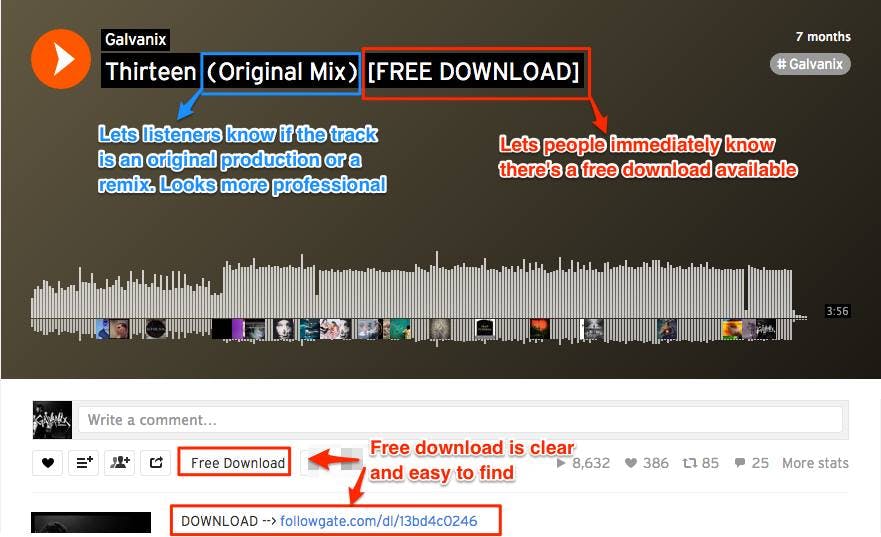



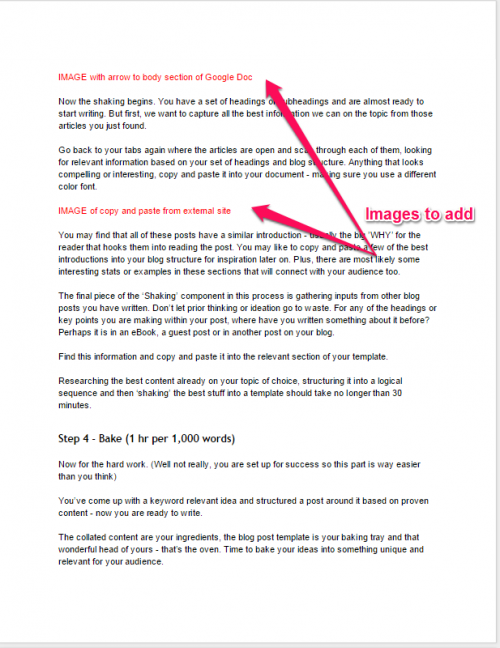


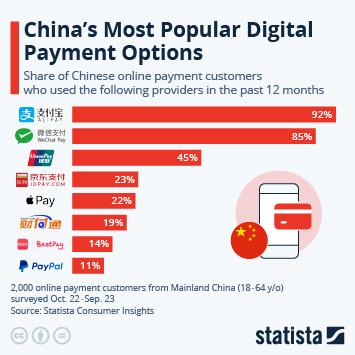









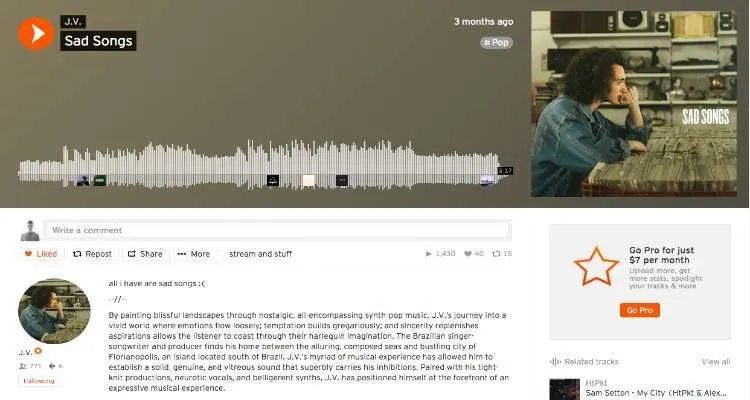



 Jimmy's Internet Marketing Business Blog