You can also customize these columns, So what I’m talking about is columns. You’ve got the campaign name, you got the results, So how many you know right here, you’re, looking at how many leads were in this weight loss challenge thing right here: how much it cost Pearlie? How Much was spent The frequency.
The frequency is basically how often it’s shown to your audience And I actually like to shoot from 1.5 over a seven-day time span. So we come over here and we do this. This hasn’t ran for a while. So it’s going to be hard, but since its lifetime – and this was over the course of months – If you know with a 1.6 – is totally fine. So if we come up here – and we do last 7 days If we’re looking at the frequency which, like I said this – is a demo account now – and I don’t really run ads on here – But I shoot for this in the last 7 days to be out 1.
5. Okay, So we got unique clicks. We’ve got all these different things that you can go through and see like delivery, It’s going to give you a little bit different information. Let’s just go back to lifetime, So we actually have some data in here. The reach like how many people wrought reached cost per thousand people reach. So you know that’s CPM, So it’s cost per milla, which milla and Latin means a thousand.
So it’s basically that’s where that’s where the the terminology came from by the way. So that’s where it’s saying like okay, how much it costs to reach thousand people, which is twenty bucks, So you’ve got all these different breakdowns. You know cross per device performance and clicks. Typically, what I use is either the performance which is the default, or Sometimes I do performance and clicks or if I’m running a article ad, I like to do the article engagement cuz.
It shows you okay, how much it costs per three second view. Ten second view and So on, or you got like the twenty five percent article read: 50 percent 75. These are article ad campaigns, So obviously that’s why it’s not showing up any data there. Okay, Now another thing you can do is customize the columns. Now this one is really big, and This is something that you want to go through and do when you’re setting up your own custom conversions custom audiences, all that, so what we’re going to do is took forever to pop up.
But like let’s jump over here and Let’s just go into custom conversions, Okay, so we want to initially set up some custom. Conversions, Like let’s say, we’ll, set up a custom conversion for leads generated, Okay or appointment, set and then also a custom conversion for sales that actually go through. Ok. So once this pulls up here in a second we’ll go through and we’ll make sure that those custom conversions are set and then I’ll show you how to go through and customize the calls, because then it’s really nice, because what happens is And let’s go over here To the demo account Just so we’re not messing anything up, So what happens? Is you go through and you can see how much you spent per day? Okay, what your daily budget is, how much you’ve spent in total.
How many leads were generated, your cost per lead. Your cost per sale, how many sales were made And You just get a whole bunch of data here? Okay, so if we come on here and Let’s create a custom conversion, So let’s say that this is our our lead page that were generate leads from Okay. So this is kind of like a little Facebook Ads mini course. I’ve got right here, So any one that hits this URL right here.
That means they have become a lead in our system right. So this is very basic. Hey I’m sending you that the email, whatever so they’ve opted in already So now I’m going to go over here and create a custom conversion for anyone. That’s coming through there, I’m going to say they have now become a lead. So we’ll just say, Facebook Ads, Mini-course and then we’ll say, lead Okay. So now we can come down here and we’ll say they are a lead and that you can give them a value once it Comes to the purchase once we set that up here in a second Well actually give that a value for this one.
You know you maybe have an idea of what the the lead value is to you, but for me I just kind of leave that blank for the leads, because I haven’t actually made money right out of the gate. So now we’ve got that Facebook as mini-course the lead for this custom conversion right here. Okay, so you can see no activity yet all good. If we just come here, we refresh that page and Then we come back over here and fresh this.
It should show that it is active Okay, so you can see it’s active right now And make sure you guys keep your face with pixels on all these pages, We’ve already kind of covered that so that’s why We haven’t gone in and put the pixel on. So we don’t need to get those details in this article, So we’ve got the Facebook as mini course that lead will be going to be able to have in one of those columns over here.
So we’ll have like the the daily budget, the lead costs or the the leads that are generated. How many leads the lead cost amount spent Cost per sale, how many sales, how much money’s made all that stuff in here? Okay, so if we come back over here now, this is our so we had our Facebook Ads mini course. This is our Facebook Ads actual full-on course. So it’s a thousand dollar value. So if we pull this up right here, if somebody’s clicked right here or if they’ve hit this URL, that means they have become a buyer Right.
So now we’re going to come over here to custom conversions, create a custom conversion and we’ll say any one that hits this URL Right there We’ll say: six-figure ads Fire. So this point they are a purchase, and this is a 997 dollar value. I don’t know why. It does this guys, It’s pretty weird, why you just put the 997 0-0, but it shows you like the dollar amount down here, It’s kind of weird, But anyway, whatever so we hit create, we go through.
We had done Good stuff, okay, So now, if you want to go through and get the eat this active and all that stuff, you just refresh both pages, But you guys kind of get how that all works right. So we’re going to come back here and let’s refresh this page Just because we just created two new custom conversions. So we want to make sure that Facebook is pulling those new custom, conversions that we just created Because as we’re going to go through and customize, these columns we’ll want to make sure that it’s doing that.
So now. What we’ll do is come over here to the columns we’ll go down to customize columns, and This will pull up a little modal here in a second, My computer’s going a little bit slow right here And then we can go through and we can detail out what We want the columns to be Okay, So, like the campaign name, I like that. I don’t really care about Aires Delivery. No, no! No! So I just kind of like go through, and these are all based off of more of The article views.
So we can just start from scratch right here, Okay, So what I like to do is I kind of like to set it up where you got the campaign name: Okay And then the number of Lisa were generated, the cost per lead and then typically like the The number of sales Costs per sale, how much money I’m making from there And then how much what the daily budget is and how much was spent okay. So now, what we’re going to do is we’re going to go, find all of those different things that we want to have included.
Okay, So, for example, Conversions. These are. These are like the custom comers We just set up. So if we want to come down here and Find those custom conversions that we have set up – Okay – so you can see right here – this is the six-figure ads mini-course. This is the lead right there right. Then We’ve got the 60 rads buyer, which I’m just giving them out here and then we’re in a little bit later we’re going to go through and Make sure that we’ve got them in the right order that we want them in Okay.
So you can see I’ve kind of gone through and I’ve like been finding all these you’ve got the so like down here in the Conversions area. This is where you’re going to find them all. Okay, so cost per action right here You just go through and you kind of takes a second to get in the right category. You see website custom conversions, So we’ve got the we’ve got the six of your ads Facebook, Facebook as many course the leads and we’ve got the cost per website conversion.
So that will show this one up here will show the number of conversions So like this five ten fifteen. However many this will show us how much it costs us to get that conversion. Okay, how much we had to spend before getting that so cost per six for your ads? Buyer cost per Facebook – guys mini course lead and Then another thing that I like to do is see. So I’ve got the the campaign name. The Facebook guys mini course leads.
So like how many leads were generated, the costs of the lead? Okay, our budget, Okay, like how much like how are we spending like per day? Okay, six for your ads buyers? How many buyers have we had the cost per? Sixth, you guys, buyer. This is the six-year ads by our conversion value case. That means that, like we put in that value 997, so if it shows right here, we’ve had five buyers and then 997 value.
That would be five times the 997. Then we can see like our cost per Purge sale right there. So let’s say is the cost of this $ 300 right here and to get a 997 dollar sale, Then we’re in the money and we’re good and then right here. I also like to add a Search here: amount spent Okay, so I can kind of get a whole thing right there. So if we just hit apply it’s going to go through and apply that right there.
Now We just come over here and we say we can save this Okay. So I like to save this, and now I will say Six-figure ads And then we’ll just say like the 997 course and then we’ll just hit save right there And you can see. We’ve got okay, So this one right here and this Obviously that’s not showing any data, because one we haven’t, ran the ads and two. These campaigns are not set up for that, But you would see how many leads you generated So how many leads from this Campaign? Right here, okay, so like we were running running our our Facebook Ads to this landing page right here.
How many leads we were actually getting and then how much it cost per lead break that down our budget and then how many buyers so like if we come over here to If we’re after that, after that lead page, oh click funnels, It’s got an air or Something like that right now, So so then, once they go through and if that next sales page we’re sending to how many people are buying from there, It’ll listen number so it’d be like let’s say: we’ve got 100 leads right here and we’ve got one or two Buyers right there It’ll show the cost So based on how much it costs to get the leads, how much it cost Like.
Let’s say it’s maybe $ 300 and then, if there’s one right here, it’ll show 997 right there, because for every six figure ads buyer, it’s a nine or $ 97 value to us, Okay, so five, maybe five times 997 and so on. And then we would see the amount spent, so at this point we can kind of see how profitable and how bad all of our ads are over campaigns. We can see how many leads are We’re getting the cost per lead, which we dive in here.
We can kind of see like which ad sets are performing better than others. Maybe some are performing extremely Well. Maybe some are not performing that well and then we could even click in here and take a look at the ads. How each ad is performing on the Leafs side of things, cost per lead as far as sales go, Because it’s interesting, Sometimes you’ll see ads that are getting great cost per lead, but the cost per sale Actually is not that great, because the ad is not setting That person up To be the mindset of a buy right, So so that’s something you got to go through and kind of take a look at the go and use the customize columns in here Go break break it down like this.
I like this is the format I like to use. You might find your own format that you like, But I kind of like to just take a look at the leads cost per lead. How many sales have gone from it cost per sale? How much does it cost to get a thousand dollar sale, Viscosity, eight $ 900. You get a thousand dollar sale, yeah you’re, still like breakeven slash, making a little bit of money, but it’s not that great and then from that.
How much are you actually making and then I like to see total amounts spent so like? If we’re you know getting Ten sales right here and that’s getting nine thousand nine hundred ninety seven dollars from this right here then? How much did we spend to actually make that ten thousand dollars right there So, anyway, guys go away? Take a look at the the Facebook columns right here Kind of take a look.
You guys can check out my format that I’ve got right here set up your own format, But I, like kind of looking at these core basic things. These are. These are my kind of like KPI, So like the key performance indicators that I like to go through and look at and know all about when I’m running my ads and so Anyway, guys, if you guys do, have questions on this, go ahead post those in the Facebook group And we’re here to help you guys So with that said, I will see you in the next article
Looking for a company that will have your back? Check out the video below:
We went over how to create your first successful ad we going over audiences targeting we went over reporting, optimization and you know what to do.
After you know the numbers – and this is the last article – so if you guys have not readed any of those articles, I highly recommend that you go back and read those, but for today’s article I’m going to show you real, quick how to pause, cancel and delete Any of the ads that you have running okay, so we are in our Facebook Ads manager. I created a kind of a dummy ad here, so the first way is super easy.
If you have one add in one ad set in one campaign, then you can easily shut off all of your ads in that campaign by just clicking on this toggle here. So this is actually off right now you can see it’s inactive. If you toggle this over, this would make it active and it’s it’s actually. It didn’t even go live, so it’s in review. If it was active at one time, it would just say active, but this campaign has only one ad set and one ad right.
If you have multiple ads in that campaign, so say you had in this campaign. If you click on this check, box, it’ll have all of the ads in it. If you go to this right, so I only have one ad here, but if you have you know five ads in one ad set and one campaign, then it’s going to shut off all of those ads. If you do it from this campaigns. Tab right! If you want to go – and you have multiple ads in that campaign, then you can go here to the ad level and shut off the ad the ad level.
I highly recommend that you do the app instead of shutting off one full campaign. That’s the easiest way to do that right, so that is the easiest way to pause or cancel an act. If you want to cancel an ad set so say if your split-testing and you have multiple multiple ad sets ad set would be who you’re targeting it could be your budget and then, within that ad set, you might have multiple ads right, we’re just going to duplicate This so I can show you real, quick yeah, so this is what, though, that would kind of look like, so I have multiple ad sets and then each of these ad set has an ad right like unclick.
These I go to this. I have multiple hats because I have multiple ad sets right. So if I’m testing one handset against another asset, say your split testing, an image right, so your copies the same your headlines, the same, the landing page is the same. The only thing that is different is the image. You have two different images and you can see the results. We don’t over that in the last article, one ad is doing really really well.
The other ad is not. You want to cancel the ad. That is not doing well, and you know that you have one ad set and one ad all you need to do is go to that ad set and just toggle off here right and then, if you go to your ad, then you know, excuse me, love you, Unselect this you, then you know that these ads are off it’s confusing, because if you go here, you’ll see ok, these are on, but really one of these is off right.
So if you check this box and then go to your ad, you know that this campaign is off. So what I would do is I’ll just go and turn it off so that you know you’re not confused by any of the numbers. If you just click on because the problem is, if you click on this campaign – and you click on this – and you go straight to your ad, then it would show both of these as being on that, you don’t know really, which one is going right in this Case we now know, because this is toggled on this – is toggled off.
I would always recommend just going and clicking all of these, so that you know which is which is going on here right, so that’s kind of what you should do if you want to pause or cancel the ads that you have running now. If you want to delete and add what I recommend doing and how I teach creating Facebook ads is doing one hat per one ad set and I would just go and delete the ad set and that will in turn, delete the the ad itself.
So if you go here to the ad set that you want to cancel or delete you just click on this checkbox and then go and delete this and say yes, I want to delete that. You have to be really sure that you’re deleting that, because you can’t get that back right and then we deleted the ad as well. So if your, if you follow how I teach one AD per one ad set, then you can just delete the ad set that you don’t want running, really, there’s no reason to delete the ads unless you broke a lot of rules and violations of Facebook, and you Kind of want that expunged from your Facebook account.
That would be the only reason I can see the leading an ad would be beneficial. Otherwise you really just want to kind of keep that ad there so that you have the numbers and that you know. Okay, this split test. This is what one I really don’t want this. This picture really didn’t work, so I want that to be in there. So I know if I ever forget, I can come in here and say: okay, that picture didn’t really work.
I don’t want to use that one ever again right so guys. That is how you pause, cancel delete any of the ads that you have running. As I mentioned earlier, if you haven’t readed previous articles, go read those if you like this article, give it a thumbs up, make sure that you subscribe to the blog, because I come out with a new article, every single day, 1 p.M. Central, alright guys. So if you guys, like this article again, give it a thumbs up, and I look forward to seeing you guys in the next article you
Looking for a company that will have your back? Check out the video below:
Facebook retargeting ads for your business right now, real quick before dive in and I’ll show you exactly how to set that up. I just want to show you guys how powerful this is so, instead of going through and showing your Facebook ads to a Completely cold audience that has no idea who you are that never heard of you We can go through and with this retargeting pixel, We can Show our ads specifically to people who have already visited our website, We’ll already are with our leads, or people have already engaged with your Facebook page that we’re readed a article on your Facebook page.
So the cool thing about this is this person’s already warmed up. They already know a little bit about who you are, and so the credibility authority the’trust all that stuff is a Lot higher with these people, and so the results you’re able to get are Dramatically higher than or matically better, as opposed to go through and just market. It to a cold audience, So I just want to show you guys right here.
This is inside my main ads account. You guys can see these are the purchases okay. So, every time you see a purchase happening right here That is worth a thousand dollar purchase of $ 1,000 ticket Item that comes into our business. Now, if you look right here on the cost per purchase, look For this one right here where it’s 12, it’s cost! 92 dollars and 95 cents to get a Thousand dollar purchase so overall the amount spent was a one thousand one hundred fifteen dollars to make it twelve thousand dollars in revenue.
Okay. So now, typically, if I’m going through marketing to a cold market cold audience, It cost me about probably three to four hundred dollars depending kind of on the ads and everything To go through and generate that that thousand dollar sale. Now, if you look at overall, we have Twenty-nine purchases right here, so twenty nine thousand dollars, basically thirty thousand dollars and it costs just forty five hundred Dollars.
Okay, so that’s like a 7ex ROI right there, so super huge. So you can see ninety-two dollars right here. This one obviously didn’t perform as well about three hundred eighty one dollars for a thousand dollar sale, this 191 247. Ninety four, eighty six, then you scroll down here 56 dollars, eighty four dollars and eighty 9 166. So you can see all these different one so $ 89. So I spent a total of three hundred fifty-six dollars to make four thousand dollars back out.
Okay, So I just want to really quick show you guys all that stuff, because that is the power of The Facebook retarding pixel is said these Facebook retargeting ads and really quick, If you guys, are kind of getting started, you’re brand new with Facebook Ads. If you drop a comment down below and thumbs up on This article, I will share with you my Facebook Ads mini course. That’s going to Walk you through step by step, how to get started with the Facebook Ads manager how to set up your Facebook pixels, your retarding pixels, all those different things, And I break it down step by step for you guys how to some of your campaigns.
Do the targeting so all I got to do is just drop a comment down below give a thumbs up on this article, and also, I would really appreciate it if you guys subscribe the blog, because we launched a new article several several times a week on how To generate more leads, make more money and grow your business so anyway, guys now that we got that all out of the way, and You guys see how powerful This is, let’s go through and show you how to set up this Facebook retargeting pixel.
So you can actually start using this and implement it into your business. So if we come over here, This is a just. A demos ads account I’ll just exit out this one. I’m just going to refresh this make sure that I’m still logged into the right account. Okay, so right here guys, This is my demo ads account and what we’re going to Do is we’re going to come up here to the search bar and we’re going to type in pixels.
Okay. Now, if you guys have never set up your Facebook pixel before no worries Kay, What’s going to happen, He’s going to have, I think it’s a green button right here and it’s going to say, create Facebook pixel. It’s going to Just take you through a step-by-step Process. Right here on Facebook to be able to go through and create that Facebook pixel Okay, so now you can see this is a demo account, but I use it for all my demo stuff.
So yes, It is like firing so like what firing means means that any time so like let’s say, We’ve got this pic this pixel, which real quick. Let me just hit that really quick. What is a pixel right? So basically, it’s a little piece of code that you’ll go through and you’ll put on your website And I’ll show you guys how to do that here in just a second as well And you’ll. Put that on your website and anytime, someone pulls up your website.
It basically is this little of code that communicates back and forth with Facebook, letting it Facebook know who visited your website. Okay, so it’s pretty cool And then you can go through and that person becomes a part of a custom audience that you can go through and set up these Retargeting ads and go show your ads specifically to these people. So you can see a hundred and sixty-three people have visited the websites that I have this demo pixel this demo stuff on that I can go through and create an ad targeting these 163 people, okay, so pretty cool.
But what we’re going to do is going to kill it. Click on default, pixel right here and guys Facebook’s changing their their Facebook as manager, the way it looks and all that stuff all the time, But this is the most recent. This is where an April now of 2018, so I just want to share with you guys the most recent most up-to-date everything of how it all looks. So you can see all the stats right here of how many times like per day, that it’s it’s firing That someone’s visiting your website.
But what we want to do to go through and Set up this Facebook, retargeting pixel and using it on our actual website. And I’m going to show you guys how to do it on our celeb. Catchy are lead generation software here that we’ve got now I’ll, also show you guys how to do on click funnels, because that’s another one, that’s widely used by a lot of people just to make it simple and Honestly it’s the same thing if you’re using WordPress, Shopify Winx, whatever it’s the same process and format, I’m just want to show you guys, really quick, Okay, so we’re going to do is we’re going to click on setup over here, and We should get these options right here.
Use an integration or tag manager manually install the code yourself or email instructions to a developer. Now, You’re, probably like me, okay and you’re, probably not tech, know Technologically inclined you’re not very advanced with all that stuff which I’m not either guys. So you might think, like. Oh I’m going to email choices to a developer. Well, you might not have a developer. Okay and honestly, the nice thing is Manually installing the code yourself is very easy.
Okay, all it is, is copy and paste like you, don’t even have to know what the code is, what it means, what it does You just copy and paste and that’s what I do and so that’s what you can Do as well, so we’re just going to Click on manually install the code yourself And then we’re just going to skip over section number one and the number two look at this guys Copy: the entire pics code and paste it in the website.
Header. Okay, now I know about you guys, but I’m not very technologically advanced, but I can copy and paste pretty easily I’m pretty good that right. So I’m just going to come down here as you hover over. Let’s see how it says: copy code to clipboard, you just click on this and guys all this stuff. All this nonsense. I Have no idea what it means and you probably have no idea what it means either.
All I know is that if I copy this – And I paste it onto my website – I know that it works and that it communicates back and forth with Facebook, Okay, so that is all you really need to do so I just click on this copy. The clipboard now First show you guys how to do it inside of Arsenal and then I’ll show you guys how to do inside of Clickfunnels here, really quick. So what we’re going to do is going to come in here to the website builder We’re going to click on edit, Okay, and if we come back here, it says Paste the pixel code at the bottom of the header section just above the head tag.
Okay, now, if you’re, using WordPress, Wix Shopify clickfunnels Arsenal, whatever you’re using Pretty much you’re going to have It’s going to have a little custom box where you can just paste it into the head tag: okay, this head area. So what we’re going to Do is come back over here And if we just go over here to this page level, we can go down to Advanced and see this little box says header tracking code.
This is exactly what it’s talking about. Okay, so all we do is just paste it right there And then, if we want to do it on the Thank You page, We let’s click on that. We’ll click page Paste it right here on the header tracking code, We’ll hit, publish and it says, website, saved and publish, and that’s it guys You are done now every single time. Somebody visited visits this landing page that you’ve created inside the Arsenal, software Facebook’s going to know they’re going to go through and track it inside of their system And you’re all set ready to go now.
The same thing goes for click funnels over here. So if we come over here, Let’s just pick a random funnel, So we’re going to come in here and sorry. My Internet’s a little bit slow right now. So, let’s come down to. Let’s say this testimonials one: Okay! Well, I want to go through. I want to track everyone that visits this testimonial page and you can go through There’s two ways to do it. You can go through and do it page individually Or you can just do it once and it’ll apply to every single page in this funnel.
So I’m just going to come up here to settings Okay And then inside the settings it’s going to have a spot where you can see the header tracking code. Now I’ve already got my main Facebook pixel for my main website in here. So you can see this right here. I already copied and pasted that. So if we want to do this new one, We just paste it in there and you are set you Just come down and hit I’m just going to actually take that off, because I’ve already got the pixel code in there.
Then all you got to do is sit, save and update settings, and You are good You’re done. You’re set you’re ready to go now. One thing that you can do is this: Facebook Pixel helper, if you guys, are using Google Chrome, which I highly recommend using google chrome Just in general, using Facebook as manager using everything, but they have this little pixel And I’ll. Show you guys right here. So Facebook pixel helper – This is a chrome plug-in where you go say, add to Chrome.
You can see right here. It’s grayed out right now! That’s because the Facebook pixel is not on this page right here now, if you pull up, Let’s say one of my websites right here, You’ll be able to see right here. It says highlighted It says two or one, it could say one or two. That means that the Facebook pixel is Successfully installed, so this Facebook pixel helper. This is a hundred percent, free chrome plug-in, You can say, add to Chrome, okay, And then you can use that to test and see if it’s working on your website on your landing pages, on your blog on Whatever site you’re going through and using okay.
So now that we’ve got this installed, what we want to do is come back over here to the Facebook Ads manager And we want to create an audience so we’re just going to click on audience. Okay, so audiences right here and we’re going to recruit through and create an audience custom to people. We have already visited our website. Okay, so this is pretty cool. So read this: we’re going to come over here to create audience, Will click custom, audience right here and then we’ll say hey We could do a customer file.
That means we could. If we have a list of leads, we can upload that information into Facebook, But what we want to do to take advantage of the Facebook retarding pixel is to go through and click on website traffic right here And then we could say hey. I want all website visitors. That means anyone wherever my pixels at Anyone. That’s that hits any page on my website in the past 30 days And I think you can go to Mac’s 180-day see that right there.
So you can go up to 180 days if we want to collect every one or you could say hey. I only want people who visit specific pages. Okay, So you can go through and do like your blog right here put in the URL to your blog. So, let’s just say I’ll just show you guys really quick right here, So our Arsenal mkg our blog. If we click on this – and we say – ok, hey, I only want people. Where are we back here? So I only want people that have visited Something one of the pages on this URL, so on our blog right, so you go through it.
You can say, or this landing page or that landing page or this is specific, blog post and You can go through and create these custom audiences or for this example, We’ll just say all website Bet visitors and we’ll say demo all Website visitors to give it a Name and also you can go through and include more in case you can dive in deeper, say: hey anyways visit, all my Website pages or or you could say, hey anyone, who’s visit this specific web page Or you can even go through and say how much time They’ve spent on your website, which is pretty cool, Looks like if you go through and create a blog post, and if you want to know like you know, did they read it or Not? You can say: hey someone who spent at least 30 seconds on my blog post on my website And see if they’re really searching around and no and so they’re, not just like clicking on or clicking off or you can say, hey I want everyone.
That’s visited my website, but I want to exclude Anyone who has visited this specific website or this specific page okay. So if there’s like a page where it’s like, I don’t want, I don’t want these people to be included in this audience. You can go through and do that as well and then once we go through and create the audience name, We can create that audience and then what’s going to happen, is it’s going to drop down So we’re going to say done for right now You see demo All website visitors, Okay, so it says populated right now and guys this is going to it take.
Sometimes a couple hours could take as much as Four hours to go through and populate it, But that doesn’t mean that you can go through. That doesn’t mean that you can’t go through and start creating your Facebook ad campaign Targeting these people specifically now, Let me just go through. I wasn’t going to do this, But I’ll just show you guys how to go through and target that that specific community with these Facebook retargeting ads So let’s go through and click click create And then we’ll say, for this example just say: traffic and guys.
I cover in that Facebook guys mini course. I mentioned that I’ll. Give you guys, if you’d, give a thumbs up on this article and drop a comment below I cover all these different marketing objectives and when you want to use each one And how to go through and use them and all that in detail. So for this one We’re just going to say, traffic demo campaign Continue and then now what we can do is we can actually choose that specific Facebook audience right here We come down to custom audiences click right there and then it will pop up.
We have our look like audiences, Which I cover that all in that Facebook, as mini course as well guys to drop a comment below give a thumbs up in this Video, we’ll just come over here to custom audience. You can see right here demo all website, visitors, okay, so You can see it says less than 20 people, but that’s just because it’s still populating Okay, so you don’t have to worry about that. We can just click on this and as it populates Facebook will automatically update that.
So you don’t have to go through and worry about it, and Because this is a custom audience, We don’t have to worry about. You know targeting the United States or age or men or women or language or anything else right here. We just target this specific audience And then we go through and we can choose where we want to place the ad Our budget, that we want to spend each day and typically on retargeting ads, we can spend a lot less money.
We can spend as much as like five dollars Or one two five dollars and go through and hit that specific audience, and I was just on It’s been a few weeks now. Actually, but I was on a call with our Facebook Ads rep And it was really cool because they were saying that for if you’re, if you’ve got a custom audience and your retargeting that audience That Facebook will actually show your ad before any other advertisers.
Because you basically own that data Okay, because it you’ve shown that hey this person’s already interacted with my brand. So it’s going to show your ad first and your ads are going to be a lot cheaper. So it’s pretty cool, And so you can actually spend a lot less money on the daily. You can say maybe five bucks, or even a dollar, depending on the audience size, Hit, continue and go through finish up, creating that ad and, as I mentioned guys, all the ad creation, all that stuff I have inside of that Facebook Ads mini course.
I want to give to you guys, if you just give it a thumbs up and you go drop and comment down below so Anyway, guys, hopefully, that’s helpful with the whole Facebook retargeting pixel setting with your Facebook retargeting ads, getting all that put together. If you guys, like this and you’re brand new to the blog, my name is Jason Wardrop, I launched new articles every single week. Helping you generate more leads, make more money and grow your business.
So Hopefully you guys like this. If you guys want that Facebook guys mini-course, give it a thumbs up drop a comment below, And I will see you guys all tomorrow.
Looking for a company that will have your back? Check out the video below:
I think we’re all scratching our heads about how these internet people make money online. Now, there’s someone who’s, maybe aspiring to do the same thing. This article is for you, I’m going to show you how to make almost $ 300 a day just from tik-tok, and you don’t need any starting capital. You don’t eat any investment.
You just got ta make content for 15 seconds. If you want to know how creators are able to make money on it, tick tock, all I got ta do – is keep on reading all right guys. First of all, what’s that my name is Jade and welcome to my blog. I have to make a huge disclaimer because I feel really bad. If I don’t say this, so if you’re new here I’m an 18 year old entrepreneur – and I have businesses all about social media and the one thing I’ve learned is if your goal is just to make money and that’s your focus, you’ll never be able to achieve That goal by focusing on it, which means don’t focus on the $ 300 a day like I really could buy literally so many clothes from Urban Outfitters with $ 300.
It could literally pay off rent any month right. If you make $ 3 a day, you could literally get an iPhone 11 and just want to be, though yeah. I know it’s pretty lucrative and pretty exciting, but don’t just have the intention to make money. What I’ve learned is tik-tok is a social media. App that’s built on fans and followers. So if you ask people for money, they’re going to go away, but if you build a genuine relationship and Trust and you’ll have longevity to put out other revenue streams in the future.
So, if you’re looking for a quick rich scheme, I am NOT this article. I would click off and read someone else. Today’s article is actually going to be kind of boring, but I’ll just try to make sure it’s entertaining. I actually brought in a tick-tock expert, Selena killa she’s over 500k up on tick-tock and she hates calling me a tick-tock expert. Well we’re going to pick her brain on how creators are making money on this pot.
So one of the most important ways you guys can make money using tick-tock that we mentioned in this article is selling merch, so Selena. I were talking about opening up a website to sell products. Now, one of the most important things when building a brand is having a memorable domain. Oh, I actually really wanted a website called PBJ com. I was so mad when I realized that the domain name was taken or unavailable.
I actually got PBJ site instead for one of my businesses, I love it says it’s way more short and sleek and perfect for building a memorable brand, so whether you’re someone who’s wanting to start their new tic toc career or sell merch in the future. You can actually use the dot sight extensions for your next website next time. All I got ta do is go to get site or click the link in the description box.
Thank you dot size for sponsoring today’s article don’t get back in today’s article, alright guys. So I’m here with Selena killa, can I call you by that too. I’m here with Selena and Selena is primarily the tic-tock expert we talked to in the last article I wan na see if I can even take down the e boy King. How are you doing? I’m good well today we have a few questions for you, since I don’t know as much.
My first question for you now is: what are the ways people can make money on tick, tock and if so, do you think it’s actually sustainable to make a living? So you can make money through lives so for people who don’t know what our live streams on tick tock. So it’s just like you’re sitting there in your room or wherever you are, and it’s happening in real time and you’re talking to whoever you’re talking to your fans and they have a little button.
They can buy money, buy money, buy gifts which is their money, and it says it to you, and so you basically get gifts and those gifts translate to actual money that you can transfer into your PayPal account. Do they pay you out like every month, because it is like YouTube, Adsense or just a cash out, so you can do a cash out. You have to have 50 dollars, at least in your account to be able to cash out.
I think you can cash up up to $ 1,000 a day and that’s not Wow very cool, so live streams, one revenue stream. What else would you say brand deals for sure? I think brand deals now are coming more into like fruition, just because we were talking about the the sponsor post now, so you have to put hashtag sponsor because it’s more like a serious, concrete thing, because there’s so many people actually getting brand deals, and you don’t Want to like kind of muddle, the lines of actually like.
Is it a brand deal? Is it just something that you like or so, and I saw you recently do like an LED use in an LED like that? Okay, there’s like ways you can integrate. It creatively right, like you, don’t just like hold the product. Do you make on, I think that’s the great thing about tik-tok is that they want you to make articles to catch people’s eyes. They don’t just want you to be like. Oh, here’s a mug buy it because I mean feel like sometimes in YouTube.
You kind of have, like the whole article to kind of convince people to buy a product. You have only like a minute to 16 or 15 years really seconds to make. Someone want to buy it so for my LED lights they said I could post as many articles as I want as long as I tag them or like talk about the light, but I can do whatever I want to see the thing of the tik-tok. I thought it missus person for me as a user.
I, like a founder creator, a lot for example you, but because the algorithm is so like there’s so much content, they give you every single day you can get lost. So I saw that a lot of your followers on tik-tok, followed you an Instagram, so my question, for you is because tick tock might not be the platform to like just make money. Have you found that? Because you could real now pass, are you directing it on other traffic sources? Is that the same thing 1,000 %? Because I don’t think I would have gotten half the brand deals? I did if it weren’t for me connecting my Instagram to it.
A lot of companies reach me through Instagram, because my business email is on there, so they will email me through that or they’ll DM me or anything like that, but usually on tik-tok. Since you have to follow the person they actually message them. You both have to follow each other to have to be able to message, so you fans can’t just randomly message. You like, like Instagram, where you can have like your DMS, that you can’t keep.
They won’t see if you see if that makes sense. So yeah that’s pretty much it yeah. Now I have like 20,000 people, almost, I think, 20,000 on my Instagram, which I did not think wasn’t going to happen. So I guess it leads me to my my third question, which is your own product cuz on YouTube and Instagram. I’ve seen that that’s up their revenue stream is that the same, have you seen tick tock words create merch or their own product.
Before I know a couple of people that create to march through websites or they’re trying to create their own brands or they collaborate and make music for people or they make actual plush toys stickers, anything that you can think of they’re making some people are really creative. They make their entire design or some people just plaster. There use your name on it and what you qualify, but yeah. It’s happening and there’s people that worry that will reach out to you and say I will make your merch for you, because I’ve gotten that plenty of times that I’m not ready yeah.
I don’t want to be one of those people that just plaster something or shirt and then just say: okay, give me money knowing those three revenue streams, the donations, brand deals and then product. Have you seen anyone or maybe personal stories like? Can you make a living off of it? Like is tik-tok enough to make me, do it full-time? What do you say? Yeah sure I think, because it’s opening a lot of doors for people.
I know that another way that people are getting money is actually companies that produce music or have rappers they’ll say: please use this song, make it a trend, we’ll give you $ 300 a post. Well, so it’s not only just merch or anything like that. It’s companies that are trying to utilize these people because they obviously have an influence. That’s like really fast growing and it reaches people really quickly that they can make a trend with that song because there’s so many artists that blown up just from tik-tok.
So I think definitely you can make a living. I know a rapper, he blew up on tik-tok and he says he was barely getting his bills paid and now all of a sudden he’s getting Brandi rose and aside to a record label, let’s just break it down. Like I think you get this advice, I don’t do it for the money, but for people who want to see the potential what’s possible, I’m going to ask. Maybe this is too personal, but like what’s the most, you know that someone has made – let’s say I’d like a one: single live stream, a couple thousand dollars, because there a lot of people, use these tactics to enforce people to pay money.
So they said okay drama. Queen is like the about most. You can pay right. It’s like fifty dollars. Basically, even though tick-tock takes some of that money because they need to make money somehow so they say: okay, I’m wearing this sweatshirt. If you donate three drama queens you’ll get more numbers in a raffle to get this sweatshirt, so they give an incentive yeah, they give an incentive. That’s nice! Fine! I personally don’t do that because I feel like it was a connection to my fans because I have a lot of you know younger fans.
I have a lot of fans from different places and they can’t afford to give me money, but I don’t want to like ostracize them for not giving me donations, because people will ignore you. If you don’t give donations, sometimes I’ve seen tick talkers. That would be like where’s. The donations give me money and those people that doesn’t work well in the long run yeah, because I feel like to me that’s why.
I’m like I make a decent amount of money from tick tock, but I think I don’t make as much as other people because if I did like oh, if you guys give me a drama queen I’ll, add you to my private snapchat. I don’t do that, but I know in the long run I’m going to have fans that actually stick with me because I treated them well right and I think I mean wrong, but like do you feel like brand deals and although donations are great revenue streams there.
It’s less long-term and maybe creating a product will have longevity, because the customer is getting value and it’s a national business where you’re able to scale it. Do you think the direction, maybe your personal going into, is creating your own product for longevity mom wait! It’s like. I told her I mean like doing an interview. Thing is she’s, just like okay, it is definitely not long-term, but I think that this is a running point for people, because I just got a huge brand deal that I can’t talk about, but there’s issues with that.
Already so it’s like crazy stuffs happening yeah, I’m getting brand deals that are like starting to step up, bigger and bigger and bigger and bigger, which is great. But I also want to create my own brand, like not just me but my own clothing brand in general, but I know I want, but I won’t be able to get there unless I have my fans to support me so right now, I’m just kind of focusing On I’m going to get as many fans as I want – that’s not true, but it’s like grow, my audience stay connected with them and then they’re going to support me in a long run, because everyone wants me to do merch, I’m not ready for merch.
I know they’ll be waiting for I’m just waiting for a decent team, because the only thing I’m very I don’t want to release something. That’s subpar to come back to this full circle. The laughs there’s been talk about at the mindset because I don’t think you’d ov into that much yet a lot of people see the potential of tik-tok and they want to do because of the money and I’m not even talking about tech.
Talk I’ll talk about YouTube. Instagram they want to do it because of fame and fortune. How do you keep a mind Suzy? I mean quickly from wrong, but I feel like maybe stumble onto this like this was a more genuine passion for you and then you found ways to monetize. Is that what you recommend for everyone like just to create something they like first or like, because so many people like how what advice would you give to someone who wants to do it? I got that question a lot asking like how.
How can I get famous? What do I do, and my answer is always like there’s. This is an app you’re supposed to have fun on create genuine original content that you, like. You can follow. Trends do things like that, but once you start getting analytical and being upset about numbers and being upset that nobody’s viewing your stuff, it’s pointless. People didn’t see my stuff for, though, for a while, and then I had one article about Japan that she blew out and I could have just stopped there, but I kept going because I enjoyed what I do it shouldn’t be about fame.
That’s my point because I didn’t do this for fame. I just got really lucky and I don’t think I’m famous, I just think I’m popular. So, thank you so much for coming on to my blog and I hope you enjoyed it, make sure you give this article a like and subscribe and shout out to the comet winner. If you want to be the next comment, winner comment below I’ll catch, you guys in the next one
Meet the guys behind one of the top-rated pumpkin seed snacks on Amazon.com!
If you’ve been subscribed to the blog, then you’ll know you’ve probably seen it before. In fact, every Thursday I put out a poll asking you guys, then what kind of content you want me to cover that weekend come in so this Thursday, then I did exactly that I’ll put screenshot up here and, as you can see, then the clear winner was Facebook Ads testing.
So that’s exactly what today’s article is going to be about tomorrow, then Sunday will be on the second place winner, which was Facebook as scaling. So if you want to see that article then make sure you hit that subscribe button, and that means something guys, that’s a topic. Thank you for tuning in. I hope you enjoyed the article and let’s get straight into it. What is going on, then guys welcome to my ad manager account.
So the way I’m going to structure this article, then, is I’m going to start off firstly going through why this strategy actually works. I’ve got a Google document that we’re going to go and actually work through kind of. Why the reason in why we have to do things this particular way and why this particular strategy works and then afterwards, muchly going to go through on my ad manager, account and actually create this testing strategy.
So you can see exactly how to set up yourself now. I’m fully aware that some of you won’t care about why this thing works, even though I thoroughly or strongly recommend them that you do read this first bit. I will pause time stamp up here somewhere in the middle of the screen, for those of you that just want to skip ahead straight to the actual creation of this strategy. So that means said then, let’s get straight into it.
So Facebook Ads testing strategy new for 2019, so number one then before we get into this strategy itself, two things you need to consider. First number one: Facebook Ads optimize on the answer level. We’ve got proof of both these points as well, and then number two facebook recommends a minimum of 50 conversions per week for ad optimization and that is on the ad set level. So if you’ve got 10 ad sets within your campaign and each ad set is get in, say, 5 conversions, even though you’re hitting those 50 conversions, not one single one of those ad sets is getting 50 conversions on its own.
Therefore, it’s not going to be delivering optimally and just to prove it to you guys, then I’ve got Facebook’s own business website up here and the first thing I want to show you, then, is this bit here, so this is also crucial to making sure you get In 50 of the conversion events you optimized, for so, if you’re choosing purchases, then these must happen within your conversion window. So this is going to be a crucial point to the testing strategy as well, and then the next point is well probably the main point as well is that keep in mind that we recommend getting about 50 optimization events within your conversion window per week.
So what that’s basically telling us is that if we don’t get those 50 conversions within a week there now ads aren’t going to be delivering optimally and they’re not going to perform consistently. And if I do show you this next page, then you can see the Facebook state setting themselves as well. So each ad set accumulates data, so an ad set, not a campaign, so ad sets optimized on an ad set level needs each.
So each ad set there needs about 50 of the conversions it’s optimized for swear, that’s view, content, Add to Cart or purchase for Facebook to be able to deliver it with stability and efficiency. Now, as it says there and me, it says, needs about 50, the more the better the more data Facebook has to go on the better it’s going to be able to perform. So just give you an example, then if you have 10 and sets that get 5 conversions each in a week, I said this earlier, then you have 50 conversions, but because they’re not all on that one ad set.
Then all of those ad sets essentially won’t be delivering optimally. So what you’ll be better off doing is combining those 10 ad sets or combining them that budget into one ad set to make sure that one particular ad sess gets 50 conversions and that’s exactly what this testing strategy encompasses then. So that being said, then just two things you need to consider while going through this, because it will make sense, then why I’ve chosen these particular criteria.
So to begin with what locations should you target? I always recommend the big for english-speaking one to the UK. Us, Canada and Australia. Now you want to separate this per ad set. The reason you don’t want to put them all into one ad set is purely a couple of reasons really number one. The overall audience size will just be way too big. Are we absolutely massive and we don’t want audiences that are too big to start with I’ll get more into that later and number two as well? If they’re in separate ad sets, then you can make sure that you dedicate an equal amount of budget to each country.
Therefore you can, you can give each country its own fair chance, and then you can make a better judgment. The results won’t be skewed. Basically, if each country will have had say ten pound each spent on it. So if one brings in say five purchases and the other brings in two, then you know straight away which one is performed better, whereas if you combine them all into one and set them, Facebook is only going to give the majority of the budget to the best Performing one, so it won’t necessarily give each country its own fighting chance, so you won’t get an accurate representation in a which countries are the most profitable number.
Two then agent ginger to lead so leave this as default, especially if you’re going into an each-way. Not quite sure who your ideal customers are going to be so target anywhere from eighteen to sixty five-plus and then include male and female, no interest expansion. So that’s the little check box I’ll highlight it once we go through the creation process. Next point test: one interest at a time. So what we’re going to do is we’re going to use we’re going to flex target, but we’re only going to go kind of one level deep.
So we’ll have our base interest and then we’re going to flex it with another interest and that’s how we’re going to structure this testing strategy so we’re only going to flex with one interest at a time if that makes sense. Hopefully it does any questions at all. Obviously, do leave a comment down below, but all will come clear then, when I actually go through the process of Korean is strategy within the ad manager.
The next so emplacement again one per and set of four equal budget testing. So the two we’re going to focus on then is the Facebook newsfeed and an Instagram moving on into a daily budget. This is where things get interesting. So what makes this testing strategy unique, then, is we’re going to be duplicating the actual ad not duplicating that ad set not duplicating the campaign duplicating the actual ad and we’re still going to base it on the whole five dollars per day? So it’s going to be five dollars or just four dollars on there to make it a bit more clear times the amount of ads that you want to run.
So I recommend at least three, which will total a daily budget of $ 15. Obviously, the more the better and I’m going to explain why, later on in the article, because well to basically the more the higher percentage of an audience we can test, then the better results and more accurate representation. We’re going to get all over. That audience is actually a successful one or not, and the pros then, of having a higher daily budget and actually do Paquette do cocaine on the ad level is the number one we have a higher budget than everyone else.
Everybody talks about the whole five dollars per day, so if everybody’s doing five dollars per day and we’re spending at least fifteen dollars per day, then at the end of the day Facebook is a bidding market. So if we’ve got a higher daily budget, then we should get in theory, better results and everyone else, because we’re showing to Facebook that we’re willing to spend a bit more money and we’ll also be out bidding everyone else.
And if the majority of people test and a five dollar daily budget and we’re using fifteen dollars, then we’re going to be able to outbid people and therefore we should get the pick of the bunch when it comes to the customers. Also, we get better ad optimization going back to that original point of Facebook ads optimizing on an ad set level. If we’re spending more money per day, there’s going to be more data coming in for that one particular ad set, and therefore it’s going to optimize better and deliver more efficiently.
Moving on to the next point, there’s a seven-day click or one day view the fact that we choose seven-day click means that anybody who clicks on our ad and then purchases within seven days, they’re going to contribute and count towards those 50 conversions, whereas if it was Only a one day click then they click on your ad, but then they buy two days later. They don’t get counted towards those 50 conversion.
So therefore it takes longer to actually optimize totally optimize. The ad set, because they’re not included in that 50 of that makes sense and then the final point is our bid strategy which we’re going to leave a lowest cost and the reason we do this, then, as it says in brackets, use target cost when scaling is Because we’re testing we want to know, we want to see what the actual lowest cost is that we can achieve purchases for this particular product, because then that’s going to give us a gauge of whether it’s actually worth scaling and then once we do move into scaling.
We use target cost because then that way we can take to Facebook. This is how much we want to pay roughly per purchase. So, as we scale up, then try and stick as close to that as possible. So that being said, then guys that’s a strategy. Hopefully, it all makes sense. So what I’m going to do now we’re just going to go back to my ad manager account and I was going to build one out in front of you, so you can see practically how this strategy actually works.
So, to start with, then I’m just going to go ahead and click create new ad set looks like I was halfway through. So let’s click continue. In fact, let’s go right back to the beginning, so objective wise. Then I always start with conversions. Now, to be honest with you as long as you’ve got a strong product and you put it in front of the right audience, then you can always start with conversions, because with conversions comes everything else and what I mean by that, then, is that for somebody to Make a purchase on your store: they have to become part of your traffic if they have to view content, they have to add the car they have to initiate checkout.
So as long as you’ve got a strong product put it in front of the right audience, then everything else will come along with it. If that makes sense, so moving on to the actual ad set level, then your pixel name will be in there. Obviously, now the reason mine is called that is because I’ve got a few different ones. I just name them to make sense to me relevant to the right stores, conversion event wise now.
The reason that’s like that as well is because I I have a store that sells multiple niches, so I has set up different custom conversions, hence why it’s called that. So as long as you’re only advertising one niche at a time then just use the standard purchase. Conversion event moving down then into the first section, which is locations now. What I’m going to show you is setting up just kind of one ad set one particular answer, but if you want to get a bit more advanced and create multiple ad sets at a time, then what you do is you scroll to the top? Let’s get rid of this annoying message as well, and then you can click create multiple new ad sets and what that allows you to do is pretty much self-explanatory.
Just create multiple new ad sets and you can split test everything and essentially set everything all up in one go, but I’m not going to go into too much detail in this article, because I have done a specific article on that topic. Actually so for this example of this article, then we’re going to leave it as UK aging gender stays as default, and then this is where we get into the actual tags. In section of our strategy – which is this section here so one interest at a time and no interest expansion, so what that means, then is make sure you unclick that.
Therefore that means that Facebook is only going to target people that are included in our detailed tags. In Section, so what we want to do, then, is make sure they were only tagged in one interest at a time, but we’re going to flex it by one level to make sure that we’re targeting the most focused section of our audiences as possible. So, just as an example for you guys, if we’re in the dog nation, I always use it as an example on this blog.
What we’re going to do is we’re just going to use dogs as like the base interest, but, as you can see, the potential Reach is still 15 million people, which is actually huge. We want to make this a lot smaller, purely because if we’ve got a new pixel in a new niche, then for us to go out and advertise in an audience – that’s 15 million people and spend in 20 pound per day. Then, as you can see, our daily reach is anywhere from 1 K to 8 K so to spend 20 pound.
I’m not sure what that works out percentage-wise. But it’s probably like point zero zero one percent of this overall audience, so the chances of actually finding people who are going to purchase our product within that potential reach size is very, very, very absolutely tiny, purely because our pixel is not matured. It’s not optimized. It doesn’t know who our purchases are, so essentially it’s going to go out and show our ads to random people until people start to take notice a bit and start to engage with it.
So, to begin with, we have to flex down to make this number even smaller. So what I recommend, then, by flex, is by flexing by at least one level. So if we click on our audience, we can put another dog interest in here then to essentially bring this potential reach down. So I’m just going to use dog Today magazine because it’s one of use quite a lot and select that and see what that does to our potential reach up brings our potential reaching down to 61 thousand people wish you’re more than happy with.
I recommend, if you’re testing one interest at a time, then try and get your audience below 300,000 people just because that’s small enough to adequately test or get an idea, then of whether your product is going to work or not. Now a lot of people will say: there’s not enough scale, not enough room there to scale it and you’d be 100 % right, but what you’re forgetting is that to begin with, our pixel is not going to be very well matured.
So we have to do this to build up the traffic, build up the purchases, that’s going to mature our pixel and then once our pixel was matured once it knows what and who our ideal customers are, then we can just get rid of dogs. Today. Go back to 15 million people and Facebook will know who our ideal customers are. So now we can go out and actually find those people within this audience of 15 million people where’s to begin with, it won’t be able to do that because it won’t know who our ideal customer is so essentially, then we have to do the tags in for Facebook ourselves to begin with, until we’ve matured our pixel any questions on any of this at all.
Then obviously, please do leave a comment down below, so I’m just going to fill this back in again. Dogs today magazine now. The recent magazines work so well is because, for anybody to be subscribed to a dog magazine, they’d have to be pretty crazy if they don’t own a dog. So it pretty much just tells you straight away that people within this audience owned dogs and therefore they’re, going to be interested in a dog product moving down then into placements, make sure you hit edit placements and then start off by just getting rid of all of Them and then just select the ones we want now.
The two we’re going to be focusing on then are the Facebook newsfeed and the Instagram newsfeed as well. But what you’ve got to remember is that we’re going to split test these in two different handsets now. The reason we don’t combine them, then, is because Facebook is going to optimize our budget into the one that it thinks is working the best. But, to begin with, what I recommend is devoting the same amount of budget for each one, so each one gets its own.
Fighting fair chance to produce the results basically and then once you know which one produces the results, then just focus primarily on that one, so this particular ad set. Then I’m setting up for the sake of this article, it’s just going to be in the Facebook newsfeed. All mobile devices – that’s fine, now daily budget. What I’m going to do is, as it said in the strategy, I recommend using at least three, so I’m going to put the daily budget, then 215 pounds we’re going to use conversions when you use SEM and a click or one day view and we’re going to Go for the lowest cost as well.
So that’s pretty much our ad setup moving on to the actual ad section of this campaign, so now this is finally loaded up. Then what the default screen you will see, then, is this one which is the create ad screen, but what I recommend doing then, is using an existing post. Then that way, every time you run ads to a particular post. All that engagement comments. Tags are all going to build up on one post and therefore, when that accumulates you’ll build up the social proof and the more social proof you have, then the more likely people are to engage with it as well and actually click on it too.
So choose your ad, then that’s not the topic of this article, so I’ve done plenty of articles on ad copies and everything so go out. Do your research on that, but once you’ve got your ad done all set up, so this is just an example. One then, for this article go ahead and just click confirm place your order and then once this confirms and takes you to the next screen once it. Finally loads, so now this is finally loaded, then, as you can see, we’re back in my ad manager account on the ads level.
This is the one that we just created and what we’re going to do now, then, is just you placate this we can court. We can leave it in the same campaign, we’ll leave it in the same actor and let’s create two copies: click duplicate and then once it’s finally loads just go ahead and click publish, because essentially we want to keep everything the same. All we’re doing is duplicating the ad, so we’re running three ads under one and set.
Essentially so, let’s close this down so as you can see, then what we’ve got now then is we’ve got three ads under one ad set level and what this is going to do then, is it’s just going to basically allow us to test an audience more adequately Than just using one ad for a number of reasons, number one we’re using a bigger budget. Therefore, we’ve got better bidding power against other people. Number two I’d sets are going to optimize better than just using five dollars per day and number.
Three, then, by using three different ads, especially this works really well as well for larger audiences. Purely because, if you’re going out with one ad, then obviously Facebook is going to choose a certain segment of your audience to show your ad to. And if that certain segment doesn’t react well to your ad, then you might leave that audience thinking the audience doesn’t work and it’s over the audience or your product, whereas if you’ve got three or five or even ten different ads, Facebook is going to go out and Show those ads to five two three five or ten different segments of that audience, and then you can see which ads are returning the results and then once you’ve done that once you’ve, let it run for a day or two.
You can close down the ones that aren’t performing very well, and then Facebook will start to put even more budget into the ones that are performing well. So that means that the guys, that is the whole testing strategy from start to finish, I would love it if you guys actually go out, implement this and come back and let me know what kind of results you’ve been getting. I’ve been using this a lot, especially when scaling ad sets, and it’s been working really well for for me, in fact, I haven’t done a with proof article for quite some time, so maybe, if you guys want to see it, of course, I tend to go on Whatever you guys recommend, if you guys want to see it, I can do another with proof article.
I actually show you one of those ad sets where implemented this strategy, so you guys can actually see the kind of results I’ve been getting, and that being said, then, hopefully that made sense. Hopefully you guys are still reading. If you are, then, hopefully you enjoyed the article, otherwise you wouldn’t be reading this far and if you did then please do leave a like. That’s all I ask, and that being said, any questions at all make sure you leave a comment down below.
I assume we’ve covered quite a lot, so there’s probably going to be tons and tons of questions, but I do get back to every single person so feel free to spam. As many as you want down below in the comment section and that being said, then I’m going to stop talking now. It’s nearly. It is just gone three o’clock in the morning, so that means something guys have a great weekend and I’ll see you all tomorrow.
For Facebook, Ads scaling,
Looking for a company that will have your back? Check out the video below:
My name is Cass. I run digital marketing campaigns in the e-commerce in the entertainment field, mostly and really stay in the service business. All over. My goal is to literally show people in each individual sector how to run ads, my speciality being that I am also music, present professional running a music management company. How artists actually run Facebook ads on the actual content when they turn promote it? If they got release albums single article whatever I will be going through the step by steps that I actually do my creation process, how actually, where I get my data from, why do I do this objective? What I do this, why do that? You listen and see everything.
There is nothing on YouTube at the moment. That’s a seek aid for artists. I thought you know why not let me offer some value and give somebody some give. Oh, you guys, should I say some insight onto how you do it right now on the screen, when my clients she’s an amazing R & B singer, I’m going to be using her account as a demo just to show you how the process would work when you Set yours up: if you don’t actually have a facebook business manager, I can’t if you use some boost the boost button order or the promote button on Instagram or Facebook.
Please guys stop its. This is the only way I advise anybody to do Facebook ads, because the reason why, when you’re doing the boost and you’re not getting all the data back as much as you can on this – and they are guys everything 80 % of my ads. Unless I’m testing that new interests are only going to be data-driven, they’re only going to be stuff that, as she works I’ll, never ever do ad, just picking something out the sky and being okay, this should work.
No, we don’t do that, so one be showing you. It’s how you can use real data you might would have received. You do have Spotify analytics where you can see all your list so for that or even if you can do from Instagram anyway, where you actually have there, we wait your top see at least your top five places. So what you want to do this is the I’m home screen. So at the moment we’ve only spent in for today six pound, twenty nine and look at the different we’ve reached three point: seven: nine we’ve reached half a million people and nineteen thousand first engagements.
This is obviously a bit more advanced, an aspect of using things that look like audiences, where I might make another article of, but this is how cost-effective one and face, whereas can actually be so what you want to do when that’s all sword and if you haven’t Created a business I believe I said earlier, I haven’t created face of business manager, account I’ll put like a link in the bio where you can go through the step by step.
Easy process just obviously create one and stuff like that, but ok we first run do is once asked you say assume: your accounts are sorted. What you want to do, let’s go to the top, which says business manager or these these three menu dashes. You want to click that normally this whole menu isn’t open. You want to click all tools and then you click Add manager. I’ve already opened up on this tab here, so it’s ready for you guys, but obviously, at the moment we have.
We have one active ad received 259 likes and look how much we spent guys. You’ve only spent one pound 61 out 15. So this is obviously how cost-effective running ads actually is. If you know what you’re doing I’m going to give you the basis of how I learned and how I started first, one is successful ads. Well, yes, free things, you consider this campaigns, there’s ad sets and then there’s ads. Let me close this.
You don’t need this anymore campaigns ad sets and then ads campaigns is basically what your objective is that what you want achieved you want to achieve more engagement, you wan na achieve more article views. You want to achieve traffic to a certain website or any of those type of things. There’s all these different ways how you can use different campaigns ad sets is literally the audience so, where they’re, from the interests, their age and also that includes the budget.
How much you wan na spend and also includes I’m the placement, so it’s on Facebook feed is on instagram. Feed is an interim story. There are some things in AD itself, pretty self-explanatory. What the audience actually sees. So first, we want to do. Let’s just assume that you have nothing here, so there’s no I’d say whatsoever. You want a quick click. Sorry create now takes you to this screen. This screen shows you.
What actual object is you wan na do imma keep this very, very traumatic. If you did not that long as you guys can crack on as quick as possible, but for artists for me anything to do music, you know stuff, I would say huge traffic engagement. Article views maybe lead generations. It depends on that to campaign, but everything else. I’ve. Never personally use for music artists. I wouldn’t this is a bit too broad brand awareness and reach, but you want to be a bit more specific recording that you actually want people to do, because Facebook has a whole lot of day and how people behave on their platform.
So on this actual campaign, I wan na use engagement, use engagement because it’s one of the cheapest objectives and also you get two for two for both, let’s say yeah teen, for once. Let’s say I am. I want, from a music article, provide the article views then Montori the people that will see it. People that overtly read articles on Facebook, engagement, the fact that they reading it and further they’re commenting and liking.
I get that extra blast prosperous. So what you want to do now is engagements click. You scroll down, change the post engagement class on the add with the previous added prior when it was on Facebook like we want to do, is name it. So let’s say the record is called the records cold winter. Why do I always leave the name of the objective? Next, I never just leave it just winter black, because later on, when I have lows different ads, I know echo.
This is the winner engagement. This might be the winner article views. This might be because you wan na get a habit of testing different stuff just to see what really works of you. So then there you go when I engagement click continue, and this is the ad set. This is the actual audience now, like I said before, we work on stuff that we have data for one and a or driven ad is probably your your safest way, not to waste your money, because it’s there that you have received evil from Spotify or from Instagram And eggs or Facebook analytics whatever Oh Google Analytics like all this stuff, is solely based on real data that you have obtained.
So what I’d say you guys can do? It’s called your Facebook, not Facebook, sorry, Spotify, analytics so see. This is a disease one. It’s the type of status at the moment last 28 days make sure it’s reason, don’t do it since the star, maybe seven days. It depends if you’ve had like a burst like a show normally 28 days, because you only the most recent time P. But I listen to music Beauty 2015. Some of people might have even not used, they might use tidal, they might use something else, so they might just they might not be your demographic anymore.
So keep a reason I wan na. Do you want to keep in consideration this part Mercedes gender, to show you the gender splits, and then it shows you that age? You want to keep that in mind for later on, and then you can see, see the location, Sochi, United States, UK, Germany, cetera cetera. So she all the monthly listeners, and then it shows you to see its cities now always guys what I person doing, advise you guys to do.
Make sure that you guys pick your top five to ten cities when you’re running ads reason. Why I do. That is because those are not only your most high listeners listeners, but it’s like if, let’s say how thick your speaking is, if Paris’s third part doesn’t work as well as I want, and let’s say, I’m doing top five, I can just go down like a cool. Take prayer self the ad set, then we do Los Angeles that doesn’t work then I use to them then so on and so forth, because you don’t know, you will never ever know how your fans or your audiences are going to respond to something.
So you always want to make sure that you’re a step ahead of them doing that, knowing that before you spent your money where it should actually be going. So what I do I let you just drag this and copy. Let’s see top five, it’s top six early into it. Why not and then simply copy paste, that’s command C or control C. I believe I’m using this in ages, but I believe that is, but I’m going to go to spreadsheet or already copy.
This prior aren’t ready for the article, but you want to go to a spreadsheet. You want to go to a Google Doc or any type of copy and paste notepad or ever you use unless you just copy and paste, and then we want to do you want to highlight the city. So sorry, this one here, sorry sirens. Distract me apologize, I’m going to copy your top six and go straight back onto Facebook and then what you wan na do before you add it onto here guys you want to change this change.
The people who live in this location like another little nugget, you don’t. I leave it evarin in this location, because everyone’s location would be way too broad. An aspect of every location could not necessarily mean they’re from London. They could be people that was visit. You know people that was just on just stopping by for like a day or two. You want to make sure there’s people that live in this location.
Let’s take a United Kingdom, then this copy that in Sydney so Papa, then you wan na do select cities, towns, match vacations double-check the same place. So it’s a pod, yeah yeah good at six locations and they go. We have a location, so our top six places was mentioned before about look-alike and custom. Oh nice is this: where you do might do another article depending on the response, and if people need a bit more help, that’s a bit more advanced, but let’s just keep it very basics.
You guys can get get yourself a very good introduction to how to do it: okay, cool so on the right issue, issue the potential reach, how many people actually are in this set audience and show you the estimate. These just estimate based on Facebook, state and stuff, like that, what you want to do is here is the age you wan na go back onto Spotfire scroll back up to age, which is here and then see where the highest ages.
So it looks like it’s from 18 to about 34, so you want to do. It should go back to Facebook and do 18 to take for them, but they’re driven ads always work the best it’s. Our 55 million has gone down to 28 million, so we wan na. Do you wan na progressively carry your audience to the they already have and then mix. It depends on actual record kinda feeling right making a record that you only want to share women or, if you’re, like I said, I swear your music only case that women or only case the guys or whatever, then obviously it’s up to you cuz.
I don’t know what music you guys are making, but you do also do have the option. I’m languages I would leave, because music is very, very it’s. A universal language mean itself if you’re like trying to sell a certain product or your. You need people that you to read that your caption or whatever, then you might want to change that, but I would leave that blank and then here you go. The talk in this is where you can pick what type of interests you want to put this ad.
In front of Maron addicts been R & B singer, I’m obviously going to go with R & B acts, so she has 1.6 million users on Facebook and Instagram. So I click on that and on my 28 milk goes down to this. Obviously, some go down to that. Whilst we add more people, you’ll see it obviously rise up, but you can do if you don’t know what or who else to pick. But you just wanted more of idea, click suggestions.
It shows you other things, so I would put 9 contemporary R & B, because it’s pretty large demographic, pretty large group and also it fits it crosses over a lot. And then, if I was to pick, I don’t know, let’s do TLC mara makes more like old-school nostalgic sounding music. So let’s do nice stuff. Let’s add our show and you don’t to do you don’t have you don’t pick too big of audience guys because you don’t want your budget to it depends what you do if you’re testing then bigger the better, if you’re being specific with Deyo you, don’t it too Big in my opinion anyway – and let’s add one more so these are your groups – Wow hope you can do another little nugget, let’s say, for example, I want to put this ad in front of people that use Spotify.
I’m running a stream now Spotify you’re, going to put it down in front of people that use diesel Apple musical title because they didn’t use the platform. So she uses its you system what you want to do, click narrow audience and then type Spotify say then. Now my 11 million has gone under 4.2 million, which is a good number to leave what you want to do now. The reason why I did that sorry is: I’m now telling Facebook Facebook put my ID in front of people that I can temporarily Kalani lure new TLC uh sure, but they must 100 % they must match.
They must like Spotify as well. So obviously, people that use, but if I was obviously on like Spotify, Oh people, that that are familiar with Spotfire they’re, going to not be like hesitant to like, like a wedding and stuff like that. Okay, so that’s your actual targeting also it what you want to do. You guys is. Maybe, when you have you start a new account that this right here, it’s going to be ticked, please guys on ticking Cohen, is ticked and make sure audience this big.
That’s basically Facebook’s base. This tech basically means okay. These are my five interests, but if you think you can find me, cheap engagement do so. That being said, that means your ad can be prefer in front of people that doesn’t really fit the actual sound or your article ever condition promote so make sure that’s an ticked. You can either save audience, say audience it’s great when it comes to like dealing with customized audiences LinkedIn with Facebook, pixels and and look like audiences.
So that’s another article, because it’s pretty extensive but I’ll leave that for now! Oh, you can save it. If you on a future use it of you wan na edit later on, like you know, let me try one of just men. I want to just women, see what that’s better, because, like I said earlier, you never know how your demographic is going to respond to your to your records. Okay, just scrolling down Oh Mac placements, edit placements – I always edit placements reason being if I my content is formatted for let’s say in it’s a story.
I don’t want to have like a square article on Instagram, because if I scroll down to in the story here you see the example they give you it’s obviously square. It’s not square. Sorry beg your pardon rectangle. You don’t want to have one that starts here and it’s all black you usually send up being messy. It’s. What you want to do is make sure that, whichever your actual ad looks like the size, every the resolution fits on the said platform.
So, let’s just keep it very, very basic: let’s just do Instagram feed I’m taking everything and I my 4.2 should drop so it’s down to 4.9, because obviously that was including Facebook users only server software face were has so we’re only doing on insta story in so Feed sorry scroll down mobile devices, of course, cuz it’s going to be nany my about based optimize, so post engagement. That means your ad is only going to be in front of its can be automatic.
People are going to like and comment and stuff like that. Impressions is more so how many times a screen. You don’t need that and then tell unique reach. I would leave that alone. Only honestly, if it’s an engagement, I just keep on posting giesemann. Realistically, the only things you change here is just two things, your budget and if, when it’s going to start off you’re leaving on an on for continuous time, so me personally, I like using lifetime budgets to be some.
I like using lifetime budgets, because if I try and system you know, I want to spend 300 a month. If I forget so, whatever reason turn it off and I leave on the daily Facebook isn’t going to tell me that hey your ad still on by the way so during lifetime budget is a very, very easy way to introduce yourself to just understanding how you should Budget your ads in the future, because, obviously it doesn’t matter if you’re, if you have a lot of money or if you don’t have a lot of money, you kind of s as much.
You do have a lot to invest in. You want to see how much certain amount of money it’s going to take you we’re going to do an ads, so, let’s just say, for example, clients use 200. Obviously, that’s going to drop because the more ad spend the more the bigger isn’t. Let’s say if I was do something: like 2 grand LC jumps up so yeah, let’s keep at 200 and guys another little nugget how office you want to make sure you guys leave with some from my value and little tricks always always always always always start your Ad from 12 a.
M. To 6 a reason why I say that it’s because, let’s say you’re doing a daily budget or 5-pound and you start to add 5 p.M. You’ve only got a couple of hours until the next day. So what face was going to do is going to try to push it out as much as you possibly can. Having in mind that every single time you know I don’t face work, there is going to be a learning process where Facebook needs to learn.
This needs to learn: okay, all these people and these demographics with these age or these genders, and these interests in these a good essay by our I’ve seen something longer. It depends on the actual audience, but I’d say always always do it in a night, because if you are running it, I live at 12 a.M. By the time people wake up. It’s only going to be optimized, your audience is already going to be learned and what type of stuff.
So let’s say I run it Saturday, 12 a.M. So you have a full month worth of posts of marketing. We can do. You can run as a schedule. Just in case, if you’re trying to catch people at work or if, if it’s like something tailored to people in school or if you’re doing like a school, I don’t know there’s obviously different, actually, because why you’d wan na do that. Personally, I didn’t run at all times: don’t really ever mess around with that just leave it, as is I wouldn’t done a couple of times and it does exist successful, but that’s only for very specific campaigns.
So now that’s all done. You have 3.9 million users audience. Sorry, you click continue now another nugget guys, like I said I wan na make sure you guys leave us some form of value. This is very, very, very important, conscious enough how important this is, because I messed up big time when I first saw dad’s face, but gives you two options. You can either create an ad or create an existing post use existing post.
Sorry always always use an existing post. The reason why I say this is because there’s many ads I’ve gotten a quarter of a million on that you will never ever see on anybody’s feed, because I did a create ad. The only time that is actually only ever active is when IG turned on that. Your ad itself, so my earlier days, I thought oh yeah. Of course I have to create in that yeah. I’ve got some Trinity why? Why would that sound ludicrous if you use existing post all the social proof, all the views, all the comments or the likes or the share not necessary shares class, obviously facing these stuff will always be there.
If I have to add – and I get a hundred thousand – which I normally do – I get a hundred thousand views on article after that ad is finished. It’s still going to be there, it’s not going to disappear. If I decree ad, as soon as I turn off the ad, it’s gone, so I would say you could either do it through. Here you could add manager and you click where’s. The posts page place underneath it and you can schedule it and do that type of stuff, but why I’d say just organically poster how you post anything and then later on you, let you do this.
Click on the Instagram account to make sure goes to this Instagram account. You select the post, you shouldn’t say Facebook page say Instagram. This is like a new update before whatever used to do that, it used to be like a drop-down menu. Click on add either way. Select post, where we doing this an Instagram. I believe this article. This is the article or has article right there and click continue.
Don’t happens. You see, obviously how it looks like on an insulin feed. Obviously, if you use more than one, it shows you more than one how it looks like you’re off you don’t have to add a caption, because the caption is default by whether you use prior then call to action call to action is literally where you want people To go to after they see that if they want to click on it with article views, you have like read more suffer that poor engagement, unfortunately engagement ads.
These are the only options they give you. I always just to learn more and then a comment, but what that’s our youtube link to this article is but let’s just type in YouTube: okay, the reason – and why would you want to keep that there? Oh? Why is she required? Because I know from somebody with that? An actual goal will be pointless if I was doing this ad and I wanted it to go YouTube to get more YouTube views.
If I wanted to also do Google AdWords, we saw see another ballgame, and so Google AdWords not your gig on YouTube, but then I want to do one on Facebook that sends people to youtube they subscribe. I couldn’t do it obviously learn more. I face a pixel. I will be doing a article on that because it’s super super important. The reason why I put a dive so calm, a little breakdown read your face. A pixel is my Facebook pixel, it’s a back encoding that you can literally copy and paste or code in.
If you are familiar with it, part of me, um I face a pixel is literally some code that facebook gives you that you can put in the back end of your website. What the Facebook pixel does is track people’s behavior. You can add individual custom pixels on on different pages like, for example, if one page, I have a show that I’m promoting and another page, I have a ap that I’m promoting another page. I have a competition, let’s say I think, he’s speaking I can put pics on each individual page and whilst people actually go on the actual page, the face of pizza will will knock down that this person went on it.
So you later, when I want something retargeting, I had some people that actually have engaged and about you paid attention to content or pay the things to a certain page on on the website. Then I can be talking them later on people hey and they’re not going to be. This is why sometimes you might be on a website. Let’s say something I was on Airbnb couple days ago, just looking around and then that’s, where being beat add a baby definitely uses facing pixels, because this little thing kid I have on my Google Chrome, it’s called a Facebook pixel helper.
You can download it from Google Chrome store where you literally any website go on. It tells me they have a pixel, not sound. Already cool I’ve got me under there. They are so regarding back to the actual tutorial. This is something that’s a bit more advanced because basic pixel ties into custom audiences that ties into look-alike audiences and that’s a whole nother realm, but this whole article that we’ve just sat in and all she works.
This is probably the easiest way that you guys can actually gain traction and getting real viewers, real engagement, real people that actually like your music to actually read music. Apart from that, I don’t think, there’s nothing else. Oh yeah! What you want to do. Click review make sure that you’ve named everything, because if you have more than one ad it could get confusing, because obviously Facebook doesn’t create separate names or separate ads and stuff like that, so you and EFC this cold winter.
It’s on the engagement, let’s say that’s my age group. I might be a forward, slash spot fine top six and then I might add, the actual interest might be like this and then he be like winter article and then ready click confirm mostly confirm this. I’m going to need, add, could the snow and I’d read it running, I’m only using the tutorial click confirm this will pop up okay, so this will pop up and then you’ll see it went to engagement interview, take some time for Facebook to actually accept it and Actually have a live, especially if you got a new account, so if you are, how do you have a new account? Give it like a good hour or two just so before? Yes, you would wan na do it because I see the cause in the actual ad set.
Let me quickly show you go back in here. I can pick obviously when yeah she’s going to start. So obviously, if you did prior, I say yes, I do. I run this hall at 9 p.M. And I finish it by 9:30. It was still land when I need to do it, so she give me some time prior but yeah guys. That’s literally how you do Facebook ads for musicians and bands. They know this was helpful. Let me know if you guys need any more tips them.
You know if you want more content regarding pixels, look-alike audiences and stuff like that. But again, Facebook is such an amazing platform to use because it’s so cost effective. Google AdWords is an amazing platform as well. I might do a article on that, but Google AdWords are a bit more premium. I think, basically, because of how vast their search engine is and what they actually know, but um yeah any questions.
Let me know comments below. Let me know if you would want to know anything specific, but yeah
So my goal here is to give you a complete Facebook ad Tutorial, so if you’re brand new to Facebook ads and you’re kind of like hi, I just don’t really know how to go through and set these up where you’ve heard kind of mixed opinions, Whether Facebook Ads work or they don’t work, I want to kind of break down those barriers.
Show you guys, maybe why they haven’t, worked and show you guys how to actually make those work. So I’ve worked with now over the last 18 months or so. I’ve worked with over 3,000 small business owners, primarily working with real estate agents, mortgage brokers and other local business owners, and also in the last 18 months, I’ve been able to go through and generate 1.5 million dollars in revenue strictly from Facebook Ads.
So guys, If you kind of heard like mixed opinions and reviews and all that stuff, like I don’t know if they really work or not work And all that good stuff, They work, They work amazingly. Well, You just kind of have to have the right person to break it down and explain it to you. So I hope that I’m that right person today, and also if you guys, want my free at Facebook Ads mini course. It’s a $ 97 value.
All you got to do is drop a comment down below and also, if you don’t mind, give this article a thumbs up If you’re brand new here my name is Jason Wardrop. I specialize in lead generation Going through and growing your business marking your business online, so make sure you got you guys subscribe to the blog where we launch new articles every single week. Helping you go through and Generate more leads grow, your business and all that good stuff.
So you guys do want that Facebook as mini-course drop a comment below give it a thumbs up and Let’s jump into things guys, Let’s break down. Why maybe you’re not having success with facebook ads Or if you’ve heard other people saying like? I don’t know Facebook guys don’t really work now. This is the typical story of what people do they’ll go through the creative Facebook page, Which is obviously pretty easy, because it’s a hundred percent free it takes about 30 seconds, go set it up.
They’ll go through They’ll make a post. If we come down here to one of my more recent posts, So this is my my pin pulse up here at the top of my page They’ll go through to make a post like this one right here and they’re like okay. I want more people see it because I want to generate leads. I want to make sales or whatever it might be, and then they’ll come over here. Like Oh boost pulse like that means it’s going to and more people are going to see this so they’ll click on this.
It is really easy to go through and Set up this post be boosted so that more people in your community or in your target audience are going to See this okay. Now, if you’ve done this before and you’re like Jason, this just does not work at all. I tried it, I’m didn’t get any leads or whatever you’re exactly right. Okay, Now, if you go through and you click boost post and click boost right here, Facebook has so much data on all of their different users, So they know which users are more likely to.
Like and comment on, a post, which ones are more likely to become leads, Which ones are more likely to buy something online or those even more likely to read a article okay. Now, if you click on boost post, you click boost right here on this little Facebook post and you target two People in your local community or people in your target audience It’s going to go through and show your post two people are more likely to like or Comment on that Facebook, post, okay, so That’s probably not what you want You probably are looking to generate, leads You’re, probably looking to make sales.
Obviously This is really good to get a lot of exposure on that post. But if you’ve kind of gone through – and you haven’t seen results, that’s probably because this is exactly what you’re doing and Facebook’s just showing it to the wrong people, because You know it’s not your fault. You just didn’t know that that’s who they go through and show it to right. So, let’s jump over here to the Facebook Ads manager, and I want to show you guys how to set this up So you’re, actually showing your ads to the right people based on what your objectives are, whether it’s to generate leads make sales or, if you do Want likes and comments, Or if you want people to view your article or whatever it might be, so you can see right here.
This is just a test account which I’m actually having it shut down here, because I don’t really use it, But just for the sake of this example, what we’re going to Do is come over here to create a campaign so that green button right There is to Create a new Facebook advertising Campaign. Now, if you went through and you made a post on your Facebook page so, for example like this one you still can use, You still can use this post by setting up things on the back end.
Can I’ll show you guys how to do that here in Just a second okay? So if we come over here, It says: what’s your marketing objective right now, remember How I said when you click boost post. That only is going to show people more likely to like and comment on your post. Well, look at all these other objectives right here: okay, So and awareness – that’s just going to get you tons and tons of reach kind of similar with this one right here or the consideration Traffic.
That means, if you’re, trying to get people to click to your website, to your blog or you just want people to go to a certain destination online engagement right here, this one’s just like the boost post, that’s going to get more people to like and Comment on. Your Facebook post app installs. Obviously, if you have a mobile, app They’re going to get more app, installs article views, people reading your articles and you can go through and say hey.
I want to shoot people that, or I want to target people. Okay, that are going to be reading three seconds of the article Ten seconds. The article 50 percent of the article 95 percent of article and the cool thing is actually You can go through and create custom audiences by how much people have readed of your articles. Now I Cover all that in detail in my facebook as mini course. So, as I mentioned earlier guys, if you guys want that, make sure you Guys drop a comment below thumbs up the article and I’ll share that with you guys as well so Um also, we have lead generation, okay, now lead generation.
This is using. Facebook lead forms. Okay, It’s a little perform that when they click on your poster, your ad, it’s going to pop up – And it’s going to have you know their name phone email. The cool thing about this: is it Pre-populates with the information that Facebook has on file? So if you kind of done stuff before and you’re like man, I’m getting bogus Lee’s or whatever, This is a very good option to consider to eliminate a lot of the the bogus leads like you know, test at gmail.
Com Or no bet note com or something like That right and then messages This is kind of tying in with Facebook’s messenger platform, which is really cool. You can have that engagement instead of following up via email or text. You can follow through Facebook message and then conversions. This is what I actually really like. I use this a lot. This is going through and using a landing page now, if you’re kind of like Jason, I don’t really know the difference between a landing page and my main website, my main home page.
That is also in the Facebook Ads Mini course, because when you use a landing page versus sending people to your main website, You’re going to see about 10 to 25 times more leads When you’re sending people to a landing page as opposed to just your main website Or your blog okay, So I cover all that I’d, like obviously there’s a ton of ton of information that I can go through and cover. But I want to get to Kind of choosing one of these objectives and then showing you how to target the audience.
How to stuff the ad and I’ve also got A few ad examples up here And kind of give you an idea of how to actually set up your ad is you’re going through and creating all this. So so, For this example, let’s just say we’re going for traffic. Ok, now traffic! This is not like you’re on the freeway right, there’s not like yeah. You know you got stop and go traffic all the red lights. This is Sending people.
So someone sees your Facebook ad or your Facebook post. Is there scrolling through their newsfeed on their phone or in their laptop, And then they click on that post and then it sends them to your website. Okay or your blog, or to your landing page or wherever. You’re wanting to send them all right, so That’s what this traffic one is all about. So if we click on this, we can give it a campaign name.
So, let’s just say we’re going to do like traffic and then it will just do demo right here. For this example, okay, So we’ll go through We’ll hit continue. Okay, so now we get to you can see like we’re breaking it down, so we got the campaign, which is basically your objective Right like what Do you want to? Actually, Do you want to generate leave some people, your website, people, to read your articles, Whatever it might be, and the ad set this is getting into your targeting like Who do you want to target you want to target people in your local community? What age you want them to be? Do you want to be male/female? Do you want to display target specific interests? What is your budget? You want to spend five dollars a day.
Do you want to do a lifetime budget of $ 100 for the whole month? All that different stuff and then once we have the campaign objectives selected, which we’ve already done that will dive in we’ll go through this ad set level. At that point, we can go through and create our Facebook ad okay, so Right here, let’s just give it a name, really quick. We can just say test demo right here and normally I like to give it a name based off of who I’m targeting.
So if I’m targeting people in Dallas within a ten-mile radius, ages, 45 to 55, I like to kind of go through and put that right in here. So when I’m going back and looking at my advertising campaigns, I Can see kind of a quick look at which ones are performing better than others. Okay, so we’re going to go through do traffic website Right there. We don’t need a messing with any of that stuff, and then we go down to the audience now guys.
This is where it starts to really get dialed in with who we want to target and in that Facebook, as many course was talking about. I Show you how you can go through and create custom audiences of people who have already readed one of your articles on Facebook. Okay, People have already visit your website, people that already are your lead, so your contacts, you can actually import all of your contacts, Whether you have their email, their phone numbers or whatever information you have Import that in so you’ve got this like warm market of people, That already know exactly who you are now those those ads are actually going to perform a Lot better than if you’re just going through and targeting a cold market.
But the nice thing is: is it’s nice to do a little bit of both, because then you can go through and get more exposure Or people that have no idea who you are, But then you can also have maybe an ad running for a dollar two dollars. A day to your warm market And be able to generate leads for a lot less Okay. So for this example, Let’s just say we are a realtor in Dallas all right, so Where we go through it, as I mentioned guys to look the custom audiences, They talked about in the Facebook Ads mini course.
That is all down right here. We can go through and create them, select them and do all that good stuff. But we’re not going to hit that right now in this article. Okay, so we’re going to say we’re a Dallas realtor or you could set your Dallas restaurant or gym owner or whatever business You’re in right. It kind of just is the same type idea. So, instead of saying locations United States, We are going to put our Local area.
Okay, so we’re just going to say: Dallas Texas, well, click right there. Then this is really cool guys, based on what business you’re in okay, like if you’re a restaurant, You probably don’t want to do a 25 mile radius, but you might want to do just a 10 mile radius K Or you can even see you looked up here. It says current city only okay, because you’re like hey, I’m a restaurant, so people are probably not going to come ten miles just to go to my restaurant, So you want to go through and get that super dialed in now, Depending if you’re, you know, let’s say If you’re a restaurant, you probably would want to use everyone in this location, Whereas, if you’re a local gym or a realtor like this example, you probably want to do people who live in this location, Okay, because everyone in this location, that means they could be there Visiting for work They just passing through or whatever it might be, which, if you have a business where you know like they’ve, got to be there to actually like buy a home or They’re there, for you know to go to a gym or anything like that.
You don’t really necessarily want to target Just everyone. You want to get pretty Specific now. Obviously, look at these cool things. If you have like a tourist business, you say hey. I only want to hit people traveling in this location, so you can do some pretty cool things with Facebook advertising right here. So let’s just do people who live in this location because we’re going to go through and give more of the like a realtor example Right.
So now we come down, We choose our age range. Okay, now someone looking to buy a home They’re probably going to be, I would say minimum age is about 25 right and it could go up to 65 plus You can kind of dial it in like. If you like to work with the younger community or kind of like the middle age community or more of the older community, you can kind of go through and target based on that and then obviously, if You’re going through and selling homes, you want just all genders Right, you don’t want to be able to be specific to men or women, But obviously, if you run like let’s say a fitness gym and the focus is just Women or just meant men or whatever it might be, you can go through and target that and then Also languages here I typically like to leave it open-ended, but you can come in here Just to kind of show you guys you can say hey.
I just want target English speakers. Okay or maybe you want to go through and work with the Hispanic market, so you would might type in hey I’m going to type in Spanish and just hit people that speak Spanish. So you can see. There’s 450,000 people, that’s a pretty good market right there right! So, let’s just leave it at that! I’m not going to target any language because you know whether they speak Spanish, English, I’m fine with that.
Okay, so we’ve got 1.8 million people there And then we come down. We can choose some detailed targeting based on what business you’re in you might want to target. Okay So like, let’s say home owners. Okay, so, like you can come in here, You can see hey the interests of homeowners or demographics right here, guys, people that own home. So, if you’re looking to go through and help people sell their homes, you might want to go through and target homeowners right there, Okay, So that that goes through and that drops it down quite a bit because not everyone obviously owns a home.
A lot of people are Probably renting in the area, And so just you want to think about. Okay, like what type of advertising campaign am I running. Who do I want to target and then go through? You can include some detailed targeting here now Lots of times what I like to do just right out of the gate. I don’t really like to include targeting I like Facebook just to go through their advertising. Algorithms are actually extremely smart, and so they, a lot of times, can go through and Find the ideal people based on your ad.
Just you just got to give it a few days, Maybe three, four or five days to go through and kind of like learn. Some information on who your target audience is and who’s clicking on that ad Who’s, opting in and all that stuff, and so a lot of times I like to just leave it open right here: Okay, now Connections, I usually just kind of leave this open-ended. I just don’t touch it and then placements now.
This is big guys When they say automatic placements. This is recommended. I don’t necessarily always recommend that okay, so basically that saying hey We’re going to show your ads on Facebook on Instagram on, you know on our advertising networks, all these different platforms, So I usually like to go to edit placements And you guys can get a general Idea of the different places you can go through and show these ads.
Okay, so you could even say hey. I only want to go and show people on mobile or only show to people on their desktop, but for this just to simplify, I Normally leave it on all devices right here which is recommended. Okay, so I’ll just leave it at that. Then you can see all these different options, guys likely this Facebook, You got the newsfeed instant articles. You got the right-hand column like when you’re scrolling.
Through on your desktop. You got the Marketplace. You got the Instagram feeds you can pop it up into the Instagram stories. Up at the top, you guys have probably seen some Of those ads that you got the audience network And then also messenger. When people are scrolling through a messenger on their phone, They can see an ad and you can see kind of like what the ads are going to Actually look like now.
If you’re brand news Just start now guys, I would just say unchecked everything. Besides The Facebook news feeds and if you want to do Instagram newsfeed, that’s totally cool too. If I go through and just uncheck all of this And then just keep it to like people scrolling through Facebook, on their phone or on their desktop or scrolling through Instagram – And I like to just kind of keep it basic at that.
Okay. So now we’ll scroll down – and this is where we can go through and create our budget right, so we’ve got a daily budget or A lifetime budget. Now, if you want to say hey, I only want to spend a hundred dollars total on this campaign. I would use a lifetime budget and you can go through and set the start and end date And how much you want to actually spend, or you can say, hey. I want to do a daily budget, And maybe you want to start out with just ten dollars a day: okay Or maybe five dollars a day or whatever the budget that works and fits within your advertising budget there.
But I usually like, if you do have the budget, I usually like to start out about ten dollars a day, just because you’re able To go through and get the data back from Facebook and see if campaigns are working or not working, You’re able to see it. A lot quicker, So you know if you’re spending only five dollars a day, It’s going to take maybe two or three times longer To see if that campaigns working as opposed if you’re spending ten to even 15 dollars per day.
Okay, now, if we come down here, I usually like to just kind of leave the optimization for a delivery, just just, as is a lot of this stuff. I just leave it as is and honestly There’s a lot of like high end advanced stuff that you can get into, But a lot of times kind of the basic general idea of what Facebook gives you it’s good enough And you don’t really need to go through And get all you know, particular about what’s checked on, What’s checked off, Setting like a bid cap and all that stuff just stuff that you really don’t need to go through and optimize right now, So we’re just going to hit continue guys and now.
At this point, This is where we can go through and set up our actual Facebook ad. Now let me jump over here. I wanted to show you guys a couple of these ads and just show you how they’re broken down and why I do The different things that we do. So this is an image ad okay, So you can go through and you can use a article here. You can use an image you can go through. There’s one, That’s called a carousel where you can actually add multiple images or multiple articles.
So some pretty cool different things there, But you can you go what you want to do. Kind of the structure of an ad is you want to call out your audience? Okay, so I would say: hey your city or your County homeowners and we’re looking for people looking to sell their home, We’re going to say, hey attention. You know Dallas homeowners right or if you’re a restaurant, you can say hey Dallas, foodies right or do you like to work out in Dallas, or you know just like calling out that specific audience And then what I like to do is kind of ask some type Of question to pique their interest: hey: Do you want to increase the value of your home? Now, if I’m looking to this, I’m seeing hey, I’m a Dallas, homeowner! Okay and you say: hey: Do you want to crease up out of your home? Of course, you want to crease the value of your home right, you kind of piqued their interest, And then you get initial call to action.
Hey go through click here, and this is taking them to a landing page. So I’ll just show you guys kind of what that looks like right here. This says it like seven, simple tips are raising the value of your home before selling Get the tips they put in their email or you go for the name phone email. You know what you’re going for this is obviously just a demo right here, but Then you go through and maybe add a little bit more value, Okay, so that they didn’t they’re like not totally sold to go click and opt-in right there, You can say hey by The way I’ve compiled a free pour the seven simple hacks.
I tell my clients to raise the value of their home or, let’s say, if your local restaurant, we do awesome like Taco Tuesday, where we have like fifty percent off all of our tacos or Hey. You know if your gym owner, Hey we’ve, got an awesome, seven-day, Free like membership or something like that. Just kind of like get you kind of peaked into there And then I always like to close out with another call to action Which is send them to see the same landing page and then thanks And then your name to kind of add some personalization to it.
Alright, so we break this down again. Really quick. You’ve got the you’re calling out your target audience. Okay, you’re peaking their interest with some type of question right, which is kind of like a no-brainer question. Like hey, You know: Dallas residents, Are you looking to get fit for the summer like that? That’s really targeting that that specific market right there, like you, know Dallas foodies.
Would you like to try the best new barbecue place in town or whatever it might be right And then you’re kind of sending them there? And then you can go through and send like Write. Another line of some different bonus or some value that they’re going to get when they go through and opt in so Another one I’ll show you guys really quick, I’m not going to break down exactly step by step like I did the last one, But it’s a Very similar one, but this one is obviously a article Which is cool because, like as I mentioned, that face book advertising mini-course I’ve got for you guys.
I show you how to go through and identify The people who have readed three seconds of your article. Ten seconds of you do 25 %, 50 %, and so on. So it’s really cool, because then you can know like hey this person’s, not a completely cold Audience right. They’ve actually seen my article. They have probably a little bit of an idea of who I am What my business is and how I can go through and help them okay.
So now, let’s jump back over to the Facebook Ads manager. So this is where we are going to go through and create our ad or, as I mentioned earlier guys, if you, you know already Made your post and you’re like hey. I just want to use that post. I don’t wan na have to recreate it. You can click on use existing post right here, Okay, Now what we want to do is we want to select our facebook business page that we’ve got you can see.
I’ve got. I’ve actually got a few two over here, but we come through. I select the Jason ward drop links, That’s the one I want to use. You can even go through and select what Instagram account if you want to run it on Instagram as well, And if you don’t have an Instagram account connected, you can just say: hey use. My Facebook page as that Instagram account okay, Then coming down We’ll just go through, and click select, post it’ll pop up all the posts that you’ve recently posted.
It’s like, let’s say for this one. I want to post this one right here And so now it’s just going to show this and then at this point all we got to do is hit confirm And that’s it, but the ad is completely set up. Now, Let’s go back, Let’s say you don’t have an existing post. You want to create this completely from scratch, So we first want to select the Facebook page right and then we can choose the format right here.
Okay, now I showed you guys. We have the image ad. We’ve also got the article ad. We’ve got these different options right here, And so there honestly guys, I don’t necessarily prefer one or the other They’re, both Good for different reasons, kind of depending on what you want to go through and show. If you want to go and give an insight Look at or of your restaurant or an open house or a you know of your gym or whatever business you’re in Obviously, a article would be kind of nice and kind of like just show.
People inside and the cool thing is guys With this. I don’t recommend so like this one right here. This is a very professional article. These actually don’t perform as well as just kind of like a normal basic article shot with your eye phone Or your whatever mobile phone. You use okay, so I would highly recommend Just going through keeping it basic. You don’t have to go through and have a massive marketing advertising budget for all this, so just go through And use your phone as you’re going through and setting all this up.
Okay, so now you can go through. You can choose Hey single image, single article slideshow. So I like to usually Start with either a single image, like I showed you guys earlier or even the single article and then right here You can go through and upload an image from your desktop. Like let’s say, maybe, you’ve got an image of your gym Or of a home that you’re looking to sell, or you know your restaurant, whatever It is or you can even go through and you can use some free stock images And you’re going through select.
Let’s say you are a Realtor right, that’s kind of the example We’re using. So we want to go through and use a home Okay. So we go through. We click on this and, like you can see, it’s got a watermark when it goes live It’s not going to show the watermark Okay, so you don’t have to worry about that. We’re going to hit confirm Okay! So now it’s going to pop up It’s going to show us the ad right here and then, let’s say our website I’ll just pull up my website right here, Arsalan kg comm – let’s just throw that in that’s! This is where we’re trying to send people to Okay and then well.
We use kind of like that same method now, just for just sake of time, guys I’m just going to copy and paste this right here and We’ll come back over here into this text box. Here It says home what we’re going to Do is just like go through and put that right in here And then the cool thing is, is we’ve got some of these templates for you guys, so we can say Dallas, homeowners and just kind of fill in your Own information, so you can say, hey get my tips here and link out to We’ve got our website up here, Which guys, if you guys go through my facebook, guys mini-course drop comment down below give it a thumbs up.
I show you guys the difference of why you should use a landing page as opposed to your main website. Obviously this one I’m just using our main website. I highly recommend not doing that. I just want it. Okay, and you can say down here: Hey thanks. Your name Jason Wardrop, okay, So now we come down here. You’ve got the headline right here, so you say, like hey: Dallas homeowners Increase The value of your home, Something like that rights like go through kind of grab their attention right there, And then I like to do for the call to action.
You’ve got all these different options, Or you can even say hey no button. I like did you learn more because if somebody’s interest is piqued like they do technically want to learn more right, and so, instead of saying like sign up or what, like you know, request time, it’s kind of a little bit like sign up almost is a Little Bit standoffish, so I like to kind of do, learn more because it’s like hey I’m curious.
I would like to learn more okay, then down here at an overlay image. I just leave that multiple languages just leave that I want initially show that now display link optional. I just probably leave that for right now, Then do speed, link description, so you guys can see over here. This is the mobile newsfeed and if we want to check and see like what it looks like on different platforms, We can scroll through, and so this is what it would look like on your desktop Newsfeed and that’s where this newsfeed link description would be okay.
So we can say, like hey, Increase the value of your home, something like that and then you’ll see it’s going to pop up down over here, But I think because our headlines so long, I think that’s why it’s not popping up. So normally, if your headlines Not super long, It will pop up down over here It’s not going to Sara Lee pop up on your mobile or you know, or even on Instagram. So this isn’t like super super important.
But if you want to go through an out of that, you totally can, then you can see right here. This is what’s looking like on Instagram, so it’s kind of nice be able to go through and sort through and see what it looks like on these different platforms there, and then all we don’t have to do is just hit confirm and We have now gone through And created our advertising campaign right guys, So that was kind of like a you know, a quick run through.
I wanted to show you guys all the different steps And why you should be using the Facebook Ads manager as opposed to Boosting your post. You want to make sure you get the right objectives, but if you’re looking to use like you know, lead forms like I talked about where it’s got, that little form that pops up and Facebook automatically fills in the information with the name phone number, an email address Or if you guys want to go through and create custom audiences With people visiting your website already or reading articles, Or you know, people that are already on your email or in your contact database, be able to market specifically just to them.
I have that all in my facebook ads mini-course to drop a comment below give it a thumbs up. I will get you guys that hundred percent for free I’m not trying to charge you guys anything, I’m just trying to go through help you out, I was I’ve, been actually listening to gary vaynerchuk’s new book. It’s called crushing it. It’s awesome. If you guys have not gone through and got that, read it or listen to it or whatever I highly recommend it talks about going through and building your personal brand to take your business to the next level.
Okay – And he talks about you – know Facebook ads the importance of that And how you can go through and and grow your business more and more, and so honestly guys. I just want to provide you guys with some massive value, because I know how it’s helped. My business and what it’s done for me and also countless of other business owners. I’ve worked with now over 3,000 business owners and I’ve seen what it’s done for them.
If you can go through and properly implement what the Facebook advertising platform gives you and allows you to do. You can be Extremely successful. It can be a total game changer for your business. So so I met you guys earlier. If you guys want that drop. A comment down below give this article a thumbs up. Also, if you guys don’t mind, let me know what you guys thought of this tutorial. I know there’s like the Facebook Ads manager, Honestly guys We could be on here for 4 to 5 hours, But I know you probably don’t have the time to go through and sit through all that stuff.
That’s why, in that Facebook Ads mini course, I’ve broken it down into little ten to fifteen, Maybe twenty minute articles to kind of show you different aspects of the Facebook Ads manager, how to get your business going and bring it to the next level? Okay, so Anyway, thanks so much for reading today, guys if you guys are brand new here, My name is Jason Wardrop. If you like content like this, you want more of it, make sure you guys subscribe.
The blog also hit that notification bell, because we Will go live from time to time, so I can go through. Show you guys different things. You can jump on, ask questions. I can answer those live and help you guys out with your business. The best of my ability, and on this blog I like to go through and share with you how to generate more, leads, make more money and grow your business. So, if that’s anything that you’re in today makes you guys subscribe and thanks so much for reading today – And I will see you all tomorrow –
Looking for a company that will have your back? Check out the video below:
That’s almost 5x the amount of results. What’s going to know if a mare gathers here with Willis academy.Com and in this article I’m going to go and give you guys a 24 hour campaign update to show you guys data right so that way we can look at data and analytics. So, let’s go ahead and step behind laptop boom, we’re behind the laptop now.
First and foremost, this is an update of the original campaign article that I created. So let me actually go to Dropbox, really quick. I don’t know if you guys recall, but we have two angles: three images, three audiences and 18 total variations. So if we look here right 18 different variations at $ 10 add sets is about 180 dollars spent. So if we look here so far, we have about 182 dollars spent, so we’re right on track to about that ten dollars per day spinning.
So this is roughly about twenty four-hours-a-day a day right and I personally don’t make any data-driven decisions until about three to four days once we actually have enough data, so we don’t have an updated yet, but I want to go ahead and actually just kind of step On the laptop here and kind of give you guys an update to show you guys within 24 hours, like what what type of data you’re going to start getting an update of of what I thought was going to happen happen compared to what did happen.
So first thing that I do want to go to an address is, in the last article we had the the affiliate marketing audience right, so affiliate marketing, affiliate marketing, affiliate marketing in the last article that was actually performing the worst that was performing the worst day. It had no actions performed no results, however, right, that’s the importance of not making any decision too early, because I personally thought it was going to do the best right, but and what and what I mean by for let’s go and actually look at the ad set.
Really quick, so if I open up the ad set or go to edit today of marketing, if we look here, the audience is simply affiliate marketing. Is that simple right so right now what we’re doing is we have a sandbox campaign and we have 18 different variations. That we’re trying to see we’re trying to find winning angles, which is basically ad copy and headline we’re trying to find winning creatives, which is a winning image or try to find winning audiences right.
So in the beginning, the audience’s were showing that affiliate marketing wasn’t converting, but if we take a look here and we go to cost per results, when we go to the top here, the top performing one right guys remember these. These had no actions, but the first time I shot the campaign overview campaign or article, but that being said since that article, the top performing audiences for the marketing, so with that being said, you have to give it time right.
You have to give Facebook enough time if you notice here it says active learning, active learning right so once the active learning is off right. It’s not it’s not learning any more, but it’s always learning. But with that being said, I want to go ahead and actually see which image is performing the best right. So I don’t know if you guys remember the three images are actually so, let’s go to I’m going to go to affiliate, affiliates, affiliate, marketing, affiliate, affiliate marketing and then affiliates affiliate marketing.
I just want to show you guys the three images right, but this should tell you guys something right: one of the images is performing out of dollar twenty seven one of the images is performing at 344. One of the images is performing at $ 10 right. So let’s go ahead and actually take a look, so the image that is performing the best so far me sitting in a pool right on my phone um luxury pool. I believe that was in the W in Miami right.
The one performing at on three dollars right is: I could have guessed this one. This is funny this is funny now I could have told you. Actually, I wouldn’t know whether the Tiger the tiger one or the one me sitting in the pool would do better, but I definitely thought that they would convert better than me with a group of people right with morale job, so the audience so far right, we haven’t, Gave it enough time, but the audience looks like this could be a winning audience, but sometimes you think your audience isn’t working, but it’s really not the audience.
Why? Sometimes you have a winning audience. For example, I should say this was a winning audience, but I had this picture right here and I was getting $ 10 $ 10 per result, which is what I’m getting right now. I like all this audience sucks. No, it doesn’t you suck right, you need them. You need to create enough variations, so the reason why you want to do different audiences, different creatives, different different angles, and you want to do it like.
So, let’s look at the actual campaign structure. What I did two angles right, so two different sets of ad copy. Next and let me actually go to the ad comics – I don’t even know what ad copy this is. I believe this is the affiliate marketing ad copy. It is the affiliate marketing ad copy. So if I go to the affiliate marketing ad copy, obviously right dear struggling affiliate marketers and I’m targeting the audience of affiliate marketing, so they like affiliate marketing, I’m targeting affiliate marketers and then now I have a creative and out of these creatives.
So we know that the angle right – we don’t know this yet, but based off of the numbers right, I don’t have an update attack to make data-driven decisions, move a sophomore or looking at right now. We know that the angle, which is the ad copy, as well as the image we know that there are not the images, the angle and the audience is probably a winning angle in audience. So eventually, what I’m going to do is split sense: that ad copy and split test that ad copy in that audience and I’m going to go to split just a whole bunch of images and see if I can get a winner out of that and out of That, if I can go ahead and actually beat this image with other images that I have right, some pretty dope images, then I’m going to go ahead and actually move it to another campaign of my winner.
So this this campaign right here is basically like split testing campaign. I guess you could say now another one right is over here right, another one that seems to be catching a little bit of traction is the overworked campaign. Now, let’s actually see what images right now, the two different audiences one is Tim Ferriss right. So that’s actually edited to show you guys the audience. So the audience is Tim Ferriss and the audience here is Russell Brunson right.
So two internet marketers. So with that being said, I’m going to laugh if they’re the same image right, but let’s go ahead and actually see. I knew it so guys we have found I’m not going to jump the gun of guys, but I believe we found a winning image right cuz. Let’s take a look at this guy’s right. Look at this look at how awesome this is data-driven decisions, so the top three converting ads. This isn’t a fluke guys.
This is just this is this is what the public says is what they want. So if we look at a fitness, we look at all of these three. So look: there’s two different marketing angles: two different marketing angles right: two different marketing angles: three different ad sets. If we go to the ad creative, we have a winning creative right. This one is outperforming every other creative so that guys, that is data-driven the sitter’s.
So what I’m going to do is I’m going to go ahead and use this image? I’m going to continue to use this image, but I don’t want to jump the gun yet right. Um but guys one thing that I want to go to show you guys is 182 dollars spent. I only got 25 leads right now. If we were to spin, if I was to get a dollar 27, let’s just say, let’s just round that, let’s just say I was to get a dollar 50 per lead right, that same hundred and eighty dollar ad spin would amount to a hundred and twenty leads.
That’s almost 5x the amount of results right. So what happens is guys. The whole objective in the beginning is not to make. I know that sounds crazy, but it’s not to make money. It’s to get data is to find winners. It’s to find the ads that are actually working and then what I’m going to do is I’m going to reallocate that spend to the winners, so files are reallocate that spin right right now. This campaign is not a profitable campaign, meaning if I’m getting leads on average.
For seven dollars and twenty-nine cents, I’m getting 25 leaves with one hundred and eighty dollars spent. That’s me losing money, but me split-testing has allowed me to find a winning image so far, right so far and a winning um angle right a winning angles. So what I can do is I can go ahead and actually split test that angle with that image and try to actually beat the actual angle and audience right.
That’s how I can that’s one way that I can optimize that and try to improve, but with that being said, what I’m going to do now is eventually, after a couple of days, I’m still going to go ahead and give a time right, but after I give It a little bit of time. What I’m going to do is I’m going to be able to actually re allocate some of that money and if I was getting instead of seven dollars on average per lead, if I was getting leads at a dollar, thirty ton dollar.
Fifty even below two dollars leaves below two dollars. That is a profitable marketing campaign for me, so I’m going to go in a scale at that level, I got ta find the winners first right, so I just wanted to do a quick, 24-hour update just to show you guys right what we’re looking for now. We’re not looking for guys as these I’m not even looking at the backend stuff. Yet I’m not looking at I’m not looking at the backend stuff.
Yet right. First, we’re going to go to look at the front-end numbers and then an additional things that you guys can look at from the very very beginning could be like the cost per click you guys can be looking at the UM, the click-through rate. So one thing you guys will notice if I go to the top-performing Li or the top performing ads here right, the top performing ads the click-through rate is one point one six three point eight and two point five: three right.
I would assume that these top three probably have some of the highest click-through rates because of this image click, the rate click the rate. Now I want to go to actually so these two right here. These two ads have pretty high click-through rate, so I want to go to and actually look at the image. So guys is that high, the higher your click-through rate? That means it may be a pretty good, pretty good image if you notice here five point: seven four percent click-through rate – and it has seven link – clicks now – there’s some sort of disconnect here, because this one’s getting a low cost per click, this one’s getting a high Click-Through rate, but the question is: why isn’t it converting I’m getting cost believes out for four dollars, so I’m going to go and actually look at that so affiliates and Russell so the target one guys.
That’s why it’s getting a high click through a just me. Petting a freaking tiger right, so this one is getting the highest click-through rate. That’s why I’m not going to go ahead and actually jump the gun to say the other one is the winner yet because over time this may actually change. So we have to give it enough time right and give Facebook enough data right. I like to be personally, I don’t like to make a decision, unless I at least have about a thousand impressions right, which is one CP, one CPM right cost per thousand impressions.
So with that being said, um yeah, that’s basically the article I just wanted to show you guys some of the analytics that you guys should be looking at. Obviously your cost per action, whatever you’re trying to accomplish did you guys go look at other things, I’m going to kind of give you guys. Some extra data, like the click-through rate, shows me. Okay, the Tiger the tiger ad may be a good image, but because it’s getting a high click-through rate, I just might have to write a different angle to that audience.
So this may be you what I mean right, that’s why you want to get all the analytics. The click the break shows me it’s a good image, but there’s this that there’s some sort of disconnect there right to where it’s not performing as high as the other ones. So one different angle that I could switch up is: I can go to actually in the actual ad talk about being in Thailand, petting Tigers and being able to travel the world and going from corporate slavery to traveling the world, because I have a laptop business or Work from home business that allows me actually travel work for my laptop work from anywhere.
That allows me to get experiences like paper tiger, so on and so forth. So if you guys want a – and I can appeal to people who want to actually travel and an audience that will probably work well with, that would probably be like the 4-hour workweek and I can go ahead and say so. If you want to go ahead and learn how to live, laptop lifestyle click down look boom and then it may be a little bit more congruent.
So I actually want to look at two more things right, so this is actually you never mind. So if you notice the one with the high click-through rates, this is talking about struggling with idiots, so petting a tiger and talking about struggling affiliates that may there may be a disconnect there right. So maybe I have to switch up the angle with this different net, but with that being said guys, we have two to three more days to actually wait.
Look at the data, I’m okay with losing this money, because I’m getting really good data, I’m getting I’m at because guys understand, sometimes you’re going to go ahead and actually put up three you’re going to put up all these variations and you’re not going to go and Get anything zilch is zero. I mean you’re not going to get a winning image, you’re not going to get a winning angle. I just so happen to potentially have a winning image and a winning angle.
So I’m super excited about that, so an a winning audience. So that being said, um the more variations you you create and the faster you spend depending on what your budget is, the faster you’re going to acquire data, the fashion you’re going to be able to make moves right. So the bigger your resources, the faster you’ll, be able to make moves. But with that being said, that’s basically all I got for you, that’s how you make data-driven decisions.
That’s how you look at your analytics. That’s a campaign. That’s been up for about 24 hours and we do have some pretty data and some pretty good insight on this campaign. Now it’s just time to wait a couple more days to look at the data and make data-driven decisions. First and foremost, I want to say thank you for reading this article, if you liked this article and want me to make more like and make sure to smash that like button, also, if you haven’t already make sure to subscribe, to join the fam and click that Notifications got to be notified every time I drop some new heat.
Lastly, if you’re tired of working a job, if you want to freaking fire that boss live life on your terms and never have to work a 95 ever again, click the first link in the description to learn the best way to make money online right now until Next time, Eric Ellis evil for marketing checking
Looking for a company that will have your back? Check out the video below:
Newsfeed could be on the mobile newsfeed or the desktop newsfeed.
Okay, it could be on the right-hand column. It could be on Instagram Instagram stories. It could be. You know a article, it could be on the audience Network, There’s so many different places that you can go through and show your ad Okay And I want to break down and show you guys. What’s worked really well for me And then also what you guys should consider doing with your business right now, real quick guys, If you guys want my hundred percent free Facebook Ads mini-course, it’s a complete run-through of the Facebook Ads manager.
It’s really it’s really for beginners! A complete run-through of the Facebook Ads manager. We show you guys how to set up the Facebook pixel, all the tracking, so basically a quick overview of setting up all of your Facebook ad campaigns just drop a comment down below give this article a thumbs up, and I will share that with you. Alright. So, let’s jump into this Okay, So when we’re going through and we’re talking about placements, whether we want to show the newsfeed or if we want to show the right-hand column or Instagram or the stories or whatever it Is we’re going to go through and we’re going to create a new campaign.
All right, so, let’s hit start over here Now, based on what your marketing objective is Like. If you want article views or if you want leads, or just people to click to your website or whatever it might be, different Marketing objectives can work better, depending on where you place them right. So I just want to give you a quick run-through, though, in this article of What’s worked best for me on pretty much all these different marketing objectives as a whole.
So for this one, since we’re talking about Placements this marketing objective, Let’s just pick traffic for this demo right here and we’ll hit continue And so at the ad set level. Okay. So this is that second step and then the third one you’re going to go through and actually create the ad the actual, creative Right. This is where you’re going to go through and choose which placement? Okay, whether you want to show the news, feed the right-hand column, The audience network on Instagram and the stories on the new Instagram news feed on mobile desktop.
You have all these different options and this office view also, where you choose your audience right now, I’m not going to get into you the audience targeting all that stuff of like who we should show these ads to that’s all in that And as mini-course facebook, as Mini course, So if you guys want that drop a comment down below give the article a thumbs up – and I will share that with you – but let’s come down here to Placements okay now by default they say automatic placements recommended Okay and I don’t always recommend that.
Okay, now, Let’s bring this down, You have a few different audiences right now, when you’re, targeting your warm audience. Okay, Now your warm audience is people who have already visited your website They’re on your email list. They basically have interacted with your Facebook page, So they know who you are Right when it’s that type of group, That’s typically a lot smaller audience. Usually it’s, like you know tens of thousands of people or, if you’ve been doing business for a long time.
It may be in the you know, one hundred two hundred thousand people, but that’s where I’m a would use all Placements. Okay, because they already are familiar with you. So if they see you on Instagram and the stories or the news feed or on Facebook ranking column, there are at ready, like they’re, going to their attentions, going to jump to you and what you’re doing right now, if you’re going to a cold Audience completely cold Out – and they have no idea who you are They’ve, never seen you They’re never heard of you Nothing and you’re trying to get their attention.
What I like to do typically, is go to edit placements and I Usually like to start out with just the Facebook news feeds right here: okay, So what I’ll do is you can see? They’re all checked. I come over here and I uncheck all these. I uncheck the messenger, the audience network, I uncheck Instagram, unchecked instant articles, all of these different ones – and I just start out with Facebook news feeds right now.
This is historically what I’ve seen work best for my business and a lot of other people’s businesses. However, Just because a lot of people are starting to focus on the newsfeed now The the cost of generating leads in the cost of doing business, It can be a little bit higher it’s going up because it’s kind of like the supply and demand right like if You’re going down A freeway and they’ve got like let’s say a hundred billboards on this 50 mile stretch.
Okay and There’s 200 people Go through and show their advertisement on these hundred billboards. Okay, the cost is obviously going to go up and it’s going to go up. Go up go up to the point where there’s not 200, there’s now maybe 150, and then, if there’s that there’s going to still go up to the point where you know They’re leveling out right that 100 And so that’s kind of what’s starting to happen.
There’s so many small businesses, So many people trying to advertise in the news feeds and that’s why I, oh I’ve forgotten check this one. That’s why it’s it’s good to go through and test out some of these different placements. So the second one that I like to go through and test out is the Instagram newsfeed. Okay, now, typically, What I like to do is go through and create a different ad set okay, So what that means is, I would go through.
Let’s say I’m going through and creating this this one with the news feeds I would Continue. I’ve set my budget and I would continue and create the ad, But I would go through and I would create a completely different ad set targeting the same exact audience. Okay, because then we just we can get a really good split test. Okay, So targeting the same exact audience. So we can really know which one converts better and instead of clicking news feeds We for Facebook, We’re going to do the Instagram newsfeed, So we’re going to uncheck that and you can see we’re just targeting the Instagram newsfeed Okay, so I’ve seen I’ve seen different results.
I’ve seen varying stuff, like so sometimes Instagram back in the day. Their advertising platform I didn’t feel like was that great, because the targeting stuff was a little bit off. I feel like it’s gotten a lot better, so you can go through and start targeting more with Instagram and in the news feeds and Then, if you go through and you find out later on, you’re like well – Oh It’s only like it like.
So, let’s go back and let’s say we’re targeting on Facebook, bad as replacement And you go through and you’re. Looking at your stats, Okay and I can – I can shoot another article for that – a little bit later, how to go through and look at your stats. And Let’s say you see, most of your opt-ins in the Facebook newsfeed are on mobile as opposed to desktop, So but more people are opting in like scrolling through on their phone, as opposed to scrolling around on desktop.
Now, Back a few months ago, the mobile newsfeed for Facebook and the desktop newsfeed, Those were actually separate that you could check, but they’re, not anymore. They combined them together. However, what we can do is come up here to Device types and we click on all devices which is recommended, and I typically recommend that as well. But if you’re, seeing like hey mobile, is working so much better than desktop, All you got to do is come over here and click mobile, only Okay, so you’re only showing it but then you’re, obviously you’re going to have to come through and uncheck.
All of these. So you’re only doing on Facebook, news feeds and it’s only showing up in the mobile feed Okay, so it’s not showing up on desktop or vice versa. So you could go through change this to desktop. But as I recommended story now, I would go through and do all the vices All right so guys. That’s basically a quick rundown, So Start out with Facebook. News feeds see how that converts and then, if you want to go through and expand and do some split testing and see some other Different placements, I would test out Instagram news feeds and then you can go see in your analytics, Whether it’s mobile that works better Or even or even desktop right and then another thing that I would do is just go through and and test things out, because your business is Different than anyone else’s business right, And so you might find that, like hey Messenger, messenger, just works amazingly well.
For me, right, like you, just might find that that just works super well. So, like basically messenger ads, you can kind of see this over here When you’re, going through into your Facebook mobile app into the messenger. A little spot like the third one down It’ll be an ad and I’ve seen that actually worked fairly well for certain ads. But keep in mind that the ad creative, so when you get to this next step down here and you create a new ad, Just know that it should probably be a little bit different than the ad that you’re showing on your Facebook newsfeed All right.
So anyway, guys, hopefully that was helpful for you guys kind of break down the different placements and What you should try. First, if you’ve got a small budget like if you got ten to fifteen dollars for twenty dollars a day, I would start out with the Facebook news feeds and then even merge into the Instagram news feeds. If you’ve got a bigger budget, if you’re spending, you know A thousand two thousand dollars per day or even more, then you can obviously have a little bit more of a budget To start experimenting with some of these other ad placements right.
So, anyway, guys this article is helpful, obviously Give it a thumbs up, drop a comment down below. Let me know what you thought. Let me know anything that you know you’ve experienced different placements that work extremely well for your business. I always like to experiment. I always like to try anything So I’d love to hear your feedback. Also, if you guys are brand new here to the blog, Make sure you guys subscribe, because we launched new articles every single week on how to generate more leads, Make more money and grow.
Your business, So thanks so much for reading guys and we’ll see you all later.
Looking for a company that will have your back? Check out the video below:
Now somebody asked on one of my previous articles. They asked about hey, we cover split testing, so I figured I kind of cover this in today’s article now, if you’re, like Jason, what the heck is split testing like what does that even mean? Basically, what it is is testing out two different variables in your marketing campaign: Okay, so that could be your whether you’re, using a landing page versus a leave form that could be on your ad you’re, using an image versus another image, or Maybe an image versus a Article or maybe, you’ve got some copy on one ad versus another copy, like you’re, just trying to test out two different things and See which one is going to convert better for you All right now.
The key thing that I would highly stress if you’re going through and especially if you’re brand new to Split testing, is only test one variable at a time Now. What does that mean? So if you’re going through it you’re testing out which landing page, looks better or works better, Okay, Only test out change out, maybe just the headline: Okay and then maybe in another test, you just change out the the call-to-action button Like what it actually says, really: click The call-to-action button then another time You can test out.
Maybe the button color or Something else, but you don’t want to test out too many variables at one time, because if you test out, let’s say on one page, You’ve got the headline and you’ve got kind of like your sand headlines. Centered called actions standard like bullet points and everything, But then you change everything on the next page. You don’t necessarily know like you. Don’t have like that That go to of that standard base of what you know, works Versus why if something else works better or not? Okay, so you want to go through and you want to have your standard chord like okay.
This is what I’m going to be working off of and then I’m going to change the headline see which headline works: better. Okay, this one works better. So I’m going to go switch it in here and change that out to my standard and then I’m going to test out the Call-to-action button see which one works better. Okay, this second one! It didn’t work that well, so I’m just going to keep with my standard and so that’s how you want to go through and do things so There’s a lot of different software’s.
You can go through and use as far as the landing page split testing, But this we’re to talk more about Facebook, advertising split testing. Let me show you guys how they’ve made it a lot simpler in the last couple of months to go through and split test. So Some different things that we can split test is our campaign objective, Whether we’re using link, clicks or website conversions. We can test off audiences, So one audience versus another audience and see which one really converts better.
We can test different ads like different ad creative. So if we want to see okay, Does this image work better than the other image or You know like this is creative versus this other creative or this, this image versus a article, So we can go through and test out a lot of these different things. So I just want to show you guys, really quick how to set this all up inside of the Facebook Ads manager And kind of some of these new updated things here.
So if we come over here to this green, Craig button I’ll go through create a new campaign and this one, let’s just keep it basic and easy, We’re just going to say the traffic campaign case. We want to send people to your blog to your landing page website, Whatever It might be. Okay, now legis. This is fairly new. This isn’t the last couple months, they’ve added this, but it says create a split test.
So it’s a B test, you’re creative Okay. So that’s the actual ad the placement, So is it going to show up in the news feed The right-hand column is going to show up on Instagram or in stories or where is it going to actually be shown the audience? So are you going to show it to people in Texas or California Or Florida, or it could be based off their interest or age groups or a lot of those other things or also delivery, Optimization? Okay, so that could be like clicks on the ad versus landing page views And so we’re going to like go through and cover a lot of this stuff.
So all we do is just click this on and we’re just going to say, traffic and we’ll just name. This, the demo okay, So now we’re going to hit continue. This is going to take us to the ad set level We’re actually going to dive through and hit a lot of these different things. So this is going to kind of cover some of the different split testing strategies and things that you can Kind of, learn and discover here.
So this is, you know, okay, you can go through and you know target different audiences. Those have a little walk through we’re. Not going to hit this right now because kind of already know what what’s saying right there But down here. This is where we’re going to choose the cases variable. What do you want to test out guys? Facebook they’ve made this so easy and they keep making things easier and easier, at least In my opinion, they kind of like walk you through step by step, So you come through and you say: okay, What do you want says like just really quick hitting this here? No audience overlap.
Your potential reach will be randomized and split amongst ad sets to ensure an accurate test. Okay, because they’re going to take a random portion of our people over here, random portion of people over here They kind of are similar and match. But it’s not like overlapping and so you’re going to get the best data possible Right, so we’re going to come over here. What do you want to test So creative, as we talked about before this? Is your actual app? Is it the image that you’re using a article Like? Are you using a carousel ad? Are you using what text are you using Delivery? Optimization, That’s more of like! Okay.
Are you you know going for link clicks? So if they click on the ad or landing page views, okay, so link clicks. There could be somebody that clicks on the ad and Then let’s say they’ve got bad cell service or just on their phone or something like that or the Wi-Fi is bad and it takes forever to load the page. And So they like exit out on the page before they actually even go through and see what the pages that counts as a link click, Whereas landing page views is somebody that is actually going to view the page.
That means a page loaded and they’ve actually seen your website. Okay, so audience right here, We’ve kind of talked about that and then placement So for this example, let’s just say We’ll, say well, sick placement for this one came and this works for all these different ones. So we come down here. Placement variable number one, Okay, so we could say hey automatic placements, which Automatic placements for Facebook What they want to do is they want to be able to show your ad on every location possible right Because really what’s happening with so many more people jumping on Facebook Is that newsfeed, Like the amount of people that are trying to go market on the newsfeed it’s going up, and so you know It’s supply and demand right, There’s only so much space on that newsfeed, so many users, and so it gets filled up.
So they want. You to advertise on Instagram on the right-hand column on the Marketplace on all these different locations. So maybe, for this one we’ll say add, say a we’re just going to leave it automatic placements and ad set B We’re going to actually test out something else. We’re going to come down here, We’re just going to do News feeds right here. The Facebook news feeds All right, so we’re going to test out Everything versus just the news feeds and then we can even add a testing here So like maybe want to go through and test the Instagram newsfeed versus the Facebook newsfeed versus everywhere.
So all we’re going to do is just click on test. Another ad set right here We come down here and instead of doing Facebook, We’ll just click on Instagram, So uncheck the stories and we’ll say the Instagram you see so now. We’ve got we’re going to measure out the histogram newsfeed versus the Facebook newsfeed versus on all Placements right, and so you can come over here and see like where our budget is going to be going.
Okay, 33 %. The budget is going to go towards ad set a 33 percent towards ad set B and 33 percent towards ad set C. Then we come down here and we’re just choosing our audience. Okay, Now the same thing works guys. If we were to come back over here and shit test out instead of placements, We want to test out audience right, we’re going to go through and we’ve got okay audience a who do you want to do maybe want to do a custom saved audience like Dallas, Texas, Fitness right Versus ad set B.
We want to do maybe real estate, Okay, so and obviously you want to probably split test those because we’re not really related, but you can see how you can easily go through and choose these different audiences where Facebook, the nice thing is they’ll they’ll, give a specific Amount of the budget to each one of these different audiences cuz, so back in the day, guys how this all worked is if you create an ad set and you would go through, and You have like three ads in the ad set.
Ok, Facebook and they’re, like first 24 hours, They would kind of just pick whatever ad was performing the best and they would just run with it. Okay, So you didn’t even know if, like maybe one of the two other ones, actually perform better than the one they picked, But they just didn’t really give you enough to run with. So what I did back in the day is, I only have one AD Per ad set. So if we’re come over here choosing more creative right here – Okay, I would just have one AD per ad set, But now it’s nice because they split it evenly.
Cuz then, after you, you can go through and you’re running your split test, you’re, seeing which one actually works, better you’re able to get a lot better idea of which one works the best and why it worked the best and they go through and Improve your advertising From there now, the reason why guys at today we’re doing all the split testing is the lower our cost per lead, lower our cost per click or cost per Engagement or cost per sale or conversion Whatever it is that we’re going for Alright.
So the creative same thing, if you’re doing this, we’re going to be actually hitting this later in the add section. Alright, so you go through, you create your normal audience. Okay, you set like okay. Where do you want to be placed and all this different stuff? And then you can say you know you want link, clicks, landing, page views. What do you want and then you would go and set a budget we hit continue And this is actually where we would set up the split test.
Ok, so add name. Ok, so a day right here We could even run it from different Facebook pages right. It’s like we wanted one from your Personal brand versus one from your company’s brand and then we can say hey. Maybe this one. We want to do an image, Whereas down here or we got to go over here to add B Okay, we would maybe want to try out a article Okay, So we can see like which one works better, Which one gets us the best Bang for our buck, Because it’s all, obviously all about return on our ad spend, So some people will go and spell that out.
Roas return on adspend, So ROI return on investment right, and so That’s kind of the key goal of why I want to go through and set all this up. Okay, So anyway, guys, if you have any other questions, drop down a comment below, if you guys found this article helpful, is pretty self-explanatory From here as far as going through and setting up your ad like if you want to go through and choose an Instagram account.
Okay, this is the one I have Integrating here. You upload a article. You go through, throwing it URL to your website some text, all that stuff, But keep in mind guys only change out one thing. So if on add, B you’re doing a article versus add a you’re doing An image, you want to make sure that this text is all exactly the same. Okay, You want to make sure your call-to-action bowl says, learn more.
You want to make sure that is all Exactly the same as well. You want to make sure it’s setting to the same exact landing page, Because you really want to get a good idea of. Is it the ad that we’re testing out right here, Or maybe you found an ad that works really well, And so you want to test out the landing page like? Is it the headline of a landing page, the call-to-action, the colors? The aim, Like the background, like what is it that really we want to go through and test.
Okay. Now, in my personal experience, The simpler the landing pages, the better just like playing back background of white, Very clear text, just very simple page – that loads, quick and I’ll, get you the right information. That’s what’s I’ve seen his work best So anyway, guys and also, if you guys, want my facebook ads mini course, I’m going to add a link down in the description as well to that Facebook guys mini course and walk you through the Facebook guys manager.
How does have the Facebook pixels? Obviously you got this article right here which helps you with split testing, but will give you a whole rundown of how to set up these ads, like the pros cons of doing different things and just kind of give you a little behind-the-scenes look of my business of What I do and Anyway so hopefully that’s helpful. You guys found this article helpful, Go ahead and give it a thumbs up.
I would greatly appreciate that also drop a comment down below. Let me know what you think And if you guys are brand here brand new here, make sure you guys subscribe to blog cuz. We try to launch the new articles every single week and help you generate more leads, make More money and grow your business So make sure you guys subscribe And with that said guys, I will see you all in the next article.
Looking for a company that will have your back? Check out the video below:


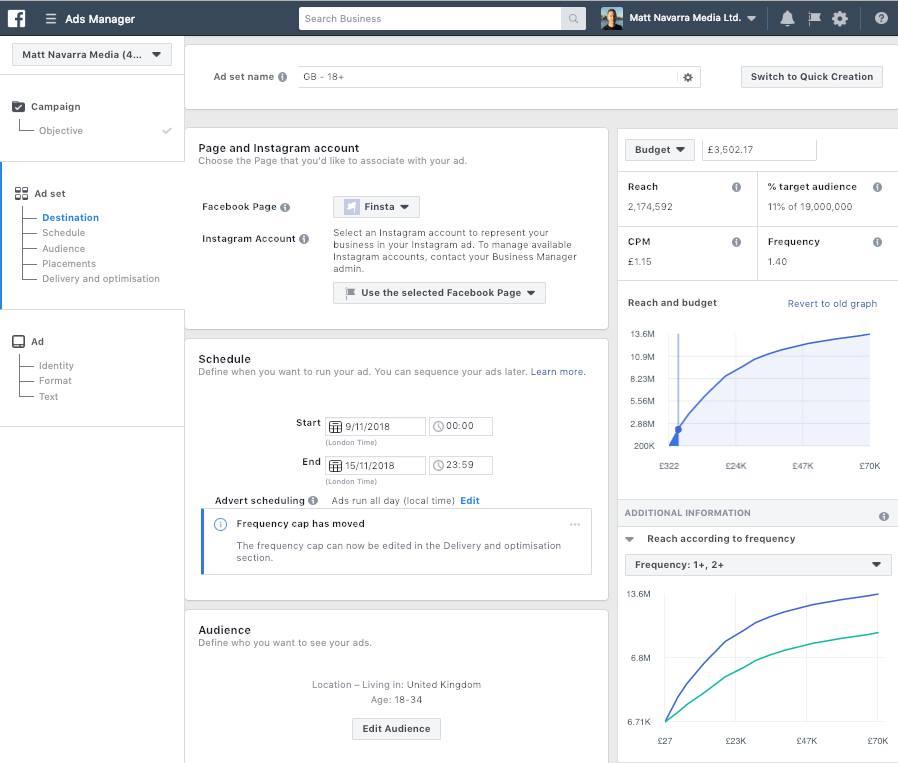


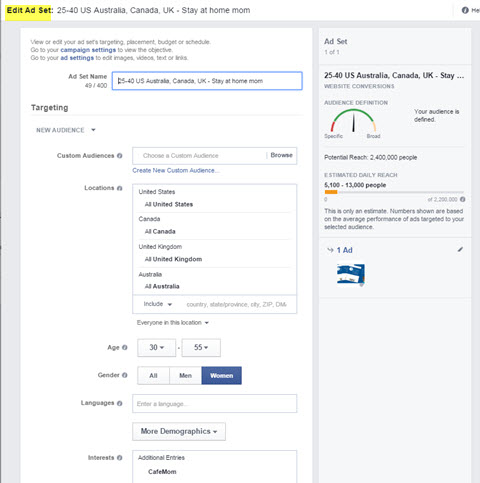


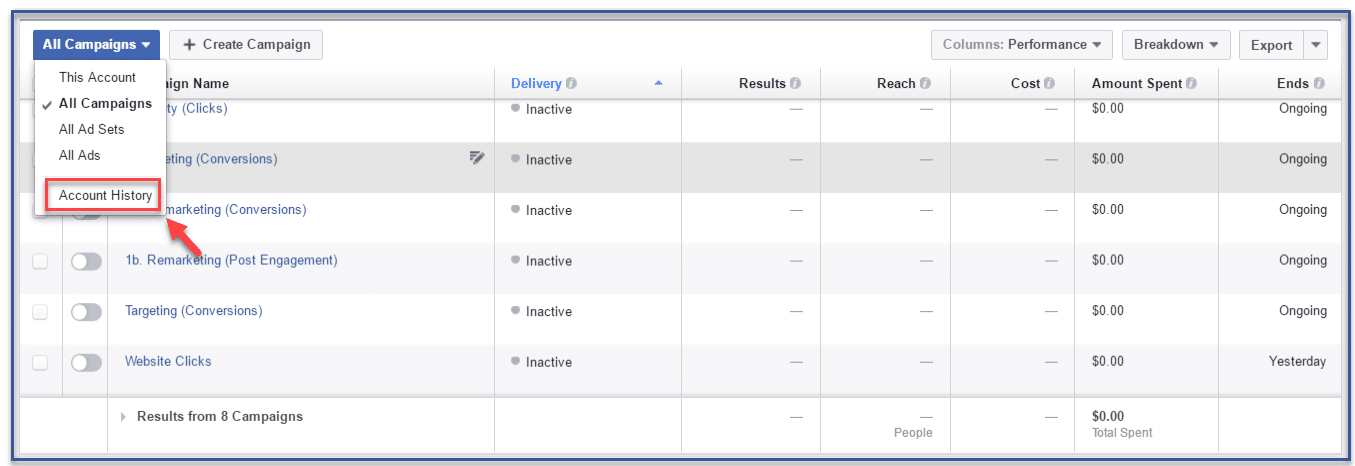


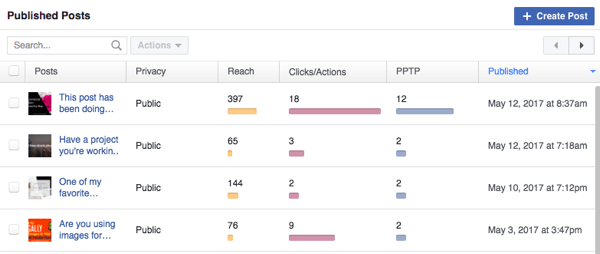
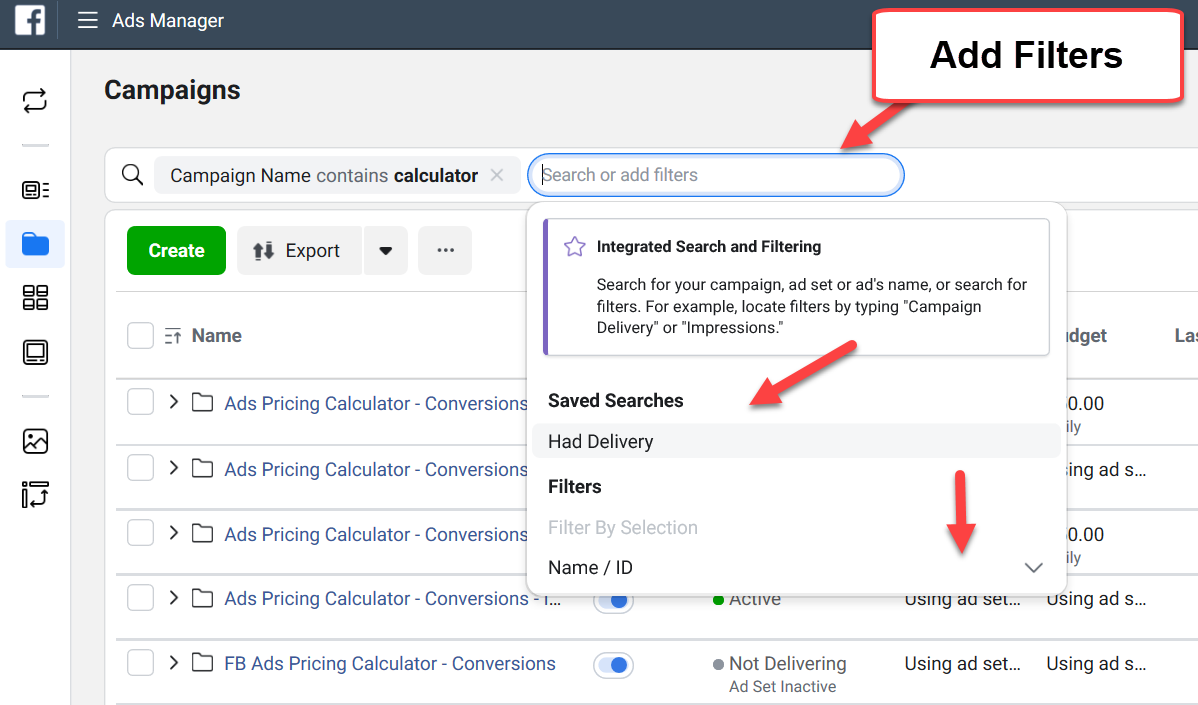

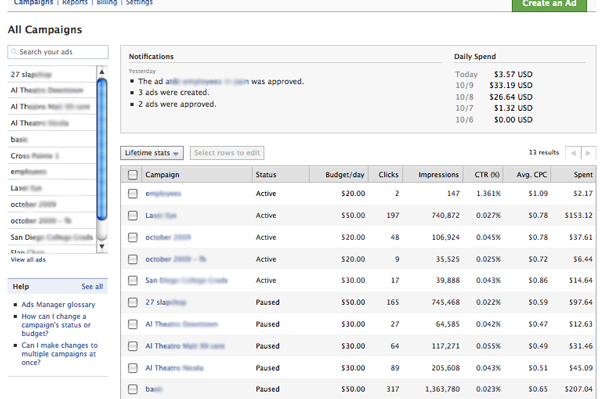
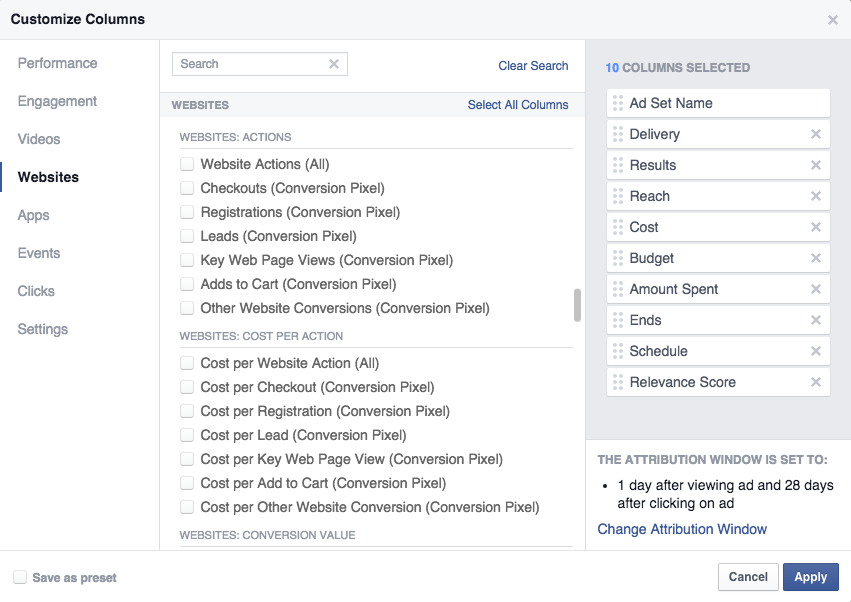


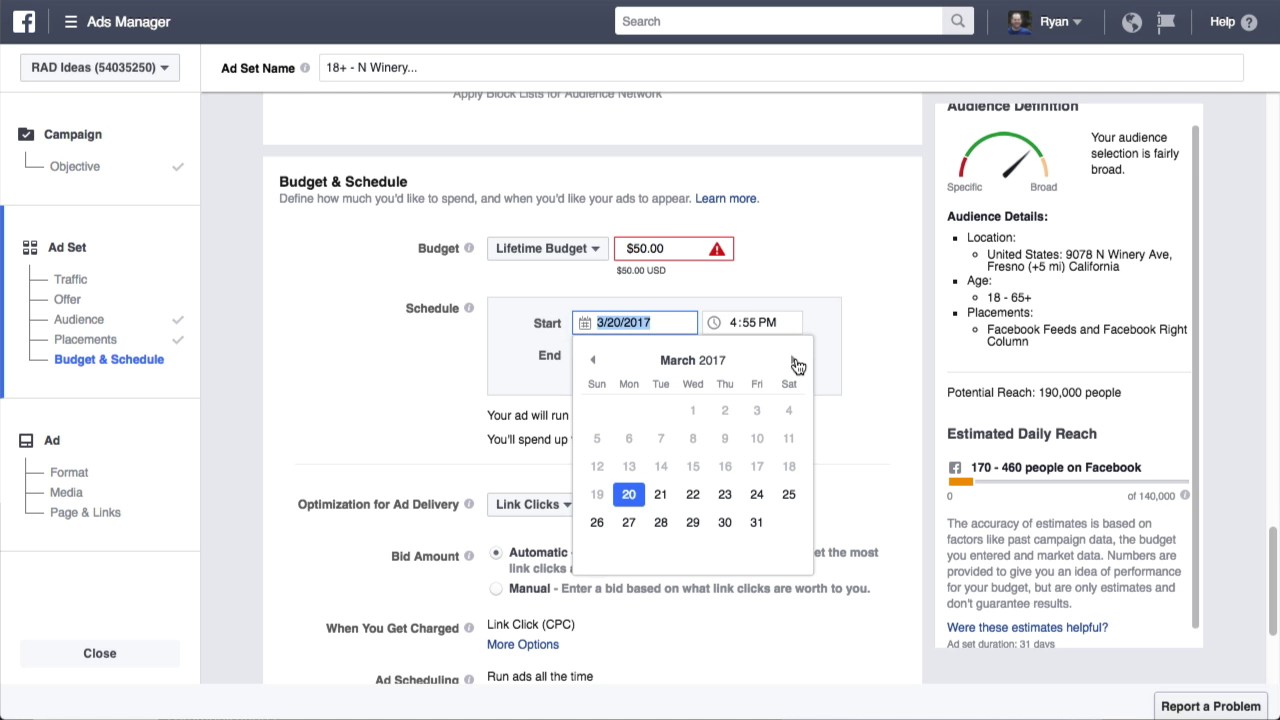
 Jimmy's Internet Marketing Business Blog