Categories
Online Marketing

NCT4G 15Jul15, Deep Dive into Google Analytics, Part 8 of 8

That kind of gives you a sense of okay. Here’s where we’re at where we’re not if you’re in the ninety percent bounce rate, then you know if some of them may not be right.

But if it’s really loading no well we’re doing pretty good, like you can try to figure that out too, but you’ll see that those numbers change depending on the season two. So it’s kind of like a guessing game. In some ways I mean, like every statistic can be measured against something else, but is it really worth measuring? I don’t know so you have to kind of kind of dig into it and your research background obviously lets you kind of think about that.

A different way than maybe some of us: how did you are changing the age? You know people who are being coming to your side me that certain age, but those are aging, and you want to get a new people to come to your page. So the age will be coming, so that’s kind of one sink is changing or other values measures, so our site now is only that’s a 20-some percent coming mobile yeah. What you think it’s increasing, but it’s still only twenty-seven percent.

You know in 50, plus percent desktop or laptop or whatever. So you know the audience is definitely increasing, but you know we’re making a move now to go to a responsive design, yeah of course, but at the same time you know it’s all good, because if you could not it’s different yes and i’m learning drupal that there’s Actually, a template theme, it’s responsive design, yeah that you can apply to your site if you have a drupal site – and you know i’m sure, wordpress and others – and you know have a similar thing.
So it may not be like a huge makeover, depended on the platform in the other side yeah. I canna United question dunno. So when you had the dashboard off and then basically the different types of reports, yeah you’re exporting, that is, that being exported to your email directly. Yes, I can take any of these actually and see how you’ve got this export button, so you can export it to any file type. That’s here.

So you guys see. Csv you’ve got so you’ve got a new google sheets PDF or you can have an email to yourself. That’s what I want and if you email it, it still gives you the option to choose what type of format you want, and so I don’t have to remember to send these out to my executive staff. Monthly phillippe just send it to them as an attachment, and I just go so I can choose the frequency here and then when it goes and then you can add as many people as you want to send that out to you find that you prefer to do It like as a PDF, so nobody can play with it.

Why, when they’re bored as a excel, typically typically for them as PDF on just because they want to look at the hard numbers it care to mess with it. I would say it’s not a beautiful export. You know they probably would like me to play with it a little bit before I send it to them, but for what it’s worth, they at least get the top pieces of information that they’re looking for it can kind of make some executive decisions on content or Creating content based on what I send to them.

Do you also just kind of send it to yourself just as a reminder yeah, I do yeah. You can do that easily as any any page you’ll see it up here at the top you’ve got. You know I sports your dashboards are the same way. So if I were to go out this monthly staff, I can share it. I can email it. I can export it here. You’ve got the PDF of money, but you can email it just because it’s got multiple things inside of it can’t create multiple sheets.

So, in each dashboards considered like a different type of report, don’t love trafficked, yeah good! You got this one visit the bounce rates and copper any enhancements. It’s just a slightly different thing. That way out was those the dashboard junkie. There’s lots there yeah. Oh, could you touch on goals and setting up goals because that’s something we just sort of graduated to yeah we’re going to get there ourselves, so I’m been tinkering a bit over since I am with that.

The n 10 conference in April play a little bit with it, none of their totally set up. Here I mean if a fully functioning one here been playing in a different environment, but only so it is grew up. I was testing it out. Let me see if I got it here: go down to under conversions, you’ve got goals, and so, but the you. Basically, you set up a goal, so it might be like your donation page right. So a goal is a way for you to track whether or not someone’s completed a cycle, so you might want to track how many people have actually made it to that.

Thank you page. So it might be that you want them to get to the donation page and then obviously proceed through to that. Thank you page. So you set it up for here and you select them and it will tell you how many people have actually completed it, and then you can also choose, like other other values that go along with it, and so we’ve got webinar purchases. This thing this is one that was playing with, but the just trying to see whether or not people were actually going through with the registration page.

I think it’s a little unique for us, because the way that Drupal we’ve got customized registration forms – and so I can’t quite figure out how to get the google code onto those forms for our purpose. So it’s been a little bit more complicated than I would have liked it to end then, but it’s certainly a thing that makes it easy for people to once. You’ve got the code installed, they’ll start tracking it just like everything else, so you’ll be able to see those conversions are beginning to end daily and monthly basis you at it over time.

I know that you finna does a specific training on that too. So it’s a good resource for that goes. Yes, denim silver belt them, so she’s got one on her site and David yeah. That’s why I mentioned that before when we said exit page, we had just set up a Thank You page on our donation form as one of the goals that they reach. That page now, you know, and then also you know, I think, as far as you know, like our science site would be a great example of they came to the site and they spent 45 minutes there and they really loved the content.

And it’s awesome and maybe they don’t donate that day or maybe whatever what I still think you know, we’ve reached our goal, so there’s different goals for different times and just because they’re, not you know running to make a donation. You know all the time or on a regular basis. You know that’s why. Obviously, you could have different goals well, integral if the gold could be that they’re downloading a product or downloading a rush fever or something whatever that might be.

It doesn’t necessarily have to be a monetary type of thing either it could be something else yeah and that’s why you know if you go to your main dashboard and it’ll, show you like average time on site or average. You know average time on page. It’s really important that you don’t take that number at face value and that you look at your actual pages and that sort of thing our science site. We have a lot of pages.

There are a lot of static institutional things and then we have weekly fresh content. That’s up that has articles embedded above the article is five minutes long and people are spending five minutes on that page on average, then we’re doing our job they’re sitting there and they’re reading the whole article, but our average time on site is much lower because people Are going to the institutional pages too and then leaving quickly so so it is really important that you don’t take your general site information to too much at face value.

You really want to drill down and look at what’s happening at the page level in rockland we were having a lot of problems from not problems but having a lot of the box going through, and we wanted to figure out. The number of people were users without the box. How somebody set up for us. They estimated that if they were there longer than 10 seconds and they were a human being person yeah, why right on it remember something happen for it.

Yeah, that’s a good way to look at it too. All right, any other specific questions, there’s a lot there. I cannot merely cover it in an hour, but hopefully that helped a bit, and you know I love to go deeper, especially reminyl tracking, to have something that the ninth next fluid step. So next month we meet um, oh gosh, what David we always meet. The third Wednesday, okay, so pull out your calendar, the thirst Wednesday, the 19th.

Thank you, and we will be talking about actually how to do some of this audio stuff. That marks been doing. He helped is at the conference and he does with a couple times where he sent up the audio for us and I’ll just record so that people can go once in some of this and he’s got. Ta have some moves great equipment out here for us to play with, which is very generous with them to do so. We’ll have so many things that people can practice and try it out.

We had the different pieces set up at the conference because I thought was me if I had an interview room and I think it was neat for people to see that it’s not necessarily a scary topic that you can definitely do it easily and he’s got a Couple ways to show us with her to do a budget-minded Lee or maybe the professional route. If you choose to do that too, but thank y’all for coming tonight. Are you still uploading interviews, they’re, all a bit of them and there were two posts today lesson? That’s a wise thing: okay, what is worse great once the season, the toys I am without


Categories
Online Marketing

3 Critical Metrics to Follow With Google Analytics

With the analytics In a week, I check our analytics On our site all the time, but I feel like I’m just sort of Poking around and sometimes I ’ ll – find a nugget Or things like that, but I do feel intimidated. Because it’s such a you know versus something: Like a Facebook, where you’re just guided Through creating an ad In analytics, it’s like you’re in A fighter cockpit in a way right, There’s a lot more stuff.

Going on there, So I think what people Are really interested in are sort of systems That you know “ Here’s how you do A 10-point check on your analytics.” or something like that. Can you talk a little bit? About your framework, when it comes to actually Setting up analytics and what are Some of the key metrics that people need to be focusing on If there are any Yeah sure So, first of all, what we got to do, Is make sure that Google Analytics is tracking correctly When we do install the code? We do some initial testing, we go ahead.

We visit from mobile phones from the desktop To see, does it get the country? Does it get the divide? Does it get all that kind of stuff After we enable The eCommerce tracking, which is not enabled – and I don’t really know why But you have to do that manually. There are a few things: Really really simple things that no one has to be Really intimidated by these First of all, Conversion Rate, Super important We have to know How many people, out of a hundred and because some of the people? That might read the interview, are not really tech savvy or don’t really know.

What a Conversion Rate is Conversion rate is what the amount The percentage of the people that they get to convert, What does convert mean They get to do a sale, They get to buy something From our websites and we’re talking, About the eCommerce, So is it 1 % Like 1 out of 100 people, Two out of 100, One of the simple things that you can do, If you have 1 % Conversion Rate, which is an okay Conversion Rate, It’s sort of like the industry baseline In a way right, -It’s an industry baseline, let’s say -Yeah, I know those sort of things You get.

One person Out of a hundred people, but you paid for those A hundred people to come into your store and you get 1 % Conversion Rate. What, if you look At your numbers – and you figured your website – In that way, you get a 2 %, I won’t go into 5 % or 10 % Literally with just that move the amount of money That you are getting into your revenue simply by one thing, So Conversion Rate Is super important? The other super important thing is Average Order Value or AOV So AOV.

Why? Because, if I get an average On a customer, let’s say he buys something: Which is $ 20 every customer, and even if I can give That $ 25 or $ 30 literally, I don’t have to change anything else. In my whole other strategy, I’m spending the exact same money, but I’m getting more From every customer Conversion rate, Super important Average Order Value Super important, Then there are more technical stuff that they don’t have to be.

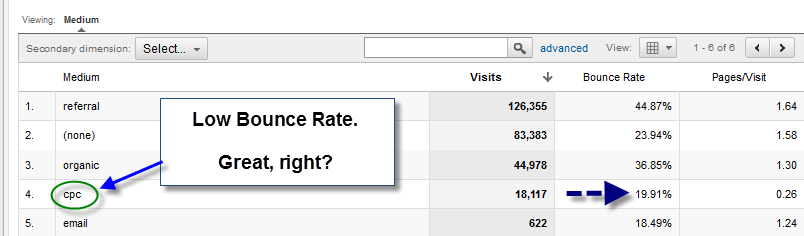
Super intimidating, so one of them Is Bounce Rate I will stick To those three, obviously, there are way more But I don’t want to over complicate it So Conversion Rate Average Order Value and Bound Rate. So what is Bounce Rate How quickly people bounce They get off your website? As soon as they see it, The Bounce Rate is measured. By a percentage, The biggest the percentage The worse, our stores are performing An average in the industry.

Let’s say it’s 65 % to 70 %, but still it means that 70 % of the people Were just paid with Facebook Ads with Google Ads Or whatever that is, They just came to our website. And they didn’t even spend more than one second In our store, So even if you get an average Of let’s say, of 80 %, which means 80 % of Google Didn’t even see your landing page, You get it down to 75 % Even 70 % even lower, it means that you start making More more and more money for every visitor and potential customer That visits your store, It doesn’t really have to be intimidating.

If you translate everything to money. Then it becomes way easier Way: sexier And those three metrics are the key ones. That people need to be looking at. I think that’s a really valid point. I don’t know that You’re the biggest Marvel movie fan. But if you have to be an Avenger Which one might you choose? Probably I would be Doctor Strange, I like to think of myself, like The geek I am, and the nerd I am When people go out, And have fun and they party I go work.

Or read webinars or look at things: I could change in the store, somehow we can make More things, I think, I’m living Like Doctor Strange People call me The Mr. Google Analytics -Doctor Analytics -Doctor Analytics Doctor analytics, So that’s one of the things That I really really enjoy because I said Google Analytics Is not sexy but making money is, and I like making money 100 %. Very nice, thank you for coming Awesome.

Thank you, Yeah. I really look forward. I should announce also, I think it is clear. But Doctor Analytics will be a part of the upcoming Ecommerce All Stars Secrets course our free-mini course That we’ll be putting out for the world to learn the core skills that they need. To grow an extra-ordinary business They’ll learn how to get by That’s the beauty of this course You’re going to learn. How to get started? What mindset you need to have And some of the core skills, but we’re also going to be providing A lot of things that will allow you to truly take it to the next level.

And really have an untapped mindset. That’s the thing I’m noticing From all of these interviews And frankly, all of the people Of the world who are making headlines for good and for bad Is that they have this unbridled will They are not small thinkers right? They are people That are able to look an opportunity and really think big about it. I think that’s what runs Through this whole course, and I’m really excited To be putting it on, I’m excited to be a part of it Guys I’ll make analytics sexy.

I promise Okay I’ll try my best Nice, very good. Well, thanks again, -Awesome -Alright -Thanks -Cheers


Categories
Online Marketing

How To Read Google Analytics Data With WordPress Plugin Analytify

One of those services I offer is detailed, analytics suite. I use Google Analytics and upgraded and amplify it a little bit so that my clients have an amazing opportunity to get to gather insights and a really meaningful and visually pleasant way.

So here we can see this company has several hundred visitors a day on average twelve visitors at this exact moment in time, while I’m logged in they have one visit our online. That person looked up directly I’ll, show you some of the cool things that you can learn your the amount of data and insight they can find is really wonderful. For example, you see how many different sessions different times people logged in we can see the total number of visitors, the overall number of pages that those visitors viewed the average time on site.

Many of these are SEO. Metrics also that Google and the search engines look for and factored into their algorithms as they’re determining which nights to rank they like when people stay on websites and engage and consume the material, they don’t love. When people bounce off a bounce means someone lands on a fair amount of people are going to do that because they’re coming looking for information, something but part of the SEO game is figuring out ways to entice and engage people to dive deeper and stay longer.

On the site, so the average number of pages for this session is I’ve got a large number of new sessions. So it means new people who haven’t been to the site are finding it clean. It obviously good things. Expanding the brand. Look at that cool visual, their percentage of visitors, a new meaning, six percent, compared with returning thirteen percent they’re, so very helpful to know the devices are villiers.

Would you imagine that over 50 % of what traffic occurs on mobile devices now, and so many of us myself included often think and from a desktop point of view, a desktop image point, and it is important and critical to assess and optimize the mobile version of Your website because, for example, this particular website 627 percent of traffic cones via a mobile device. Now we can actually see particular pages that people are landing on number of views response time.

I can dive deeper, two more pages on the site and it’s really helpful to know which pages are bringing people to the site. For example, if you have a blog post or some other content, that is very valuable. That item we can see how many people are brought to the site via that particular post. For that particular page, and as your online presence and content power grows, you will have more opportunities to gather people to your site.

This is a really cool tool. It’s called a heat map and it allows people to see where people are actually moving their cursor and and clicking, and what what elements of your site are working for them, and so I definitely highly recommend that so these this is a good snapshot of analytics and What we can do for your company in terms of giving you data and insight and metrics that can help you develop and have continued to improve and expand your online SEO strategy thanks.

So much


Categories
Online Marketing

How to tag or annotate a link or url to track visits in Google Analytics. By Stephen Croome

In the example you’re seeing, I know, I’ve sent out an email campaign and I want to know out of all the people. Who’ve come to the website how many people came via the email that I sent out. So the first thing to do is: go to Google go to the Google URL builder.

This tool will allow us to tag URLs in a way that we can find this answer. The URL is a bit strange, but don’t worry about that. So I’m just going to google com, you go at the right place, bring my website URL! There’s three fields you have to fill in, which is source medium and name. I’r going to use magazine, email launched for the source, the medium will be email and a campaign name is logo. Introducing people to our new logo, click generate the URL and it generates you a URL with all the bits that it needs to be able to track.

Clicks on the link, so i’m going to in the next article, show you how to go and find this data within google analytics. What you’d need to do now is take this URL and be using it in the email that you send out. You


Categories
Online Marketing

NCT4G 15Jul15, Deep Dive into Google Analytics, Part 4 of 8

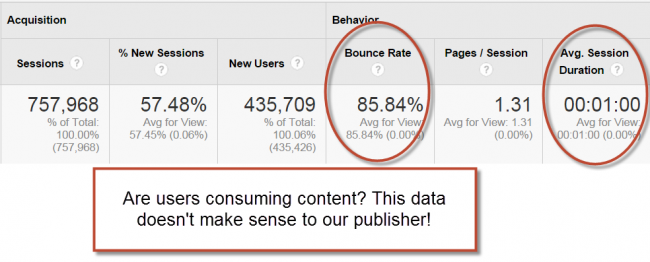
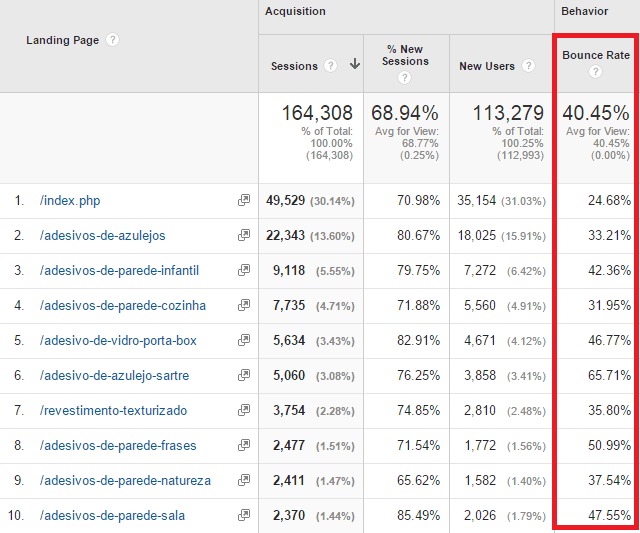
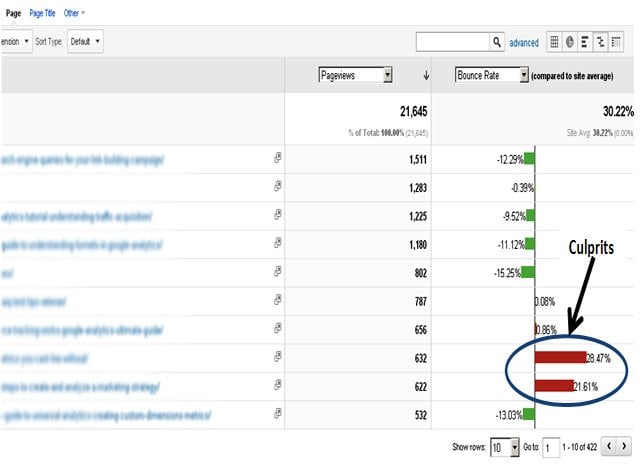
I did not particularly address that as like a communication preference just because we’re trying to really get into the nuts and bolts of measuring and looking at the data inside analytics. But I’m sure that there are people in this room that could talk to you about that too. All right, so bounce rates over seventy percent just feel nasty right. If you saw bounce rate of seventy percent, you might go.

Oh, my gosh, I’m not doing a very good job, but it’s okay they’re a little bit normal in some cases. Um, okay – and I guess the thing there. It’s really just a statements, not really question right um, but when you’re looking at that, they may have a bounce rate lower than seventy percent lower the 242 okay good, smooth I’ll show you some of the center stuff. It’s usually a little bit lower on certain pages.

Will see it higher other things, we won’t feel see it quite that high I mean you, have it just somewhere mm-hmm it’s going up, though, there’s and there’s an upswing that we’re seeing it overall, and these are true statistics with inside each of the different fields whose, What’s up um, this is from the from a few folks that I’m kind of like a collection of websites that are maintained by a consultant, pretty much yeah, so not something I have to recommend pack on which is good Thank money.

I don’t take right for them, but your action step in this purpose is really to make sure that, if you’re seeing bounce rates that are maybe in that over fifty percent range. Yet you may read week your coffee or your texts that are on those pages and see if that makes it difference. Maybe it’s just a matter of some language that they’re that they don’t find understand or that’s not compelling or you know, drawing them in it could just be your your design overall is terrible or might need to be tweaked right.

It’s not careful, nothing’s, ever terrible and I’ll preface for any souvenirs with Taiwan. What that is there? Any significance to the number was just driving garble uh. No, it’s actually the timeline also yeah one case: all senior services there yeah exactly midnight and that’s true you’ll, see in the live metrics I’ll, show you from this in your site, you’ll see that a day can make a huge difference.

Any of you. Anybody use google analytics on a regular basis and the check it daily or so. Okay, so you know very well, you walk in there one month, compared to the very next month can look like Cooper. What rule is this? It’s not the same one. What do done! I think the other thing that people will see is, if you have a jobs for it or a career section to your site. That’s always going to rent higher so usually tends to be in your top pages, just because people are constantly looking for positions specifically a nonprofit work too, or if you have something that’s an internship, then it could be random people finding that just from google searches.

So you want to make sure, though, that those job visitors that are looking at your site. What do you want to do capture their information right? They might get a little bit interested in nonprofits. Maybe that’s. Why they’re there so have some type of call to action for them to engage and go a little bit further. They might just be interested in your next blog post. All right, more and more people are visiting your website using a mobile device.

Anybody see an uptick in their mobile device usage and several hands anybody Nancy. Do you know what your statistics are? Well, we have our main site and then we have our journal back thing site and then the magazine, the main site, is about twenty-five percent level and seventy-five percent does come, but our other is is getting 50 50 okay. So it’s about half a half. We looked at this a few years ago, as we were trying to think about whether or not many in a responsive design.

What do we need to take that path, etc? Then the time we only had three percent traffic through mobile site, mobile usage or even tablets we’re like okay, we not not only top priority list on to say that that’s changed drastically wrong, so it’s much much higher rent for us. Now that it was was. Do you have any impact here like what yours looks like I don’t know if the top of my head, but I know it’s it’s grown definitely, and especially with people reading article.

So the key takeaway here, like your next action step, is just really to make sure that if it’s not a mobile-friendly site that you’re working towards that, not saying that you have to go fully responsive, that’s not necessarily your next step, but think about the design implementation That you have currently and see what tweaks that you can make to obviously make it just a little bit better user experience for those that are coming from a mobile device and start working on your board and your boss um, so that they understand the true statistics.

Behind this that you know, we talked about the mobile gettin and that kind of thing, and it’s really happening so no better time than now to start planting. Those seeds really understand that I was going to say one of the easiest things you can do to help with making your site easier for mobile users. Is you know how you’ll feel hyper linked text? You know click here make that a button instead of text it’ll be easier for somebody to hit on a mobile screen if it’s a button, instead of just text embedded with it or text, and if you can’t do a button because it doesn’t make sense based on The layout of the design make your hyperlinks larger font text so that easier to clinton as well, that we don’t have to zoom in our pin tuna pitch open and clips.

That makes huge difference for people that are online. The other important thing to mention since we’re talking about Google anyway with this, is that google has changed their algorithms again and those sites that are mobile-friendly are actually returning higher in search results now than in previous years. So it’s taken into account in those SEO searches search engine optimization. So you want to make sure that you’re thinking about that ahead of time as well, so you can actually do a test to see where you rank as mobile, friendly or unfriendly.

I suppose, with inside the google site, to search for that and there’s a little test, you can take me to Center your your website and it will do it for you. So obviously, they’re awesome very impatient how many of you want a patient sitting there and try to figure out what’s going on, so those people that are coming for mobile devices are more likely to leave your side immediately. Is there like it’s funny or those buttons? Aren’t there if they can’t do what they want to do, they’re not going to stick around and so there’s kind of a fickle visitors whatever.

So mainly what you want to do is make sure you’re getting to the point right, be succinct in your copy. That’s on your pages, especially those that are more prone to be visited through mobile usage, and you can look at that in analytics and figure out which pages people are most visiting. Some a device like that. So keep your writing concise and make your call-to-action buttons really really obvious.

So your visitors from search are also likely coming from a mobile device. How many have you sit in a car and are trying to find a restaurant or something right? So I’m not the only one, so it makes this that google is kind of pushing this whole whole thing with the mobile-friendly sites. But what you want to make sure that you’re doing is just pay special attention to the pages that attract your search.

Visitors and you can look well, you can kind of slice and dice any data on your site and we’ll play with that here in just a second, but just make sure it’s really really easy again. This call to actions are important um, but your your visitors are probably going to be coming from from search as well, so make sure there’s pages that they’re visiting the landing pages are going to be designed properly and well.

So speaking of search, your terms are also key to what’s happening, so make sure that the list of search terms people are using as they come to your site. You can look at the terms that they have entered that, get them to your plate to to your site, so make sure you know what those are and that you’re on your kind of it sometimes is your organization’s name. Sometimes it’s even your ed or it might be a particular program or event that you run those search terms will pop up and say: they’re taking me there I’ll see what it is.

That’s drawing them in and then make sure your request to your you’re, designing around those things and make it easy for those people that are going to be using your services to find you. Obviously so in your tagging, your meta tags and stuff that you use on the site make sure they pulling those key terms out, and then the other thing that you can do for mobile design also is make sure that your phone numbers are clickable.


Categories
Online Marketing

Installing Google Analytics – Progressive Web App Training

We want to know what users are doing on our site, which pages are popular, whether users follow the paths we expect and if anything goes wrong. Analytics is all about collecting measurements of user activity on the site. Google Analytics is a service that collects processes and reports.

Data about an applications, use patterns and performance, adding Google Analytics to a web application enables the collection of data like visitor traffic, user agent, the user’s location, etc. This data is sent to Google Analytics servers where it is processed. The reports are available in the Google Analytics web interface and throw reporting API. Google Analytics is free and highly customizable.

Integrating Google Analytics is simple. First, you must create a Google Analytics account. Each account has properties, these aren’t JavaScript properties, but refer to individual applications or websites. Google Analytics then generates a tracking snippet for each property. This is a piece of JavaScript that you pasted into your page. It sends data to Google Analytics back-end. You can also use the analytics library to create custom analytics, such as tracking specific user actions or tracking push notifications.

I want to say a bit more about properties. An account has properties that represent individual collections of data. These properties have property, IDs, also called tracking IDs. That identify them to Google Analytics if an account represents a company. One property in that account might represent the company’s website, while another property might represent the company’s mobile app. If you only have one app, the simplest scenario is to create a single Google Analytics account and add a single property.

To that account. The analytics server will then generate a custom bit of JavaScript matching your account and property. This is the tracking snippets. This is the key part of the tracking snippet. The entire snippet needs to be pasted into every page. You want to track at a high level when this script runs. It creates an a syncs Tagg that downloads analytics is the analytics library defines the GA function called the command.

Q creates a tracker that gathers user data and sends this data as a pageview hit via HTTP request to Google Analytics. This data is analyzed and stored in your analytics account, in addition to the data gathered by tracker creation, the page view event allows Google Analytics to infer what pages the user is visiting, how long they are visiting them and in what order for simpler applications. This is the only coding required note that you can replace analytics j/s with analytics underscore debug KS for console debugging.

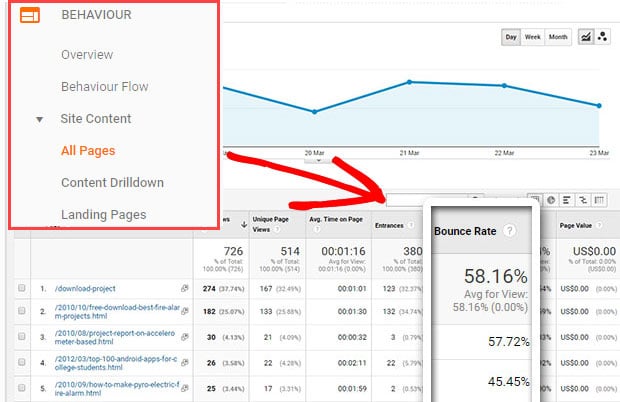
Using this version will log detailed messages to the console for each hit, sent it also logs warnings and errors for your tracking code. The data is sent to Google Analytics back-end where it is processed into reports. These reports are available through the Google Analytics dashboard. Here is the audience overview interface. Here you can see general information such as page view, records bounce rate, ratio of new and returning visitors and other statistics, it’s also possible to view analytics information in real time.

This interface allows you to see hits as they occur on your site. I encourage you to take some time and explore there’s an extensive set of features in the dashboard. You should explore the standard reports and look at creating your own. Knowing how to use analytics effectively is a skill in itself. Fortunately, the Google Analytics Academy offers a free set of online courses. I encourage you to install analytics on some of your sites.

If you haven’t already check out the free analytics Academy courses as well, then once you’re comfortable with analytics, come back and I’ll show you how to integrate analytics into a PWA. Thanks for reading and I’ll see you soon,


Categories
Online Marketing

Keyword Researcher | SEO Keywords Generator – SEO Organizer Tool – Best SEO tool 2018

This is an important article, because it contains a lot of key information that you’ll need to understand before and while you’re using the app for us as SEO. Guys, it’s very important to be familiar with what I call the six foundational steps of SEO. Now, if you go over to the keyword researcher website, you can actually find these steps listed here as well, and there is some more information about each one, as well as a little animated presentation about how keyword researcher solves this issue.

But we’re going to go over each step very briefly, right here as well, so recall that our primary goal in SEO in search engine optimization, is to optimize our website for the search engines, namely Google. So people in the world type keywords into Google and we hope that these people will land on our website. So our first goal in SEO is to discover or import the keywords that these people are actually typing in to their web browser.

So, as you’re probably aware, there are many many many tools for sale on the web that help you with this step, one discovering and importing keywords and, of course, myapp keyword researcher – is one of these tools. It helps you find import and discover keywords, and that is step one, but a lot of people never get much beyond step one, because there are actually several other steps after that and without the right tools.

Many of these steps can be quite tedious, for example, in step two, you have to remove the bad keywords. These are the keywords that you do not want on your website. It’s pretty easy to just make a large list of keywords, but when you actually go to work with this list of keywords, then it becomes apparent very fast that your list will contain thousands, if not millions of words that you do not need for your websites.

So developing clever functions to remove the junk keywords. The keywords that you don’t want be pretty tricky and that’s another thing that keyword researcher helps you with in step 3. You have to find various ways to find the good keywords. These are the keywords that you do want on your website and keyword. Researcher comes with built-in functions to help you with that and then in step. Four, you have to organize these keywords into logical article groups, because if you have one page on your website talking about both cameras and kittens well, that’s not a very logical group.

So, combining your keywords into logical clusters and focusing on that cluster with your given webpage, is, of course a big part of SEO. On-Page, optimization and keyword researcher helps you with this step as well. Keyword researcher also allows you to create content in the app and the app will tell you if your keywords exist in the article content or not, and then, when your content is all done, you can export it to WordPress if you want so again.

These are the very simple six foundational steps of SEO, no matter what happens in the future of SEO or no matter what new tools come out, you still need to be comfortable with these six steps. Primarily, this can be summed up as just seeing what your potential customers or potential visitors are typing into Google and then making sure your content, your web page content reflects their desired searches.

That is SEO in a nutshell. So now, let’s talk about the first part of this process. Discover how do we discover keywords, so one way to discover keywords is just to see what keywords pop up in Google autocomplete. So, as you type sentences into Google autocomplete like how to fix a something, then you’ll get lots of keywords that pop up in the drop-down box. And, of course, if you start typing letters after this sentence after this phrase, then you’ll get even more keywords.

As you type a c d e, obviously, as we keep going through the alphabet, we keep discovering more and more keywords, and this is the realization that is very valuable. And this was the inspiration behind the original construction of keyword researcher, because when you’re using the google component, this is what keyword researcher does it replaces the asterisk with various letters of the alphabet and simply saves the result.

So let’s go ahead and start up keyword researcher now, so we have keyword researcher running on our computer and just going to start a new project. And here we are in our first blank project inside the app. So you recall in Google, we typed in how to fix a and then we typed in various characters – and this is all keyword researcher – does as we put an asterisk here. This tells the program where to put various letters of the alphabet, and then we just hit the play button and keyword researcher will download the keywords from the internet, as we can see it doing on the bottom of your screen.

Right now and of course, the trial version will only search part of the alphabet, but if you decide to purchase keyword researcher, then you can log in with your email address that you used at purchase. I’m going to use my clever gizmos email address and click register and we’ve just converted the app from trial mode to full mode in full mode, you’re able to save your project and, more importantly, in the full mode, you’ll notice that you can search their complete alphabet.

A through Z, again, the trial mode only lets you search a through H, but in the full mode you can search the complete alphabet so I’ll go ahead and clear my search box and I’ll clear the keywords we found previously and I’ll scoot my interface over a Little bit to make some more room, because at this point what people usually do is they look at the ID yeah panel here in the middle, and this is important because the idea panel will give you some ideas about what kind of keywords to type into the App, so if you had a camera website, then you could type the word camera here and the plural here cameras and then a city name like Los Angeles.

And if you look down in the idea, generator you’ll notice that the app has placed these keywords into various question. Queries for you to consider typing into the search box. And you can do that by simply clicking on the actual item, how asterisk camera? How to asterisk. A camera questions are often very valuable. Why do cameras asterisk our cameras asterisk and if we scroll down, we have the preposition for asterisk for cameras Astra’s for a camera cameras for asterisk.

So again, there are dozens of suggestions down here, including regional suggestions, like Los Angeles, camera asterisk, but I also encourage you to try to come up with your own phrases to type into the search box here, because nobody knows your customers more than you do. You have to think about what somebody who wants to get to your website. What would that person be typing into Google? Try to think of all the possible words that person might be looking for and then try to complete that person’s sentence with the asterisk, and once you have a few keyword.

Ideas then hit the play button and let keyword researcher find these keywords for your website. If I put the keyword box up, we can see the app working, but for this tutorial I’m not going to let it go all the way through. I’m just going to stop it right now and we’ll examine some of our keywords briefly, and we can see lots of camera keywords in our keyword grid. Now, if I want to get search volume data for these keywords, if I want to run these keyword through the Google Keyword planner, all you have to do is click the copy to clipboard button and then start up the Google Keyword planner.

So here I am in the Google Keyword, planner and I’ll just click on the get search, volume, data, button and paste my keywords and go, and here we are the Google Keyword planner. These are my keywords and I’m just going to click the download button to save my excel csv to my hard drive, and so now we have our new Google Keyword, planner csv saved to our hard drive and we want to bring that into our app.

So we come back to keyword researcher and we see we have this import. Google csv files button and I just simply drag and drop my csv file into keyword researcher and if you look below you’ll notice that we now have the average multi searches, the search volume column. For our keywords, everything is in what we call the temporary grid, because this is the grid you use for importing keywords into your project.

This is the actual project group keyword grid is here on the left, and it’s good to have two grids, because you can decide to delete keywords in the temporary keyword grid before you actually move them into your project. For example, if I wanted to delete all these keywords, I can just right: click on it and click delete and, of course, the keywords are gone in this grid. You can also put keywords on the blacklist, the grey list or the white list which we’ll discuss in a minute, but for now I think I’m just going to move all of my keywords to my main project grid.

Now, let’s take a moment to review our six foundational steps of SEO recall in step one, we used Google autocomplete to discover new keywords. We also use the Google Keyword planner to import new keywords, so now we’re on step two. We to remove the junk keywords. These the keywords that we do not want on our website – and this is where keyword researcher is very – very useful. For example, let’s say that we don’t have any cameras for astrophotography, so we would hit the black button here, and that makes it so that this keyword camera for astrophotography.

This keyword is now on the blacklist, and that reminds us in the future that we do not want to target this keyword. Phrase on our website same thing for diving suppose we do not sell any diving cameras or we have no information about diving cameras. We might want to blacklist this one or let’s say that we do not sell any cameras for documentaries. Then we can blacklist that one as well. So the white list is for keywords that you do want on your websites.

The grey list is for keywords that you have not organized yet, and the black list is for keywords that you do not want on your website and that’s why these three sreades are so valuable because it very quickly allows you to sort and arrange and filter keywords That you do or do not want on your website again white means you do want the keyword. Grey means we haven’t decided yet, and black means you do not want the keyword on your website, particularly you do not want to generate content or sell products about that keyword phrase, and what about the next step step number three: how do we search for the good Keywords that we want to use on our website and that’s why keyword researcher comes with a lot of great search functions.

If I right click on the keyword header, then I can see lots of search examples right here. You can see we can search for a diet or exercise, diet and exercise, as well as many others. Now these words, diet and exercise are just examples. We have a camera website, so I might search for things like camera and computer when I press ENTER you’ll notice that my grid has been filtered, so only show me the phrases that have the word camera and have the word computer.

So if my website had information or was selling cameras for computers, then this is the kana keywords that I would be looking for. The next three steps in our SEO chart here are about organizing keywords and then getting the keywords into our article content and ultimately publishing the content to the web and in keyword researcher when you’re ready to start actually making clusters keyword clusters for your web content.

We have this middle article tree here, where you can arrange your content into categories and articles. So I’ll start by naming our category computer cameras and our first web article here or web page, I’m going to call that PC cameras or your desktop applications. So again, this is just an example of a possible piece of article content that might be featured on a news website or even on a website that actually sells PC cameras again.

This is just an example, but at this point I can drag and drop my keyword phrases into this actual content. Article and you’ll see that keyword researcher has associated this article. With these four keywords, and in this fashion we can build an entire content strategy with keyword researcher, if you’d like to play with that more or to see a bigger, more filled out website. We have a demo when you first start up the app.

So I’m going to click the home button and you’ll notice. If you click this play button here, keyword researcher will load a sample project. This is a sample diet website and if you open the article tree and click the expand button, then you’ll see a website with lots of categories, articles and lots of keywords already associated with it. And, of course, the reason why we created this sample website is so that you can play with queued researchers, function, allottee and see how keywords become associated in paragraphs articles and categories, and when you actually have an organized website structure like this, you can slide this over And click the right content tab and then select one of the articles in the list and we have some sample content here for the sample webpage.

This is about a healthy, low, carb diet. Article again, this is just a sample content, but what this shows you here is where our target keyword phrases in this case: low, carb diet when you click the highlighter icon. You can see where this keyword phrase appears in our article content and again recall. The whole points of SEO is to get the keywords that people are typing into the internet. We want these keywords to be reflected in our article content.

Again. This is step number five in our foundational steps, ultimately, in some way shape or form, you have to get the keywords that people are typing into the internet. These keywords have to exist somewhere on your web page, so that Googlebot can associate your web page with the sort of content that people are searching for when they type in these keywords. So if you click the instruction manual or click the various items here, we have other help articles which discuss this topic more in depth.

But basically, you use these tools in keyword researcher to try to get your keywords into the article contents of all the articles or webpages that you’re laying out in the content strategy that you’re developing here in the article tree in keyword researcher and when everything is ready To go, the coolest thing is you can deploy. All of your content to a WordPress website recall that this was step number six in our diagram, publish your content on line.

Now, if you don’t use WordPress, you can’t, of course just copy and paste to your website or you can export to a Microsoft Excel or a CSV file. But if you do use WordPress, then you click export’ here on the top and just select the export to a wordpress XML file here and that will open a form where you can select the pages that you’d like to export. So we’ll stop the little tutorial here for now again, if you want to see more articles about the various functions in keyword researcher, please visit the website or click the blue button here, the instruction manual button, when you click it.

This should open your default web browser and you should get to the keyword researcher article help page, which contains many more articles about how to use keyword, researcher and if you have any questions at all, then please click the contact button at the top of the clever Gizmos comm website and send us an email and we’ll help you out. So that concludes our little keyword. Researcher demo and I’d like to thank you for your interest in my software and thanks for visiting clever gizmos com.