Everything around just took a quick tour of it myself, and I wanted to show you guys. Some of the features when you first log into a sight, you’ll notice that you’ve got some default widgets here. This is what they shou yuan sort of like your home screen.
They call it the dashboard, and you see this is a site that it’s not really in use right now, but it still get some random traffic. It’s got a couple of visits, it shows you, you know how often people bounce off of the site. It shows you where the people are coming from and then just like normal you can, you know, change the dates you can say compare this to last month or well, last period of time that we want to look at.
So that’s that’s all they’re still you’ll notice that all of these widgets now have a little gear next to them, so you can actually change whatever the widget is. So if I, for example, I didn’t want visits, but I only wanted to have new visits there. Then I could change this widget and it would just change so what they’ve done is they’ve broken up these different metrics in two different categories.
So you see you’ve got the things called metrics which are sort of one-dimensional here and show you a number. That’s all they’re really going to do. You’ve got a pie chart you can compare things. That’s like, for example, this country code over here you’ve got a timeline which you may be used to seeing the you know visits per day and then you’ve got a table where you can actually see some metric and different values of that metric displayed next to some Dimension in this case, the dimensions are like one example is page title, so what I’ll do is right now just go ahead and create a new widget, and let’s, let’s make this a table and dimension that I really like to know is the page title, because sometimes I’r working on blogs that don’t have human friendly, URLs or legacy systems, where i’m not able to stick that in there.
So i’ve got page title, and so that actually show me is you know whatever you see in the search search engine result page for example, and then I like to say, let’s say how many visits to that page get and then the second metric. Sometimes I like to see how many people exited from that page or sometimes I like to see how many of those were new visitors you’ve got a lot of different options here. But let’s just go ahead and for this one pic exit and then it called it visits, because that was the first metric I picked, but really what I want to call this is pages or page titles or something like that and then, if you actually have gone Through this interface you’ll see, you can add a URL that will take you deeper within Google Analytics right here from the dashboard.
So really, this is for people kind of know what they’re doing, but I have played with this little bit. It works really well. So then you save that and then let’s say that I just want to take this may be down here. It’s all very drag-and-drop. I don’t really care about this being right up front. So now I’ve got there’s my pages and then the other one that I always really like to know is like how are people coming to the site, so I’m going to do another table and this time for the dimension, I’m going to look the keywords and just As you type it will autocomplete, then again, I want to say how many of them are visits and then in this one I want to see how many people search for that and then exited right away.
So i’m going to call this widget keywords and again I could put the link there if I wanted to just as an example Ryan price Mediacom. Just because we know that we can’t – and there you see it will show up – is like a little on a piece of paper and it will take you to whatever site it. Was you clicked? I think the normal ideas that you’re going to have a URL somewhere inside of Google Analytics. So in this case the keywords it says not set, meaning that this is probably direct traffic or a link of some sort.
So they didn’t come from a search engine result. Page when they found this website, so that’s a little bit about setting it up. You can also create new dashboards so right now they all all of your site’s come default with one dashboard. One thing that I didn’t really like is that, at least as of yet there’s no way that I’ve seen to copy the widgets or the dashboards from one site to another and also from one user account to another.
If you have, for example, you and then your business partner, both need to look at this analytics for the site, you both have to set up the dashboards individually and you have to duplicate all of your work. So this can be a little bit of a challenge and hopefully they’ll introduce some sort of a method for getting at that in the future. I’r one more that I set up was a pie, chart operating system operating system right, oh and then the metric here would be visits.
This is backwards, the other one we started with the dimension and we move to the metric this one’s backwards. So you can show up to six slices, that’s fine! So the last the sixth slice will just take other operating systems. And again I don’t want to name this visit. I want to name it operating system, and now you see that seventy-five percent of the visitors to this website or from windows, twenty-five percent or from iphone.
Obviously, if this were a more popular site, you’d see more slices but okay. So I just wanted to show you this with a site that had a little bit more working statistics on it. This is for florida, creatives, calm and you’ll see on one thing. For example, the timeline here you’ll see that the peaks and valleys of traffic, so for some reason on this week, on tuesday and wednesday, we had a lot of traffic come in on the site and then we can actually change us.
We don’t want to see visits versus visitors, you could see visits versus bounces, and so this can be a good way of knowing you will see. The this side is the actual metric for visits, so the highest is somewhere around 80 and then this side is the highest for bounces. So it’s somewhere around 50. They look like they’re the same but they’re actually on two different scales, so you kind of have to be adept at reading graphs to realize this.
We’ve got 74 visits and 41 bounces, meaning that and you could actually get I’m sure, there’s a there’s a way to get the bounce right in here too. But it’s a little over half of the people visited one page only and then probably hit the back button or closed that tab, whereas on the following day, even though it seems like there were more bounces just the way that you read the graph, so you can See the the average bounce rate is about sixty-five percent for this particular website.
Again, you can see where people are coming from. I’ve set up that pages, widget Keir will do visits any exits, so you can see that the majority of visits it will sort by this. First metric majority of the visitor coming into the home page: that’s the the generic home page title and then the second most popular page for this month. Anyway, is this cooking classes, page and you’ll, see based on the keywords to these? Are all directed traffic or non search engine traffic, whereas these next to Florida creatives that’d, probably bring you the home page, cooking classes, Orlando, that’s the second most popular page, so that kind of makes sense.
And then here the operating systems, majority windows, but a lot of Macintosh users on this particular site. And then we also have some iphone ipad. And then these not set are probably search engines or other sorts of scrapers. And then the other is just because I sold only have six, so I could probably make it more and i’d see tiny slices that were smaller than three percent. If I really wanted to, and that’s a little bit about the dashboards and widgets on the new google analytics
And the most trusted for searches related to Your products or business, So those two things, Relevance and trust – is What Google’s looking for to determine? Which which Websites, it should rank on the first page, And so when I say Google, just so you know, I’m going to be using that interchangeably for all search engines. Because 167 billion searches happen on Google a month. That’s a ton. Most searches happen on Google right Right, so I’m just going to Use, Google interchangeably, I mean it is the 167 billion Pound gorilla in the room, so we’re just going to go with it.
I’r scared All right so SEO, like Why why is it important? Why should we invest our time? Energy and money into it So search engines, they’re The new Yellow Pages: This is where people go to find answers Billions upon billions of Searches are happening each month and many of those are for Your products and services, So, if you’re not showing up On the search results, page you’re missing out on a Huge untapped potential of all these customers, Who, literally, are typing your products into the search? Bar wanting to purchase 88 % of people, research Before they buy and they’re-, where do they research [ Nealey ], That’s huge Google, so you need to just- It’s just plain and simple: You need to be there So, instead of me telling You, let me just show you, Let’s go check out a Search result right now, Cool: let’s do it All right, so we’re going to Break down the different pieces of SEO by going to the Search results page itself: Okay, So, let’s dive into it, So let’s go to Google.
Com and What’s an example business that we should look into [ Nealey, ] Um: let’s try, lawyers [, Morgan, ], Laywers, ahh, That business of yours is getting big time: huh [ Nealey ], Something like that. [ Morgan, ], Yeah, Phoenix Arizona, you need a lawyer now So lawyer, Phoenix Arizona. So what I just typed into The search bar is known as the search query and this Is a phrase or a question that you are looking for answers for This can contain your Keywords, for example, lawyer, is a keyword and Phoenix Arizona is probably a keyword.
So now, let’s look at the Three different pieces of the search engine results, page Also known as the SERP Okay, so these first two sections Right here these are the ads paid ads and normally You can tell because they have a little ad flag right there. So you can see there are two ads here and then, if we scroll down to The next section this is the local map listing sections, So these are local businesses.
Only so if you serve a national audience or you Don’t have a physical location that you serve, then you Aren’t going to show here The way that you appear Here is you have to have great SEO on your website? And you also have to have an optimized Google, My Business profile, And you can see that only a Few businesses appear here so there’s usually three. This is known as the local three pack And then occasionally there’d be an ad, So this is an example of Someone who’s paying to appear in the local listings and Then these three below it are the ones that are naturally Organically showing up here, which Google has deemed For Phoenix Arizona, these are the best three.
You can click on more places. And that’s going to bring you a wider map of all the Different local lawyers, So you can see quite a few And then you can dig into their Google My Business profile from there, So here’s an example of one So the next and last piece at the bottom. These are the organic results. This is where you want to be Because, unlike the paid ads, you have to pay to play for those.
So once your ad budget is Out poof you’re gone you’re no longer there, But with these you prove to Google over time that you’re the most relevant and The most trusted answer and then you’re going to stay Here, for a long long time, as long as you continue To show Google that you’re better than your competition And people love these A lot of people while ads are affective, we’re kind of trained to Just skip over the ads and go straight down: To the organic results, and so so many people will Just hop down right here and they’ll click and find their lawyer, So I wan na go back to the Top and I wan na talk about keywords and keyword.
Competitiveness because keywords are things which We’ll be talking about, you need to put all across your website. It’s these search terms. That people are looking for, and so you need to make Sure that you have that on your website as well Um, however, some are much More competitive than others, So if you look at lawyer, Phoenix Arizona, there’s about 32 million results, It’s pretty broad Phoenix is a pretty big city.
If we change it to something. That’s less competitive, let’s say a dog grooming- Dog groomer Phoenix Arizona, only 2.3 million results So clearly less competitive business. So there’s not as much competition there, which is great if you’re a Dog groomer cause. That means you have a- if you’re Doing the right SEO it’s going to be easier to Appear on the first page for that search term, Unlike lawyers, where They put a lot of money into advertising.
It’s a very Very very competitive space. There are people, always Fighting for those top spots, Should we only put short keywords: Is there anything else we can use So initially, no With Google. You need to start Small with they’re called long-tail keywords, so They’re they’re keywords with three four: five: Six words altogether um, because you need to prove your authority in the small, less competitive Spaces before Google is going to realize that you Should be ranking for these more broad terms, So for this example, If I’m a dog groomer, let’s say I specialize in poodle grooming, So we’re going to change It to poodle, groomer, Phoenix Arizona And you can see the Competitiveness there’s only 300 thousand search.
Results, so this is great because there’s not as many People who put poodle grooming on their websites, and so for me this is a great opportunity. For me to start building that authority with Google, So remember if I’m a dog Groomer and you go to my website and there’s absolutely Nothing about dog grooming, it’s just my name. My phone Number and maybe a photo Google’s going to look at that and think this doesn’t talk anything about It’s not relevant Yeah.
It’s not relevant. So this person must not be great for this keyword: They’re, probably not a dog groomer at all, So our job is to go and make Sure that all the content on our website is relevant, To those keywords, All right, so you’re Telling me all I need to do is update just a little bit. Of content on my website, Not exactly so remember, That we’re doing this not only for our users, So they have information, but for Google, Okay, So and Google wants our Websites to be structured in a very particular way right.
Ultimately, it’s a robot That’s scanning the backend of our website, so the Backend data of the website, Google wants to make sure that We have it formatted in a way that it can easily read and Know what our website is about, So these are things like Our H1 tag, our meta data meta descriptions which I’r going to go into right now to show you where this is [: Nealey ] Awesome. Let’s see it [ Morgan ]! So for Since we’re here on this poodle grooming website, Let’s go to this one Puff and Fluff Grooming and Pet Sitting: [ Nealey ], I’m all about rhyming, [, Morgan ]! It’s a nice! Looking Website it has great colors great branding, but the problem is Google doesn’t see any of that.
This is what they see Boom. [ Nealey ]. That’s gross [, Morgan ]! That’s not that pretty And end users, your customers, If this was your way that your website was presented, they would get nothing from this However, this is exactly what Google looks at when they’re Wanting to rank a website All right, so you’re Telling me that I have to know how to code to do that. Not necessarily because Modern day website builders already have this built in here.
You can see with this website. They’re actually using a plugin for WordPress Called “ All in One SEO”, Where you just put it in and It just makes it super easy for you, as a non-technical. User to update all of these SEO elements, which is awesome So as part of this, you need To have your meta title, so this is basically the title: Of each part of your website that when you go back to the Search engine results page you, this is what will show up So for this example.
They set their meta title for Puff and Fluff Grooming and Pet Sitting And then you can also see right, Here the meta description they get to choose what that is All right. So that’s the basics of SEO. The search engine results page Everything on your website. We just talked about everything on-site that you need to do to your Website so now, let’s talk about the things off-site. Okay, That shows Google that you’re The most trusted answer for search results.
All right so explain trust A little bit more for us Yeah, so I have an analogy. So let’s say that you get a call one day and it’s from a fifth grader And the fifth grader says: “: Hey Morgan is the best basketball player in the entire world..”. Are you going to believe him? Probably not. I think you paid him Right all right now. What If Kobe Bryant LeBron James and Michael Jordan, called you up and said, “ Hey, I’ve got the scoop.
On this new player, Morgan She’s, the best basketball Player in the entire world.”. What would you say to that? Would you believe them? Oh absolutely Yeah They have authority, They have authority, so you will trust their opinion. And it’s the same thing with Google: The way that Google can Tell if your website, if it should trust your Website cause again, we could toot our own horn all day long, And we see this all the time.
People say: “ best dog, groomer, In Phoenix Arizona,,” right, Like people love to toot their own horn, but with Google [ Nealey ] Self-proclaimed. It needs that authority. From other people and that’s where backlinks come in And so backlinks are Links on other websites that point back to your Website and Google uses this as an indicator to see Oh okay, this is actually a really good website. Other people are talking about it Now with backlinks.
It’s Quality over quantity, You don’t just want to go on. The internet and go put your you know, go on every comment. Every YouTube comment, like just put your website everywhere, cause that’s going to look spammy Google’s not going to like that. It wants really high quality. The Michael Jordan’s, if you will, What is one thing they can do right now, The biggest thing that you Can do that will give you so much bang for your buck is to put content on your website.
Especially content that has your keywords To determine those keywords: You should probably… What are the products and Services that you offer or what are the products And services that you want your customers to know about, For example, using the dog Groomer in Phoenix Arizona – maybe is there certain types, Of grooming that you do that you’re really well known for Let’s say you’re the best Darn toy poodle groomer this side of the Mississippi, ( laughs, ).
Okay, You should have a separate Page with content on it about that specific Service that you offer So that’s what I recommend Go make sure your page Just has tons of content so that way, when users and Ultimately, Google look at it, they know exactly what You’re about and then Google will start ranking you All right guys. I hope you Found this beginner’s guide to SEO helpful and that These are actionable things that you can start doing now.
So that way, your customers can start finding your business online If you’re going to get started. And you found this helpful, let us know in the comments: Below the number one thing you learned about SEO today Awesome and make sure You like this article, subscribe to the blog And if you wan na see these articles first ring that bell, But this has been The Journey Signing off.
So I talked a lot about with my clients, the smart objectives. So this is objectives for your business or for your website or anything what you do in life, which is so the smart objectives are specific, measurable, actionable, realistic and time-bound.
So in regards to Google Analytics the important one is M for measurable. So there’s no point in having a website out there. If we’re not actually learning about whether that website is working for us, you could have 10,000 visitors coming to your website. But if you don’t know that 10,000 visitors who come to your website and be what those visitors are doing when they get to your website, there is absolutely no point in having a website at all.
It’s just of no use to your business, so I would thoroughly and encourage you whether it’s Google Analytics or any other stats tool and to have a a tool on there, which is grabbing those stats for you. So you can learn about your audience and how better to engage them. One of the first benefits of installing Google Analytics on on your website is actually its influence. It has on how your your website gets indexed, so if you’re using analytics and Google automatically knows that you’ve added a page to your to your website so and how it does this is when that page goes live you go and look at it.
It triggers Google Analytics and to load, and then it says oh well, this is a new page. I need to add it into my index unless you’ve switched it off using the robots and txt file. What this means is so Google also has a an automatic submission tool, so you have to manually sorry not on automatic and manual submission tools. You have to go and submit your your web pages manually. This just takes that that take takes out that extra step, so so long as you’re using Google Analytics.
Google knows, and whenever you add a new website web page to your website and it’ll index it within I’ve, seen it happen with the matter of hours 24 hours evening. The second tip which I’ve got is about understanding your visitors. So the key thing about the visitors to your website is looking at the they used to be called unique visitors, but it’s now sessions. They introduced that within the last sort of twelve months people used to talk about hits now hits could mean that you can load up a single webpage, but there could be a hit for every image that loads on that page and for the JavaScript in for the Style sheets – and things like that, so one webpage could generate 50 hits.
So that’s why we’re really interested in unique visitors or sessions to the website, because these are individual, unique people who are visiting your website. And this means that you can average that that data out over a period of time and see how many individual people are coming to your website and interacting with it over a and you know a minute-by-minute. If you want to get real-time information, but probably most people look at their stats on a daily, weekly or monthly basis, and this just allows you to give benchmarks and what those benchmarks allow you to do is that if all of a sudden, you see a dip In your website traffic, you can react to it so if, for example, you’ve uploaded a page of content which violates Google’s Terms and additions, for example, so they’re no longer listing your page and search engine, you can react to it D list that page go and tell Google about it and hopefully get that traffic back up because don’t forget nowadays, most people to validate a business they’ll go and have a look at their website.
If your website’s not being indexed in Google they’re, not going to be able to find you equally. If most of your website, traffic is driven through organic and search engine results, and your website disappears off planet you’re going to lose that business, your business could go under so keeping an eye on how your website is performing. If you start to see it tail off, you can react and hopefully and build that traffic back up to where it was before.
The third thing I want to talk about is and the different what a pageviews and fountain what constitutes the bounce rates? It’s a really common. I do a lot of workshops in this and it’s the most common question. What’s the bounce rate, so bounce is basically when somebody lands a new homepage and they leave without engaging with the site or basically doing anything, so they don’t scroll down. They don’t click on the link, they don’t read a article.
They don’t do anything and by default, that period of time is 30 minutes, and so, if somebody landing site doesn’t do anything with it for 30 minutes, then that’s considered to be a bounce. You can manipulate that. I think you can tell Google to reduce the bounce rate on your website if you want to, but typically if I mean, if they haven’t done anything in the first sort of 10, 20 30 seconds, probably unlikely to do anything with your website.
Anyway, so so Google displays this bounce rate metric and through analytics. The next thing I want to talk about is goal conversions and funnels so goal conversion. I talked about in a previous article about and the three things that happen within seven seconds. So the message you’ve got to get across is who we are, what you do and where do you want your customers to go to next so that where to next is and what we call a goal conversion? Ultimately, we want something to land on your website and either and pick up the phone or submit a contact form or buy products for me.
So so you can tell Google and Google Analytics what that goal. Conversion is so, let’s call it a contact form submission. The funnel is how they reached that point. So we create a funnel. A simple funnel might be land on the homepage. They go to the contact page and then they hit submit so there’s three steps in that. Funnel we want to and the way the reason why funnels are important is, it might be the let’s say you have thousand visitors to the website.
100 of them hit the contact button, but none of them have, and none of them are completing the goal. Well. Okay, now, what we can do is see where customers are dropping out at that funnel. Maybe we’ve got too many form fields in the contact or maybe the contact forms is broken, so this gives us an opportunity if we see that as a dropping out our particular points in that funnel that you’ve created for them.
You can react totally web developer to go in there and fix it. One thing which changed and quite dramatically probably about two or three years ago, with Google Analytics and another question which I started to get asked quite often was you can you can have a look at the keywords which people have put into Google and view those on On through analytics to see what keywords people have searched on in order to land on your website and there’s this one specific keyword that people started to realize was just gaining in popularity for every single website and it was something called not provided.
So I kid you not at the top of the list keywords on everybody’s google analytics and starting to become not provided, and now it accounts for about 90 % of keywords which people search on so now, people aren’t actually searching for the keywords not provided and ended Up on ending up on your website, the reason why it’s happening is because most search is now on Google and, if you look at on the URL and you’ll, see a little padlock icon and it will say HTTPS instead of HTTP, you know forward slash, Google com, So those searches people are doing being pushed through a secure, socket layer, HTTPS so through a secure layer and what Google does is it just obfuscates them? So you can’t actually see what those keywords are.
So it does that for privacy reasons to protect the person who’s browsing the web so now you’re getting loads of really useless information about keywords through Google Analytics, which is really frustrating so the workaround for it there is a workaround, it’s pretty straightforward! You can install something called Google Webmaster Tools onto your website and if you’ve got Google Webmaster Tools installed on your website and you can actually see what and searches are being carried out and resulting in your web page being delivered in the search results before people get To your website, through and through Google Webmaster Tools, so you’ve actually got access to that list of keywords and through another Google tool, it’s just really frustrating that you can’t see it through Google Analytics.
So that’s the Google not provided workaround and which there’s more information about it on my website or if you google, for it I’m sure you’ll be able to find a plethora of different tips how to work around it. So, just to summarise those key points, the reasons why Google Analytics is really important. So first it talks about smart objectives. Google Analytics allows you to measure the prompt to your website and happy for interacting with your website, and it has an immediate impact on how quickly can get pages indexed in Google search engine.
We can see how many unique visitors are coming to our websites and and measure that on a regular basis, we can have a look at bounce rates and see see whether people are landing on the page and how well they’re interacting on it and how many pages They’re actually viewing and finally, we look at goal. Conversions been creating funnels to track people right the way through to a call to action which we’ve created for them and at what point they’re dropping out of that process.
So I hope you found the article really helpful and thank you for reading. Don’t forget if you want to read more articles than please hit the subscribe button and if you’ve got any questions about this specific article, then please leave them in the comments box below I’d. Be more than happy to answer them!
Nowhere And so SEO stands for. Search Engine Optimization and it’s work that you do To make sure that you prove to Google and other search Engines you’re the best So for SEO. I like to use the analogy of all the work that you need to do is like a 1,000 piece puzzle And you and all of your competitors. You all have the same puzzle and we’re trying to prove To Google who’s the best which one of these puzzles Is the most complete My puzzle’s best? Definitely the best Yours is definitely the best.
We know that Does Google know that We shall find out Right But the thing is not Everyone has all 1,000 pieces, Some people are new, Some people have been Doing it for a long time, and Google doesn’t necessarily care that you have all the pieces in The thing that Google cares about is that you have more than the next guy. You could have maybe 10 pieces and if you’re in not a very Competitive space then yeah you’re going to appear on the first page, So these eight tips that We’re going to talk about are going to help you to Start putting those pieces in to get started on your SEO.
Journey for local businesses Perfect. So, let’s jump into the tips. What’s tip number one Tip number one for local businesses: Everybody needs this. Is you need to create or claim your Google My Business Profile, Google, My Business? Is this Tool that Google has created that allows users to see all Of your business information in one place, We did a article all about This so go check it out, so you can deep dive, but basically, if you don’t have a profile, You need to go, create one and, if you haven’t claimed your profile, meaning that your profile exists.
But you didn’t necessarily do It or some user created that you need to claim it. So that you can update it with all the right information Right, You need to make sure It’s in your control, Don’t let it out to the World for anyone to add It’s yours, So tip number two is that you need to optimize your profiles, It’s great to have it created, but if you don’t have all the information that Google is looking for, then they’re not going to recommend your business over someone else.
So that means having your Business name correct your address: your phone number, your hours of operation, Those are the basics that most people do, but optimizing it really Means going a level below that so adding photographs, adding your logo adding pictures of your building, so that was when people are Actually going to your business, they know what it looks like If you’re a restaurant include pictures of dishes.
And what you’re known for so that way, people have Lots more information when they’re, looking at your Google, My Business page, So those are the key things That you need to do to optimize If there’s reviews that are outstanding, you need to respond to All of those reviews You need to encourage your Customers to go and leave reviews, because that also plays a part In how you’re going to rank against other local business profiles, All right, Morgan What’s tip number three Tip number three: is you Need to add your business to relevant business directories.
These are other sites. That their main business is promoting other Businesses like yourself, and so you need to make Sure that your business, not only is there but the Information is correct and the great thing It’s an easy back link. Absolutely So it really helps with your SEO to make Sure that your business anywhere people are looking At these business directories, your business shows up All right, which brings Us to tip number four Tip number four is to Add your business address to your website.
It sounds pretty plain and simple, but a lot of websites don’t have that So again to increase your rankings. This is one thing that not Only Google is looking for, but your users, if they’re wanting to visit your business, they want to have the address. Very prominently placed So put it in the footer. Have a separate page about your location, Just make sure that it’s there Visible and very prominent All right so should We put a Google Maps thing on the site too.
Yeah that helps That’s. Visual People can click it. They can see exactly where you’re located the cross streets. So that’s Always helpful as well so just make sure that you actually have the address called out. And written out next to that Perfect, which brings us to tip number five, What’s tip number five, Make sure that your NAP is consistent across the web. What’s NAP, Name I like naps, I mean well ( laughter, ) Name address phone number, So you need to make sure That those three things are consistently formatted everywhere, So pick one and then Update it on your website, [ Nealey ], Stick with it, Update it on your Google, My Business and then update it anywhere.
Else where your website appears, If you don’t own those websites, Email, the owner and say: “: Hey: can you update this?” And most likely they will but just make sure it’s Consistent everywhere Perfect To number six, what do we got? You need to update your home, page’s, meta, title and meta description, The meta title and meta Description are things on your website that you control how your website shows Up on the search results, So whatever the meta title, Is that’s what will appear on the search engine results page and then the little description below This is a great opportunity for you to let your clients Know what you’re about So, if you are a coffee shop in Seattle, maybe you should have That, in your meta, title and description Put your location, Put more information about your business.
So that way, your users Know what you’re about Right and most website builders or applications that you use have a section for you. To add a meta title, a meta keyword and meta descriptions. If you don’t know how to go. In the backend and do it, which most of us don’t want to right So if you need help just contact, whoever you’re Hosting your site with They’ll, probably be able to help you get that information there.
Because if you don’t set anything Google will just assume Whatever it wants to put there – and it may not always be relevant to what you want to Invoke to your audience All right Morgan! What do We got for tip number seven Tip number. Seven is just to make sure that all of your other Seo elements are in place Make sure that you have great Content on your website Make sure that your Source code is formatted in the way that Google likes to see it, Make sure that you have a great number of high-quality backlinks that are pointing back to your site.
All of this will help with your local SEO. We actually did an entire article. All about the basics of SEO check it out right here, So it’s super relevant to make sure your site is structured in a Way that Google basically wants so on your site, those H1 Tags, like you mentioned it’s basically, a code On the site that says “, This is my most relevant Tag line,”, if you will So only one H1 tag per site.
Images are super important. Because Google cannot read images, but it can read text. So that’s that little description there Most website, builders or Applications, like Word Press, has a place for you to add those All right. Morgan, we’re On the very last tip, It’s been an incredible Journey # thejourney. What is tip number eight Tip number. Eight is To consider launching paid ads or Google guarantee, So if you’re not getting The results fast enough or the traction that you need Using steps one through seven and appearing in the organic sections, then this is where paid ads and the Google guarantee comes in, So you can consider doing these things Paid ads.
Obviously, it’s pay to play Whoop. You appear right at the Top of the search result, It’s amazing, but once Your ad budget is gone. You no longer appear there, But people click on the ads, They’re very effective. So I love paid ads. It gets you right to the top, but I’m not really familiar. With what Google guarantee is Give us the low down, So the Google guarantee Is basically paid ads supercharged, So you could pay.
Anyone really can pay to have their business. Appear in the paid ads, but the Google guarantee Takes it to the next level, where, if someone purchases the service through the Google guarantee And they’re not happy, they can get their money. Back, which is really awesome, So it’s Google vetting certain businesses and making sure that they Provide a great experience, There’s extra levels, you Have to do to qualify for the Google guarantee, but it’s really great and Stands out in the search results and people love it All right guys.
Those were our eight quick tips to help improve your local SEO. I hope you liked it I liked it Did you like it. Loved it, I thought you would Make sure you like this article Comment below on just Something you learned today Subscribe Ring the bell, so you Know when these articles are coming at your first, This has been The Journey. And we are signing off
It’s not something you can do today and you’re going to start Getting traffic tomorrow Right Right, But if you have all this Great content but bad SEO, no one’s going to find it Welcome to The Journey, I’m Nealey And I’m Morgan, And today we’re talking about how to get traffic to your website All right.
So I’ve got this website and I made it all super pretty its got good. Animations, how do we get traffic to it Yeah, so you spent so much Time and you’re pretty bummed that no one’s finding your website Well, the first thing you Need to do is you need to put content on your website? So if you don’t have articles, if you don’t have a Reason for people to be continually coming to your website. You need to give’em a reason So start publishing content regularly Start a blog.
It’s the Easiest thing that you can do You can post whatever cadence you want, whether its once a week twice a week three times a week, four Five six times a week, I don’t know You pick what works for you and just start putting content out there. Then people will start finding it and then subscribing and Coming back and back again, All right and as a bonus, we actually dove pretty deep into content creation.
And content marketing We’ll throw the link right over there, But talking about the cadence and series, how do we really keep things? Organized and consistent Easiest thing you can do is create a content calendar, Its a place where you Can put all of your post and all of your ideas in one Place and then you can see,’Okay. I need to write these 10 articles and they’re going to post on these days..’ Perfect.
So we have the Content created Content is king Now, should it just live on the website? What else should we do with That content to build traffic, So the easiest thing that you can do is once you already have tons of content is: go, publish it everywhere Everywhere. Everywhere So, for example, if I have a blog post and I took great photographs and its five tips on how To be awesome, you know I should show the world on Other places on YouTube, Pinterest, Twitter, Instagram, Hey.
Maybe I should share those five tips on those other places because I have followers. There are lots of people out there that don’t just follow you on your blog, So you need to get that content out. There’s people on Pinterest Who don’t even know you exist? So you need to make sure you create a nice little Pinterest banner and it links back to your website, because people will be Searching and they’ll find you and they’ll become one of your New followers and readers – I like that, So that’s super important.
You create a banner for Pinterest and you create a you repurpose that content for Instagram, don’t just copy paste. It everywhere right, You have to make it for that platform Like Twitter, keep it super. Simple super short Instagram Include one of the tips. Imagery is everything Especially the five photos Right Make sure its for that audience.,’Cause they’re there for a reason Like if I’m on Instagram, I want to see imageries And things like that, I don’t want.
I don’t want to see text Yep For YouTube. You Basically, have a script already written with That piece of content so just get in front of the camera and share those five tips and publish to the YouTube world There. It is, And then you put little Micro-Content everywhere else on YouTube and then back to your website, just repurpose its like a circle Just be everywhere and share Yep Share it all All right, so we’re repurposing content, we’re putting on social we’re, putting it on our website, putting it where our followers are.
But what we haven’t brought Up is email marketing. Now a lot of people say ‘Email marketing is dead, don’t use it its in the Past everything’s, social.’: What’s the value behind email, marketing, First and foremost, people who are saying Email marketing is dead, NO, NO, NO Email marketing is still alive and well The great thing about email marketing, its really one of the only Places where the algorithm, like all these algorithms out There that hide your content and make it so people who Are supposedly following you can’t find it You own that list, And so, when you send an email, They will see your email, So that’s a great way to get your content in front of eyeballs of People who indicated like literally they’ve, signed Up to follow updates from you, So in email, marketing, there’s lots of different Things that you can do You can do a newsletter.
You can just anytime, you post, you automatically Send an email to anyone Whatever you want, just go and get in front of Your audience through email, What are some of your Favorite newsletters Like go check your inbox Right now and just look: Are you following businesses and there’s a reason and What a super great point is you don’t always read those messages Right right, But you still see that brand constantly Yep Right, keeping that awareness going When they see that email from you sometimes they’re, going to click they’re going to go back to your website and that’s Going to increase Traffic to your website, And just to add on to that, we talked about it in earlier articles, not to’sell, sell, sell.
‘, You Want to’tell tell tell.’ And when you’re creating your Email marketing newsletter – you want it to add value, Whether its your blog post or content, Don’t always be an offer to buy this.’cause you’re going to get Just unsubscribed immediately, So what are some other Options that we can do to help build traffic to our site Yeah, so we’ve done a ton. We’ve built our own content. We’ve shared our content on All of our social blogs and all these different places we’ve gone to our email list Now its time to go to Other people’s website Out into the wild, Yes, The wild wild west of sites that you do not own yourselves, So you don’t control It called Guest Posts, So basically we know how Hard creating content is its time consuming.
You have to edit it. You have to draft. You have to Come up with all these ideas and you’re an expert And maybe you’ve already Written about the things that you’re an expert About so many times over, Your audience knows that, but maybe someone else’s Audience would benefit from learning from you, So Guest Blogging is Going to someone else, maybe in your niche or a Different niche and saying “ Hey.
I would like to write An article for your audience, Here’s what I was thinking.” And what that does. Is you Create very useful content, And then the most important is that, somewhere in your bio or in that article, you have a link back to your website, So that these new readers can find you and then go to your website visit and follow you from there. Not only that that also Build back links right Yep, So that helps your SEO.
Increases the traffic, which is what this article is about – That’s perfect because That ties into SEO Getting more traffic to your site. It means appearing on search engines. So if you aren’t even Appearing on the first page, your basically dead, No one goes past. The first Search page of google or any of the search engines, So you need to work on your SEO, which is your Search Engine Optimization, So that way, people when they’re searching for your keywords or your products or services that you show up and they visit your site.
We actually just did a Article all about this, You can check it out right here. All the basics of SEO SEO is so big, make sure To check out that article, But if you have all this Great content but bad SEO: no one’s going to find it. So you really work on your Seo to increase your traffic Right And what really Helped me understand, backlinks and something that I deal with a lot is you can think of backlinks Almost as like followers or like on your post on Instagram or wherever else, The more likes you get, the More people are going to see it, So those backlinks are Just “ likes” for your website, So SEO takes a ton of time right.
It’s not something you can do today and you’re going to start Getting traffic tomorrow, [ Morgan ] Right right. What are some things that, if we need that instant gratification like’, I’m a millennial, I need to see it now.’. What are some things I can do. To get that instant traffic Yep, Like you said, SEO, is building a Relationship with Google, So it does take time. It’s Like we’re dating Google, You have to take them on all these dates month after month week after week, and so it really does Take six or 12 months to really have very Very strong SEO results if you’re consistently Putting in the efforts, But if you need traffic now there are things that you Can do right now to get.
.. Right, meow Right now To get the Traffic that you need Its called’Ads.’ So ads on search engines are an easy way to have your website pop up on the top of the search results, But the problem with it Is that its pay to play? So if I have a $ 1000 ad budget, every time that someone clicks that ad it gets subtracted from my budget And eventually whatever the rate is when by budget’s gone, my website,,’Poof.
‘, It no longer appears on the search result, But ads do work. We love Google, That’s why we use it Every single day, Multiple times per day, So people love Google And they do trust the ads. So if you need people to Buy your products right now, you might want to look Into a PPC campaign to get that traffic Right, That Pay-Per-Click and Google’s not the Only place you can do it, I’m sure you’ve scrolled on Facebook or on Instagram or Twitter and you’ve seen the ads there too, Like you need to be Where your audience is Like Google’s, probably the most relevant,’cause people are searching.
For those exact terms, so you’re going to get that instant click, But its part of the brand awareness and just random clicks to the site, those social media platforms, Are probably pretty good, too Yep, Speaking of social ads, social ads can be very targeted because they know everything About your demographics, what you like, what you don’t like! It’s a bit scary, All right! So we’re Doing all these things to build traffic to our website, but how do we know what’s working Analytics? So if you do not have Google Analytics installed on your website.
You need to stop and go Install it right now, Because it has so much information about who is visiting your website when they’re visiting your website, how long what pages they’re visiting when they’re leaving Its so much information, and it will help you understand. Which of your articles that you spent so much time creating are getting the most traffic Where they’re, coming from What search terms, people are searching to find those articles And so you’ll be able to see very quickly what are your top performers and what are your duds? So you can stop working on the Things that aren’t working And building more content that people are actually searching for So Google analytics you could do a whole article.
Just on that There’s master courses – Just on Google analytics, But even just having The basic installation will give you enough information, so you can continue building content that your audience wants. Which will bring more traffic And then to add on that. I probably recommend setting Up, Google webmaster tools Just so you can see where your organic search Traffic is coming from. You can see the search terms.
How often people are viewing It they’re clicking it Things like that kind of piggy backs on That Google analytics Yep All right guys. I hope this Article was helpful for you and that you have actionable Tips that you can start today to start increasing Traffic to your website, I’m curious. Let me know In the comments below What is one thing, you’re Going to start doing, Are you going to build content? Work on an email list, let me know, I know what I’m doing.
Creating article content, Nice Awesome, Make sure You like and subscribe and ring the bell, if you wan na see when our next articles are Coming so you get it first, This has been The Journey Signing off.
When my next article goes live high authority, backlinks are one of the four most important ranking factors in google search and it stands to reason because links to your website are the foundation on which Google was built.
When Google was launched in 1998, it was the only search engine at that time that ranked pages on the basis of how many external links a page had the founders of Google reasoned, that the most valuable page is on the web are the ones that have the Most links pointing to them, you can think of it as a popularity contest. So what are high authority? Backlinks they’re links from websites that have topical Authority within their niche and which rank high for any of the following? Metrics alexa global rank, Moz ranked domain authority citation and flow and trust flow.
When you get a backlink from a higher thority website, it passes, link equity or link juice to your website, and that raises the value of your domain Authority. For example, if you had a domain Authority of 10 and you got a backlink from a website with domain Authority of 75, your domain authority might go up from 10 to 25. Obviously, the exact details would depend on the algorithm that is used by Moz to calculate domain Authority.
One caveat I have to mention is that, in order for a backlink from a high authority website to benefit your domain authority, that backlink has to be a do. Follow link a do follow, link is a link which has not been marked with a nofollow tag in general. If a website links to you, because you have a valuable piece of content, that link will usually be a do. Follow. Link here are nine proven ways to get high domain Authority backlinks to your website technique.
One right, high quality data driven content, outstanding content will naturally attract high authority backlinks and those are the backlinks that carry most weight with Google. To put it simply, the most powerful backlinks are the ones the other ones you get, because your content was outstanding, not the ones you asked for, and Google is getting better and better at telling the difference technique to create infographics.
The biggest challenge faced by article writers is how to get high quality relevant images for their articles. If you can produce useful infographics that illustrate a particular topic, you’ll earn high quality, backlinks digital marketing expert. Neil patel calls infographics the link builders trojan-horse. They get you inside the walls of high authority websites and get you links that you would otherwise never get technique.
3 mention other bloggers. This is a technique. I use a lot in my articles linked out to 4 or 5 bloggers in every blog post. You write then reach out and let them know one of the basic principles of human behavior is reciprocity, and that means that those bloggers you link to are probably going to do the same for you link to your content or share it with their followers technique. Number 4: look for link roundups, link, roundups or blog roundups are curated summaries of the week’s best blog posts in a particular niche to find them type in a search string such as keyword plus best articles of the week, keyword plus best posts of the week.
Keyword plus blog carnival keyword, plus friday link, roundup or keyword plus weakly link. Roundup, then just simply reach out to those websites that you’ve discovered do link roundups and ask them for a link technique. Number 5 broken link building in this technique. You go out looking for broken links. What you’re doing is looking for links from high authority websites to pages to web pages that no longer exist.
So this is how it works. First of all, find a resource page on a website then use a Chrome extension such as check my links to look for broken links on that resource page because of link rot, which is the natural tendency for web pages to disappear over time. There’s a high chance that a resource page will have at least one broken link write an article on the same topic as the broken link then use a backlink checker such as ahrefs to find other websites that also link to that missing.
Page next reach out to the websites the link to the missing page and a inform them that they have a broken link and B suggest to them that they link to your article instead technique. Number six resource page link. Building this technique generates more high authority backlinks than any other technique. Here’s how it works, most websites have resource pages, and you can find these resource pages by typing in search strings such as keyword plus resources, keyword, plus useful resources, keyword plus helpful resources or keyword plus useful links.
Next eliminate sites with domain Authority of less than 30. Then reach out to the remaining sites and offer your article to be included on their resources. Page technique, number 7 Jarro, which is short for help a reporter out. Journalists are constantly looking for a quote. They can use in an article or a reference that they can use to back up a point that they’re making and the sites they write for often have very high domain authority to use Haro, go to help a reporter out and then sign up for a free Account as a source you’ll get an email three times a day, asking for short contributions on a particular topic.
Usually these contributions are 150 to 200 words. The main thing with Haro is to respond quickly. The journalists who post their requests to Haro are busy people and they’ll often take the first contribution they receive technique. Number eight is the moving man method. This is a a backlink building technique pioneered by SEO expert Brian Dean and in this technique, you’re not looking for broken links, you’re looking for links where the content, the links are still there, but the content is gone so, in other words, you’re looking for websites that Have shut down, changed their names or moved URL and, in all cases, the content.
The original content is no longer there and they’re redirecting the traffic to another domain to find websites or pages that no longer contain their original content. You can use any of these search strings keyword, plus shutdown, keyword, plus out of business keyword, plus rebranded or keyword plus website closed once. You’ve found the URL of a missing resource, then type the URL of the missing resource into a backlink checker such as our FS compiled a list of all the sites that link to that missing resource, eliminate the sites with a domain Authority of less than 30, and Then write your own article that covers the topic of the missing resource finally reach out to those websites and offer your article as a replacement for the missing content technique.
9 testimonials. This is one of the easiest ways to get high authority. Backlinks businesses are constantly looking for testimonials and because they want to show that the testimonial is genuine they’re, almost always link back to you, sometimes with a do follow, link but there’s a catch. They want real testimonials from genuine customers to begin with, make a list of all the plugins you use on your website, then reach out to the websites for those plugins an offer to write a testimonial.
If you want to take this technique to the next level, you should consider purchasing a product just so that you can get a valuable backlink, of course, before buying the product, make sure the website has high domain authority and make sure that the links in their testimonials Are due follow links, so that’s it for this article thanks for reading and if you found it useful, please hit the like button and I’ll see you in the next one.
What is it it’s a tracking token that you get to put on your website and then it gives you so much information about the people who are Coming to your website what pages they’re visiting when they’re, coming, how they’re coming and the best part about it? It’s free! I like free, All right so first step we’re going to to go google.
Com/analytics And then we need to sign Up for an Analytics account All right, so it’s going to bring You to this landing page Hit Sign Up, So we’re just going to name this one Morgan Test for my test website And then you can choose to share your data with a variety of things. I’r just going to click those Right now it’s up to you And then click Next, Since we’re setting This up for our website we’re going to click.
We want to measure web. The next thing that we Need to do is we need to put in all the information About our website, So we gave this account a name, and now we need to specifically Call the website name, So this website is called upskill.Life and we’re just going to use the Same thing, upskill.Life, This is actually one of Nealey’s accounts that we’re going to be setting up for him. I think it’s, the Beauty and Fitness So pick an industry category.
And then you can obviously put your Time Zone and then hit Create. So now that you’re account is set up the very first page that it Brings you is your Tracking ID. This is the most important step. Just because you created an account does not mean that suddenly, Google is going to start Tracking your website, You actually have to do something with the code that it generates So right here, very top front and center it let’s.
You know that this is your code, But you don’t just copy And paste this code, you actually need this Code all the way down here this script, So what you’re going to go? Do is you’re going to put that on your website. Every website is different. WordPress has areas that you can do it. Depending on your theme, you Might have to add a plugin, but it’s best to go and Look at your website’s documentation to see how to Add the Google Analytics’ code So after that than I’m good In theory, it may take 24 To 48 hours to propagate, so that’s why you can come Back here to the status just to keep, checking and Right now it says no data received, so we haven’t Put it on anything, but it will say you’re good.
I have a site, we can go. Into that has traffic and has the code it’s Been there for a long time, So let’s go check out. One of my other sites, So this main page, this Kind of gives you a snapshot of everything that you’re seeing So right. Now you can see that there’s one active user on this site. You can see over the past few days more or less what how many Users have been there page views, balance rate and Just some other statistics, where they’re coming by country, when are your hottest hours, So these are other reports that give you even more granular data about the people who are Coming to your website, So this first one is real-time.
So if you can click right here, you’ll see the number of people active on your site right now or Over the past 30 to 60 minutes, You can see where they’re coming from just one person has been To this site recently, but you can drill it Down based on location traffic sources, where They’re coming from, but what’s more important, Is your audience in general? Yes, you can see a snapshot in time, but I love to go to the audience tab and then go to overview where I can see over a longer period of time how many people have Been coming to my site, So the first thing that I like to do this is just showing the Past week that’s helpful, but I let’s go back in time.
Let’s just look at 2019 as a whole just to see [ Sam ] Yeah one week doesn’t give you a lot of information. [ Morgan, ] Yeah and you may Wan na just look at a quarter or a month, but you can See bigger trends over time, So the default it’s going. To default to users, I like to also look at page views, And then it also has some Other just high level statistics for this period, which is great, you can see the Total number of page views the average number of pages per session number of sessions and so on, how long they’re staying on average and then the bounce rate.
So the next big category, which is one that I love, is Acquisition. This is where are your Customers finding you And I always like to do Overview first because again it’s just the dashboard That has all of the metrics in one place and then, of course, you can always drill it down. This would be able To help you to redirect how you’re, using all of your time Like you, could get more On social, then you know where to spend more of your time And you know promoting your business Yeah or if you don’t Having many people coming organically, it’s probably an opportunity that you’re not ranking in search, And so you need to probably do more SEO.
Another category is Behavior So once they’re on your Website what are they doing So, let’s click on the Behavior Tab and go to the overview, So you can see – and we’ve kind of talked about these on the high level overview. You know what how many Pages, are they viewing the average page time bounce rate, but you can actually see Where they’re spending the majority of their Time on which pages, If you go right here to Behavior Flow, you can kind of see a mapping.
Of of how a customer is going through your website, As you get more familiar, With Google Analytics and you’re using it more And more for your business, there may be certain aspects: Of the different reports that you love seeing and Others that just aren’t really valuable to you, So you can go to the Customization section and then create custom. Dashboards and views so that way, when you log in you see the most important things and then you can go back.
To doing what you do best All right, that’s everything! Google Analytics, I hope you found it useful. Let me know in the comments below what you’re favorite piece of data is to track using Google Analytics I’m interested. Is it Page views is it users? Is it traffic sources? Let me know And make sure that you like subscribe and ring that bell. So You know when we have new content coming out. This is “.
What are backlinks backlinks are links that are directed towards your website. The number of backlinks is an indication of the popularity or importance of that website. Backlinks are important for SEO, because google gives more credit to websites that have a good number of quality, backlinks and good continent.
What are the best backlinks for your website? A search engine considers the content of the sites to determine the quality of a link when inbound links to your site come from other sites and those sites have content related. These links are considered relevant to your site. If inbound links are found on sites with unrelated content, they are considered less relevant. The higher the relevance of inbound links, the greater their quality.
What is the best way to get backlinks to your site? One social media likes and shares from posts on your websites will generate high-quality links to youtube making a nice article based on the keyword you’re targeting 3 article directories. Submitting articles to article directories like a zine article, build great links for free for blog comments. Commenting on blogs, with related content to your website will build relevant backlinks 5 question-and-answer sites.
Side like yahoo answers and Oricon generate tons of traffic and backlinks a constant supply of content on these sites, with your website will generate backlinks and visitors to your site, resulting in more sales. These battling tactics only take a hour or two daily to build a solid foundation for your website and generate traffic for years to come. The result of a good backlinking strategy will help increase your ranking on google equaling, more visitors and bigger profits in return.
Thanks for reading, please click the link in description for more information.
This is Bruce with the BSVP On-Site here at SES, Chicago with Greg Jarboe from Seo PR Greg there’s a great conference here: Today, but this particular YouTube his me some Changes versus last time we talk. What are some other basics there. Someone just starting off with the company Website or company Google+ page should be doing with their Youtube blog Well, first of all, they need to Understand that having a YouTube blog now requires You to become a programmer in the old days, it was all about.
I need A article and hopefully the article, is a hit and goes viral when we get to the gazillion views. Well, Not many people had a gazillion views, and these days it Turns out that having one here isn’t really a model for success either So let me give you the numbers ominous. This actually comes from CEO YouTube. If you’ve got really compelling article about it, said dog on a skateboard You can sell advertising next article about two dollars, a CPM to the two dollars about, but if you’ve got a skateboard blog or a blog about dogs, you can sell advertising on that.
For Twenty dollars a CPM so ten times more and the reason is Because advertisers want predictability, they don’t want to have to chase last One hit wonder they want to be able to say you have an audience its interest in Skateboards urs interest in dogs, water is, I have dog food or I have been all skateboards, the so whatever it is, that The product is in, I want to be able to advertise on Blog that has that audience week in week out month-on-month.
So all The sudden, if you’re interested in making a living On YouTube in there are thousands of people were making six-figure incomes a year. You can’t think like a Programmer reminder produce this week next week. Produce a week after in because all of that shift word google has done is given us the one blog. There was a lot of Gnashing of teeth when that happened, because all lot of people who’d invested in creating You know brand blogs that were customized lost, All the customization, but what the game in exchange was the Fact that new one blog is friendly on mobile Devices include smartphones and tablets in interestingly enough.
We just got this Fact, wide two weeks ago, forty-percent articles, you know you too Now viewed on mobile devices so or having a Site that is friendly on a smartphone or a tablet is nama thing you may you may want to live Your customization effort boy, you picked up big audience so, but if you’re running a Business, your business’s producing widgets Howard And Pau with monetizing your blog you’re trying so Your own product, as opposed to your, I guess, station yeah it so if you want To use your blog for marketing as opposed to selling ads next to your articles at the same Thing I don’t wan na reach forty percent of the people, we’re going to read articles on a mobile device, seldom widgets to so one way or another.
Despite the fact. That meant that people had to make changes. Are taking advantage of this new blog and some other new features? That they’ve offered is important, whether you’re using the Blog for marketing you wan na drive traffic to Your website or using YouTube to monetize those articles, you’re Trying to make your careers YouTube content creator source the best content it it turns up. Funny is Still number one I, the new david, has just come in from The Pew Charitable Trust, so it’s from a neutral third party and I’m sorry comedy – is still King number to go in.
This is new data. This is certain jumped off the chart. Last couple beers is how to articles an are it’s really hard to be funny, so not Everyone can actually pursue that as a genre. The content for whatever their trying to Do whether it’s marketing your make a living, but how to all of us can Do how to articles in its is really surprising how much People now turn to you too, when they have a how-to Question 1 answer: after you, russia’s article Google brass Balls very impressed ball.
This once-a-year, if You, Google giant brass balls you’ll discover that An article that I wrote for Search Engine Watch ranks number one in what the article was about. Was there Was an effort afford to try to get Stephen Colbert Tour ranked number one for German brass balls: And I wrote about it, and a part of this was to demonstrate That, although Google said Google bombing didn’t work anymore, we thought that it Still could in it did, but as soon as we present that Data a CS Toronto: Google did what they do and ironically I now Rank for the term that we were trying to get Stephen Colbert a ring for so arm.
Obviously, some the engineers a Google have a sincere, don’t think Stephen even ring sure that All now, but I do so – it’s interesting party have Tribune You can pick up and hurt so basically to get ranked Number one Creech, a good blog, create a good article. Dads is long-tailed in specific yeah, I N and and embarrass the hell out. Of Google for at least a week or two and then you know, guess what the they have ways of changing their Algorithm from time to time – and lord knows how I ended up number one, how can we find more about Greg Jarboe, Lord his a rash on the internet? So you can do a search.
You know your right. You can find me a at our website SEO hi from PR dot com. You can find that I write articles for Search Engine Watch an real SEO. You could read when my books, one of them Is YouTube in article marketing in our day that was published two years ago and so I recommend you, don’t read it because trust me you to his change. So much last Two years up, the eleven chapters in the book – 7 A.
M. Or out-of-date so don’t read about, but the new one that Is just out last month, so its only foreperson other day, I is strategic. Digital marketing, a written a chapter in that book along With a whole lot of the other faculty at Rutgers, who teaching the digital Marketing program, so you can find me there, you can find me to CS conferences. Thank you. This is Bruce him a blow with BSPP and site
So, let’s get started to get started open your dashboard in a new in a new tab and now again we have to install a new plugin for this, so how our plugins click on add new and in your search for Yoast.
Okay, here it is Yoast SEO by Yoast. This is by far the best plug-in, for you know SEO, as you can see, more than 13,000 people have rated and that it is a five-star five-star rated product, five-star rated plug-in and more than 1 million active installs. At present, so this is an amazing plugin, no doubt so. Just click on install now now click on activate. Ok. Now again, you will see a new thing, a new tab, oh yah, which says SEO just click on that.
Ok, here it is it’s. It says zero problems, which is fine notification, not needed right down. Just click on general here you’ll get an option called open. The configuration wizard click on that now you have two options. You have to select this one configure Yoast SEO in a few step now here, the environment, you have to select the environment, three options: production staging development development is when the site is running locally for development purposes.
Staging is a copy of side used for testing purposes and production and the site is life with the real traffic. So our website is at production stage, so select production click on next now you have to select the type of the website, whether it is a blogging website, whether it is a webshop web shop is basically ecommerce website. So we have to select the webshop click on next, whether it’s a company or a person.
Ours is a company, we’ll select log, toad incorporation. You have to choose an image: a company logo, let’s select any image, a short image. If you have okay, this one select your logo, your company logo, click on choose an image. Click on next now put in your Facebook, Twitter, Instagram, whatever you using Google+ or YouTube URL, and don’t don’t ever underestimate any of these steps? Don’t think? Oh man! This is not important.
Our facebook URL is not important now this is not important. This is really important. All these steps that are over here, it is not like you know they have just given you some random. These things are really important. I it is really connected to the SEO stuff, so make sure you put all your url, so you, okay now after you do so click on next, then it is post type visibility. The first one is, the post type post should be visible or hidden means the post type, which is post, which is basically our blocks, whether you want a visible or hide them on.
You know, search engine, so obviously we want it to be visible. But what should be there for your pages, whether you want to show your pages on search engines or not? For example, we created about this Contact Us page, so obviously we want them to be visible on search engines. If you want, you can also make visible for media. You can also hide them. If you have any products. Here is the main thing products we want this to be visible.
Okay, this is the main thing make sure it is visible for products. The most important thing. Okay, so once you have done this setting click on next okay, so it asks whether it has multiple authors does. Or will your site have multiple authors? If you think yes in the future, you have more author, then select yes. If no, then, no, then click on next. Okay, now you have to get Google authentication code.
So just click on this ok select your account. Click on allow just copy this code paste it over here now click on next and now you have to select the separator, for example, come back to your website and here at the top you see the title which says ecommerce website address in this separator is a Pipe – and you can select this big so on so let’s select this one, the small and click on next, you can have any kind of separator.
It’s just separates your website name with the product name or page name whatever. It is now click on next now you can sign up for the newsletter. If you want, you know, if you don’t, then just click on next. Ok, now you have some options. Basically, it is just you know some ads from Yoast. If you want to upgrade to premium, you can click on this. If you want to learn how to write copy that rank, you know whatever it is.
You have different courses, free courses, I guess on YouTube, so you can read those articles if you want, after that, just click on next. It says your turn Nate. You have done it. So click on close now come back over here in the webmaster tool, and here we have to add a Google search console so just open new tab or search for Google console. Ok search for Google search console! Ok! Fine! Now here you will see this link.
Google Webmaster Tools, click on that okay, now here, if the you’re upset and obviously wants you’re upset because we haven’t created that so click on add a property and just copy your website link paste it over here, click on add: okay. Now we have different options through which you know you can a connect. Your ghost from this Google search console with this one. No, so you have many different options.
Just click on the first one, HTML tag, the most easy one now here, you’ll see something called content. Is equal to then quotations under quotations? You have some code to you have to just copy those code which is under quotation, but I think you cannot copy when you click on that everything is selected. So just do one thing: copy everything open, a new tab, paste that way your and from here you will be able to copy this portion so just copy this push in which is under content.
Click on control C come back for you paste it over your click. On Save Changes, okay, once you do so again, come back, oh you’re on the console page and click on verify. Okay, so it should say this message. Congratulations. You have successfully verified your ownership of your website and you will see your website link over here. So we have successfully done that the most important thing this was the most important step.
Now, let’s see how to set up or how to increase the search engine optimization of our products, for that how our products, click on add product all products now select any one of the product. For example, let’s select this one men’s blue shorts live now scroll down. Now here, you’ll see one new box over here, which is Yoast SEO. Ok, you’re, getting a snippet preview of how your product or how your link for this product will look like on Google.
Ok, you can select mobile, so this is how it will look on mobile. You select that top. This is. How do we look on desktop now to select one focus? Keyword basically focused keyword should be like you know. Let me show you, for example, it is men’s. Blue shorts live, so what you can select is blue short sleeve. This might be, this can be your focus keyword. So now you have this, you know analysis section where you have different dots, red dot, orange dot, a green dot.
Basically, we have to turn all this thing into green dot so be here. We have turned two things into green dot. The first one is focused, keywords appears in the URL for this page. What does this mean? We have selected a focus keyword over here, and this is the URL of our of our page of our product. So, as you can see, blue short-sleeve is there. This is a focus keyword, it is present in the permalink, so that is what it means.
Okay and second, was, is you have never used? This focus keyword before very good? This is basically because this is the first product on which we are working for SEO. Optimization. Now, let’s see other thing now, this one, which is a red dot, it says no meta description has been specified. Search engines will display copy from the page instead, okay, so what you can do is just click on this edit snippet and you can have meta description, just copy something from your and paste it over here.
Okay, when it turns red, it means that you have. You have to decrease the size for this okay, okay, so this is how this is the length of Meta Description that you should have now. As you can see, the Meta Description is available. I and you can see it on the snippet preview. Okay, once you do so click on close snippet editor. Now we have the third thing. Also green, which says the length of the Meta Description is sufficient.
Now, let’s see the net nada dot, which we have to work on, the focus keyword doesn’t appear in the first paragraph of the copy makes your topics clear immediately: okay, so basically the focus keyword should be available on over here. Okay, so let’s add anywhere over here and obviously it should make sense, I’m just showing you for the sake of showing, but you have to see. Where does this thing fit and it should make sense, the sentence should make sense.
Okay, so that we have put this thing or your now again, we have turned one more thing, Green, which is very, very awesome. We are going good now again this a red dot which says a Meta Description has been specified, but it does not contain the focus keyword. So this is our focus keyword. We did enter a meta description, but it doesn’t have the focus keyword. So, let’s replace this thing with our focus: keyword, okay, put a full-stop at the end, click on close snippet, editor and now boom.
We have five green dots, so we are really going good. It says no internal links appear in this page. Consider adding some as appropriate. So what this means is, you know you have to link something to your to your page. Internal link. Internal link is basically when you click on that link, it will redirect you to different page or different product which is available on your own website. Okay on the same website – or I know external link are basically when you click on that link.
You will be redirected to another website, so that is internal and external link. So how to do that, for example, here it is written typewriter, so you can select this. You can a you have insert or edit link click on that and you can paste a URL okay. So, let’s add this URL domain website URL and click on apply. Okay, now we have added an internal link on this website and again now we see six different, green dots, which is awesome.
The keyword density is 0.4 percent, which is too low. The focus keyword was found one time. Okay, so basically, what it means is the focus keyword should be no available at several places. For example, let’s add all yours now we have to then we can add over here. We have three. Now, let’s again come back now, it has. The keyword density is now 10.1 %. So out of this content, one person content can has our focus keyword, which is very fine, which is very good.
Now, let’s see this thing, this orange marks, which says that okay, fine, it is good, but it is not best. You have to turn this thing into green, which is the best practice with best SEO practice. So, let’s we don’t want good. We want the best so we’ll turn all these things also into green. The next thing is the text contains 267 words this slightly below the recommend recommended minimum of 300 words add a bit more copy.
Okay, so we have to add some more text over here. So just copy this thing again paste it over here now again come back okay now it says the text contains 370 words to 74 volts, which is above the minimum of 300 words. So again we have a new success. Now, let’s move on to another point, it says the images of this page are missing, alt attributes. So basically what it means is, you know, let’s see, let’s, let’s see we have an image over here.
So, let’s click on this image, and here besides image, you have caption all text description, so you have a title which is good. You also have to have a caption, so basically caption you might have seen in different news ma news websites. If you have seen when you have an image like this, for example, this is the image the Indy caption in below this image. It will be written. This is a beautiful girl or she is Taylor, super she’s, so on and so forth.
So that is what a caption is, which says you about this image. Okay, so you have to put a caption for this image, so this image is selected and make sure you do this for all the images which you have used in your website, then there is alt text you. What is an alt text? Suppose someone is using a very slow Internet and what happens is you know? While is visiting your website? The image doesn’t load because he is using a very slow Internet.
So, instead of this image, he will see this text, so image won’t be shown, but he will see some text so that is alt text. Now you have to write some description about this image, so you can write some description about this image. Okay, so make sure you select all these images and you fill everything title caption alt text, description. Okay, once you do so click on set product image. Now again, that thing has turned green, which is again awesome.
Okay, where is it yeah here? It is the images on the page contains alt attributes with the focus keyword. So this is awesome now here it is no output. Outbound link appears, as I said, we have to kind of link. We have already had an inbound link. Now, let’s have an outbound link. Okay, so let’s select some something some you know some word house and let’s link it to outbound. For example, let’s select this word, click on link and let’s link this to wordpress.
Org. Don’t just link you to any random website, make sure you’re linking to a very strong website. WordPress.Org is a very strong website. You can link it to YouTube or so on. You can, for example, suppose you are talking about your product and you want to say that you know what I have a article on this product, so you can read that article on YouTube and you can give that link. So basically, your this link will redirect to YouTube, which is a very strong website, so make sure you, you know, have a mumbling for a very strong website, not just a mini XYZ website.
Okay, now come down and only one thing is left now. The SEO title is too short, use the space to add variation or create compelling call-to-action copy okay. So this is the title now again: click on edit snippet, okay, so basically it is at present everything is set to you know everything is set to default, which is the first. The title will be there. Then page name will be there. Then date will be there and then site name will be there.
You can have you know a custom title. For example, let’s have this title: you know click on this title and add something more best short or best blue shirt, because you want to use this terms again and again best blue short, sleeves sorry shirt available in the market. Okay, so this title does make sense and it is also bigger just keep it this to available. Basically, you have to turn this thing into green.
Okay. Now click on close now, as you can see, everything is turned to green. Now it says SEO thing is good, but readability, it needs improvement, because you know all these words. I don’t know which language is this, so you have to use basic English language and you have to use some really basic words. You don’t have to use some tough words. Basically, you have to have the description wherein everyone can read something easily.
Even a school guy can understand what you’re talking about. So if you do so, after that, your readable readability will increase okay, once you are done with all the changes, click on update and you have successfully posted and increased the SEO power of this product. Now your product become really strong. Seo is very, very, very important. Companies charge thousands of dollars just for making this thing the same, they use the same plugin, and this is how they will do everything and they charge a lot of money for that.
So after reading this tutorial, I hope you guys how you get a lot of help, and this tutorial helps you and you are saving indirectly you’re saving a lot of money. So just for this, I hope you guys will give a 5-star rating to this course, because I have used – and I have put in a lot of efforts in making these goals, and I’m also providing these bonus lectures to you, which will be very beneficial for you.
Not only for this website but for any website which you make in future, so I hope you are so I hope you guys have enjoyed this lecture. Take care and I’ll see you guys in the next lecture, probably the last lecture. Okay, so see you soon,


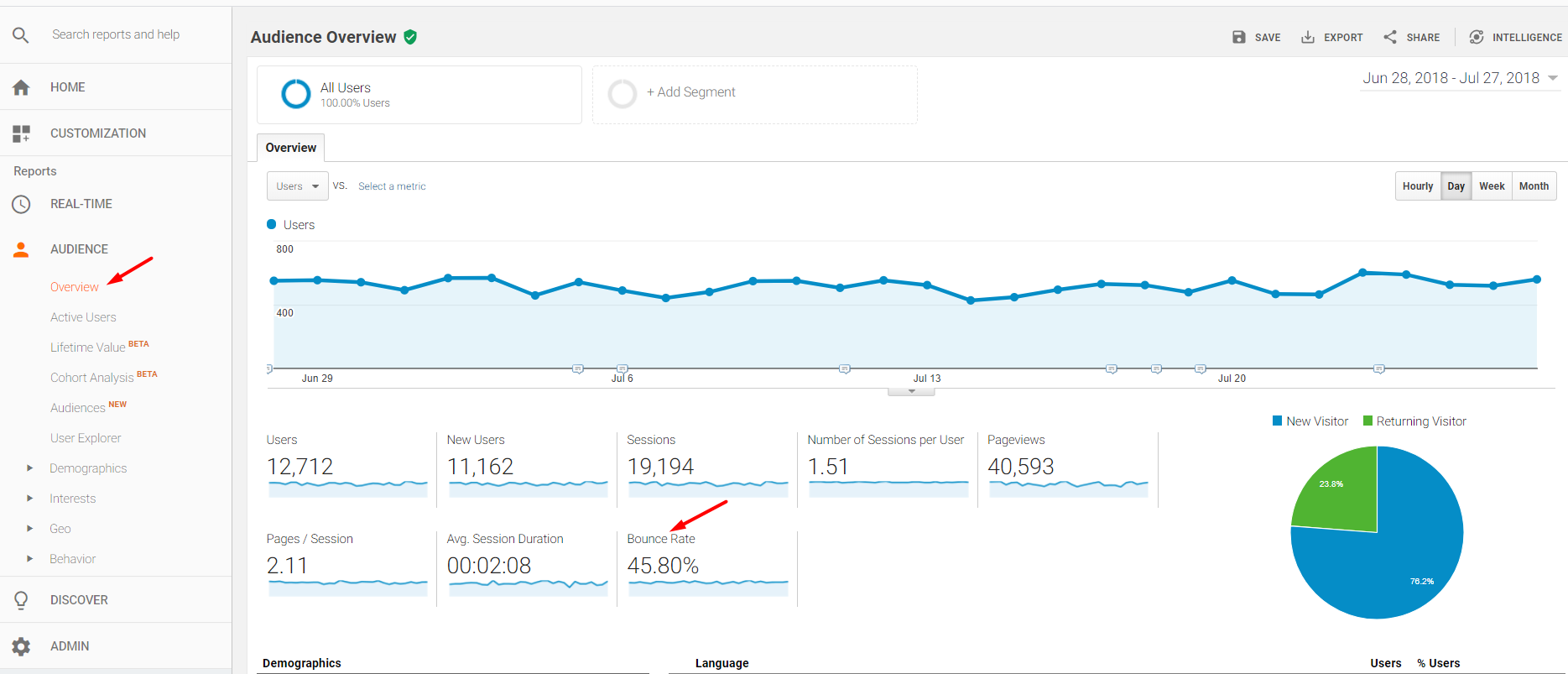

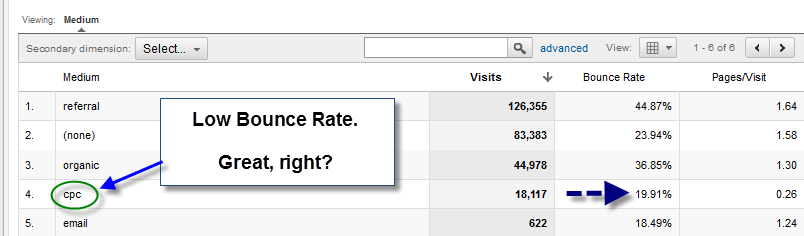




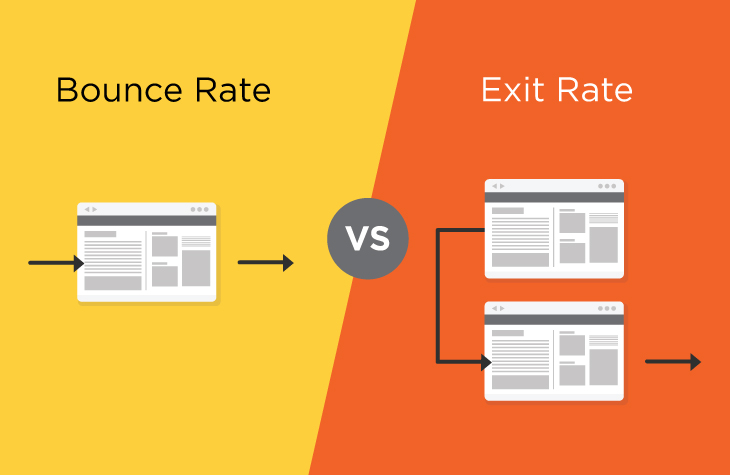
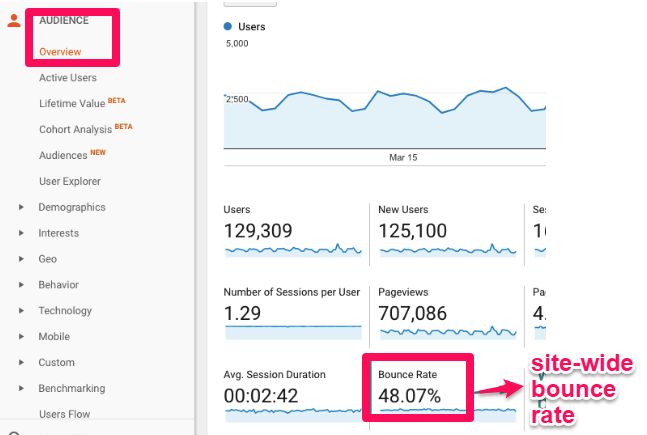





 Jimmy's Internet Marketing Business Blog