Categories
Online Marketing

How to Use Facebook Ads for Beginners (2020) – A Complete Facebook Ads Tutorial

I’ve spent close to half a million dollars now on Facebook. So I feel, like I know, a thing or two.

This is this: is an old old account? You can see right here lifetime. Just so, you know a little under 6000. This is back time when I was testing and then I made more of an official business account And that’s where I do most of my spending right. So that’s for me personally in my business, But then I’ve spent another. I don’t know hundred thousand, maybe four other clients, so We’ve really gone through and nailed down a lot of the different strategies and obviously there’s always more to learn: there’s always Things that are changing with Facebook and you need to stay on top of that.

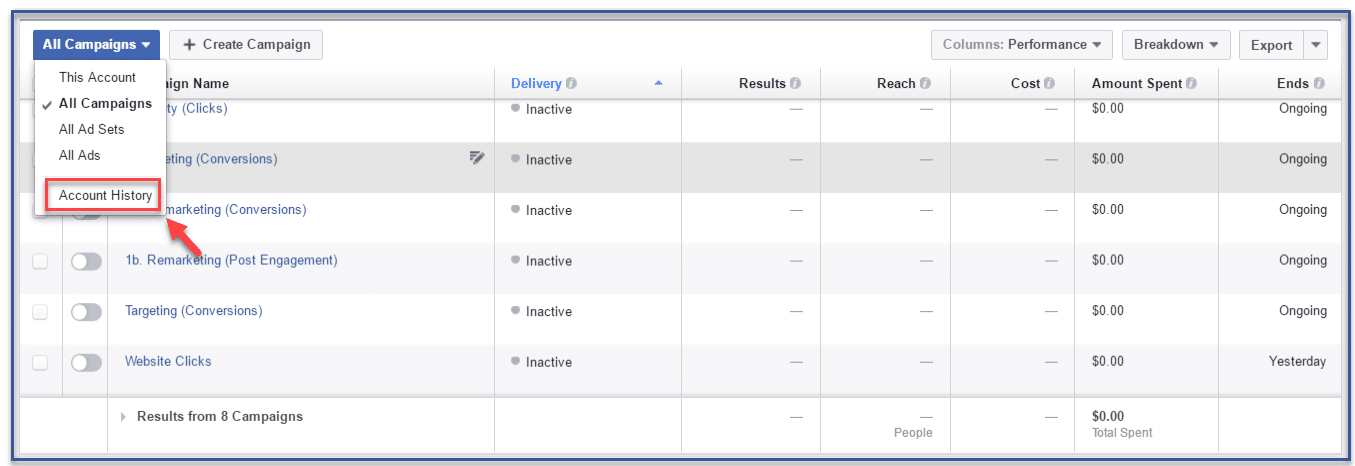
But with this I want to give you guys a quick run-through from A to Z, so Right here guys Just to give you a quick overall view these. These are all of your campaigns alright And we’re going to walk through There’s good, There’s three types of things: There’s a campaign There’s an ad set and then there’s an ad okay. So, like campaign is kind of like at the top, And then you can have multiple ad sets to the campaign, And then you can have multiple ads in each one of the ad sets right.

So just to break that down. It’s actually easiest to go through and start creating campaign to explain each one of the different Meanings of what those all are cuz like you’re, probably okay, Just what the heck are those right. So if we click on create campaign right here, all right, It’s going to See we’ll start over. It says: What’s your marketing objectives, okay, So there’s a lot of different things here And we need to choose the objective that best suits us of what we’re shooting for.

Okay, so we’ve got Brent of awareness right here, consideration or conversion, so Facebook they have so much data that they know. If they’re going to show an ad in front of somebody. They know if somebody’s going to read A article like more likely to read a article or more likely to like or comment a post like for me. I don’t really like and comment on a lot of posts, but I’ll click on a lot of links, And so they’ll probably know okay I’ll, show Jason ads that are more traffic base of people.

So traffic is basically like you Them to click to your website or to a blog post or something like that where it’s article views. That’s like posting a article on Facebook. You you just want people to read it. You don’t want necessarily them to click anywhere Engagement. That’s just like clicking that boost post button on your Facebook page. That’s to get people to like and comment and share on your posts and Facebook knows the people that are more likely to do that came and right here.

There’s lead generation, That’s using Facebook’s lead forms Which we could shoot another article another day, if you guys want a article specifically on that Just comment down below, because I can go through and show you step by 7. The cool thing about this is: It gives you their name phone email address, whatever information you want, But it automatically pulls the information that Facebook has on file so a lot of times.

You can eliminate a lot of the bogus information When it comes to lead generation. Right now Messages this is kind of a newer one, but this is really hot right now of just like, you know, they click hey, I’m interested to call to action is send message, and then it starts a conversation in your facebook, Messenger, okay and I’ve seen some Crazy awesome results with facebook, Messenger and then Conversions right here.

This is using. This is diving a little bit deeper And I’ve got some other articles on this, but using Facebook’s, pixel, Okay, So they’re pixel is basically their way of tracking everyone that comes to your website. Everyone that becomes a lead all that stuff, which we can hit a little bit on that today, But will also I’ve got. I’ve got actually another article that I’ll link here Be able to show you guys how to actually make that happen.

Okay And how to set that up and use it on your website, so these are all the different ones. So, for this one, Let’s just say We’re going to go with traffic alright, And this obviously is based off of your goals of what you want to go through and do I didn’t really hit brand awareness. Brand Awareness is just getting like a massive reach, getting like more exposure than anything. You know it kind of like that in store visits, catalog sales.

This is a little bit more advanced And it depends on like what type of business you’re in so I’ve actually never used those Just because I’m not in that type business. But if you use you’re, working with like a physical location Like store visits, obviously are going to be huge or catalog sales. That’s probably going to Be really more to e-commerce. Alright, so let’s just say traffic right here And then we could give the campaign a name.

So we’ll just say: demo traffic campaign right So come over here and just really quick back I’ll show you, Let’s just click back right here. You can’t set a limit to the campaign. Saying hey, I don’t want to spend any more than 200 bucks, 500 bucks whatever or 50 or whatever the number is, But I typically don’t do that. I just kind of keep my eye on the campaigns and read them. So what does it continue here? Okay, So the campaign so like we’ve got the three Different pieces of the campaign, which is kind of like the overall, the highest part of the pyramid.

I guess and you’ve got ad sets where you can have multiple ad sets within the campaign. Okay and then the ad right here, So your campaign is the objective: do you want two people to read articles traffic get leads? What do you want to happen, then? Your ad set? This is where it gets into the Targeting of fining, like what’s the audience like. What’s the demographic you want to target? What’s your budget, You can see right here.

They break it down They’ve, actually they change this about a year ago And they made it really simple to kind of see all the steps like your objective. Okay, now the trap. Okay is traffic? Who do you want the audience to be? Where do you want to be placed? You want to be on your mobile phone, a Desktop on Instagram on all these different platforms, and then your budget. So it’s like hey. Do you want to spend five hours a day? You want to spend $ 100 a day like how much do you want to spend okay so over here as we come down, and we can give this a name to so we’ll say demo a Traffic ad set, and then you can.

I typically would like at this point to just give it a name based off the audience Right which we don’t know yet something just kind of create this on the fly. But it’s kind of cool because you see like the potential reach of what you’ve got so far and we’ll break it down. You’ll see how this number right here is: 200 million. How, as we go through and break this down, It’ll shrink but you’re getting more narrow.

More specific, Okay! So when I’m running a campaign, if it’s, if it’s like a national campaign like all across like the US or Canada or whatever country you live in, I Like to get a few hundred thousand people in that campaign, because Facebook works better with more data. Okay, So, like the bigger the audience, the bigger at work, it works. However, if it gets too big if it’s getting to like three four five million, Sometimes you’ve got to like nail injure your targeting a little bit better.

If it’s like a super broad market, then great Like if you’re selling, I don’t know like Weight, loss, stuff, cuz, that’s a pretty broad market. But if you’re like in more of a specific niche, you probably want to stick around like the one to two million on the higher end right. That’s at least what I’ve seen. But then, if you’re doing like local ads. Obviously, it’s kind of based off of How many people live in your town in your city, right like you, live in Chicago versus, I don’t know like it’s.

Some small town in South Dakota right like you’re, going to Have a lot fewer people, But you don’t want to be reaching out to people in North Dakota because this is not going to be within that right. Demographic, okay, So come down here traffic. I just leave this here. Nice thing is some of the stuff. You don’t really even have to touch It’s. It’s not like it’s super important so offer I don’t do anything there and then custom audiences.

This is a little bit advanced, so we’ll hit that in another article and then four locations – Let’s say let’s say this is let’s just say this is a local, app, okay, We’re running it for a local weather, we’ll say a real estate agent. Just because That’s I work a lot in the real estate space and the mortgage space. So let’s say: okay, We’re going to come down here and we’ll say. Or do we want to be a tape? Orlando, Florida, Okay, So we’ll type in Orlando Florida and lay this? They went from 200 million down to two million people right here now.

What, if I run in a local ad, this locations of this drop down it by default, is going to say everyone in this location, But I typically would want to do people who live in this location? Okay, because it’s like hey, I just want people who live in this location and that’s good for real estate. But if you’re doing like it for a restaurant – And you just want everyone that location, because, if they’re busy and as a matter if they’re visiting You want to be able to target them as well or you can do piece people recently in this location.

So if they were there But they’re, not there anymore or people traveling this location so like if you’re like running ad for more tourists type stuff, You can do that as well. So For this one with real, We’ll just say, people who live in this location And then you can see that without narrowed down to 1.5 million, because well That is kind of a touristy spot right. So now what we could do Is we can go through and say: hey.

I only want it with people in the current city, Okay, so which that’s going to nail down to eight hundred eighty thousand, or do you say hey, I want to do more of a radius Okay, so you can go up to 50 miles or down to ten Miles so just because this is a little bit bigger city Right, we can do a 10-mile radius, okay, so now we’re going down and As far as the age range you got to kind of think of, like your target demographic, Like how old are they like somebody? If we’re doing real estate, It’s looking to find someone, That’s looking to buy or sell a home, Then 18 year olds – probably not going to be in that demographic.

So I’d say that we like to go up to at least Like a 25 26 27. Something like that, and so you can see how you’re narrowing down This as well. You Go through. You could type in languages, It’s like. If you only want to work with people that speak English or you could say, hey. I want to work. I know there’s it’s a big Hispanic market in that area, so you could just say hey. I want Spanish, So you can kind of see as two hundred twenty thousand people or you can just say, hey, You know I work with, doesn’t matter what language they speak.

If they they live in the u.S, They probably speak a little bit of English, so I’ll just leave it at that. So I’ll, typically just cuz I’d speak English. I’ll just put that in Now guys. This is where it gets pretty cool right here: Okay, the detailed targeting okay, so the detailed targeting you could do some really cool stuff here. So What I like to do you go through and browse? You can browse by demographics, so somebody’s education, Okay, it’s education, level, They’ve got a college degree or they’ve.

Just high school or they’re in college They’re in high school They’ve got a master’s degree, So you can get pretty like bit and obviously this is not always something that you have to go through and choose, But sometimes depending on your ad you’re. Creating this can be really helpful, So it’s just good to know some of these different things that are in here or financial. You can say hey. I only want to hit higher income people, so people they’re making over half a million dollars a year.
Okay Or I can target the lower or like kind of like the middle-income or something like that or saying, hey net worth, okay, Because if you got like a high value, real estate property. For sticking with this, you probably like somebody – that’s only like – has a $ 100,000 net worth. It might not be able to afford a five-minute. Well, They can’t afford a five million dollar property. Okay, so that’s kind of cool right here and then also, I said what hits of these things, because these are like What I like found somebody stuff with some of these things in here I was like wow there’s a lot of stuff.

You could do so. I don’t want just open up your guy’s eyes And your mind is seeing some of the different things that we can do here. Alright, so you can do home ownership, Which is big for obviously real estate mortgage. You say: hey, I’m looking for people to first-time homebuyers home type life events Interests you see like okay, You want people like there’s one where let me find this There’s what old behaviors.

I think it is okay, Where it talks about people’s purchase. Behavior right this right here, So people that are like more likely to make big purchases online if you’re doing like ecommerce type stuff, see these buyer profiles, Coupon users that, like it’s crazy, how much data Facebook has because Facebook now has the data that you give them. But through Facebook’s pixel they can actually track What sites you’re going to.

They know what what links you’re clicking on What ads you’re clicking on so they’ve actually got a lot a lot. A lot of data on you, Okay, cuz. Some people last times were like well. How do they know that I, like I like skiing – I don’t like any of the skiing pages, but You know maybe you’re clicking on those those ads or something like that. So they’ve got. I mean I’m not going to go through all these, but they’ve got tons of things down here or you can just say, hey They’re, interested in real estate.

You could just type that in okay, so right here interests or Behaviors either. One of these, the difference between interested behaviors interest is basically they’ve liked. Something related to real estate on Facebook. Behaviors is kind of like they’ve, more acted upon something like they’ve, that’s more of like they click the link or something like that. It’s anyway guys, you guys could get lost in this forever.

I’m not going to dive in super deep more on this, just because we’ve already, I feel like hit that pretty well So adding the connection type this right here. I don’t always really do this, but you could say hey. I want them to be people who, like I wanted. I want to just target people who have liked my facebook page already, so it’s like that’s kind of your warm audience Or if you want to like expand a little bit.

But you know how have some of the ads that says: hey So-and-so, like you’re, one of your friends, also likes this page. This is where you can go through and do that so you say: hey friends of people who, like your page or if you want to just Expand and get new people say: hey only. Eight people Exclude people who, like my page, because this is not those like my patients only for new people coming in okay, so now coming down What we could do here so automatic placements a lot of times they have this here by default.

I like to do edit placements and Just so you can see like all the different places we can have these ads. You have it on the newsfeed, so this Mobile and desktop used to be separate, And now it’s just one of the same. If we want to make it just on mobile or just on desktop right here on device types, It says all devices recommended, which I usually leave it at that, but you can say only on mobile devices or only on desktop computers.

Okay, so that’s just something really! Quick there and Then, as we’re going down here, I like to just typically leave it on the Facebook news, feeds and uncheck everything else: okay, Just because I’ve seen the best results with that. However, I just wanted to show you some of the different places you can have these dad’s okay, So you could have it on there instant articles, There’s kind of like a newer blogging type platform Industry articles.
This is kind of like what YouTube’s already been doing. Having like the streaming articles before a article, you know right column, you guys have seen that on your desktop top right lot of times, you get cheaper ad Space for that, just because it not as many people click on that. However, It could still convert extremely well and then right here. This is where you do it on Instagram, okay, Facebook owns Instagram, and So, if you wanted to show on Instagram as well, you say hey, I want to show it in the newsfeed or at the very top on the stories.

Okay, so that’s kind of a cool little feature there. Then you’ve got all these different ones. You know, if you want to do messenger and say hey, I want them to click and go to messenger, or you can actually have it an ad. In essence, pop up in that person, Messenger box, Okay, which it’s kind of crazy right – okay, Now just scroll down here guys. I Don’t really touch this right here and then, as far as the budget, you can do a daily budget.

So I want to spend five bucks a day or a lifetime budget. Just saying hey, I Only want to spend $ 35 $ 100 $ 50 or whatever It is. I typically just like to do a daily budget. Okay and you can start out at whatever number, whatever suits your budget right now. If you have an audience of like seven hundred thirty thousand, you can start at like a higher number like you could start Technically, you know, let’s say 50 or 75 dollars a day.

I like to start normally like around twenty twenty-five dollars a day if I have like a massive massive budget, But if you’re reading this article you’re probably more of a beginner. So if you start around like the five to ten dollar range, That’s probably just that’s perfect. Right so we come in here and then this is. This is something That’s that’s cool Like what I like to do sometimes is when I start a new ad campaign, I like to give it the whole entire day so like right now, I think it’s like 6:00 a.

M.. On a Saturday. I I just woke up. I couldn’t sleep, It’s like I’m just going to shoot a article, So I like to get the full day and let it run so that I can kind of like see the whole day’s data. It’s so like. If it’s. If it’s right here so we say I like to start like, maybe on a Monday, okay and then we’ll say, look We’ll start at 8:00 a.M. Okay and then, since we’re a daily budget, Well, you can’t have a Start end date and then still a daily budget, or you could say, hey, run my ad set continuously, But I like to kind of like have a start date right, and so all that switched Up on me, so we come over here: 8:00 a.

M.. Cuz, then. So, if that’s Monday, at 8:00 a.M. On Tuesday, when I like kind of gets you my ads and stuff around like 8 or 9 a.M.., I Can see a full day’s worth now. Really quick, quick tip, if you guys are only spending $ 10 a day. I would give it probably three to four to five days before you go through and evaluate Whether your campaign is work Not because sometimes it takes a little bit of time for Facebook to go, optimize it and find the right people and the more data They have.

The better They’ll be able to optimize it for you, okay, so despite popular belief, Facebook actually wants you to succeed, because if you succeed, you spend more money with them and it’s great for everyone right. But at the same time you got to have a good ad that that really is fitting with your target demographic Which we’ll talk about ads here in a second okay. So That’s kind of like what I like to do so if it started on Monday from 8:00.

At 8:00 a.M, I could check it, Maybe that next Tuesday Just kind of get a quick glimpse of what it’s looking like. But if I’m only spend $ 10 a day But you’ll wait to like Wednesday or Thursday and really determine if it’s a winning ad or if it’s it’s, not right, okay, So coming down here, link clicks, I typically don’t really mess with any of this, and that Doesn’t matter it like, doesn’t matter what campaign I’m Ronnie, I just like leave it just because lots of Facebook’s basic stuff is kind of like already set to where you want to have it.

Okay! So then, we’ll come over here to the the ads section right and You need a business page, Whether it’s your personal and your business, one or whatever You need a business page in order to run ads, you can’t run it from your personal profile. Okay, now It’s nice because it’s super easy to go through and create your your own Facebook page free, easy takes like two seconds all right, Then, if you’re also advertised on Instagram, you can connect your Instagram account right here right now, the cool thing is is, if You haven’t existed like let’s say you made a post on your Facebook page and, and you want to use that you can just click on use existing post and That you can go through and select one of your previous post right here.

Okay, Now, if you go through and you’re creating a new ad inside a Facebook Ads manager, this is what’s called some people call it a blind ad and the reason why it’s called a blind ad Is because this is actually not going to show up on your Facebook page in the newsfeed Right so there’s the two types you can go: make the post on your Facebook page And then use it as an existing post and use that in your ad campaign or if you Inside here it actually does not show up And there’s Pros and cons to both some people don’t want it to be like if you’re, excluding people from your Facebook page, It’s only a special offer special something for people that don’t like you your page.

Yet then you could do that. Sometimes it’s nice to have it on your Facebook page, Because then you get some free, organic exposure, some likes and comments that you don’t have to pay for, and It looks like those posts, sometimes look a little bit more natural. It’s not like a straight up at Because they’re going to look a little bit different, like an ad inside of ads manager, you’re going to have like the headline The sub headline is going to like Be like I mean you’re just going to be, like you ask See that you see everyday, whereas in a post on Facebook, It’s not necessarily going to look as much like an ad and she kind of like almost, I guess, not trick people But like make them think it’s not an ad.

It is still will say sponsored at the top, But those are some quick little differences there Now we’ll hit these really quick. Just because this is a tutorial for beginners. I want to give a full Rundown of everything. It’s like the carousel. This is we’ll just kind of show: They’ve got like the little demos right here. This is where you can go through and you can have multiple little different images or pictures so like this is kind of nice if you’re in e-commerce and You’ve got like different products that they might be interested in right of like hey, We got this or this Or this, then, that you could just come down here and change these different ones Just through here you can add it, It could be an image or a article.

One thing I’d like to do in the past, with when I’m trying to get more clients is I’ll. Do a carousel ad right like this, But also have different testimonials, so all like going out four or five testimonials like Hey this person, this happened or this person. This happened this person. This happened like real estate. You could potentially feature multiple listings that you have right. Where I like to typically just do one listing, if I’m a real estate agent, Borrowing my business but that’s an option there, you do a single image ad, which I’m sure most of you guys have all seen.

Just it’s just one main core image: the single article Same type of thing, but it’s just a article. Instead of an image Slideshow, I actually have never really used slideshow, but it’s like kind of just that You can see like it says, create a looping article ad with up to ten images. Okay and then Collection right here. I’ve never used this as well. So I’m not going to like go speak to it. I’m not an expert on it feature collection of items that open into a full-screen mobile experience; Okay, so that could be cool.

Okay, Let’s start now, I would highly recommend starting out with a single image or a single article. Here’s the I guess. Basic simplest wants to do so. Let’s say single image, So you can go in here, upload an image You can see there free stock images or browse the library all to see. I don’t even know what images I’ve got Well, she’s like the core, the made the popular profile picture. I always use on everything.

Oh so, if it looks like this guys, There’s a tool, that’s called canvas, yay and va.Com. It will see if this really quick cuz. This is important Like this ad right here. This same thing was happening like this: lady’s head was getting like cut off Cave just kind of like how my heads getting cut off. So what I did on canva is, you can go through and they’ve got all of these Dimensions that are already pre-built for you.

Okay, so, like facebook, add a YouTube thumbnail, This is what I use. Do you make all my YouTube thumbnails. This is the old Facebook, a total dimensions. Facebook cover Facebook, post, Instagram post the college different things So I’ll just hit this and then what I’ll do is I’ll upload. You can just upload the image It makes it really easy to upload. Okay – and let’s say this – is the image right here: Okay, so now, if I go through – and I throw it in right here – and We can make a little background – Let’s see what the background should be.

Maybe this cool house – That’s probably not going to fit that great. I, Like this house, is my background. Actually, Okay, and obviously this is probably Anyway, You guys can see it’s pretty easy. You just like drag and drop everything, and then you can kind of like move. You around all that stuff and then You could even type text. Okay, so test ad Will change that to be white, so they can see it a little bit better to change the font.

Okay, we just maybe throw this up in the corner, and Do it also really quick guys if you have more than 20 % Text in your facebook, add image You’re going to get disapproved Okay, so I actually typically like to have as little text if no text As possible, So this is actually typically what I do on at YouTube thumbnail This doesn’t matter but on something like this I like to like, maybe have like. Maybe it’s like hey and obviously this is not like what I do for real estate.

I’ve got other strategies and stuff like that. But let’s say if you want to throw an image of you or somebody in there have a little background image And then you let your your headline and sub-headline do the talking? Okay, Which will show you guys here in a second now We can download this and Upload it into Facebook, Ads manager. Well, it’s just for this one, I’m just going to browse the library.

I want to show you guys that really quick, Add images we’ll just use something right here that we’ve already got in place. I Will just use this: It’s a it’s a home right, okay! So then we’ll throw in the URL like let’s say, for this example, We’re just doing it to Google. Obviously, you’re not you’re, going to put in the URL of your Your landing page and and I’ll hit another article on that. But you don’t want to send it to your main website or your blog.

It you’re going to waste a lot of money, You’re not going to generate any leads, but obviously it depends on what your goal is right. That campaign objective up here. So if you just want people to read your blog post, then yeah, you could just send them to your blog right. But if you want to generate leads, you want to send to a landing page which all I’ll have another article on that. But that’s kind of where we want to go there, so the text right here The Facebook’s made this pretty easy guys You just kind of go through okay.

What’s the website, you want to send people to what’s the text, you can say test text Copy right here. This is just like your main Facebook post, like what you want to say in there. You can make this as long as you want, can make it like a long long story. You can make it very quick, and what I like to do here, Just is, is a tutorial kind of for beginners, like letting you know how I like to write my my eat.

My copy Excuse me guys, so I like to go through first thing. I like to do is call out my audience. Second thing I like to do is do something to pique their interest and To give them kind of a call to action and then add some value and then another call to action so like, for example, Let’s say Orlando Homeowners, Okay, so that’s calling out my audience. Okay, so I’m targeting people in Orlando And if you’re a homeowner and I can go through back in my interest and say hey – I only want people that are homeowners, so you have specific.

But then, if you’re live in Orlando and your homeowner – and you see Orlando homeowners, That’s going to peak your attention right, that’s going to be like oh hey! This is for me, You could say. Are you looking to sell your home in the Next three to six months? Okay! So now that’s like weeding out through Orlando homeowners, kay, If you’re not looking to sell your home You’re going to keep scrolling You’re done.

I’m not talking to you Say. Are you looking to sell your home in the next three to six months and then, and obviously this I’m just creating this on the fly You could say like Alright look like let’s say, I’ve got somebody looking to buy a home Okay, I have a family of Three looking to purchase a home in the I don’t know where Lana that well so we’ll just say blank Area so like if you were wanting to get like specific to like a community, you know Who is hoping to purchase their Dream home within the next Few Months, okay and then we can say like full details, click here And then we can have a link, so we’re going to have the link.

So if they click on this image right here, That’s going to take them to the the site, but also Is sometimes nice. Add the link inside this copy too, because there’s a reading it lot of times people read Ads or anything online with their mouse. I don’t but a lot of times people do, and so, if you’re they’re going through and they’re like, Oh well, Do you look here? It’s just easy to click right, and So you can add like sometimes it can be as simple and click quick as that or you can add a little bit more.

Sometimes I typically just leave it at that. So light-cone have the audience and then of those people hey. Are you looking to sell your home next 36 months, we’re weaning it down and then we’re adding like it’s like a little value. Add like hey guys, get like if you’re going to sell. I’ve Already got a family of three looking to purchase a home in this specific area. Now, obviously you don’t want to like make that up.

You want to be like legit, But you want to be. Some value. Add there to get them to be like to pique their interest of like okay, What separates you from all the other real sage and stuff like? Why would I want to sell my home with you? You know I mean so then For the headline. This is where that google spot is going to be. We can say, are you Yeah we’ll just say? Are you looking to sell your home okay and that’s going to pop up right there and Then we could say: hey call to action.

Learn more. We’ve got several ones right here, We’d say no button. I don’t want it to look like an out-of-time, so we’re just going to say hey just like. Are you looking to sell your home or read more so this is kind of depends on like what your goal is right a Lot of times. I will typically do just learn more Just because, like it kind of like it’s, not Something of like hey, download now or donate now, or Buy Now or sign up or something like that, That’s a little bit you put a guard up or as learn more, It’s Like most people are fine Learning a little bit more about something right: Okay, so we’ll just actually I didn’t click that learn more, so leave it at that.

Okay And then I I took – we don’t hit this and then this display light link. You can change that if you want, I typically just leave it in then a newsfeed link in description, so we can say test Copy right here. That’s going to Pop up down here as your sub headline. This is the mobile view. You can see mobile newsfeed and this is only going to show up on your desktop newsfeed. So if we go through and we Scroll and hit this, this is going to show all the difference ad placements that we chose in the ad set level.

Okay, So we chose news feeds, It’s going to show this one right here, and this is another view of it. Okay, And this is what its going to look like on your desktop newsfeed, so I can see test copy. Let’s say we can say Orlando home owners. Looking to sell in the next three to six months, I usually do this like a little shortened version of what I’m talking about here. Okay, so It says Earl an emotionally going to sell in the next three six months.

We have a family Looking to buy something like that, and this is like learn more okay, So just like a quick, So I’ll give them they’re scrolling through and they kind of Skim past. All this then they see this. Are you looking to sell your home Line of home or just looking to sell the next few six months We have a family looking to buy and they’re like? Oh, What’s this all about, learn more, They go to your website, okay and then down here.

All this URL parameters – That’s super advanced stuff. You don’t need to mess with that. Honestly, I don’t really miss that even still – and I’ve spent a couple thousand dollars a day on Facebook, So facebook pics will leave that leave this I’ll leave. All that use hit confirm Good to go Okay, so some other little last tidbits of things if we come over here to ads manager. This is so like this is going to Be.

Will save leave this page okay, so This is taking you back to this area. You can filter through stuff by lifetime. You want to see everything for the whole lifetime Or you can see how your campaigns just performing today or last 7 days lost times. Last 7 days You got ta, keep in mind, It doesn’t show the day of ok. So that’s just going to show the last seven full days or last 14, full days Last times I like to look at it at the last seven days, Okay and see what it’s like this.

So you can see I’m not running any ads And then you kind of mix it up and say like okay, I want to see it by Performance or delivery, so delivery would be like how many people are being reached thrive or engagement. How many like Reactions comments, shares links like all the different information there, so you can kind of like Go through and scroll through what, by what you want to see it, and then you can see here, you can see your campaigns ad sets and ads Okay.

So if you want to go through and say hey I want to get. I want to nail down on a specific like let’s say this foreclosure leads. This is only going to show the ad sets that are within that campaign and then, if we click on this, it’s going to Just dive deeper. So, like you got campaign you clicked on so it says one selected, Adsense, There’s only one ad set in this campaign. We click on this, so it just dives deeper now We’re at the ad level.

So there’s just this one ad and if you’re like crap, I want to like see what it looks like. I can’t remember what it looks like we just hit this. It will hit preview and it’s going to pop up what this looks like a So we kind of see what this looks like. If you want to see what it looks like actually in the newsfeed You’re going to hit Hey click on this say Facebook post with comments, and This will pop up what this actually looks like.

So if you wanted to like, like it yourself right there, you could just throw in a like right there and This kind of it switches between what profiles or pages you have on your account. I’ve got a lot. You probably don’t have as many as me. Okay, so those are some different things and then also up here, this hamburger menu, You get all tools. This goes and tot kind of takes. You in different Aspects like you can create different custom audience so, like I’ve got a article on this.

Actually, where you can upload your All of your contacts into Facebook, you know Maps their name phone and email with the name phone email, But they have a file with Facebook, which is kind of cool Facebook, pixels, Which I’ve got a article on that’ll out of here. As well On tracking, so that’s kind of cool. So if you guys all add these articles like, if you guys, click in that top section, Where there’s like the little circle with the eye I’ll have some of those different articles here.

So you guys can kind of explore some more of these different things, And then this is where you can go set up like the billing and all at them, Like the admin type stuff, and so anyway, I’m not going to hit all these things. This is just quick. Obviously it’s a little bit longer tutorial, But anyway, if you guys want to learn something specific, there’s something that I didn’t cover in today’s article.

I hope I covered a fair amount, But if there’s something that I didn’t cover today, make sure you guys leave a comment down below Also if this was helpful, Go ahead and hit hit like and let me know I I want to bring you guys and help You guys up as much as possible And if you guys are not subscribed to blog, make sure you subscribe. I try to launch a new article every single day. I do my best with that, but I launched new articles weekly for sure on how to generate more leads, make more money and grow your business, whether You know your real estate agent mortgage broker, if you’re creating your marketing agency Or you want to start already you’re An entrepreneur like it doesn’t matter What business You’re in, But I will go through and show you how to go through and grow things with Facebook with social media And how to go through and grow your business.

So anyway, guys Thanks so much for reading today and hope you guys all have an amazing day.


Looking for a company that will have your back? Check out the video below:


Categories
Online Marketing

FACEBOOK ADS MANAGER Tutorial (2019) – Campaigns Vs. Ad Sets Vs. Ads

So, let’s dive in and the easiest way to really explain all this stuff. You can see kind of you have the look at your campaigns, your ad sets and your ads right up here.

So you can just click and flip through each one of those tabs and The campaign, if you think about it like, should be drawing something like a board or something like that. It’s kind of like at the top and then you kind of like it’s like a pyramid right. So within one Campaign you can have multiple ad sets and then within each ad set you can have multiple ads All right. So, for example, like one campaign might be to get leads and then you’re targeting people in you know Texas, you’re, targeting people in Florida you’re targeting people in California.

Those would be different ad sets and then you would have different. You could have different ads within each one of those ad sets or You could have the same ads within each Mo’s. That says now. I know that’s probably confusing, Let’s jump in and break down exactly What all these are. So if we click on create’ right here, You can see so it’s start over. We have the campaign Okay, so campaign. It says: what’s your marketing objectives Like what do you want to do? Do you want to get people to click to your website? Do you want people to like or comment on your Facebook post? You want people to convert into leaves you want people to go through and make a purchase like.

What do you want So like that’s, basically telling Facebook, because the truth is guys. Facebook has so much data on all of their users that they know what users are more likely to click to a website. They know which users are more likely to kalaiy or comment a post, which ones are more likely to buy something online or by some Specific product online or to opt into a lead generation site. So all that different stuff.

So, that’s why you want to tell them exactly What you’re wanting to do And that’s why a lot of people actually fail with Facebook Ads as they’ll go through and on their Facebook page. So let me just pull up my Facebook page, really quick to show you guys this example So on their Facebook page here, They’ll come down and they’ll make a post And what happens if this will ever load up is you’ll. Get this little boost post button right here, Okay, on every single post that you make boost post and then people will be like, oh well, I boosted my post.

I, like you, know I put money behind it. I did the targeting all that stuff because they made it really simple: just click right. There Cuz obviously they’re going to make it simple, because this is an easy way for Facebook to make money. Then you just go through choose your targeting, who you want to target and you hit boost right. You spend five ten twenty bucks a day, However, when you go through and hit boost posts, this is choosing the market objective of Engagement.

Okay, Which means Facebook is going to show that posts of people more likely to like and comment on your posts, Not necessarily go and click to your website or generate a lead or make a sale or any of that stuff. So Sometimes you do want to do that. Sometimes you do want to go, get the engagement, the social proof behind a post. That’s really good for branding Right, but you don’t always want to do that So the campaign that is your marketing objectives And will hit those different market objectives here in just a second and then your ad set.

This is your targeting Okay! It’s who you want to target This is going to where you’re going to target the custom audiences that we’ve created the look-alike audiences. Alright, this is where you’re going to choose the age, the gender. If you wanted to do interest or a specific location, Any of that! That’s all in the ad set level: that’s telling Facebook who you want to target And then you can see and they’ve made it really simple.

That used to not have it like this, But they made the structure very, very simple, Okay, and So you can see this. The audience like I just explained in the placement, So what the placement is is. Are you going to place your ad on Facebook, I’m the newsfeed? Are you going to place into Facebook right hand, column? Are you going to place it in the Instagram newsfeed? So it’s kind of like old, traditional marketing.

Do you want in the magazine? Do you also want in the newspaper? Do you want it on the billboard? Do you want on the radio So just like all the different places that Facebook owns, which they actually own? Quite a bit of space right So, like you’ve got the Facebook stories. We’ve got the Instagram stories. You’ve got. You know the Instagram newsfeed Facebook newsfeed, So we’re ever. You want to place it we’re going to dive into which placements, I believe, are the best and when you should go through, and You know, expand it out to more places We’ll get into all that stuff here.

But then also your your budget and your schedule, like You, want to spend five dollars a day, ten dollars a day, a hundred dollars a day, or do you want to spend a lifetime budget of $ 100 over the course of a month? Or do you want this? The campaign spent $ 5 and ongoing until you shut it off Whatever it is, and then the ad is obviously what you actually see on Facebook or even on Instagram. So it’s the image, it’s the headline, It’s the text and the copy of all that stuff and we’ll get into the different ad formats And when to use each one and how to use each one.

What what things to really think about here in a later article! So with that said guys what, when it comes to what your market objective, there’s there’s several things that we got ta think about and, like I said, We need to know what our marketing objective is and Facebook has all this data on all of these users. So if we want to send people to our Website just to kind of check out a new blog post that we have or whatever We’re going to use traffic, if we want them to like or comment on our Facebook posts, We would use engagement.

Okay, if, obviously, if you guys have a app or something like that mobile app you’d use this one, I’ve never used it. If you want people to go through and read a article that you’ve promoted, you’d use article views because Facebook knows which people are more Likely to sit on their phone or souther computer and read a article on Facebook All right Now this one, as I mentioned earlier, If you’re brand new starting out, You don’t have any custom audience of any existing users or any existing buyers or leads, or anything like that.

This is a great one, because then you go shoot a you know two three-minute article talking about your product services, whatever it is, Promote it for, like five bucks, a day run it for ten days You spend fifty bucks and you’ll have a few thousand people. Usually you can get article views for about one penny per article view Okay. So if you look at that and that’s a three second article view, that’s not like a ten or you know, 25 percent view of the article.

But if you look at that, you Five dollars per day – That’s 500 people that are reading the article and it’s going to be exposed and reached a lot more than that. So that’s a really quick and easy way, simple way to go through and expand that audience lead generation right here is not necessarily using Landing pages kay we’re going to actually do as section on lead forms, because that’s a little bit a little bit different.

But basically, you run an ad and it’s to get a lead right: schisms, name, phone number, email address or even physical address and Then, instead of sending them to another website like a landing page to get that lead. What you’re going to do is there’s a pre-built form on Facebook. They click it, It pops open and then it pre-populates with all the information they already have on file with Facebook.

Okay, so it’s really cool. It’s really powerful. There are some pros to it. There are some cons to it, We’ll cover those as well and then messages. This is to get people opting in and starting that communication with facebook Messenger, Which is super powerful as well. If you go through kind of the facebook Messenger bot course that we’ve got the module in here, then that’s going to be able to help you as well with this piece and then We’ve got conversions, which this one is going to be more.

This one’s going to be big time with landing pages right or, if you’re, converting somebody into an actual purchase or sale or whatever. So that’s with the pixels, creating those custom, conversions all that That’s where you’re going to use this now catalog sales. This is going to be a lot more for e-commerce stuff, but to be completely honest, I’ve not done a ton with that, because I don’t run ecommerce stuff store visits.

This is a newer one. I haven’t done a lot with that Brand awareness and reach. I messed around with those a little bit, But as far as like going through and reaching a broad audience and building a custom audience, I like to use article views still for that. So So those are kind of different things, and one thing that I would like to just kind of like Just say so you guys kind of are aware On this traffic one.

You might look at that. You may like, oh, why would I ever use that? So I’m just going to use the conversions or the lead generation right here if you’re trying to generate leads. However, If you guys remember from the retargeting section, If you’re not spending enough money each week to get at least twenty convert, You actually want to do this traffic campaign. Okay, because Facebook’s their conversion algorithm, It really optimizes and really starts working which you’re getting about 15 to 20 conversions per week.

So that’s about two to three per day. So if you’re spending only like two to three dollars on a retarding campaign, That’s probably not enough money being spent to actually get those 15 to 20 conversions. So I would do is. I would spend two to three dollars on the the traffic campaign and run that okay, So those are just kind of some of the different marketing objectives, We’ll get diamond deep into each one of these will show you guys how to set them up.

I just kind of wanted to get to that and explain like why you would use different ones and when you would and Then even kind of break down the campaigns ad set and AD level. So with that said guys, I will see you in the next article


Looking for a company that will have your back? Check out the video below:


Categories
Online Marketing

How to Use IFTTT to Automate Your Life and Business 2

This is their home screen and does not look great. Isn’T that pretty That the crowd here seems like it. So what’s so great about it? Is that it’s just so plug-and-play it’s pretty, and it’s simple so you that you can’t ask for more than that – and these are my applets, that I have set up and there’s a couple of fun ones that I want to bring to your attention and stuff. Maybe you’ve never thought about before there’s some obvious ones that are just practical, but I really like having fun with some of the ones that are more out-of-the-box, so the first one I’m going to show you is this one.

So what this says is if the weather changes then post a tweet with an image to my Twitter account. Let me back up here because I didn’t do a great job to sort of introducing. What is tiki is the essence of ifttt, and that is, it connects applications and devices together to automate things, to make your life just a little bit easier. Okay, when do you think, might be a good time to use something like this.

I could think of a million ways, and I actually was inspired a while ago by a blog post are read that talked about how the coarser in group in New York uses this. So, basically, whenever new york is forecast well, actually, whenever it rains in New York, a tweet automatically goes out with an image, and it says paint new york check out these top 10 things to do in New York when it rains in the city when it rained Something like that, so I thought that was a great idea.

You can also time this for sunrise and sunset, so one of my clients was a an online Jewish magazine, and so what we did was we triggered a like shabbat shalom, happy sabbath to go out with the come down on friday, so really cool. What I did in this case, here’s 1 i’ll, show you a graphic. So when it rains and Cleveland, I send out this graphic – and it says it’s raining Cleveland a great time to get cozy and brush up on your social media, so think about the ways that you might use that.

But you can also do it based on your calendar, so let me get back to here, so you could say on the first of every month to do this. You know on every full moon. Do this so really really fun way to use ifttt. Let me go back over to my applets okay um. Now, let’s just talk about i’m going to walk through these we’re just going to talk about some of these. You probably already have set up with this red square up here on the top right and it says post your Instagram photos as native Twitter photos when twitter is in the caption.

So if you want your Instagram photos to show up nice and big and beautifully in the twitter feed, that’s all you have to do is get set this this applet up and the reason you would do this is because, if you just connect the app whether it’s Facebook or Twitter or anything with instagram, then you typically just end up with an ugly little link in this case. It post the picture, nice and big, and bold and beautiful, but check this one out so on Twitter.

What this one says is: if anybody tweets with the phrase I want to create a course, then send me a text message at this number, so really anytime. Anybody tweets with that exact phrase. I’M going to get a text message now. Why is that a good idea like why? Why would I particularly want to have that information? Well, because I have a course that teaches people how to create courses now are another experiment that I love to do is in those of you who have followed me for a while have probably seen me do this a few times.

But, to be honest with you, it really never loses its novelty far as I’m concerned. This is difficult thing ever and that is you’re going to go over to Twitter and then we’re going to go to advanced search, which is twitter.Com /a search cash advance. Alright, this is what we want and where it says this exact phrase, i’m going to say, I need a graphic designer and then we’re going to click search and what you see is all the people who have just tweeted that they need a graphic designer.

This person is guys I need a graphic designer someone to redesign to design logo, t-shirts, corporate branding, i’ll pay marketplace price, pls retweet to assist or please reply to it with resist to assist. I need a graphic designer, that’s good, a tree, creating logos, I mean on and on, but you don’t have time to sit here and hit advanced search all day long in twitter. But what you do have time to do is to set this up so maybe you’re.

If you’re a graphic designer in the quotation marks, it would say I want a CI need a graphic designer and then you’re going to get a tweet every time. Someone says that pretty cool right: let’s go back over to the other applicants and remember don’t worry, you know, don’t worry about writing all this down. I am putting all this into a slick. Workbook, that’s going to be emailed out tomorrow. Course it’s free and I’m hopefully going to compile some of your suggestions for your favorite ifttt applets and recipes combined with these as well on.

Let’S see here, what’s the next one automatically sync starred emails in gmail to evernote, so I don’t know about you, but I get a ton of email and a lot of them. I don’t have time to answer right away, but they’re important, and I don’t want to forget about them. So I will start i’ll click the little star in gmail and it will automatically go to my Evernote this next. One automatically create new reminders on your iphone.

Four emails that you start in gmail, yeah, that’s redundant, ok, email, me, 10, things to know in the morning. I love this one. This one I get. This is where I get great ideas for what to post on my social media, because I’ve got new york. Time result New York Times. Basically, I get an alert from them with any breaking technology news. So if you’re in the health and wellness base, then you would get breaking news for health and wellness and so on and so forth, according to whatever your me shit.

What else I want to point out? Oh, this one’s cool, so whenever you arrive in the city in New York, send yourself a map of the subway. So I’m they’re quite a bit these dates, because I’ve been participating in Todd, Herremans on basecamp mastermind and so its cool the minute that I’ll and I get an email with the map of the subway system. This one saved my too much more times than I can even tell you.

This is set an SMS alert before any event starts on your google calendar. So, for example, today I had a client call at ten. Am I almost forgot about it, but I got a text message. 15 minutes prior to the meeting. That said, your meeting with so-and-so is starting a 10am, so that was really helpful on a every morning at 7am I get the forecast for the day this one pin a photo to a Pinterest board and this one I highly recommend right here where it says.

If new is TT update, then send me a text message and that’s because ifttt is constantly adding new, integrations new devices and stop softwares and platforms that they integrate with and you’ll find out about it. If you set up that rule, so let me show you quickly, starting from the beginning, how you set up one of these easy, peasy little recipes and see, look at how beautiful this is it’s so so, like I just love how clean and simple it is so You’Re just going to follow the prop, so we’re going to click here.

If this now look at all these things we have to choose from, we can connect any of this stuff together. Even your washing machine, ok, your washing machine light bulb SurveyMonkey. I mean I’m just randomly your nest, thermostat on and on on Iran. So many things. Ok, so let’s say on it. You don’t want to scroll through all these things, and you know what it is. You want to connect, then you could just start typing it in date and time and now I could say everyday at a certain time.

Every hour, every day of the week every year on a certain date and time you specify every month on the whatever day of every month, so every single person that’s reading with your audience, there’s something you can come up with. That would be of value to your audience to send them on the first of every month or at the last day of every month, to check in and say, hey, you know it’s the last day of the month.

Did you do such and so or this is a reminder to do such and so so explore this and have fun with it? So what we’re going to do is we’re going to say every month on the first of the month and then we’re going to click create trigger, and then the next probably get is just blew that so now we’re going to click on that and what we want To do what we didn’t do on the first very much um gosh, we have so many options.

So i’m going to say Facebook page and i’m going to say that I want to. I can either just create a status message or post the link or I can upload a photo from a URL. So that’s probably going to be the best thing to do so. I’M going to click here and i’m going to put in the photo URL now quick, tip low pro tip for you in order to get a really easy, clean URL for a photo like the one that I showed. You hear that I have.

That goes out on a tweet every time it rains is to go over to amazon s3. Now I’m warning you now that if you’re not familiar with amazon s3, when you look at it you’re going to go yeah yeah I this is more than I want to take on. But if you just follow exactly what I’m doing, you’re going to be fine and now look at this teeny weeny weeny right there – s3, that’s what you want and what I’m showing you is basically a cloud, but the great thing about amazon s3 is that number one Stuff, uploads lightning-fast: you can create these buckets to organize your content and the truth is, I need to go in there and add a few more buckets and organize myself a little better, but you can create these buckets and then and then you upload articles or graphics Or PDF documents – and it gives you these shareable link in it.

I don’t even know what I pay for this. It’S so inexpensive, maybe five dollars a month, and I have so many articles so much content and I’ve never gotten a message that says like you’re, you’re, running low on content and it’s extraordinarily reliable. In fact. There’S a lot of big-name systems and platforms like teaching platforms, and I don’t want to name them right now, because I used one the other day and I can’t remember which one it was like.

I don’t know if it was teachable, I don’t know where I was, but the point is a lot of big companies that how your content already use Amazon at s3 to host, so that just shows you like help how kind of durable it is or dependable. I should say so: okay, so here we are and arm i’ll, just go over here to this one, because this is where I just uploaded that little dog graphic and you click upload and then you’re going to click, Add file, and I recommend for this purpose to Find a PNG payment, which is what can be if you create your graphic in kamba.

It will default to that format. So let me go to downloads, because I know I have one there. I thought I did so now. What I’m going to do is just click dot PNG in my search and that’ll bring something up just so. I could demonstrate okay, so we’ll just pick this and then click open and then don’t forget this part in the lower right hand. Corner click start upload. Ok done: do you see how fast that was just insane done? Not only that I’m live streaming and I’ve got all these things open and that just happened that fast.

So then, this is very, very important. You’Re going to click to the left of that file, its blue now and then you’re, going to click properties and you’re, going to click permissions and then add more permissions and you’re going to click open, download, you’re, going to check that check the little box and then You’Re going to make sure on the pop-up menu click everyone. Then click save now we’re going to hit reload on this and there’s the file we’re going to click the little blue button.

Again, click properties again and then there it is, there’s our beautiful little link. So you just turn that graphic into a link this also by the way, works really well as a lead magnet. So you know arm, as opposed to feel like when you send a thank-you after someone off into your thing or on the thank you button on your lead page. You can have this be the link, so they are immediately. Click on it and they’re automatically taken right to thing that they opted in for so very, very cool.

Alright. So let’s go back over here, so the photo URL would be whatever it was that we just created. And then you put your message here: it’s the first of the month, it’s lalala and then just click create action and then that’s going to be your ifttt recipe. There, so that’s it! That’S how you create a recipe. It’S just going to just going to walk you through it totally plug-and-play. Please feel free to comment down below and share.

Your favorite is TT applet with us and for those of you who are just joining us. This will be mailed out to you if you’re my email list, you’re going to get the beautiful workbook that I’m creating, which is a compilation of all my favorite, is TT recipes, some that we mentioned today and some that I did not get a chance to mention. So on that note have a great day thanks for joining me, and I I hope you have some nice zesty delicious tacos tonight, because it is talking to use that


Categories
Online Marketing

10X Social Proof With Your Facebook Ads – Facebook Advertising Tips And Strategies

So, yes, obviously you can go through and you can go boost the post and get more likes, get more comments, But I’m not talking about that. I’M talking about how to go through and strategically Leverage and use that Facebook ad, so that we can go through and Compile likes and comments from all the different ad sets that we’re going through and creating.

Now. The thing is, is when we go through and we create multiple ad sets Like, let’s say we’re, creating a campaign, and we want to get conversions. We want to get leads on our landing page Right and then, if we go through, we want to use that same ad, but we duplicate the ad set. What happens is Facebook actually Duplicates that ad and so it’ll be the same exact ad, but it’ll it’ll create a completely new one.

It doesn’t carry anymore over of any of the likes and the comments. So We don’t want this because, like if somebody goes through and let’s say you’re targeting one ad set is targeting, Let’s say Texas right, another ad says targeting Florida or whatever It might be. You know obviously, ad sets are targeting different audience types, whether its geographic location or interest or whatever It might be.

If someone in Florida likes your post, okay Or they have a positive comment or something like that, You want people in Texas to see that same exact thing. Right like or I mean That’s, probably a bad example, because geographical location can kind of get iffy. But let’s say you go going through you’re targeting different interests. You want people to go through and see that there’s a lot of social proof That is the power of Facebook Advertising, or I seen that other people.

Besides us them are liking. It they’re engaging with it and they’re connecting with your ads, So what I just want to show you guys really quick. This is not that long, a article, because it’s very simple and easy to do. Let’S just come over here. Let’S click on this traffic demo page right here or this campaign – So we’ve got this. This is obviously just a demo and everything like that, but we’ve got this ad set right here, We’re just going to click to the ad level.

Okay! So now, once we’re here, we’re just going to come over here We’re going to make sure this is checked right there We’re going to click on preview, Okay, so this is going to pop up a little preview of the post or the ad or whatever you’re going Trying to promote Now what I’m going to do is click on this button right here. Click on that, It’s going to say: hey Facebook posts with comments; Ok, so this is basically to pop it up on your newsfeed as if it’s you know, just a normal pulse right here.

Okay – And so this is what this is. A post is something that we’ve been Promoting right here for one of our webinars, and this is Jason right here He’s a loan officer, You can see, we’ve got 23 likes, we’ve got some hearts and we’ve got even some comments and all this stuff. So we want to be able to carry that over because, like Richard right here He’s got a great comment. I’M a true believer. It works, you know, So we want everyone to be able to go through and see the social proof behind this net right.

We don’t want to go through and start completely from scratch with every single ad that we start over, because that’s Naturally what Facebook does, unfortunately right. So what we’re going to do is we’re going to take this URL, this ID Okay, so everything at the very end. Okay, so it’s right here, this long number and we’re just going to copy this okay. So once we copy that we come over here Back to the ad set level – Okay, So this one – I just have it as like: it’s it’s just super open.

We want to duplicate this Okay, so we would duplicate it. It says: okay, Do you want to do so like this is basically just creating a new ad set, so we can target different People different audiences and we just want to use the original campaign, We’re going to click duplicate right here and it’s going to pop up And allow us to go through and change up the targeting. So I’m going to come in here and say: Demo ad set number two right: Okay, then we can come down and if we have like a custom audience Like, maybe we want to go through on one of them.

We want to target people that have visit our website and another one. We want to target People that we’ve uploaded as leaves or people have readed our articles or whatever It might be right Or we can come in here and say hey. I don’t want everyone in the United States. I just want people and kind of like the example we’re showing before everyone in Texas Right. So we come down here and we can pick.

The age group Obviously go through. Do your custom targeting It doesn’t really matter. I mean this is not kind of the key part that we’re showing you right here and then we hit publish Okay. So now, once we hit publish on this it’s going to go through and because we duplicate it technically, it would go through and Create a new ad that doesn’t have any lags any comments, Nothing on it’s completely from scratch.

Okay! So now what I want to do is I, like, I like to refresh guys the new Facebook guys manager. Sometimes I don’t. I don’t love it. It’S kind of a pain in the butt, So I refresh it because it wasn’t popping up automatically like it used to Which I love the the way he used to work Now. They’Ve kind of compiled compiled the power editor with the new Facebook Ads manager, not my favorite, So we click on right here and then now what we could do is if we just go over here and hit edit and Remember how we grabbed this URL this ID.

We just copy that, and we could say: hey use. Existing posts enter the post ID Paste it in right there, Okay, so, instead of creating that we want to use use existing posts and your post ID hit submit Okay, you know I’ve got the target on Instagram. This articles longer than 60 seconds, That’s why it’s giving us the air right there Look at this guy’s we carry over all 24 likes. We carry over the comments We carry over the shares and then we hit publish and we are set and ready to go.

So that is how you can go through and 10x is social proof With your facebook advertising. With all of your ads, your campaigns, your ad sets everything that you’re setting up now I just went through, and just yesterday I had some URL issues with my webinar registration page, So I had to go through and reset all my campaigns. All my ad sets everything which is a huge pain of, but because I usually don’t like to work on Sundays, but I Had to get it back up and running so that we could get keep our business push it forward.

So anyway, what I did was go through, and I had a bunch of look like audiences right now. We cover that in a different article, if you guys were like what the heck are looked like audiences, I can go through and cover That drop. A comment down below, if you’re, totally confused on that, and I can explain that in another article. But basically these look like audiences are like your your just your audiences.

So, instead of targeting people in texas or Florida, Okay, I’ve got look like audiences of people who have bought our software program or people have bought another one or a program. So There’s all these different audiences, and so, instead of going through and targeting all these audiences and creating new blank ads started completely from scratch. I want to go through and take those ads that already have bikes already had comments already had everything and Just kind of carry them over Like I have some ads that have almost 2,000 likes on those which that’s a lot of social proof right there like.

That is a ton where you know If somebody hits that sees that ad, like wow, hardly like almost 2,000 people have liked this They’re a lot more likely to go through and pay attention, as opposed to you know an ad that has absolutely no likes no comments, Because then, like Humans, just out of nature guys, They don’t want to be the first one to take action, They’re kind of scared, They’re, hesitant They’re, like whoa, I don’t know, and so that’s why.

I, like all these little social proof, things where you go to websites now. You know like have a little thing to pop up at the bottom. It’Ll say like hey this person just bought five minutes ago, or this person just bought ten minutes ago And then or if you’re liking a live event and there’s a seller on stage. They sell something, and then one person runs the back. It kind of triggers that up those other people to go through and run back to the back of the room to buy whatever they’re Selling right, Because, like no one’s right in the back, You don’t want to be that awkward person like you’re running the back.

We’Re like, let’s say you know you are in a live event or you’re in some room Someone’s like hey, who here Does this like? Who here, You know, Choose their food with their mouths open or something kind of weird. You don’t want to be that weird person like raising your hand, So it’s the same thing with all this stuff guys. That is the point of Facebook. That is the point of Instagram all these social networks and the social networks, Advertising platforms.

If you can get that social proof, unlike you know, Google banners, You can’t really see how many people are clicking on those banners. You can’t see any of that other stuff, And so this is huge guys. So this is a quick refresher. All you got to do. Is you hit preview on the ad? You pull it up, So it just shows this look at this. It’S just showing this app And then this is the post ID right here. We just copy that come back over here.

We use use existing posts, enter the post ID paste it in there submit, hit, publish and we are done. We are good to go So anyway, guys. Hopefully this article was helpful if it was give it a thumbs up, drop a comment down below. Let me know what you guys thought and if you guys are brand new here, make sure you guys subscribe, because we New articles every single week, helping you generate more leads, make more money and grow your business with.

That said guys, I hope you have an amazing rest of the day and I will talk to you all soon.


What are Social Signals? 


Categories
Online Marketing

Daily #54 – Facebook Ad Basics 1

So let’s move on and talk about facebook advertising.

So, first of all, I’d like you to remember that facebook is a social. It’S a social media platform and you need to remember and respect that when you’re using it for your business because I don’t know if you’ve ever heard of it, but I’ve certainly never heard of anyone going on to facebook with the intention of purchasing something. So, that’s why you know you don’t want to be sort of ramming links down people’s throats and things like that.

People are there to see. What’S going on in their world they’re there to interact with their family and friends and a lot of them are there to read cat articles and disaster articles things like that now. One thing to really remember is that Facebook protects its users, they like to protect their users experience, and if people complain to facebook about ads and spammy posts, their sin, Facebook are going to stop them now.

That will either stop the person who is placing the ads in this family post, or they will end up shutting them down all together, and we don’t want that to happen, so we need to go about using it in a very professional, straightforward and transparent manner. Facebook is not out to get your business or to stop people advertising, they are only predicting the experience of their users on the internet, so it’s really important that as advertisers and business people we respect Facebook’s Terms and Conditions.

So this is a couple of things. Actually, it’s quite a lot more than a couple of things to understand before starting, I understand Facebook’s Terms of Service now I know it’s always onerous to go through these things. But if you want to, I value your app tising account and your Facebook page and even your personal page, make sure that you understand Facebook’s Terms of Service and that you always stay inside them.

Money-Making opportunities, MLM bits home businesses, network marketing, anything similar to that are not allowed to be promoted, and it’s clearly stated in their terms of servants. The other thing I want you to remember is to never use an affiliate link for any of these types of businesses. In an ad you know, really the best thing to do is perhaps send people to a blog post or something and give them some value, or you could get them to opt in for some information for some training or some value with a call to action at The end of it that may refer to your business, but never send people from Facebook directly to an affiliate link and also using a quote or a shortened link, is really just being dishonest and it will get your account banned.

It may not be been today or even tomorrow, but it will eventually get shut down. Your account shut down, and this is why Facebook manually follows people’s ads and they opt in to see where they lead, because they want to know what experience their facebook users are. Getting on the back end of that ad, and if you have a capture or a sales page with make money online or email in my home business or even a page that has some unrealistic claims or something on it, that’ll be the end of it, snap that Will disapprove your ad and if you get more than a couple of ads disapprove, you will be shut down so be very aware of the correct way, and the honorable way, I suppose, to use facebook also be very careful of the copy you use in your ads.

Never mention any of those business types in your advertising copy all make money claims in them any kind of unrealistic claims, and if you are in the weight loss, snitch things like that, that’s also another niche that they don’t like advertising in. You have to be very careful with your images as well, so just make sure that you fully understand their terms of service and don’t go outside. It, be conservative with your advertising and make sure that you’re always giving people value and that way, you’ll be fine.

But affiliate links are a total. No, no, so the next thing I’d like to do is just show you. What ads look like now, there’s you can place ads in different places on facebook, and this is actually a desktop newsfeed ad. Now you can tell it’s an ad because it’s got sponsored here, and that means that it’s actually a paid post. Now I don’t know whether this is actually an ad and I think it probably is, or it could even be a promoted post, but this is an ad that is appearing in Facebook’s newsfeed.

Now I also want to show you a little bit more about how you can get into trouble if your ads are not appealing to the people who are seeing them, and this is another and sponsored ad on facebook, and if you click on this little arrow up Here this box drops down now. The last thing you want is people hiding this ad or telling people they don’t like it for some reason now, that’s why you need to be very targeted with your advertising and make sure that the right people who are interested in your head but see it, but We will get onto that in a more advanced fear, but this is where people would complain about your ad or hide your air and that’s how you get into trouble with them now, if they are want to know why they’re, seeing this or if you’re interested in Wine you’re seeing some of the ads that are appearing in your news, feed on facebook.

If you click on, why am I seeing this this pops up here and it will explain why you’re seeing the ad and this one is saying that adobe stock wants to reach people who are similar to their customers, and they think Facebook thinks that I’m similar based On what I do, the pages I like, and the ads and posts that i’ve clicked on our facebook so be aware that they’re following you everywhere around facebook, so they know exactly what you do, what you like, what you click on now you can manage your ad Preferences, you can ask not to see it adds a tall and really as a marketer yourself.

You don’t want that to happen. You want people to be happy with your ads. So that’s why very important to make sure that your ads are world targeted because you don’t want people not liking them, which gives you a really bad relevant score in facebook we’ll go into that later on. But it’s just something you don’t want to happen. You want people to be appreciating your ads, also important, why they should be more social and not all salesy.

So this one here is average adult receives 147 emails a day. What are you doing to stop it? We can help so these people are offering to help and giving some value. When someone clicks on here, it’s not a sales, a post, they’re, not they’re, saying bye. My stuff, some of this adobe stock won’t get 10 free images. So you would go here for free images takes people to the page, creates awareness of the brand and everything and people are they’re, going to actually probably have to opt-in to get those free images.

So that means that adobe stock has the email details. So that’s their benefit and you also get to have a look at their stock images and see if you like them or not and maybe deal with them in the future. So that’s newsfeed desktop now, where do these ads? Actually hang out on facebook have a tick, and, oh sorry, I’ll just take you here. Those ads would appear here in the news, feed and there’s one right there.

That is an ad in the news feed see. It’S got sponsored post, we can click on here. I can hide the ad if I want to, but I can also have more options. I can say I like this out. It’S useful, it’s helpful for me. I can also click here and say: why am I seeing it and it’s a very similar to that other digital marketer ad before Facebook thinks that I might be interested, so that is a news feed add they’re appearing in my news feed now to get my presentation Back again, ah here we go so we’ve talked about what two adds up jack on desktop news feeds.

So that’s then there now we’re going to look at right-hand column ads now this is a right hand, column and they’re a little bit smaller. They haven’t got so much text in them and they appear down here. So this is where the right hand column has. Now. This is a suggested page here. I can’t actually see any sponsored sort of ads at the moment, but this is, where the right hand column ads and then, from time to time you will have seen those kinds of ads before I don’t know why this! Oh there we go.

That’S the right column ad again, so once again you can check out why you want to see it now, the next one. We want to look at our mobile newsfeed ads, and this is just a screenshot of my Bible phone. You can see it’s got sponsored there. So you know it’s an ad they’re, giving away something free, ah they’re, not doing anything, that’s outside Facebook’s Terms and Conditions. So that’s the different placements of ads now how to get actually get started using facebook for your business.

First of all, you need a personal profile. So you need your own personal page now that profiler, I showed you that there, when we were on the facebook page, that is actually my personal facebook profile. Now, if you want to use your personal page for business – and I don’t really recommend it, but you can segment your friends so aren’t marrying cousin bill, won’t see your business posts. So you can set up your facebook posts, so certain posts only see to certain people which makes it quite flexible and it does allow you to do a certain amount of business stuff on your fat on your personal page.

If you want to and you’re not quite up yet to creating a fan page and actually creating it, it’s a good way to get started, but the best for Lucian for business on Facebook is a fan page or a business page now. A fan page is linked to your personal profile, so you actually create it from your personal profile, but no one can see that it stands completely alone and they can also ranked in Google just like a website.

So a fan page is a really handy tool to have, and you must have a fan page set up if you want to advertise on Facebook now, your fan pledge is a place to give value to your followers place where you can brand yourself talk about your Business as well as sharing some of your life with you follow us, and you need to remember that Facebook is social media platform just like I said before, so just going back now to facebook over here we’re going to I’ll show you where you go now.

This is my personal profile click on this little arrow up here, and this is where you go to create a page and if you just follow through so you need to decide if you’ve got a local business which, if you’ve got an internet business, it’s not really A local business, so you need to decide which part of these you, your business, belongs to and then click on that and then just go through. I do have a article in my youtube blog.

That explains how to actually create a fan page in facebook. So you can go and hook there if you want some step-by-step instructions on how to do it. Now, I’m just going to show you one of my fan pages. This is my main business pay. So I’ve got a few fan pages, all four different kinds of businesses that I have. So let’s look at this one. This is my main business fanpage, so you know it’s got a its got.

A nice cover photo. It’S got a photo of me because people want to connect with me, so that’s why it needs to have a photo of you there. So don’t be scared about putting yourself out there and then these are the kind of posts that I share on here. So you know some little bits of motivation is sort of stuff. This is a article that I’ve put up here about how to make a fan page on facebook asks. Some motivational quotes a little bit of value about a movie that my mentor can’t read is appearing in more articles here.

This is an article that I’ve shared here, so I’m basically giving value to my customers with what I post on here and also sharing a little bit of my life, because really we have an internet businesses, so we can enjoy a particular kind of a lifestyle. It gives us that freedom, so I post about what I’m doing what my lifestyles all about. So this is my Sunday morning ride up along the coast. These are supply, toes that I took there.

So that’s kind of what you use a fan page for now, um. It just bear with me for a minute, and I’m just going to move on to the next slide here and talk about the next article, because really that’s all I want to share on this first article. It’S just a you know, a quick one to get us started and it just explained the very, very basic fundamentals. So the next article is going to cover navigating the facebook ad platform using the power editor, which is a really powerful tool to use inside their ad platform, we’re going to talk about the different kinds of ads, all the different kinds of ads it.

You can do on facebook all the different things you can do with it. What you know whether you want people to go to your website or two, if you want to get more likes to your page or you want some people to read your articles, all those sorts of things we’re going to look at the different types of ads and We’Ll probably go through how to set up a light campaign to get targeted likes and followers on your page, because the first step is to get people liking.

Your fan page so you’re, starting to build a community there and it’s very important to get targeted likes. Because you want people who are going to be interested in what you’re putting on your page, if you’re putting business posts and things like I’ve got on my page, you don’t necessarily want lots and lots of cat and dog articles, although I’m not above posting one. If I find a really really excellent one there that I think my followers might enjoy, but you get what I mean you need people who are going to be interested in your business, what you do in your business and who will get actual value from what your Post on there, so this series is to be continued again tomorrow, with article number two, I’m Katie Johnston and I’ll talk to you.

Then


Categories
Online Marketing

How to Use Facebook for Your Online Business

What’S up, How are ya Good, No surprise we’re going to Dive into Facebook today The book face But I also ( laughing ) The face book. It is your favorite right, It is my favorite No well, I don’t like To choose favorites So we’re talking about Facebook for your business – Maybe I just have a personal page and I’ve decided – maybe it’s Time to create a business page for my business right, What are kind of the First, steps that I need to really think about Well you’re, already, Off to a great start, You wan na go to a business page And that’s really important.

Because then, you get the ability to track metrics and analytics So absolutely business. Page over personal page And then from there You wan na make sure you set up your profile. Get that profile photo. Usually your logo works great or maybe, if it’s your personal brand use a great headshot of yourself and then take that cover photo to really showcase your Products or your services and then from there make Sure all your information is up to date And that Is really important? Your hours, your website, Your phone number 100 % And make sure that lines up with your Google And your Yelp listings too Right I went into a coffee shop recently I Was in northern California, You drink a lot of coffee, ( laughing ), It’s true And the cashier was looking At me, like I don’t know like, maybe she wanted to rush me and I’m thinking they’re Open for two more hours, what’s the deal, ( laughing ) Sure enough, they were Closing in five minutes I go, but your Facebook says and I wanted to Go into my spiel like this, but I saved it got a quick Coffee to go fortunately, but that’s the whole point.

I left with a customer experience that wasn’t as ideal And then onto probably one of the largest most impactful components: content Right, always preach Quality over quantity Yeah, so you definitely Want to make sure you vary your content, So mix it up. You know you don’t Wan na become predictable; Okay, And you also don’t want to turn into just a business always talking about yourself right. It becomes so salesy.

When it’s always about me, me me So salesy me me me: yeah, Buy this, buy that Yeah sell, sell, sell; Rather you want to Tell tell tell Exactly ( laughing ) Throw something out there. That’S entertaining I mean social media is escapism. Oh yeah, Throw in a good laugh But also educate me, So I always tell my friends: That I follow my dentist on Facebook and they look At me, like I’m crazy, Why right What And it’s because my dentist Shares really educational tips and tricks like how to whiten my teeth without spending hundreds of dollars.

I saw also my yoga studio was just giving a friendly Reminder to stretch how to maintain the zen, which Is really important in life? Absolutely Also, sharing testimonials that you’ve already Received on Yelp and Google and turning it into a Facebook post Right repurpose that content Take that review. Let’S Say it went on about your your ice cream, you’re an ice cream shop, And the review goes on about How you have the best flavors, but the ultimate flavor Is definitely rocky road, Absolutely Yeah, it’s the best Hands down.

So you have that review that the customer went on About your rocky road ice cream and then use Canva or Something and in the background of that review and select A picture of the rocky road on a nice ice cream cone. It really brings it to life. For those of you that don’t know, Canva is a free website that Has all sorts of templates and kits and graphics For literally all things that you could possibly create Like social media templates, Facebook headers all that Good stuff and it’s free – I use it pretty religiously, Also article, So I’m a huge advocate, Of article I love article Just keep it on the shorter Side, attention spans are short Seems like under two minutes: Or so under three minutes Yeah.

Definitely I would even a minute is good and also doing behind the scenes footage. That’S one of my favorite things about following local businesses is like well, I wan na know how This all comes together And showcase your staff And also repurpose anything your customers take User generated content And I think what gets A lot of people hung up on, creating article is, maybe they don’t have a production set like we do right, (, laughing ) And that’s okay.

Our smart phones are Pretty darn good right, Yeah they’re, pretty smart, Take a article with your phone and even it doesn’t have To be the best quality Go behind the scenes. People like that story like to see the other side of things, and it really helps them. Relate to who you are as a business owner You’re, not just some faceless company. So next up we have these groups. Can you tell us a little Bit about what the Facebook groups are and how I can potentially leverage It as a business owner Yeah, so definitely Encourage you to pay attention to other like-minded Businesses, but also groups to piggy back off the Engagement, you already have, I will say, content is Where you wan na spend most of your time, but Groups can be an advantage to getting your business More exposure for sure, So next up we have advertising.

What do we do with the Paid advertising aspect Yeah, so it’s no secret. Facebook has gone on Record to say organic reach is on ( whistling ) the decline Don’t give up on it. Organic content is still Alive and well and breathing, but I think Facebook posts that you boost has a lot of potential and you Can reach a targeted audience, which is one of favorite things about it? You can start off with like five bucks and you can get in front Of a specific demographic age group, zip codes and That way, you know your post is going to reach the right people And with I would kinda Look at the post that maybe have done the best And then boost those and get those that reach out.

That’S a really good point. Thank you for bringing that up. It’S usually ( laughing ) Wait you’re the expert ( laughing ) I dabble So with Facebook. It’S you wan na go ahead and let the post that you’re Doing hang out organically for a little bit, Let it chill see how it Does garner some reach Now once it garners some Reach then boost it, That’s what we found to work best While a lot of people. I Speak to think, there’s no way to track this to ROI.

That’S a total myth. You can actually go ahead and look at it’s called your insights tab and it breaks down everything. You know what your audience is liking engaging with. Are they Clicking on the links, what time of day they’re doing this, and when you look at all of that and really understand it, the insights you can truly be informed about. Where do I go from here right Like? Where do I go from When it comes to which days work best to post, what Time of day works best Does my audience prefer The entertaining posts more than the educational And on which days And from there you can truly Come up with a great strategy, What happens if I’m not Getting maybe the engagement that I want? Are there any like, like Just great pro tips or boosts that I can do to help me.

Just skyrocket and get in front of those people Yes, Contests: Okay, how so So recently, I saw this cafe that had a special music guest coming in and they encouraged their Audience on the Facebook post, which is like promoting the music, Okay, yeah Comment below and tag a friend and then they’re going to do a random drawing, and it’s like two free Tickets to the show That quick little tag, A friend now becomes just free advertisement for you and it’s costing you a couple tickets or maybe a free, drink or free burger.

Exactly Or whatever you do, You could also ask a question: What is your “ go, to” order when You come into our restaurant Or, what’s you favorite thing on the menu and your favorite person to dine with, And so it’s your customers Spreading word of mouth about what’s great to eat So on Twitter and Instagram Hashtags are super relevant, but I don’t always see It as often on Facebook Are they a thing.

Absolutely I mean here’s the thing when it comes to using hashtags Whether it’s on Twitter or Instagram or Facebook, Or if you’re just posting either way you got ta monitor it, because it’s going to be Different for each business, It doesn’t hurt to use Them just be mindful and use relevant, hashtags Perfect and probably only one or two Don’t go overboard. Just a few Yeah, you don’t need to go overboard.

This has been The Journey. Thank you. So much for reading Make sure to like and comment. Below subscribe to know when our next articles are coming atcha and we are signing off


What are Social Signals? 


Categories
Online Marketing

How to Use Facebook Ads for Beginners (2020) – A Complete Facebook Ads Tutorial

I’Ve spent close to half a million dollars now on Facebook. So I feel, like I know, a thing or two.

This is this: is an old old account? You can see right here lifetime. Just so, you know a little under 6000. This is back time when I was testing and then I made more of an official business account And that’s where I do most of my spending right. So that’s for me personally in my business, But then I’ve spent another. I don’t know hundred thousand, maybe four other clients, so We’ve really gone through and nailed down a lot of the different strategies and obviously there’s always more to learn: there’s always Things that are changing with Facebook and you need to stay on top of that.

But with this I want to give you guys a quick run-through from A to Z, so Right here guys Just to give you a quick overall view these. These are all of your campaigns alright And we’re going to walk through There’s good, There’s three types of things: There’s a campaign There’s an ad set and then there’s an ad okay. So, like campaign is kind of like at the top, And then you can have multiple ad sets to the campaign, And then you can have multiple ads in each one of the ad sets right.

So just to break that down. It’S actually easiest to go through and start creating campaign to explain each one of the different Meanings of what those all are cuz like you’re, probably okay, Just what the heck are those right. So if we click on create campaign right here, all right, It’s going to See we’ll start over. It says: What’s your marketing objectives, okay, So there’s a lot of different things here And we need to choose the objective that best suits us of what we’re shooting for.

Okay, so we’ve got Brent of awareness right here, consideration or conversion, so Facebook they have so much data that they know. If they’re going to show an ad in front of somebody. They know if somebody’s going to read A article like more likely to read a article or more likely to like or comment a post like for me. I don’t really like and comment on a lot of posts, but I’ll click on a lot of links, And so they’ll probably know okay I’ll, show Jason ads that are more traffic base of people.

So traffic is basically like you Them to click to your website or to a blog post or something like that where it’s article views. That’S like posting a article on Facebook. You you just want people to read it. You don’t want necessarily them to click anywhere Engagement. That’S just like clicking that boost post button on your Facebook page. That’S to get people to like and comment and share on your posts and Facebook knows the people that are more likely to do that came and right here.

There’S lead generation, That’s using Facebook’s lead forms Which we could shoot another article another day, if you guys want a article specifically on that Just comment down below, because I can go through and show you step by 7. The cool thing about this is: It gives you their name phone email address, whatever information you want, But it automatically pulls the information that Facebook has on file so a lot of times.

You can eliminate a lot of the bogus information When it comes to lead generation. Right now Messages this is kind of a newer one, but this is really hot right now of just like, you know, they click hey, I’m interested to call to action is send message, and then it starts a conversation in your facebook, Messenger, okay and I’ve seen some Crazy awesome results with facebook, Messenger and then Conversions right here.

This is using. This is diving a little bit deeper And I’ve got some other articles on this, but using Facebook’s, pixel, Okay, So they’re pixel is basically their way of tracking everyone that comes to your website. Everyone that becomes a lead all that stuff, which we can hit a little bit on that today, But will also I’ve got. I’Ve got actually another article that I’ll link here Be able to show you guys how to actually make that happen.

Okay And how to set that up and use it on your website, so these are all the different ones. So, for this one, Let’s just say We’re going to go with traffic alright, And this obviously is based off of your goals of what you want to go through and do I didn’t really hit brand awareness. Brand Awareness is just getting like a massive reach, getting like more exposure than anything. You know it kind of like that in store visits, catalog sales.

This is a little bit more advanced And it depends on like what type of business you’re in so I’ve actually never used those Just because I’m not in that type business. But if you use you’re, working with like a physical location Like store visits, obviously are going to be huge or catalog sales. That’S probably going to Be really more to e-commerce. Alright, so let’s just say traffic right here And then we could give the campaign a name.

So we’ll just say: demo traffic campaign right So come over here and just really quick back I’ll show you, Let’s just click back right here. You can’t set a limit to the campaign. Saying hey, I don’t want to spend any more than 200 bucks, 500 bucks whatever or 50 or whatever the number is, But I typically don’t do that. I just kind of keep my eye on the campaigns and read them. So what does it continue here? Okay, So the campaign so like we’ve got the three Different pieces of the campaign, which is kind of like the overall, the highest part of the pyramid.

I guess and you’ve got ad sets where you can have multiple ad sets within the campaign. Okay and then the ad right here, So your campaign is the objective: do you want two people to read articles traffic get leads? What do you want to happen, then? Your ad set? This is where it gets into the Targeting of fining, like what’s the audience like. What’S the demographic you want to target? What’S your budget, You can see right here.

They break it down They’ve, actually they change this about a year ago And they made it really simple to kind of see all the steps like your objective. Okay, now the trap. Okay is traffic? Who do you want the audience to be? Where do you want to be placed? You want to be on your mobile phone, a Desktop on Instagram on all these different platforms, and then your budget. So it’s like hey. Do you want to spend five hours a day? You want to spend $ 100 a day like how much do you want to spend okay so over here as we come down, and we can give this a name to so we’ll say demo a Traffic ad set, and then you can.

I typically would like at this point to just give it a name based off the audience Right which we don’t know yet something just kind of create this on the fly. But it’s kind of cool because you see like the potential reach of what you’ve got so far and we’ll break it down. You’Ll see how this number right here is: 200 million. How, as we go through and break this down, It’ll shrink but you’re getting more narrow.

More specific, Okay! So when I’m running a campaign, if it’s, if it’s like a national campaign like all across like the US or Canada or whatever country you live in, I Like to get a few hundred thousand people in that campaign, because Facebook works better with more data. Okay, So, like the bigger the audience, the bigger at work, it works. However, if it gets too big if it’s getting to like three four five million, Sometimes you’ve got to like nail injure your targeting a little bit better.

If it’s like a super broad market, then great Like if you’re selling, I don’t know like Weight, loss, stuff, cuz, that’s a pretty broad market. But if you’re like in more of a specific niche, you probably want to stick around like the one to two million on the higher end right. That’S at least what I’ve seen. But then, if you’re doing like local ads. Obviously, it’s kind of based off of How many people live in your town in your city, right like you, live in Chicago versus, I don’t know like it’s.

Some small town in South Dakota right like you’re, going to Have a lot fewer people, But you don’t want to be reaching out to people in North Dakota because this is not going to be within that right. Demographic, okay, So come down here traffic. I just leave this here. Nice thing is some of the stuff. You don’t really even have to touch It’s. It’S not like it’s super important so offer I don’t do anything there and then custom audiences.

This is a little bit advanced, so we’ll hit that in another article and then four locations – Let’s say let’s say this is let’s just say this is a local, app, okay, We’re running it for a local weather, we’ll say a real estate agent. Just because That’s I work a lot in the real estate space and the mortgage space. So let’s say: okay, We’re going to come down here and we’ll say. Or do we want to be a tape? Orlando, Florida, Okay, So we’ll type in Orlando Florida and lay this? They went from 200 million down to two million people right here now.

What, if I run in a local ad, this locations of this drop down it by default, is going to say everyone in this location, But I typically would want to do people who live in this location? Okay, because it’s like hey, I just want people who live in this location and that’s good for real estate. But if you’re doing like it for a restaurant – And you just want everyone that location, because, if they’re busy and as a matter if they’re visiting You want to be able to target them as well or you can do piece people recently in this location.

So if they were there But they’re, not there anymore or people traveling this location so like if you’re like running ad for more tourists type stuff, You can do that as well. So For this one with real, We’ll just say, people who live in this location And then you can see that without narrowed down to 1.5 million, because well That is kind of a touristy spot right. So now what we could do Is we can go through and say: hey.

I only want it with people in the current city, Okay, so which that’s going to nail down to eight hundred eighty thousand, or do you say hey, I want to do more of a radius Okay, so you can go up to 50 miles or down to ten Miles so just because this is a little bit bigger city Right, we can do a 10-mile radius, okay, so now we’re going down and As far as the age range you got to kind of think of, like your target demographic, Like how old are they like somebody? If we’re doing real estate, It’s looking to find someone, That’s looking to buy or sell a home, Then 18 year olds – probably not going to be in that demographic.

So I’d say that we like to go up to at least Like a 25 26 27. Something like that, and so you can see how you’re narrowing down This as well. You Go through. You could type in languages, It’s like. If you only want to work with people that speak English or you could say, hey. I want to work. I know there’s it’s a big Hispanic market in that area, so you could just say hey. I want Spanish, So you can kind of see as two hundred twenty thousand people or you can just say, hey, You know I work with, doesn’t matter what language they speak.

If they they live in the u.S, They probably speak a little bit of English, so I’ll just leave it at that. So I’ll, typically just cuz I’d speak English. I’Ll just put that in Now guys. This is where it gets pretty cool right here: Okay, the detailed targeting okay, so the detailed targeting you could do some really cool stuff here. So What I like to do you go through and browse? You can browse by demographics, so somebody’s education, Okay, it’s education, level, They’ve got a college degree or they’ve.

Just high school or they’re in college They’re in high school They’ve got a master’s degree, So you can get pretty like bit and obviously this is not always something that you have to go through and choose, But sometimes depending on your ad you’re. Creating this can be really helpful, So it’s just good to know some of these different things that are in here or financial. You can say hey. I only want to hit higher income people, so people they’re making over half a million dollars a year.

Okay Or I can target the lower or like kind of like the middle-income or something like that or saying, hey net worth, okay, Because if you got like a high value, real estate property. For sticking with this, you probably like somebody – that’s only like – has a $ 100,000 net worth. It might not be able to afford a five-minute. Well, They can’t afford a five million dollar property. Okay, so that’s kind of cool right here and then also, I said what hits of these things, because these are like What I like found somebody stuff with some of these things in here I was like wow there’s a lot of stuff.

You could do so. I don’t want just open up your guy’s eyes And your mind is seeing some of the different things that we can do here. Alright, so you can do home ownership, Which is big for obviously real estate mortgage. You say: hey, I’m looking for people to first-time homebuyers home type life events Interests you see like okay, You want people like there’s one where let me find this There’s what old behaviors.

I think it is okay, Where it talks about people’s purchase. Behavior right this right here, So people that are like more likely to make big purchases online if you’re doing like ecommerce type stuff, see these buyer profiles, Coupon users that, like it’s crazy, how much data Facebook has because Facebook now has the data that you give them. But through Facebook’s pixel they can actually track What sites you’re going to.

They know what what links you’re clicking on What ads you’re clicking on so they’ve actually got a lot a lot. A lot of data on you, Okay, cuz. Some people last times were like well. How do they know that I, like I like skiing – I don’t like any of the skiing pages, but You know maybe you’re clicking on those those ads or something like that. So they’ve got. I mean I’m not going to go through all these, but they’ve got tons of things down here or you can just say, hey They’re, interested in real estate.

You could just type that in okay, so right here interests or Behaviors either. One of these, the difference between interested behaviors interest is basically they’ve liked. Something related to real estate on Facebook. Behaviors is kind of like they’ve, more acted upon something like they’ve, that’s more of like they click the link or something like that. It’S anyway guys, you guys could get lost in this forever.

I’M not going to dive in super deep more on this, just because we’ve already, I feel like hit that pretty well So adding the connection type this right here. I don’t always really do this, but you could say hey. I want them to be people who, like I wanted. I want to just target people who have liked my facebook page already, so it’s like that’s kind of your warm audience Or if you want to like expand a little bit.

But you know how have some of the ads that says: hey So-and-so, like you’re, one of your friends, also likes this page. This is where you can go through and do that so you say: hey friends of people who, like your page or if you want to just Expand and get new people say: hey only. Eight people Exclude people who, like my page, because this is not those like my patients only for new people coming in okay, so now coming down What we could do here so automatic placements a lot of times they have this here by default.

I like to do edit placements and Just so you can see like all the different places we can have these ads. You have it on the newsfeed, so this Mobile and desktop used to be separate, And now it’s just one of the same. If we want to make it just on mobile or just on desktop right here on device types, It says all devices recommended, which I usually leave it at that, but you can say only on mobile devices or only on desktop computers.

Okay, so that’s just something really! Quick there and Then, as we’re going down here, I like to just typically leave it on the Facebook news, feeds and uncheck everything else: okay, Just because I’ve seen the best results with that. However, I just wanted to show you some of the different places you can have these dad’s okay, So you could have it on there instant articles, There’s kind of like a newer blogging type platform Industry articles.

This is kind of like what YouTube’s already been doing. Having like the streaming articles before a article, you know right column, you guys have seen that on your desktop top right lot of times, you get cheaper ad Space for that, just because it not as many people click on that. However, It could still convert extremely well and then right here. This is where you do it on Instagram, okay, Facebook owns Instagram, and So, if you wanted to show on Instagram as well, you say hey, I want to show it in the newsfeed or at the very top on the stories.

Okay, so that’s kind of a cool little feature there. Then you’ve got all these different ones. You know, if you want to do messenger and say hey, I want them to click and go to messenger, or you can actually have it an ad. In essence, pop up in that person, Messenger box, Okay, which it’s kind of crazy right – okay, Now just scroll down here guys. I Don’t really touch this right here and then, as far as the budget, you can do a daily budget.

So I want to spend five bucks a day or a lifetime budget. Just saying hey, I Only want to spend $ 35 $ 100 $ 50 or whatever It is. I typically just like to do a daily budget. Okay and you can start out at whatever number, whatever suits your budget right now. If you have an audience of like seven hundred thirty thousand, you can start at like a higher number like you could start Technically, you know, let’s say 50 or 75 dollars a day.

I like to start normally like around twenty twenty-five dollars a day if I have like a massive massive budget, But if you’re reading this article you’re probably more of a beginner. So if you start around like the five to ten dollar range, That’s probably just that’s perfect. Right so we come in here and then this is. This is something That’s that’s cool Like what I like to do sometimes is when I start a new ad campaign, I like to give it the whole entire day so like right now, I think it’s like 6:00 a.

M.. On a Saturday. I I just woke up. I couldn’t sleep, It’s like I’m just going to shoot a article, So I like to get the full day and let it run so that I can kind of like see the whole day’s data. It’S so like. If it’s. If it’s right here so we say I like to start like, maybe on a Monday, okay and then we’ll say, look We’ll start at 8:00 a.M. Okay and then, since we’re a daily budget, Well, you can’t have a Start end date and then still a daily budget, or you could say, hey, run my ad set continuously, But I like to kind of like have a start date right, and so all that switched Up on me, so we come over here: 8:00 a.

M.. Cuz, then. So, if that’s Monday, at 8:00 a.M. On Tuesday, when I like kind of gets you my ads and stuff around like 8 or 9 a.M.., I Can see a full day’s worth now. Really quick, quick tip, if you guys are only spending $ 10 a day. I would give it probably three to four to five days before you go through and evaluate Whether your campaign is work Not because sometimes it takes a little bit of time for Facebook to go, optimize it and find the right people and the more data They have.

The better They’ll be able to optimize it for you, okay, so despite popular belief, Facebook actually wants you to succeed, because if you succeed, you spend more money with them and it’s great for everyone right. But at the same time you got to have a good ad that that really is fitting with your target demographic Which we’ll talk about ads here in a second okay. So That’s kind of like what I like to do so if it started on Monday from 8:00.

At 8:00 a.M, I could check it, Maybe that next Tuesday Just kind of get a quick glimpse of what it’s looking like. But if I’m only spend $ 10 a day But you’ll wait to like Wednesday or Thursday and really determine if it’s a winning ad or if it’s it’s, not right, okay, So coming down here, link clicks, I typically don’t really mess with any of this, and that Doesn’T matter it like, doesn’t matter what campaign I’m Ronnie, I just like leave it just because lots of Facebook’s basic stuff is kind of like already set to where you want to have it.

Okay! So then, we’ll come over here to the the ads section right and You need a business page, Whether it’s your personal and your business, one or whatever You need a business page in order to run ads, you can’t run it from your personal profile. Okay, now It’s nice because it’s super easy to go through and create your your own Facebook page free, easy takes like two seconds all right, Then, if you’re also advertised on Instagram, you can connect your Instagram account right here right now, the cool thing is is, if You haven’t existed like let’s say you made a post on your Facebook page and, and you want to use that you can just click on use existing post and That you can go through and select one of your previous post right here.

Okay, Now, if you go through and you’re creating a new ad inside a Facebook Ads manager, this is what’s called some people call it a blind ad and the reason why it’s called a blind ad Is because this is actually not going to show up on your Facebook page in the newsfeed Right so there’s the two types you can go: make the post on your Facebook page And then use it as an existing post and use that in your ad campaign or if you Inside here it actually does not show up And there’s Pros and cons to both some people don’t want it to be like if you’re, excluding people from your Facebook page, It’s only a special offer special something for people that don’t like you your page.

Yet then you could do that. Sometimes it’s nice to have it on your Facebook page, Because then you get some free, organic exposure, some likes and comments that you don’t have to pay for, and It looks like those posts, sometimes look a little bit more natural. It’S not like a straight up at Because they’re going to look a little bit different, like an ad inside of ads manager, you’re going to have like the headline The sub headline is going to like Be like I mean you’re just going to be, like you ask See that you see everyday, whereas in a post on Facebook, It’s not necessarily going to look as much like an ad and she kind of like almost, I guess, not trick people But like make them think it’s not an ad.

It is still will say sponsored at the top, But those are some quick little differences there Now we’ll hit these really quick. Just because this is a tutorial for beginners. I want to give a full Rundown of everything. It’S like the carousel. This is we’ll just kind of show: They’ve got like the little demos right here. This is where you can go through and you can have multiple little different images or pictures so like this is kind of nice if you’re in e-commerce and You’ve got like different products that they might be interested in right of like hey, We got this or this Or this, then, that you could just come down here and change these different ones Just through here you can add it, It could be an image or a article.

One thing I’d like to do in the past, with when I’m trying to get more clients is I’ll. Do a carousel ad right like this, But also have different testimonials, so all like going out four or five testimonials like Hey this person, this happened or this person. This happened this person. This happened like real estate. You could potentially feature multiple listings that you have right. Where I like to typically just do one listing, if I’m a real estate agent, Borrowing my business but that’s an option there, you do a single image ad, which I’m sure most of you guys have all seen.

Just it’s just one main core image: the single article Same type of thing, but it’s just a article. Instead of an image Slideshow, I actually have never really used slideshow, but it’s like kind of just that You can see like it says, create a looping article ad with up to ten images. Okay and then Collection right here. I’Ve never used this as well. So I’m not going to like go speak to it. I’M not an expert on it feature collection of items that open into a full-screen mobile experience; Okay, so that could be cool.

Okay, Let’s start now, I would highly recommend starting out with a single image or a single article. Here’S the I guess. Basic simplest wants to do so. Let’S say single image, So you can go in here, upload an image You can see there free stock images or browse the library all to see. I don’t even know what images I’ve got Well, she’s like the core, the made the popular profile picture. I always use on everything.

Oh so, if it looks like this guys, There’s a tool, that’s called canvas, yay and va.Com. It will see if this really quick cuz. This is important Like this ad right here. This same thing was happening like this: lady’s head was getting like cut off Cave just kind of like how my heads getting cut off. So what I did on canva is, you can go through and they’ve got all of these Dimensions that are already pre-built for you.

Okay, so, like facebook, add a YouTube thumbnail, This is what I use. Do you make all my YouTube thumbnails. This is the old Facebook, a total dimensions. Facebook cover Facebook, post, Instagram post the college different things So I’ll just hit this and then what I’ll do is I’ll upload. You can just upload the image It makes it really easy to upload. Okay – and let’s say this – is the image right here: Okay, so now, if I go through – and I throw it in right here – and We can make a little background – Let’s see what the background should be.

Maybe this cool house – That’s probably not going to fit that great. I, Like this house, is my background. Actually, Okay, and obviously this is probably Anyway, You guys can see it’s pretty easy. You just like drag and drop everything, and then you can kind of like move. You around all that stuff and then You could even type text. Okay, so test ad Will change that to be white, so they can see it a little bit better to change the font.

Okay, we just maybe throw this up in the corner, and Do it also really quick guys if you have more than 20 % Text in your facebook, add image You’re going to get disapproved Okay, so I actually typically like to have as little text if no text As possible, So this is actually typically what I do on at YouTube thumbnail This doesn’t matter but on something like this I like to like, maybe have like. Maybe it’s like hey and obviously this is not like what I do for real estate.

I’Ve got other strategies and stuff like that. But let’s say if you want to throw an image of you or somebody in there have a little background image And then you let your your headline and sub-headline do the talking? Okay, Which will show you guys here in a second now We can download this and Upload it into Facebook, Ads manager. Well, it’s just for this one, I’m just going to browse the library.

I want to show you guys that really quick, Add images we’ll just use something right here that we’ve already got in place. I Will just use this: It’s a it’s a home right, okay! So then we’ll throw in the URL like let’s say, for this example, We’re just doing it to Google. Obviously, you’re not you’re, going to put in the URL of your Your landing page and and I’ll hit another article on that. But you don’t want to send it to your main website or your blog.

It you’re going to waste a lot of money, You’re not going to generate any leads, but obviously it depends on what your goal is right. That campaign objective up here. So if you just want people to read your blog post, then yeah, you could just send them to your blog right. But if you want to generate leads, you want to send to a landing page which all I’ll have another article on that. But that’s kind of where we want to go there, so the text right here The Facebook’s made this pretty easy guys You just kind of go through okay.

What’S the website, you want to send people to what’s the text, you can say test text Copy right here. This is just like your main Facebook post, like what you want to say in there. You can make this as long as you want, can make it like a long long story. You can make it very quick, and what I like to do here, Just is, is a tutorial kind of for beginners, like letting you know how I like to write my my eat.

My copy Excuse me guys, so I like to go through first thing. I like to do is call out my audience. Second thing I like to do is do something to pique their interest and To give them kind of a call to action and then add some value and then another call to action so like, for example, Let’s say Orlando Homeowners, Okay, so that’s calling out my audience. Okay, so I’m targeting people in Orlando And if you’re a homeowner and I can go through back in my interest and say hey – I only want people that are homeowners, so you have specific.

But then, if you’re live in Orlando and your homeowner – and you see Orlando homeowners, That’s going to peak your attention right, that’s going to be like oh hey! This is for me, You could say. Are you looking to sell your home in the Next three to six months? Okay! So now that’s like weeding out through Orlando homeowners, kay, If you’re not looking to sell your home You’re going to keep scrolling You’re done.

I’M not talking to you Say. Are you looking to sell your home in the next three to six months and then, and obviously this I’m just creating this on the fly You could say like Alright look like let’s say, I’ve got somebody looking to buy a home Okay, I have a family of Three looking to purchase a home in the I don’t know where Lana that well so we’ll just say blank Area so like if you were wanting to get like specific to like a community, you know Who is hoping to purchase their Dream home within the next Few Months, okay and then we can say like full details, click here And then we can have a link, so we’re going to have the link.

So if they click on this image right here, That’s going to take them to the the site, but also Is sometimes nice. Add the link inside this copy too, because there’s a reading it lot of times people read Ads or anything online with their mouse. I don’t but a lot of times people do, and so, if you’re they’re going through and they’re like, Oh well, Do you look here? It’S just easy to click right, and So you can add like sometimes it can be as simple and click quick as that or you can add a little bit more.

Sometimes I typically just leave it at that. So light-cone have the audience and then of those people hey. Are you looking to sell your home next 36 months, we’re weaning it down and then we’re adding like it’s like a little value. Add like hey guys, get like if you’re going to sell. I’Ve Already got a family of three looking to purchase a home in this specific area. Now, obviously you don’t want to like make that up.

You want to be like legit, But you want to be. Some value. Add there to get them to be like to pique their interest of like okay, What separates you from all the other real sage and stuff like? Why would I want to sell my home with you? You know I mean so then For the headline. This is where that google spot is going to be. We can say, are you Yeah we’ll just say? Are you looking to sell your home okay and that’s going to pop up right there and Then we could say: hey call to action.

Learn more. We’Ve got several ones right here, We’d say no button. I don’t want it to look like an out-of-time, so we’re just going to say hey just like. Are you looking to sell your home or read more so this is kind of depends on like what your goal is right a Lot of times. I will typically do just learn more Just because, like it kind of like it’s, not Something of like hey, download now or donate now, or Buy Now or sign up or something like that, That’s a little bit you put a guard up or as learn more, It’s Like most people are fine Learning a little bit more about something right: Okay, so we’ll just actually I didn’t click that learn more, so leave it at that.

Okay And then I I took – we don’t hit this and then this display light link. You can change that if you want, I typically just leave it in then a newsfeed link in description, so we can say test Copy right here. That’S going to Pop up down here as your sub headline. This is the mobile view. You can see mobile newsfeed and this is only going to show up on your desktop newsfeed. So if we go through and we Scroll and hit this, this is going to show all the difference ad placements that we chose in the ad set level.

Okay, So we chose news feeds, It’s going to show this one right here, and this is another view of it. Okay, And this is what its going to look like on your desktop newsfeed, so I can see test copy. Let’S say we can say Orlando home owners. Looking to sell in the next three to six months, I usually do this like a little shortened version of what I’m talking about here. Okay, so It says Earl an emotionally going to sell in the next three six months.

We have a family Looking to buy something like that, and this is like learn more okay, So just like a quick, So I’ll give them they’re scrolling through and they kind of Skim past. All this then they see this. Are you looking to sell your home Line of home or just looking to sell the next few six months We have a family looking to buy and they’re like? Oh, What’s this all about, learn more, They go to your website, okay and then down here.

All this URL parameters – That’s super advanced stuff. You don’t need to mess with that. Honestly, I don’t really miss that even still – and I’ve spent a couple thousand dollars a day on Facebook, So facebook pics will leave that leave this I’ll leave. All that use hit confirm Good to go Okay, so some other little last tidbits of things if we come over here to ads manager. This is so like this is going to Be.

Will save leave this page okay, so This is taking you back to this area. You can filter through stuff by lifetime. You want to see everything for the whole lifetime Or you can see how your campaigns just performing today or last 7 days lost times. Last 7 days You got ta, keep in mind, It doesn’t show the day of ok. So that’s just going to show the last seven full days or last 14, full days Last times I like to look at it at the last seven days, Okay and see what it’s like this.

So you can see I’m not running any ads And then you kind of mix it up and say like okay, I want to see it by Performance or delivery, so delivery would be like how many people are being reached thrive or engagement. How many like Reactions comments, shares links like all the different information there, so you can kind of like Go through and scroll through what, by what you want to see it, and then you can see here, you can see your campaigns ad sets and ads Okay.

So if you want to go through and say hey I want to get. I want to nail down on a specific like let’s say this foreclosure leads. This is only going to show the ad sets that are within that campaign and then, if we click on this, it’s going to Just dive deeper. So, like you got campaign you clicked on so it says one selected, Adsense, There’s only one ad set in this campaign. We click on this, so it just dives deeper now We’re at the ad level.

So there’s just this one ad and if you’re like crap, I want to like see what it looks like. I can’t remember what it looks like we just hit this. It will hit preview and it’s going to pop up what this looks like a So we kind of see what this looks like. If you want to see what it looks like actually in the newsfeed You’re going to hit Hey click on this say Facebook post with comments, and This will pop up what this actually looks like.

So if you wanted to like, like it yourself right there, you could just throw in a like right there and This kind of it switches between what profiles or pages you have on your account. I’Ve got a lot. You probably don’t have as many as me. Okay, so those are some different things and then also up here, this hamburger menu, You get all tools. This goes and tot kind of takes. You in different Aspects like you can create different custom audience so, like I’ve got a article on this.

Actually, where you can upload your All of your contacts into Facebook, you know Maps their name phone and email with the name phone email, But they have a file with Facebook, which is kind of cool Facebook, pixels, Which I’ve got a article on that’ll out of here. As well On tracking, so that’s kind of cool. So if you guys all add these articles like, if you guys, click in that top section, Where there’s like the little circle with the eye I’ll have some of those different articles here.

So you guys can kind of explore some more of these different things, And then this is where you can go set up like the billing and all at them, Like the admin type stuff, and so anyway, I’m not going to hit all these things. This is just quick. Obviously it’s a little bit longer tutorial, But anyway, if you guys want to learn something specific, there’s something that I didn’t cover in today’s article.

I hope I covered a fair amount, But if there’s something that I didn’t cover today, make sure you guys leave a comment down below Also if this was helpful, Go ahead and hit hit like and let me know I I want to bring you guys and help You guys up as much as possible And if you guys are not subscribed to blog, make sure you subscribe. I try to launch a new article every single day. I do my best with that, but I launched new articles weekly for sure on how to generate more leads, make more money and grow your business, whether You know your real estate agent mortgage broker, if you’re creating your marketing agency Or you want to start already you’re An entrepreneur like it doesn’t matter What business You’re in, But I will go through and show you how to go through and grow things with Facebook with social media And how to go through and grow your business.

So anyway, guys Thanks so much for reading today and hope you guys all have an amazing day.


Categories
Online Marketing

πŸ’°Instagram Story Ads In 2020 | From Instagram Ads Beginner to EXPERT in One

So if you are a complete beginner, I’m going to go through and show you how you can actually become an expert in just one article and if you guys are brand new Here to the blog. If you guys subscribe like this article and comment down below, if you guys come and Instagram the story ads, Then I will share with you my Facebook and Instagram ads Mini-course 100 % feel free just as a special bonus here for reading this article.

So anyway, let’s just jump into this, I’m going to spray down and show you guys exactly how to create these Story ads, how the tools I use the free tools I use to go through and create the actual images or the articles and all this stuff. But before we dive in all that, let’s break down What an Instagram story at even is so, if you look at this picture right here when you’re on Instagram Up here at the very top.

This is where your friends stories are going to be right, and so, as you’re clicking on these and you’re reading, these You’re going to be clicking next next next to go kind of wash through the stories and then ads will pop up as you’re clicking through All Those stories right now You’ve probably already seen these Instagram ad stories. So you probably know exactly what I’m talking about For those of you guys who have not seen them yet and are not really sure what I’m talking about.

That’S what those are So the nice thing about it is when you jump on Instagram or someone else jumps onto Instagram if you’re not like a big Instagram person. They’Re, these ads are right here at the very top. So the first thing a lot of people do, is they click on those stories, because it’s right there at the very top and They don’t have to go through and scroll down the newsfeed to see these ads, and this is they’re clicking through these ads.

We’Ll just go through and pop up, So that’s a huge benefit right there Now one thing: I wanted to break down really quick and show you guys What not to do when it comes to story ads now. This is actually a good example. See how There is just he’s got like it looks like a article or an image right here and it says swipe up to read the demo. So there’s hardly any words right here and it’s just very quick and concise because as people are reading stories, They’re just clicking tapping through them super fast, And so you need to capture their attention.

Super quick I’ve seen some Instagram story as before. Where they’ve got like this paragraph of text and Nobody’s going to read that right Nobody’s going to go, sit there and read through it and see what’s going on, so it’s got. Ta be like three to five words, get to the point quick and if it’s a article versus an image, just make sure you get to the point quick so that you can actually capture their attention and Get them to do whatever you want them to do so.

Anyway, I just wanted to cover this really quick before we actually dive into the creation of these ads and one resource that Also include in the the Facebook ads and Instagram ads mini course. For you guys, you guys comment down below and give this article a thumbs up. Is the Facebook and Instagram ad specs. So this is for Instagram stories right here, So every single ad placement, So whether you’re posting on the Instagram newsfeed Instagram stories, Facebook newsfeed the right-hand column wherever it is, They all have different specs that you have to abide by.

So The image is going to be a certain size Where the article can only be a certain amount of time and so right here This is the image instagrams, the Instagram stories break down. Okay, So you can kind of see the tech requirements. You can see the image ratios 9 by 16, 16 by 9, 4 by 5, And it says image may consist of more than 20 %. That consists of more than 20 % text may experience reduced delivery because they don’t want like a ton of Text on the images and that’s why I went back and showed you guys that one example of just having minimal text Because they want it to be.

More of that social environment that that image based platform right So coming down here, You can see the maximum image ratio. You can see. The article duration in seconds Only can be 60 seconds long. If it’s longer than 60 seconds, They won’t. Let you advertise on Instagram stories. Ok, so then it kind of breaks down and shows you all of the Objectives that it supports in the call to actions, but we’re not going to get into that right.

Now We’re going to touch that when we go in and set up an actual Instagram advertising campaign. So with that said, let’s jump over here and Right here on the Facebook Ads manager. This is where we’re going to create our all of our Instagram ads. Okay. So it’s the same place. Facebook bought Instagram over a billion dollars couple years back and now. They’Ve just basically Migrated all of the advertising tools into the Facebook Ads manager to make it simple and easy for you as a business owner.

So what we’re going to do to go set this up is we’re going to first click on create campaign here. So this is a demo account. I’Ve got for, you guys, will click on create and then We’ll just hit start over here. So this marketing objective? This is really important and Facebook and Instagram when I say Facebook is basically Instagram. It’S the same thing right. They have so much data on all their users that, based on the marketing objective that you choose, They will know who they should show your ads to.

First right, so, if you’re going to do a article, They know which people are more likely to actually read a article on Instagram Watch, a article on Facebook, If you’re doing the messaging one. If you do what all these ones traffic, they know which people are more likely to click to your website and Engagement, more likely to like your comment and post all those different things. So for this one, let’s just do traffic! So that’s getting people to see your ad and then swipe up or click on or whatever and go to your website, Your blog, whatever you’re using right.

So That’s really important to go through and see What marketing objective you actually want, because I work with a lot of business owners and they’ll want to be generating leads, Someone’s name phone or email address, but they’ll choose an engagement campaign Which is really based around getting Just likes comments and shares, So it really. You know it’s not the same as getting an actual lead. Okay, cuz.

The light comment is shared that those are not leads. It’S good to get that engagement and that social proof, but it’s more of a vanity metric right. So we’ll click on traffic right here and then we’ll just call this demo Instagram story campaign. Okay, then we’ll click continue, And so this part now this is the ad set level. So the campaign is like. What’S your objective Like? What do you want to accomplish with this advertising campaign? So then, here at the ad set level.

This is where we’re going to choose the audience that you want to target So with male or female. What are their interests, all those different things, And then this is also actually where we’re going to tell Facebook that we want to Place our ad on Instagram and, more specifically, on the Instagram stories platform. Okay, So right here we could just say: Well give the name we’ll say Instagram or we’ll just say, IG story And then demo, Okay, so now we’ll come down here and As far as the the website, the traffic, you can just leave this, you don’t need to Mess with this over here on this audience Size, you can see how many people potentially are reached, how many people are estimated to be reached that day, How many link clicks, how many people are going to click to your website and all that which this is completely Just an estimation, this really Depends on how good your ads are your ad copy, how enticing it is to that audience that you’re targeting, But you can see this is 230 million, because we’re targeting everyone in the United States ages, 18 to 65.

Now, if you have a local business, This is really what you want to do and I work with a lot of local business owners. You want to come down here for locations Instead of everyone, this location, you want just people who live in this location. Okay, if you, if you have a restaurant or something like that, then you can do everyone in this location, But typically, if you’re, like a dentist, chiropractor real estate agent, loan officer, anything like that, You just want people who live in that location, because somebody’s just passing Through and visiting They’re not going to go to you right, so you want this.

People live in the location instead of the United States. You pick your exact city, so we can say Orlando Florida and then you can go through and see. Okay, I want a 25 mile radius or 1 a 5-mile radius or 10 mile, like you choose how Broad of an audience that you want to target So like. If you’re a restaurant, you probably want to go through, and The 10 mile radius is the smallest. But a lot of times people won’t drive 10 miles to go to a restaurant.

So what you can do is click right here and just Put current city only Okay, which Orlando is a fairly big city. So it’s got a 1 million people still, but it depends on what business you’re in if people are willing to go drive Like, for example, if you’re a real estate agent, You know 10 miles really. Is that far to go through and check out a new home in the area? And so you can go through and just change this out.

Instead of saying, current city will say: cities with a Will go 15 mile radius; Okay, So that upped it to 1.4 million right here and you can see the daily results, the reach and all that stuff right here Now coming down. Based on what your ideal target demographic is – and this is kind of like a general Video on Instagram story – That’s right! So I don’t know specifically what your your demographic is but think about who your ideal target customer would be Okay And then, based on that, you want to choose the age range that would Connect with those people.

Now one common misconception That I hear a lot is people think that older people are not on Instagram. Okay. Now that might have been a thing of the past, but nowadays There’s people of every age on Instagram. So really it doesn’t matter if you’re going up to 65 and the nice thing about Facebook’s advertising platform is The broader your audience. Okay, the less specifics that you give it. It actually works a lot better.

Okay! So the broader that you leave this. If you don’t go through and just go and like say hey, I only want people 25 to 30. It’S able to go through and identify who’s actually Converting, more or clicking on your ad and then by that it’s going to show it to more people That look just like that person that are very similar to that person, because they know The better results that you’re Getting with the Instagram advertising platform, The more money you’re going to continue to spend So, if you’re, making money and you’re having good success, You’re going to continue to spend and obviously that’s the way Facebook goes and makes their money Alright.

So now coming down here, You can choose the gender Languages detailed targeting now. This is something like if you’ve got a local business, I wouldn’t really mess with the detailed targeting I’d, leave it pretty Open-ended, because what Facebook does, as I mentioned a little bit earlier, they’re able to go through and identify the types of people who are already clicking On your ad and Then just tailor it to more people or send it to more people that are very some of they’ve got similar Behaviors interest likes all that stuff similar age group.

So I a lot of time likes to let’s leave this open and And and just I’ve seen a lot better results with that. But if you want to come in here and target different Behaviors or anything like that, like maybe you want target people that, like basketball right And you can see – okay enters basketball, national basketball association. So you click on that and then it drops it down to four hundred and seventy thousand people from the one point: four million Okay.

So then you go in here and if you wanted to exclude people like let’s say I don’t want anybody that likes baseball. Okay, you can go through and say hey. I want people that, like basketball, to live in Orlando, But they don’t like baseball right Like I, don’t know what business that would really pertain to, but you kind of get the idea and that you could also say. I want people that, like basketball and then narrow the audience and say I also want people that, like football Right there, So they like basketball, they like football, But they don’t like baseball, and you can see how this kids super Narrow super target right here of just Ten thousand people – and so that’s a very, very small demographic.

Okay. Now, obviously I don’t know a business you be in that you want to target basketball in football, but not baseball, But you kind of get the idea. You can go through and choose the interests. You can also say they must like this, and also this to kind of narrow that audience or you can even Exclude certain people So a lot of times. What I like to do is Tell my real estate agent. I work with these are going through and they’re setting their ad campaigns up.

They don’t want to necessarily show their ads to other real estate agents. So when they’re going through and setting things up, I tell them hey come in here, click exclude and then type in real estate agent, Okay and then you see real estate. Agent broker real estate agent directory. You can choose some of these and then so we’ll just say real estate agent. So so you kind of like exclude some of these people.

So now you can see it drops down Dramatically because you don’t want other agents or other people that are your competitors. Clicking on your ads Right just doesn’t make sense, They’re going to click it you’re going to pay for it, and then it’s not going to be an actual leaf for you, Okay, so now coming down here. This Is where get into the actual Instagram Stories portion of the training. Okay. So up until this point, It’s like whether you’re advertising on Facebook or Instagram, It’s pretty much the same now the placements right here Facebook says the automatic placements is recommended.

Now, what that means is it’s going to go through and show your ads on Facebook and the newsfeed, the right-hand column on facebook, Messenger on Instagram, newsfeed, Instagram stories? All these different platforms, which I don’t always recommend that depends on the advertising campaign you’re going through and creating. But if you want to go through and Specifically only show your ad on the Instagram stories platform, which is good to kind of know and understand that from the get-go, because if you look at these image specs and Even the article specs right here Like you – can Only have a 60 second article on your instrument of stories, Whereas on a Facebook newsfeed, you can have a much longer article Right and same thing with the image size like this is the image it’s going to cover up the whole phone.

That’S going to be very different than what the image is going to look like on a Facebook or mobile newsfeed, or even it within your Instagram newsfeed right. So that’s where I don’t always like to go with the recommended, Because your ad type and what the ad looks like is going to look a lot better. If you’re saying just the Instagram story, so we’ll come down here and we’ll click on edit placements and Then what we’ll do so we’ll actually just come over here and uncheck all of Facebook, Okay, we’ll uncheck all of audience Network and uncheck, messenger and we’ll just say The Instagram stories right here – Okay – and you can see a little bit of a View of like what this looks like.

If you want to see the the media requirements right here, we’ll just open that up in a new tab, and this is Pretty much the same. Details and specs that are on this page right here. Okay, so, like you can go find other things they like to talk about the specs, But I like to use the actual Facebook website, because they’re going to have the most up-to-date information, Because it changes from time to time right The Instagram advertising platform and how that All works So now coming down here.

We’Ve got the placements chosen Of the Instagram story ads and the device types You can just leave that you don’t need a mess around with that. You don’t need a mess with this and then coming down here We choose a budget Okay, so the budget is really based on your advertising budget. It’S not like, there’s a good better best or anything like that, But if you don’t have like a huge marketing budget, I would maybe start out with five dollars a day.

Okay or if you’ve got a little bit more money, you can go through jump up to ten dollars a day $ 20 day, Whatever it might be. But if you’re just kind of like getting your feet, wet five bucks a day, That’s 150 bucks per month. That’S really not a lot of money to go through and invest in advertising to get more exposure for your business. Okay, then Coming down here. This is a lot of advanced stuff that really you don’t need to get into as a beginning, Instagram advertiser or even Facebook advertiser.

So if we all just explain this really quick right here, see this optimization for ad delivery, so you can pay for link clicks, which means anytime. Somebody actually clicks on your ad to go to your website or You can say I want to pay for landing. Page views now the difference between these two is, let’s say: you’re on your mobile phone in a Rural area right where you don’t got a lot of great service, But you click on somebody’s ad and it starts loading the page, but you get frustrated It takes about Three to five seconds: You’re, like I’m done with this and you exit out, Will you just paid for that link click, but there was never a landing page view because they never saw your website.

So if you want to get more detailed analytics and know exactly everyone who not only clicks on the ad But actually the page loads – and they see your website, Then you want to go with landing page views now the impressions in daily unique reach. I never use these when I’m click doing it clicks to website campaign, So I would just completely forget those, but the link clicks or the landing page views.

Those are the differences and so you’re going to get a lot more link clicks for your budget at a lower cost, But the landing page views are going to be a lot higher quality. So a lot of times I like to just choose landing page views. So we’ll choose that and then we will just leave all this stuff. As is we don’t really need a mess with this, But you can see based on our budget based on the landing page views.

It gives you the estimated daily results the potential reach and we will hit continue. Okay, So now at this point, this is where we’re going to actually go through and create this story at all right And I’m going to show you guys some free tools that you can go through and use to be able to create really nice Professionally designed images. Even if you’re, not a designer, I’m not a designer, I’m a marketer, but I use this tool to go through and make really nice-looking images.

So For this one we’re just going to do a single image. Now you could do a article and, if you’re shooting the article make sure with your phone you’re, not shooting it like this, because everyone on Instagram is Looking through Instagram like this and so make sure your camera on your phone is vertical. Okay, so make sure it’s going like this, and so that your story is actually going to look good. It’S not going to be a little horizontal box.

Okay! So for this one We’re going to go through we’re going to choose the Facebook page where you can go through. If you don’t have your Instagram account Linked, you can just advertise from your Facebook page, but you can see right here. I’Ve got my Instagram account. Actually added on here so that it’ll be from my Instagram account So going down here, Like I said guys, we’ve got the single image single article, the carousel.

This could be like multiple articles or images, But just for this example we’re going to do the single image and the same thing would go for the single article But, like I said, shoot a horizontal or shoot it vertically, not horizontal So coming down. Here We need to choose an image to go through and upload right. So if we come back over here to the Instagram story, specs says the maximum image ratio is 9 by 16.

So you can see you want the image to be. You know just like fitting into your phone right here, So what I use is a tool called canva. Okay, so canv a.Com, It’s a hundred percent free, It’s easy to use. They there’s only like paid upgrades of like different images that you can use in there. But if you’re using your own images, It really doesn’t matter now the nice thing about canva, even for any other Facebook, advertising or social post, or anything that you’re doing and crating they’ve got all these pre-built Pixel Dimensions of all of these different posts, like a YouTube Thumbnail Facebook ad Facebook post You’ve got all these other ones like a facebook, app Documents, blogging ebooks marketing materials, social media, email headers.

Now, unfortunately, They don’t have one specific to Instagram stories. But what I like to do – And that’s why I use this page right here. So they’ve got 9 by 16 and 16 by 9 right here, Ok, So what I like to do is color here. So what come up here and click on use, custom, dimensions and then right here. This is where you can put the width and the height, which it’s saying 9 by 16. So what I’ll do a lot of times just go 900 by 1600? It’S! So it’s like a bigger image and I’ve got.

I can actually see what I’m working with Right and it’s a higher quality all that stuff. Then we just hit design and then look at this. It’S going to create a 9 by 16 Image. That looks just like your phone that you can go through and create right, so you can come in here. You can give it A background. You know like that. You can come in here, upload images, So like let’s say, we’ve got like the secrets, training or something like that.

You can make that black and then you can come in here. You know you just see how you can start adding stuff right, and So, if you want to go through and add text or whatever it is, You come in here. They’Ve got all these different text options where you can come in here and say: ok, I want you, know brunch or swipe now Or something like that. We’Re like, if you want to just, go through and use an image.

You can upload that – and this is one from my article that I shot yesterday, And so you can just go through and use that and get creative with how you want to do it. But remember as we go back and look at this other ad, I showed at the very beginning of this training. This is kind of the style You want it to be like very simple basic and then like 3 to 5 words, if you’re going to have words on it, to keep It simple and eye catching because remember people are going to be tapping through these stories fairly Quickly, And so you want to be able to capture their attention quickly and get straight to the point, All right, so jump back over here.

Let’S just go and download this. Let’S say this is what we want right there, Obviously or maybe we’ll come down here and we’ll say Swipe up Okay, so obviously this isn’t super compelling cuz, it’s just like I’m not telling what it is. It’S like secret swipe up boom, I’m like I’m like. Oh, I’m surprised right and so click download right here Download that it’s going to go through and download to our desktop and then from here.

We can just go over here and Upload. It I’ll just drag this to my desktop right there And we can upload it right here to see the images, so we’ve got right here, swipe up now the secrets and Then you just add a link to the website. So you can see right here. This is exactly what’s going to look like it’s going to have the timer up here at the top Swipe up, So see how this swipe up right there and to learn more.

You probably want to add the swipe up a little bit higher, because You can’t really see it because the learn more is right there. So I would probably like secrets swipe up and then that’s it. The nice thing is like that kind of does create a little bit of a curiosity of like okay, there’s secrets This guy’s. Looking like he’s like surprise, It’s telling me to swipe up. You might get people to swipe up, But the same time they’re – probably not going to be the highest quality of people swiping up to your website.

So now from here, let’s just say Google’s our website, You type in Google, you put in right there and Then you can say instead of it saying, learn more right here You can change the call to action Which that was what we were showing you a little Bit earlier on the supportive or the call to actions right here, You have all the different options. So we come in here, learn more contact us download get offer.

I usually like to learn more for pretty much everything, no matter what I’m using, I like to use, learn more So anyway, so this is basically it as far as the text goes. You don’t really need to add text. I would just leave the text in the image right here So now coming down here after this like as far as the overlay, you don’t really need to mess around. With that The face. Would peace of all this stuff, you were just ready to hit, confirm purchase.

You hit confirm and that’s it You’re done you’ve gone through. You craved your ads, So all this it confirm just to show you guys exactly what this looks like. So it says, confirm your item. Just may take a few seconds and then once it loads right here, I’m actually going to turn this off, because I don’t want it to actually run because it’s just a demo right, But we can go through and we can see the different analytics of how it’s Working as soon as this finishes publishing, So I’m going to actually turn this off, But you can see the campaign.

So this is the objective of we wanted to get the landing page views people to click to our website right And then we click on this. We can see the ads set, So these are the people that we were targeting. We have targeted five bucks per day. Okay And the schedule is it’s starting today and ongoing, and we can see kind of like the reach Impressions and you could even change up here. What you’re really like looking at right, I usually like to just leave it at the performance, the basic one, But then we can even click in here and see how each individual ad is performing.

So if we wanted to create another ad, just like this, with the same targeting same everything, We would just come in here and click on duplicate, And it would be the same campaign with the same targeting and we would just hit Duplicate and we could go through. And create another ad, So we wanted to test out a different image. Maybe move this image up, Maybe change the picture, maybe change the headline, the offering the call-to-action whatever it is.

We can go through and do that and then we just hit publish and Then that would create the next image right. So one thing you want to do is make sure that One thing I did not do, but you want to make sure that you name these different, so you can actually tell Which one is. What what so all you do is click on this little Edit pencil right here. So you could say v1, like so version 1, and Then you would say maybe something that would like to differentiate it from the next app and then we just hit publish and then this one we maybe name it just version 2.

And then, ideally, We want to say what differentiates it, which obviously I didn’t really differentiate anything right there, But we just hit, publish and that’s it guys. That is pretty much the basics of Instagram ad stories. So if you guys, like this article, go ahead, give it a thumbs up comment down below. Also, If you want that free Facebook, Instagram ads mini-courses, I’ve got for. You drop a comment down below Comment.

Instagram story ads give this article a thumbs up and if you guys found this article helpful Make sure you guys subscribe. The blog also turn on notifications, because we launched new articles every single week. Helping you generate more leads, make more money and grow your business. So with that said guys thanks so much for reading, and I will talk to you guys all later

Other then Social 

How's your website? Need a new one? Are you looking for a PRO? Check out the video below:
 

Categories
Online Marketing

Testimonials BizHack Alumni – Michelle Reitkopf – Digital Marketing Training Academy

Thank you. You are the bag, lady. Yes, what is the bag? Lady? The bag? Lady? Is a family owned and run curated kind of art collection that people can actually wear and it’s all new products and it ranges from bags to accessories and then all the way now we started with clothing and leggings and blankets and home goods. What is the most expensive bag you’ve ever sold? Oh, I think it was a $ 5,000 bag and one went to Peru, we’re so lucky.

We have a lot of international customers that seek us out and find us from the power of the Internet, and so that’s been one of our top-selling bags and you brought a couple bags with us to show us what you have sure Mary Francis is a line That we’ve been working with for 20-plus years, hand beaded made in the Philippines and every season and collection, it’s a new collection and it’s limited so she’s, wonderful, she’s based in California – and this is, we learned both of our sign.

Yes, it’s the horoscope collection and we did very well with us actually and that’s a new body shape and style, and people love the horoscope stuff, great yeah. That’S also a Mary Francis and it’s all hand beaded in the work is fantastic, she’s, very artsy she’s. Very, the names of the items are super cool and we love working with them have limited pieces of Gucci and we love the Gucci stuff, especially the florals.

We love what’s happening with the brand now that it’s just doing so well and he’s taking it to this eco. He took far out of the line. Alessandra Michel he’s the new director and he’s just with the rockstars and he’s doing great and transforming the company, and I really honor that there’s a lot of beautiful stuff here, coach and michael kors, our you know our everyday line and we do excellent with coach and Michael kors, those are our mainstay plain leather goods and beautiful stuff, and then johnny was they just came out with this new perfume and this oil, and we are doing well with that whole line great, I feel like we’re on the Home Shopping Network.

This is awesome. You know this is definitely not my world. This is your world. In fact, I learned that since 1976, your parents started a business with high-end shoes. Tell us a little bit about how about your parents business and how you kind of inherited the kind of luxury woman’s market. Well, they came to the states and they from Russia, and then they met in Israel. They both did the army and then they were in Israel and married and then they moved to the States.

My parents wanted the American Dream and they took over this man’s shop and started with shoes and all sorts of designer women’s comfort shoes from Italy from the United States, and then I was born a year or so later, and you know it’s just it’s interesting. My my parents, Mike on my mother’s side, are immigrants from Europe as well and to Philadelphia, and they actually ran a shoe store as well, but it was a low hand, okay store in kind of a rough neighborhood in Philadelphia, so kind of same business.

Other end of the spectrum, amazing: what was the name of the store when it started in 76? It started with shoe club and it was in Aventura Florida, yes, which is kind of just outside of Miami, and then it moved on and they named it Michels. After me yeah, so they called my dad Michele for a while, and so he would respond to it because he was the face of the business and everything and he’s so helpful and love talking to people and the stories.

We’D have like multi-generations come in to chop and it was fantastic, so many years and we’ve developed several stores and relationships with the local community and everyone knew if they needed something special for an event or for every day where to come to the store. And you worked at the stores. Yes talk a little bit about some of the things you did around the store. I did everything from merchandising to purchasing doing the buying behind the counter.

We did it old-school, so we were right down on the invoice from closing the shop and to opening it so the whole all of the logistics and then in the mid nineties. You left you have to South Florida. You left the shop, yes and, and you probably thought for good – you left the business I thought so I thought I was going to move on to something else and bigger and different, and and where do you go and how did you find your way back? Well, I went to school in University of Virginia and I love Charlotte’s though I love the mountains and the whole culture was a completely different one that I really ingratiate it into, and then I decided to come back after doing a little bit of time in Florence.

So I was in the mecca of art and fashion for a bit as well: we’ve always had Paris and Israel and Italy in our blood and this European boutique II feel so I bring it back to Florida. I went and moved to the Grove and started working on odd jobs here – Art Director, Marketing Manager and those sort of things, and then I kept the thread of the store. I will always woodwork like one or two days a week, and I saw this opportunity online.

That was a new versioning place for online goods and I started on eBay where I started telling $ 650 item products. At the time when people were selling vintage flea market finds so I started this whole new new items being sold online and I would go to the store to work and then I just ship out what I sold and things were moving online, that wouldn’t move in The store that people would just look at so it was a really different dynamic and I saw this opportunity so you specifically were selling handbags online on eBay.

Yes in the early 2000. Yes can you can you go back to like? How did you learn about eBay and how did you have the the insight / inspiration to sell? You know: multi-hundred dollar thousand dollar, handbags that were new yeah and what was essentially an auction site for flea market and used goods. I just start tried it out, and I do you remember that moment when you’re like okay, tell me about that, is the brand called Isabella Fiore and they did like really beautiful, hand-painted stuff somewhere from Italy somewhere from elsewhere, and they were just sitting and nothing was Moving in the store – and I thought let me check online – see see if so, anyone else in the world has been s or selling it, and I would seize things on eBay and at that time eBay was pretty big for the flea market world and I thought Why not? There is a new with tag option.

Why not try it so I put put a few on and I take like homemade pictures and they started to sell and just like that. It just was a quick happening and did you with eBay, were they auctioned or with a minimum bid yeah we did that and did you were you able to sell them at a higher price than the retail price in your store? No, to be honest, no nowadays I can do that, but those days now I would get MSRP, though, which was great, so it was a way to kind of move merchandise that you just can’t move any other.

Yes, how did it evolve from there from there? I wanted out of the shoes I wanted nothing to do with shoes, because she’s are very difficult. Shoes are tough. How did mom and dad feel about you getting out of their business? Oh, they liked the fact that and they liked it, because my mom wasn’t loving the going to the store every day and dealing with the public, so we iced all bags as an easy thing to ship.

There’S no real size to it. You can gift it easily. So I like the idea of it that it was simple yeah there’s, also not the challenge of whether they fit correct the fit is off and Zappos kind of took over at that time, and I couldn’t compete with as oppas scenario did okay. So then what happened at some point? The retail store, your parents closed the store. We closed the store, yes, the store closed because the rent went up triple yeah and they retired no they’re, still they’re still working a little bit with ya lady, the things flipped yeah.

Now, they’re working for you and well with with me, writing receipts and collecting. You know something like that and soon talk about what happened from that those first early days mm. You know 19 like what what happened over that you know 15 year period, how did the business grow, sir evolve and mature okay um? Over the years, we’ve tried out different products, different price points, different marketplaces and kind of had to go along with the times and where the technologies have been moving from desktop to mobile, to free returns, return shippings, all things have the picture.

Quality has to be really amazing, especially if you’re selling a $ 5,000 item. So we started hiring photographers going to different, shows and vegas atlanta different places to to get new brands. That would be ready for online and at this time a lot of the malls and brands were opening their own storefronts kind of competing with us. That makes sense, and that made a lot of stores close so mom and pops.

It became rare to have like a native family-run business and let alone being online. The dynamic is a little different because you’re not touching the product you’re shipping instead, so it becomes like almost like a catalog business, but a lot of the brand’s want you to maintain store Franz. They want you to go to trade, shows and still be in person. So over the years we found this different, different marketplaces, repeat: customers, brands that resonated and we’ve evolved to today, where we’re we have our own website and we’re on many marketplaces which marketplaces we’re on Amazon, which is one of our better ones that we do most of Our business and it’s really strict stringent policies to maintain turnaround with email messaging to products being, as is, and exactly what you’re selling and we’re happy to do.

So because, where you are very honorable in what we do and sell – and we want all the customers to know and have that exact thing that they’re ordering, so we’re really proud of that, when did you first get onto Amazon Amazon? We started about five six years ago and it transformed our business yeah yeah we’re doing many more sales, our Christmas December time as fantastic, and it beats going to a store yeah, I’m sitting all day waiting for someone to walk in because we reach the whole world.

https://m.youtube.com/watch?v=Ci72MW5U0gg

What differentiates you as a vendor online? What what makes you special? Yes couple things the way we curate our stuff, it’s like a gallery of items and we have a lot of limited edition pieces and we have new stuff. So we not only have this amazing piece still that might be from the special season from last season and no one has it anymore and that someone’s looking for it. But it’s new and it’s in the original packaging and it comes with all its wealth bill bells and whistles anything that it should come with.

So it’s a way that people can trust our goods with tags and dust bags and and we ship it beautifully as well, and and how does that translate online? You know like, like you know, when you’re dealing with such demanding customers, people who are used to going to the Four Seasons who are used to kind of having their every whim met. Yes, how does it like translate to e-commerce kind of impersonal? You know it could be, it could be.

I like that. I have contact and communication with these buyers and discussed they killed, call me or whoever and have someone actually pick up the phone they’re so shocked. It’S amazing when they call – and I actually pick up and explain, answer all their questions. They love it. So, there’s that level of intimacy and all and communication, which is key and it’s different than calling a department store and getting the runaround or being put on hold for 20 minutes or whatever yeah.

I that’s my favorite. The discerning client is a favorite of mine and developing that relationship and continuing it so that I know next season or the next collection that comes in that I can reach out to that person and they’ll be excited to hear from me. Is there a bit of that, like you might call or text or whatsapp sure, absolutely personalized, yeah cuz? That makes that differentiates me from I’m shopping somewhere else, yeah yeah.

That brings us to me. Yes, what in the world sounds like you’re, a very successful businesswoman? Well, thank you. You’Ve been able to kind of take a family business and bring it into the 21st century. What can i, what can busy do for you? Well, I had so many good recommendations and referrals to come to you and since the class I’ve met even more people that have taken your class and known you, and I find your class to be the next step for us in expanding the social media presence.

Utilizing Facebook, as the main cog in the wheel and seeing how that will translate onto because online sales is what we do I’d like that and I think you’re what you do is perfect for our business in translating a high-end fashion, easy capturable social presence into sales Were you feeling a little captive to Amazon? Perhaps yes, talk about that like what they’re sort of what give, I guess, maybe what giveth can be taken away? Is that sort of how it felt it just feels like? I don’t want to be tied down and I would like the potential to grow a similar business on my own.

That has that I’m in control of right and explain what that means. For someone who isn’t in the e-commerce business. What does it mean to be in control of Amazon? Requires you to use UPC codes to use certain product details, to update your the catalog to use certain images and it’s a very stringent business seller performance that they expect from you, which is fine and it keeps everyone up to par.

But certain things that I’d like to sell may not have a UPC code, but I love the designer from Columbia and I would love to use her products, but she doesn’t have that code so that limits what I can sell to the world. So I see working with you as a potential of expanding the online business, the bag, lady shop site and being able to sell other products that I adore and that I have limits with on Amazon yeah.

That’S definitely one really interesting limitation. I mean another one with Amazon is when folks go to an amazon landing page with your product. Yeah amazon owns that traffic cause the data about that traffic. They don’t share that data. They don’t let you track that customer. You can’t retarget that customer you’re really limited and absolutely with that yeah. So if someone visits that landing page with your product and doesn’t buy, you have no way of advertising to them again.

Yes, that’s a big one if they were to go and visit that same product on your homepage on your website. You could absolutely and so driving traffic from ads on facebook to your home page versus an Amazon landing page allows you for share our sales, 100 % and so part of what I think. The opportunity that you see is to kind of own your destiny. A little bit more yes and I adore that relationship. I want to be in touch with these customers, they’re, essentially mine, and I would like to have that discussion with them and send them newsletters and all the latest yeah.

It would be great – and I mean you know somebody who’s looking at a one or two or three thousand dollar bag isn’t necessarily going to buy on the first visit right. You know so so you can expect them to kind of shop around a little bit, and so it’s particularly important with that kind of purchase which isn’t going to be an impulse, buy that you’re able to have build up a relationship, and it’s very very hard to Do that on Amazon, absolutely Lilley captive to their world the other thing about Amazon that we talked a little bit about when we were first kind of getting to know each other is what I sort of mentioned to you.

Is that what Amazon giveth Amazon can taketh away? Yes, which is to say that Amazon will drive traffic to your product pages through their search? Yes, but they control everything. How much traffic you get, of course, and if they decide another vendor is who they want to get traffic to or that they’re going to start selling, which they do they compete with your own statistics. You know those bags themselves or a knockoff version, mm-hm or they’re going to make you start to pay for what you’re getting now for free.

All of those become inhibitors to your growth start and risks for your business yeah. So there’s just a lot of risk. That’S kind of built in to relying on any one digital blog for your company’s future, absolutely put all your eggs in one basket and it’s not to say that there aren’t risks associated with Facebook. It’S just that you’re diversifying the risk by. If you have a good blog going with Facebook and it’s generating you traffic there and you have Amazon and then you have eBay, and maybe you have some other blogs going as well and then you have direct traffic and you have the direct relationship yeah.

Then you have a diversified business that could survive if Amazon changes its policies or start sending you less traffic and so forth, and then you also as you explore these new blogs can grow. Yes, what have you learned so far that you think is going to make a difference for your business, because this is so retail focused? I adore the look-alike audience aspect of the Facebook campaign. What’S it look like audience good question, you utilize an existing targeted audience that you have data from and you filter it through and it they create a symbiotic audience.

That means I’m a similar to audience. Okay and I’m really a like the idea that I’m going to learn who my audience is, his Facebook is so massive and it goes from grandmother’s to tweens and all in between, and I’m really curious to see that, because that’s really that will tell me the next Phase of this adventure in business is who, targeting for I’ll, go and buy leggings for that tween. If that’s my new customer that I know is going to be purchasing for me.

So it’s a great tool. I’M really excited to learn that and get the data from the Facebook. You know that Facebook, you know, does someone who likes coach also, like Gucci, does it work that way or is someone who likes Gucci, also like whatever this is Mary friends Mary Francis? Are there like partisans, like somebody who likes this designer, doesn’t like that kind of group? Yes, it groups for sure, but it’s fashion.

So it’s multi-level and there’s something that you’ll do during the day that maybe on a weekend or an event that you’ll need something else or – and you have ideas about those groupings right just from years of experience, absolutely it’s a different population. Have you gone into audience, insights and tested those assumptions? I started a little bit, but I’m really excited to delve in there and it would be really fun yeah to do that yeah.

We could even do it together, but what we could do is Facebook. Has this amazing tool, it’s called audience insights and basically leverages the data from two billion people and you can put in their interests like Gucci. Yes and then you can see according to Facebook’s data people who, like Gucci, also tend to like X yeah, and we can actually test some of your knowledge. So you know what we might have to do when I have to do a little quiz, okay and see if we could like test you and see.

If, ladies I’m excited, I can pass the Facebook test uh-huh all right. So, let’s project forward. Okay, it’s graduation! Yes, you’re at the end of this first stage of your journey is hack. The end min is 12 12 week journey with us together. What do you imagine you’ll say to your fellow graduates as you’re, giving your graduation speech? Well, that’s a good projection. I hope everyone’s happy and healthy and growing in their business at that time and that we’ve made good relationships.

That will because to me that’s one of the most important things as the relationships with people. I love creating new ones and helping people need others and to bring traffic to the website. That’S the main goal and to translate that into sales. That would be the greatest right talk a little bit about some of the people. You’Ve met some of the peers, the the other business owners that you’ve met. Yes, I’ve met and know Julia who’s, a realtor.

I love the class also because it’s so varied with so many different types of people and types of industries and levels. So that’s been great. Anthony is selling products on Amazon as well, and he’s he’s was interesting to get to know. Carmen Tati is a great role model, there’s a lot of great people in the class, so how you know it’s possible that Amazon could go away tomorrow? You know how is busy at preparing you for that with digital marketing and media, there’s that blog through Facebook to get quality audience the same.

That Amazon captures the two billion that are on Facebook or would be captured with digital marketing, and I want to learn how to do that with your class properly and funnel that information and make it into great sales yeah. And I guess another way to talk about. It’S like right now. What percentage of your sales are coming through Amazon versus, say your website or eBay, a majority I’d say: 60 percent is an Amazon sale and if you could, if, in a in an ideal world, what percentage would be, what would your ideal percentage be website versus Amazon? 90 % website would be ideal, so right now, you’re at is it 40 % on your website or less less? What is it on your website minimal? Got it so right now: you’re like below 5 % on your website and 60 % on Amazon yeah, and your goal is to get to 90 % on your web absolutely and 10 % everywhere else.

Yes, so what is your plan to get from under 5 % to 90 %, starting with your cloths, and to see what that will bring and tapping into the market that Facebook has to offer and how will Facebook help you get there? How will Facebook help you get more sales directly on your website? I really think it’s a powerful tool because you can see the behaviors the interest capture their eyes in a way that in article and really targeted ways right and then drive them to your drive to the website and collect their contact information.

So you can stay in touch absolutely so I guess the the way that the path there is to use or leverage the audience on Facebook, sir, to make them aware of you, mm-hmm collect their contact, information yeah and then begin a direct selling relationship kind of the The idea – and I guess that’s what and that’s what biz hack is teaching you how to do absolutely great yeah I’ll get you there. I hope. So, although ninety percent – I don’t know well, let’s increase it yeah well, you know, what’s going to happen, is we’ll keep your ebay portion the same okay and we’ll make the other portions so large yeah.

Then it will just dwarf the existing. So your business will become massive. That would be fantastic. Then it will become like a hundred million dollar business. Can you imagine by the way, do you know of anyone else who’s doing what you’re doing? That’S the thing I am not in the you’re one of the first people in my new networking journey trying to meet like-minded entrepreneurs that are doing what I’m doing.

I know a few, but they also sell this bad back, and so I need to know, of course, many in the business, but not quite that are on Amazon, some sell, diaper mats that are organic things like that very specified. Not I don’t know anyone that has like a collection, so you don’t know another bag. Lady person, I know mmm, no, I don’t it’s pretty wild. Actually it is so what you’re doing seems like. Why aren’t there like a million bag? Ladies, I think there are, and they might not have the same collection or breath of online presence, or there may be relationships that you’ve developed that are hard to manage relationships, because these designers won’t necessarily make their collections available to those other folks.

It’S just varied. Some. Don’T have the storefront, some don’t have the connection, there’s different levels. Yeah, you know you’ve heard of drop shipping right. I love drop shipping and and you’re a but you’re, but you also have a large inventory, correct, yeah. How large is like in terms of dollars? How I couldn’t even but a lot Millions there’s dollars in there.


Categories
Online Marketing

Graphic Design Tips for Digital Marketing and Social Media – the #weareslam show ep 3

Welcome to the we are slam, show a show where we share marketing trends, best practices and ideas to help your business grow, and today I have with me Whitney Brockman. She is our art director here at slam agency and today we’re going to share some tips and some best practices on how to design for digital. Yes, I’m very excited stuff, yeah yeah.

So this is the type of stuff that Whitney does day in and day out, for slam and for our clients, and so I’m really excited, because this is a this is going to be some good information that you can use immediately. You can take back to your teams to your agencies and you can you can get some good work done so Whitney welcome to the show Thanks. So today we’re talking about best practices for designing and digital, and more than anything, we have to realize that print and digital are two completely different things.

Print in many cases is still relevant, but most of the design work is going digital at this point. So let’s talk about like, what’s the one, the big thing that people should keep in mind so traditionally the clients that I’m working with have been more towards the print side of design, and it’s been interesting to have them translate what they’ve been doing in print to Digital because it is dramatically different, there are limitations.

There are, you know, restraints that you can’t necessarily it doesn’t translate in digital world and you really have to grab the attention of the viewer and when I am given tasks and projects to work on, I really have to think about the big picture so like what It what’s the goal who’s going to see this who’s this for and if it’s a campaign, when is it going to end, so I can figure out the best way to get the most attention and engagement right off the bat and that that big picture is important Because, with print you know like a magazine ad or something like that, you’re designing it, it’s going through several different stages of iterations of you know.

Process might take a few weeks or a month to design going back and forth with the client and then at some point in the future. Like you see it in a magazine and that’s that right yeah, you can’t, if you see it once, you can’t necessarily go back and find it through all your magazines, but on social media. It is interesting because if you remember an ad, you can easily go find it with a lot of campaigns, you’re going to have multiple ads on multiple platforms.

So you can do those ads targeting your audience, and you know they’re going to see that over and over again, which is really great and that’s why you have to think about the big picture. It’S not just one ad. It’S not going to just be there for just one person to see and with a print ad. Typically, you want to include as much information as you can in the ad. Typically, that’s what we see a lot of, but in digital, like you, said, think of the big picture like that.

Storyline is constantly happening across different blogs different times, and you have opportunities to communicate that message over time. You don’t have to do it all at once and because, most of the time, the ads going to click through to a page where you can put all the information you want, so the driving factor is you just have to make it look good. You have to make it different. You can take risks because it’s a digital platform.

It’S like I said it’s only going to live for a couple days. You can take risks, that’s what’s important and that’s that’s one of the advantages of digital is that you can try new things and because and because of that – or you can do that, because you have essentially instant feedback built into each of the Train of flexibility. Yes, so like we post something on Facebook and instantly, we know whether or not that design and that copy is engaging and whether it’s having the effect we want it to have easy, well easily trackable.

You know if, if you have one post that you post one day and it’s getting all this feedback a lot of likes and comments and shares, you know they were doing right. But then you maybe post something very similar with a different image and you can see that it’s not engaging and you really got to sit down and you know dissect that feedback and figure out what makes one post better than the other. And we are talking a little bit earlier about just like this traditional process, which typically, you know, takes time yes and the digital process, which, because of the nature of digital, we are able to create content today and post it today and get our feedback today, and Because of that, you, you mentioned earlier to be quick, like don’t sit on ideas, especially when they’re relevant you know in this world we have things going viral every day and and you can’t wait a week if something’s gone viral, if you want to jump on board, You got to get going and figure out the best way for your team, or you know yourself to manage your time and get what needs to get out as fast as you can and because you have a format or a blog, where things only last.

For a couple of days, it’s okay! If it’s not perfect, right right exactly and if you make a mistake, you can delete it, which is nice. You can re-edit re-upload, so um. I think the thing that drives the most results is taking those risks within the brand guidelines, of course, of course, stay on stay on bran, but take those right and within the blogs guidelines. That’S probably the final point that we mentioned is that yeah, you mentioned a little bit earlier about advertising on Facebook and the 20 % rule, but just in general, every network is going to have some sort of guidelines right.

So it’s become second nature for me because I do it so much, but if you aren’t aware of especially with Facebook guidelines for advertising, there’s a limit for the amount of words that you can have on an ad. So it’s you want to really have the strong imagery making sure that your ads are going to be the most boosted and going to reach the the biggest audience there you go so Whitney. Thank you for sharing with us on how to design for digital.

If you have questions about how you should be designing for digital or just about designing in this day and age period, Whitney is going to be answering your questions on this article. So leave a comment, a question right below this article and we nee we’ll get back to you with an answer right away. So thank you for reading. We’Ll see you next time. Thank you. Thanks for reading, if you like what you just readed subscribe, then hit that Bell you’ll be the first to be notified when new content goes live.

After that you can read more articles from slamming. We pick something we think you’ll love,